
Travel connectivity guide
El Salvador eSIM: mobile internet guide
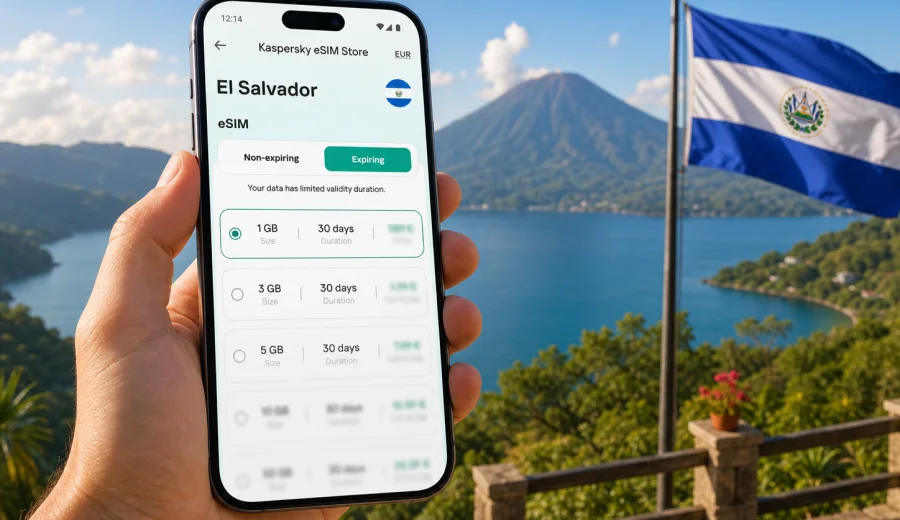
eSIM in El Salvador: mobile connection and internet for your trip
El Salvador is a compact country, but a trip there can involve many different connection scenarios in a short time: arriving at San Salvador International Airport, taking a car toward the capital, checking maps around Santa Ana volcano, booking transport to the Pacific coast, or keeping in touch with a hotel near Lake Coatepeque. Mobile internet is not just a convenience in these situations. It helps you move confidently, compare routes, translate messages, check opening hours, and stay reachable without depending on the next café Wi-Fi network.
An eSIM is useful because it lets you prepare mobile data before the trip without looking for a physical SIM card on arrival. You choose a suitable data package, install the eSIM profile on a compatible phone, and use it for internet access while abroad. For El Salvador, this is especially practical if your route includes several stops rather than one hotel in one city.
This guide explains how to think about eSIM for El Salvador, how much data you may need, when to activate the profile, and what to check before you travel. The focus is country-wide: San Salvador, surf towns such as El Tunco and El Zonte, volcano routes, lake stays, business visits, family trips, and cross-border itineraries in Central America.
Why eSIM is practical in El Salvador
El Salvador is small enough that many visitors move between regions quickly. A common itinerary can include San Salvador for meetings or museums, Santa Ana for colonial architecture and volcano hikes, Suchitoto for a quieter cultural stop, and the Pacific coast for surfing or a weekend break. Each transfer creates moments when mobile internet becomes important.
With an eSIM, you do not need to replace your regular SIM card. Your main number can stay in the phone for banking messages or familiar contacts, while the eSIM handles mobile data for the trip. This is useful if your home number is tied to two-factor authentication or if you prefer to keep messaging apps connected to your usual account.
Typical uses for mobile data in El Salvador include:
- navigation between the airport, San Salvador, Santa Ana, and coastal towns;
- messaging drivers, guides, hosts, colleagues, or relatives;
- checking weather before volcano hikes and beach days;
- translating menus, signs, and short messages;
- using ride-hailing, maps, banking, and travel apps;
- sharing photos and short videos without waiting for hotel Wi-Fi;
- checking flight updates and border information during multi-country trips.
An eSIM does not replace every part of a local mobile subscription. Most travel eSIM tariffs are designed for mobile internet, not for a local phone number, regular voice calls, or SMS. If calls and messages are needed, you can usually use internet-based apps, provided your selected tariff has available data and your device is connected.
What to know before you choose a data package
The right eSIM tariff for El Salvador depends less on the number of days in the country and more on what you will do online. A traveler who mainly uses maps and messages may need far less data than someone uploading reels from the beach every evening.
| Travel style | Typical online behavior | Practical data approach |
|---|---|---|
| Short city stay | Maps, messaging, restaurant searches, transport apps | A smaller package can be enough if you use Wi-Fi at the hotel |
| Surf or beach trip | Maps, social media, photos, messaging, bookings | Choose more data if you upload media often |
| Road trip | Navigation, route checks, weather, hotel changes | Prioritize enough data for maps and updates between stops |
| Business visit | Email, messengers, calendar, documents, video calls | Allow extra data for tethering and calls if needed |
| Family trip | Several users, maps, entertainment, messaging | Consider separate eSIMs or a larger allowance on one device |
The most common mistake is choosing data only by price. A smaller tariff can be practical for a weekend, but it can become inconvenient if you need video calls, cloud backups, social media uploads, or hotspot use. A larger tariff can be more comfortable for a flexible itinerary, especially if you do not want to monitor usage every day.
El Salvador travel scenarios where mobile internet matters
San Salvador is the main hub for many trips. You may need data immediately after landing to contact accommodation, call transport, check the address of a meeting point, or confirm your route from the airport. If you arrive late, mobile internet can reduce friction because you do not have to solve connection questions while tired and carrying luggage.
On the Pacific coast, connection needs are different. Travelers in El Tunco, El Zonte, La Libertad, or Costa del Sol often use mobile data for surf forecasts, restaurant searches, short videos, ride coordination, and group messages. Wi-Fi can be available in hotels and cafés, but its quality may vary from place to place. Mobile data gives you a backup when you need a quick answer.
In the western part of the country, Santa Ana, Lake Coatepeque, and volcano routes make maps and weather checks especially useful. If you hike, do not treat mobile internet as a safety system: coverage can depend on terrain, local networks, and conditions. Still, having mobile data before and after a route helps with transport, timing, and coordination.
For longer Central America routes, El Salvador may be one stop between Guatemala, Honduras, Nicaragua, or Costa Rica. In that case, compare country-specific and regional options carefully. A country tariff can be enough if your time in El Salvador is the main part of the trip. A regional tariff may be more convenient if you cross borders several times.
How much mobile data do you need?
There is no universal number, but you can estimate your data use from daily habits. Maps and messaging are usually light. Video, social media uploads, cloud sync, and hotspot use are heavy. Before choosing a tariff, think about what you will do away from Wi-Fi rather than what you do at home on unlimited broadband.
| Activity | Data impact | Notes for travelers |
|---|---|---|
| Text messaging and emails | Low | Attachments increase usage |
| Map navigation | Low to medium | Offline maps can reduce data use |
| Web searches and bookings | Medium | Useful for flexible routes |
| Music streaming | Medium | Download playlists on Wi-Fi when possible |
| Social media browsing | Medium to high | Video-heavy feeds use data quickly |
| Photo and video uploads | High | Upload large files on trusted Wi-Fi if you want to save data |
| Video calls | High | Quality settings affect consumption |
| Hotspot for a laptop | High | System updates and cloud sync can use data in the background |
A practical rule: choose a smaller package if you only need maps, messages, and occasional browsing. Choose more data if you plan to use social media daily, work from a laptop, upload videos, or travel with limited Wi-Fi access. If your trip includes both city days and remote excursions, leave a margin instead of calculating too tightly.
Preparing mobile internet before departure
The best time to prepare eSIM for El Salvador is before you leave home, while you have stable Wi-Fi and time to read the tariff conditions. Installation can often be done in a few minutes, but it is better not to leave it until the airport queue or the taxi ride.
Before you choose a package, check four things:
1. Your phone or tablet supports eSIM.
2. The device is not locked to one mobile operator.
3. The selected tariff covers El Salvador and matches your travel dates.
4. You understand when the validity period starts and how activation works.
Once your route is clear, you can use Kaspersky eSIM Store to choose an eSIM tariff for a trip to El Salvador and review the available data amounts, validity periods, and conditions before you travel. Kaspersky eSIM Store is an app and website that helps you choose, arrange, and activate an eSIM with a suitable mobile internet tariff for an international trip; it should not be treated as a mobile network operator.
Device compatibility checklist
Not every phone supports eSIM, and some models vary by region or carrier. Before you pay for any travel data package, confirm that your exact device can install an eSIM profile. You should also check whether your phone is unlocked, because a locked device may reject another mobile profile.
Check your device before choosing a tariff if you are unsure. This is especially important when you use an older phone, a company-issued device, a phone bought through a carrier contract, or a model that exists in several regional versions.
Use this quick checklist:
- the phone has eSIM support in system settings;
- the device is not restricted to one operator;
- you know where to add a mobile plan or eSIM profile;
- the operating system is updated enough to avoid installation issues;
- you can access Wi-Fi during installation;
- you understand which SIM line will be used for mobile data.
If you travel with a dual-SIM phone, decide in advance how each line will be used. Many travelers keep their physical SIM or home eSIM for calls and banking messages, then set the travel eSIM as the mobile data line after arrival in El Salvador.
How to install and activate eSIM
The exact steps depend on your device, but the general flow is simple: choose a tariff, complete the arrangement, install the eSIM profile, and then activate mobile data according to the tariff conditions. Keep Wi-Fi available during installation, because the phone needs to download the eSIM profile.
If you need device-specific guidance, use the Android installation guide or the iOS installation guide. Read the instructions before departure if this is your first eSIM, because settings names can differ slightly by device model and operating system version.
A careful setup sequence looks like this:
1. Install the eSIM profile while you still have reliable Wi-Fi.
2. Label the line clearly, for example “El Salvador data”.
3. Keep your regular SIM active if you need calls or banking messages.
4. Set the eSIM as the mobile data line when you are ready to use it.
5. Enable data roaming for the eSIM if the tariff instructions require it.
6. Check that background data usage is under control.
7. Save support information and installation details before you travel.
Do not delete the eSIM profile unless you are certain you no longer need it. Some eSIM profiles cannot be reinstalled or moved after activation, depending on the tariff conditions and device behavior.
When to activate: before the flight or after arrival?
Installation and activation are not always the same thing. You can often install the eSIM profile before you travel, then start using mobile data when you arrive. However, the validity period may begin at installation, at first network connection, or according to the specific tariff rules. Always check the conditions before you decide.
For many travelers, the safest approach is:
- install the profile at home on Wi-Fi;
- keep mobile data on your regular line until departure;
- switch mobile data to the travel eSIM after landing;
- test messaging and maps before leaving the airport;
- keep the QR code or installation details accessible offline if provided.
If your flight lands at night or you have a tight transfer, prepare as much as possible before departure. That way, your first online tasks in El Salvador can be practical: messaging your driver, opening maps, checking the hotel address, or confirming the next bus.
How to save data during the trip
Mobile data is easiest to manage when you reduce background usage. A few settings can make a smaller package last longer and make a larger package feel more predictable.
Useful habits:
- download offline maps for San Salvador, Santa Ana, and your coastal route;
- save hotel addresses and booking confirmations offline;
- disable automatic cloud photo uploads on mobile data;
- update apps only on Wi-Fi;
- turn off autoplay for video-heavy social apps;
- use lower quality settings for video calls when possible;
- monitor data usage in your phone settings every few days;
- avoid using hotspot for laptop updates or cloud backups.
If you use mobile data for work, create a separate plan. Email and messaging are usually manageable, but video meetings, shared documents, and system sync can consume data quickly. For a work trip, it is worth choosing a package with a margin rather than relying on hotel Wi-Fi for every important call.
eSIM, roaming, local SIM: what is the difference?
Each option can work, but the trade-offs are different.
| Option | Strengths | Points to consider |
|---|---|---|
| Travel eSIM | Prepare before arrival, no physical SIM swap, useful for data | Requires compatible unlocked device; usually data-focused |
| Standard roaming | Uses your current mobile operator settings | Conditions and costs depend on your home tariff |
| Local physical SIM | Can be useful for longer stays | Requires time, local purchase process, and SIM slot access |
| Public Wi-Fi | Often available in hotels or cafés | Not consistent everywhere; less convenient while moving |
For a short trip to El Salvador, eSIM is often the most convenient way to organize mobile internet before arrival. For a long stay, you may compare it with local options. For a mixed itinerary, you may combine eSIM with Wi-Fi and occasional roaming, depending on cost, comfort, and your need for reliability.
Practical route examples
| Route | Why data helps |
|---|---|
| Arrival and San Salvador | Messaging accommodation, checking transport, using maps, confirming meeting points |
| Santa Ana and Lake Coatepeque | Weather checks, offline map backup, transport coordination before and after the route |
| Pacific coast | Surf forecasts, bookings, group chats, photo sharing, ride coordination |
| Business visit | Email, messengers, documents, calendar updates, occasional video calls |
| Central America itinerary | Comparing country-specific and regional options before border crossings |
Common mistakes to avoid
- Choosing a tariff before checking device compatibility and lock status.
- Activating too early when the validity period starts immediately.
- Assuming a travel eSIM includes a phone number, voice calls, or SMS.
- Using hotspot without monitoring laptop updates, backups, and cloud sync.
- Deleting the eSIM profile during the trip before checking settings and instructions.
- Treating mobile data as the only safety tool in rural or mountain areas instead of saving maps and contacts offline.
FAQ
Can I use eSIM in El Salvador for maps and messaging?
Yes, if your device is compatible, unlocked, and the selected tariff covers El Salvador. Maps and messaging are among the most common travel uses for mobile data.
Does a travel eSIM give me a Salvadoran phone number?
Usually no. Travel eSIM tariffs are commonly designed for mobile internet. Voice calls and SMS are included only if the specific tariff says so.
Should I install eSIM before I leave home?
It is usually more comfortable to install the profile before departure while you have stable Wi-Fi. Check when the tariff validity begins before you activate mobile data.
Can I keep my regular SIM active?
In many dual-SIM phones, yes. You can keep your regular SIM for calls or messages and use the eSIM for mobile data, depending on your device settings.
Is eSIM useful for the coast and volcano routes?
It can be useful for maps, weather checks, bookings, and messaging. Coverage and speed depend on local network conditions, terrain, and the selected tariff.
What if I need more data?
Check the available options in your account or app. If a top-up or additional package is available for your situation, choose it before your current data runs out.
Final checklist before your trip
Before you fly to El Salvador, make sure you have:
- checked eSIM support and device unlock status;
- chosen a tariff that covers El Salvador and your travel dates;
- read the validity period and activation conditions;
- installed the eSIM profile on reliable Wi-Fi;
- saved instructions and important addresses offline;
- decided which SIM line will handle mobile data;
- disabled heavy background data use;
- tested maps and messaging after arrival.
This preparation keeps the first hours of the trip simple. Instead of searching for a physical SIM card, guessing Wi-Fi passwords, or changing settings under time pressure, you already know how your mobile internet will work.
Choose mobile internet for El Salvador before you travel
El Salvador rewards flexible movement: capital city days, lake views, volcano routes, surf towns, food stops, and short drives that change the pace of the trip quickly. A prepared eSIM helps you keep maps, messages, bookings, and travel apps available when you need them.
Before departure, review the available data amounts, validity periods, and conditions in Kaspersky eSIM Store, then choose an eSIM tariff for El Salvador that fits your route. Check your device first, install the profile on Wi-Fi, and start the trip with mobile internet already planned.