Travel connectivity guide
Ella eSIM Guide for Mobile Internet in Sri Lanka
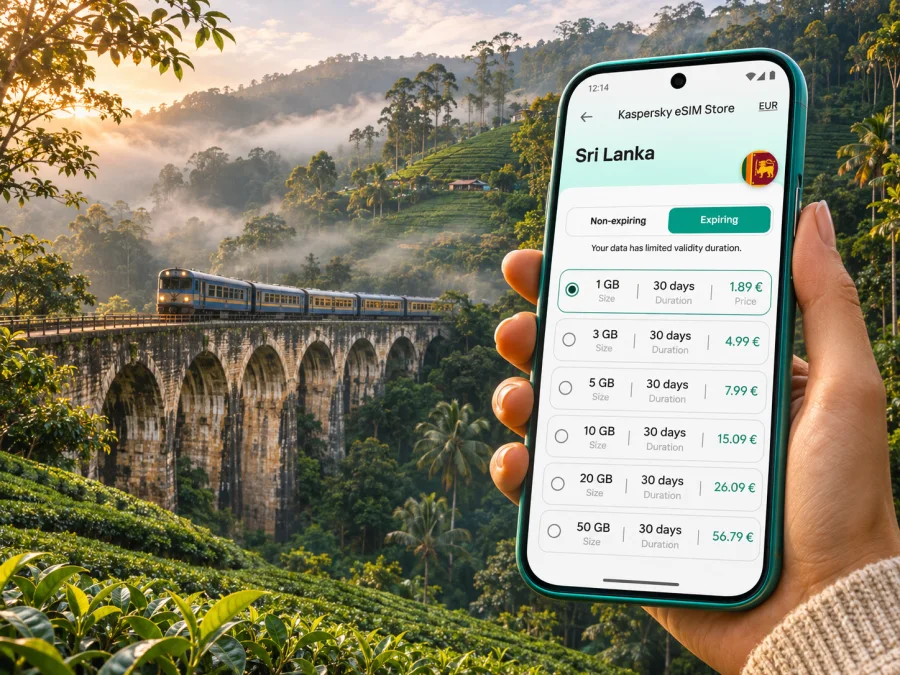
Ella eSIM for mobile connection and internet in Sri Lanka’s hill country
Ella is a small highland town in Sri Lanka’s Uva Province, known for tea-covered slopes, steep valleys and walks to viewpoints. It is a place where mobile data can help with arrival plans, route checks, and contacting your guesthouse, but a connection should not be assumed to behave the same way on a busy main street and behind a ridge. Prepare for both connected moments and short periods offline.
This guide explains how to plan mobile internet around Ella’s railway station, the town centre, Nine Arch Bridge, Little Adam’s Peak and journeys farther into the hill country. It also covers how to choose and set up an eSIM, what to check before relying on maps, and what to do if data drops while you are on a trail.
What to expect from mobile data in Ella
Ella is not a large, flat city. The town sits in a mountainous landscape with slopes, valleys, tea estates and forest. The Sri Lanka Tourism Development Authority places Ella in Badulla District, Uva Province, at about 1,041 metres above sea level; its planning material describes a wide range of elevations across the surrounding area. That geography matters to a phone signal: a location a short distance away can be screened by terrain, and indoor reception can differ from reception outside.
Mobile service in Sri Lanka is provided by licensed local operators. A travel eSIM connects through the network or networks specified by its own plan and partner arrangements; coverage is not a promise of a signal in every building, on every trail or at every moment. In Ella, keep a little flexibility in your plans, download key information before leaving town, and use your own judgement about whether a route is safe to continue without live navigation.
| Part of the trip | Why data is useful | A sensible backup |
|---|---|---|
| Ella railway station and town centre | Confirming a pickup, checking a booking, sharing your location | Save your accommodation address and contact details offline |
| Nine Arch Bridge approach | Following the correct walking route and coordinating with a companion | Download the map area before setting off; agree on a meeting point |
| Little Adam’s Peak or Ella Rock | Checking the approach and weather information before a walk | Keep an offline map and tell someone your intended route |
| Ravana Falls and roadside stops | Finding a return ride or checking where you are | Save the driver or guesthouse contact before the trip |
| Travel onward from Ella | Reviewing connections and messaging about delays | Keep ticket details and the next stop available offline |
Arrival in Ella: plan the handoff from transport to accommodation
Many visitors arrive by train, road transfer or a combination of both. The journey through the highlands is part of the appeal, yet onward arrangements can be less straightforward than in a large city: roads wind through steep terrain, guesthouses may sit above the main road, and a pickup point can be described by a landmark rather than a street number.
Before you leave your previous stop, ask your accommodation to confirm the pickup point in a message. Save the address, phone number, and any landmark description in a note or screenshot. If you will meet a driver, agree on a recognisable location near the station or town centre and confirm how long they will wait. Mobile data can make last-minute coordination easier, but a pre-agreed plan is useful if reception is delayed or your battery is low.
If you arrive by train, do not plan a tight transfer around a timetable copied from an old travel page. Sri Lanka Railways provides an online schedule and reservation information, but services, availability and operating arrangements can change. Check the official railway service for your actual travel date and reconfirm close to departure. If a service is disrupted, use the railway’s latest notice and ask staff locally about the current arrangement rather than relying on a cached map or an old screenshot.
For a road arrival, pin the guesthouse while you still have reliable internet. A pin can be more useful than a typed address where lanes are narrow or accommodation entrances are set back from the main road. Download the surrounding map for offline use, and share your estimated arrival with the host before the final climb into the hills.
Getting around: the centre, slopes and nearby stops
Ella’s compact centre concentrates cafés, small shops, accommodation and transport arrangements along the main road near the station. Walking is practical for short trips in this central area, but not every walk is level or well suited to luggage. A property described as “in Ella” may still require a steep walk or a tuk-tuk ride from the station. Ask about the final approach before booking, especially if you will arrive after dark or carry heavy bags.
For local rides, agree the destination clearly before setting off. A saved map pin or a message with the accommodation name can reduce confusion when several places have similar names. If the driver knows the destination by a local landmark, record that as well. Keep the host’s number available so you can call or message if the drop-off point is unclear.
A data connection is particularly useful for finding your way back after a viewpoint walk, checking an updated pickup location, or letting someone know that you have arrived. It is less dependable as your only navigation method once you leave the town centre. Hills, folds in the terrain, vegetation, weather, and building materials can affect reception. Even where a phone shows bars, a map or message may take time to load.
Ella also works as a base for short outings beyond the centre. The surrounding area includes villages, tea-growing landscapes, waterfalls and railway landmarks, but distances on a map can be misleading when roads climb and bend. Estimate the whole journey, including the return, and do not assume that a ride will be available immediately at a remote stop. Ask your accommodation to help confirm a transport plan if you are unsure.
Using maps at Nine Arch Bridge and on hillside walks
Nine Arch Bridge is one of Ella’s best-known railway landmarks. The approach takes you away from the main road through a green landscape, and the route may involve uneven or sloping paths. Use a map to orient yourself before walking, but do not treat a map listing as confirmation that a track is open, safe, or suitable for your footwear. Local directions and posted signs can be more current than a route saved weeks earlier.
Train movements at the bridge are a popular reason people wait along the approach. Timings can vary, so avoid planning around an old online schedule. Check current railway information when possible, ask locally, and keep a safe distance from the tracks. Do not enter the railway line or stand on the structure for a photograph. Mobile connectivity is useful for messages and checking information, but it does not replace basic rail safety or respect for railway property.
Little Adam’s Peak offers a more accessible viewpoint walk for many visitors than a full-day trek, though the route still includes an uphill section and conditions vary. Ella Rock is a longer and more demanding outing, and route descriptions can differ. Start early enough for your planned walk, carry water, and check weather and local advice. If you are not confident about a route, consider going with a local guide rather than trying to solve uncertainty through a phone signal.
For either walk, prepare your phone before leaving the centre:
- Open the map while you have a connection and save the relevant area for offline use.
- Mark your accommodation, start point, and a place where you can ask for help.
- Take a screenshot of the route notes and any agreed meeting details.
- Bring a charged phone and, for a longer walk, a power bank.
- Tell someone where you plan to go and when you expect to return.
- Turn back if weather, visibility, route conditions or your own energy make continuing unwise.
A phone is helpful for orientation and communication, but it can lose power, get wet, or fail to load data. Carrying a small amount of cash and knowing the name of the place you are visiting remain practical safeguards. Keep your device secure and dry, particularly if the path is muddy or the weather changes.
Choose a travel eSIM for the way you will use Ella
The right data allowance depends on your habits and on how much of the trip will be spent in Ella versus travelling elsewhere in Sri Lanka. A short stay with saved maps and messaging needs less mobile data than frequent video calls, cloud uploads, or streaming. Think about the whole itinerary: train and road transfers, time in the town, day walks, and the next destination after Ella.
Kaspersky eSIM Store is an app and website where you can select, purchase, and activate an eSIM with a suitable plan for mobile internet during an international trip. It does not operate a mobile network. The local network used, coverage, speed and availability depend on the selected plan and the relevant operator in Sri Lanka. Review the destination, data allowance, validity period, activation terms and any restrictions shown for the specific plan before purchase.
A simple way to estimate your needs is to separate essential use from optional use:
| Use during the stay | Typical data behaviour | Planning approach |
|---|---|---|
| Maps, messages, booking checks | Intermittent, usually lighter use | Download maps and use mobile data for live updates |
| Photo sharing and browsing | Moderate, varies with image size | Upload on hotel Wi-Fi when convenient and monitor usage |
| Video calls or frequent uploads | Can use data quickly | Check the plan allowance and use a stable Wi-Fi connection for large transfers |
| Navigation on several travel days | Repeated map and traffic refreshes | Keep offline map areas and reserve data for live checks |
Ella does not require a city-specific plan in the article’s sense: select Sri Lanka as the destination and confirm that the plan’s stated coverage matches your itinerary. If you are continuing into other countries, check whether the plan covers those destinations too; a Sri Lanka plan should not be assumed to include another country. To review available options for the country, choose an eSIM plan for travel in Sri Lanka.
Before you buy: device and plan checks
First, make sure your phone supports eSIM and is not restricted by a carrier lock. Support can vary by device model, regional variant and the mobile operator that sold the handset. Do not infer compatibility from a product family name alone. Check your phone’s settings or manufacturer documentation, and check whether your device supports eSIM before selecting a plan.
Then review the plan details in the app or on the website. Confirm that Sri Lanka is included, how much data is provided, how long the plan remains valid, and when its validity begins. Check whether the plan is data-only and whether it permits tethering if you intend to share your connection with a laptop. The terms shown for your chosen plan take precedence; do not assume that one eSIM includes calls or SMS unless the plan explicitly says so.
Keep your home SIM active if you need its number for calls, SMS verification or account access. On a dual-SIM phone, label each line clearly, choose the eSIM for mobile data after arrival, and check that data roaming is enabled for the travel eSIM if its instructions require it. Your original SIM’s roaming settings are separate. Be careful to avoid unintended roaming charges on your home line.
Install and activate before the trip
If possible, install the eSIM while you have a stable internet connection and enough time to follow the on-screen steps. Some plans begin their validity at installation or activation; others start when the eSIM first connects to a supported network. Read the exact terms before installing so you know when the plan clock begins. Avoid deleting an eSIM profile as a troubleshooting shortcut unless the instructions or support team specifically tell you to do so.
The usual process is straightforward, but menu labels vary between phone models and operating system versions:
- Confirm eSIM support and remove any carrier restriction that prevents adding a travel profile.
- Open the Kaspersky eSIM Store app or website, select the Sri Lanka destination, and review the plan terms.
- Complete the purchase and follow the installation instructions shown for your device. If a QR code is provided, display it on another device or use the supported direct-install flow.
- Name the new line something recognisable, such as “Sri Lanka data”.
- Before departure, leave the line off or configure it as directed by the plan instructions.
- After arrival, select it for mobile data and enable data roaming for that line only if required by the plan.
- Open a web page or messaging app to confirm data works, then keep an eye on the plan’s usage and validity.
Use the Android eSIM installation instructions or iPhone and iOS installation instructions for device-specific steps. Installation and activation are separate actions: adding a profile does not necessarily mean the plan is already using data, and a plan may activate only after it connects in the destination. Follow the instructions attached to the selected plan.
If the eSIM does not connect after arrival, check that the profile is enabled, the correct line is selected for mobile data, and the plan’s activation conditions have been met. Toggle airplane mode once or restart the phone if appropriate. Check the plan’s network selection guidance, but do not change advanced settings at random. If you still cannot connect, use hotel Wi-Fi or another available connection to contact support and share the device model, eSIM status and the steps already tried.
If mobile internet is slow or unavailable
A temporary loss of data does not necessarily mean that the eSIM has failed. The phone may be in a low-signal area, the profile may not have completed activation, the selected line may be wrong, or the available network may be congested. In the hills, moving a short distance to a safe open area can sometimes help, but do not leave a marked route or approach a railway track simply to seek a stronger signal.
Work through these checks in order:
- Confirm that the travel eSIM is installed, enabled and selected for mobile data.
- Check that the plan is valid and that its activation requirement has been met.
- Turn airplane mode on briefly and off again, then allow the phone time to reconnect.
- Follow the plan’s guidance for automatic or manual network selection.
- Check that mobile data is enabled and that the correct roaming setting is applied to the eSIM.
- Restart the phone if the connection still does not return.
- Use a trusted Wi-Fi connection or ask your accommodation for help contacting support.
Do not reset network settings or remove the eSIM profile unless support directs you to do so; either action can erase useful configuration or make reinstallation harder. If the problem occurs only at one location, note where and when it happened. That information can help distinguish a local coverage gap from an account or device setup issue.
Ella mobile internet FAQ
Is there an eSIM plan specifically for Ella?
Choose a plan for Sri Lanka and check its coverage and conditions. Ella is a town within the country, and plan availability is determined by the destination and operator terms shown for that plan rather than by an assumption that every local area is included equally.
Does an eSIM replace my regular phone number?
A travel eSIM may be data-only. Keep your regular SIM if you need your usual number for calls, text messages or verification codes, and review the selected plan to see exactly which services it includes.
Should I install the eSIM before arriving?
Installing before travel can make the setup easier, provided you have a stable connection and understand when plan validity starts. Read the plan’s activation terms first, and follow the device instructions provided after purchase.
A simple plan for a calmer stay
Before travelling, confirm that your phone can use eSIM, choose a Sri Lanka plan whose data allowance and validity match your itinerary, and install it according to the plan instructions. Save accommodation and transport details, download the map areas you need, and keep a little battery and data in reserve for changes.
In Ella, use mobile internet for coordination and live checks while allowing for the highland terrain to interrupt a signal. Combine digital maps with local directions, a clear return plan and offline information. That approach is useful whether you are arriving at the station, walking toward Nine Arch Bridge, setting out for a viewpoint or continuing through Sri Lanka.
Prepare your eSIM for Ella
Use Kaspersky eSIM Store on the app or website to select, purchase and activate an eSIM plan for your trip. Review the current Sri Lanka options and the terms shown for each plan, then set up your phone before you leave. Choose an eSIM plan for your trip to Sri Lanka.


