
Travel connectivity guide
English Harbour eSIM: mobile connection and internet
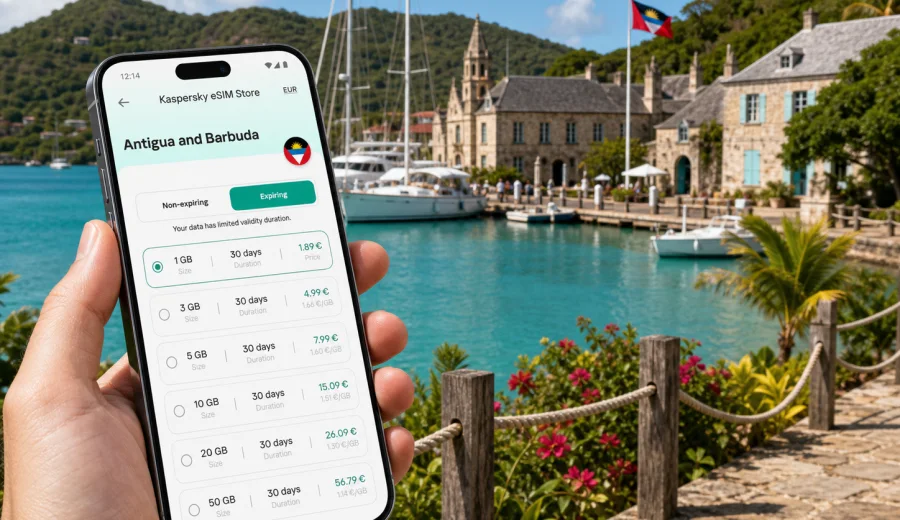
English Harbour eSIM: mobile connection and internet for your trip
English Harbour is one of the most practical places in Antigua and Barbuda to plan mobile internet before you arrive. The area is compact, scenic, and easy to explore on foot in parts, but a trip here often includes airport transfers, taxi rides, marina check-ins, beach stops, yacht events, hotel moves, and day trips across Antigua. A working mobile connection helps you keep those pieces organized without depending only on hotel Wi-Fi or asking for directions every time the road curves toward another bay.
For many visitors, English Harbour is not just a postcard stop. It is a base for sailing, a weekend stay near Nelson's Dockyard, a quiet workation, a wedding trip, a stopover before a charter, or a short break from a wider Caribbean itinerary. In each of these scenarios, eSIM can make the first hours smoother: you can open maps after landing, message your driver, check accommodation details, confirm restaurant bookings, and keep travel documents available on your phone.
This guide focuses on using eSIM for mobile internet in English Harbour, not on replacing every travel habit with a phone. It explains when connection matters most, how to estimate data needs, what to check before buying an eSIM plan, and how to use mobile internet around the harbor, beaches, hotels, and nearby routes.
Why mobile internet matters in English Harbour
English Harbour has a relaxed rhythm, but travel logistics can still be precise. Your arrival may involve a flight into Antigua, immigration, baggage, a transfer across the island, and a final turn into a hotel, guesthouse, marina, or villa. If you are meeting a boat crew, checking into a resort, or joining an event, small delays are easier to manage when you can message people and follow your route.
Mobile internet is especially useful in English Harbour for:
- navigation between the airport, English Harbour, Falmouth Harbour, and nearby beaches;
- messaging taxi drivers, hosts, tour operators, charter companies, and travel companions;
- checking marina, restaurant, and hotel details while moving around the village;
- using ride coordination, maps, weather apps, and travel documents;
- sharing location from a beach, trail, dock, or meeting point;
- keeping work email or messenger access during a business or sailing trip;
- topping up bookings for activities around Antigua without looking for public Wi-Fi.
The area around English Harbour is manageable, but roads can feel unfamiliar if you have just arrived. Mobile data lets you follow your route without loading every map in advance. It also helps when a driver asks for a landmark, a hotel has more than one entrance, or a beach plan changes because of wind, rain, or a late lunch.
Arrival: from the airport to English Harbour
Most international visitors arrive through V. C. Bird International Airport on the north side of Antigua. English Harbour is on the south coast, so the transfer is a cross-island journey rather than a short city hop. Depending on traffic, weather, and stops, you should think of the arrival as a real transfer where mobile internet can be useful before you reach your room.
A practical arrival flow looks like this:
1. Before departure, install the eSIM profile on a compatible phone if the plan instructions allow it.
2. Keep the activation instructions saved offline, especially if you expect weak airport Wi-Fi.
3. After landing, turn on the eSIM line according to the plan rules and your device settings.
4. Confirm the meeting point with your driver, hotel, marina, or host.
5. Open your route to English Harbour and keep the hotel or dock address ready.
6. Once checked in, connect to hotel Wi-Fi for large downloads and keep eSIM data for movement.
This approach is useful even if you have arranged a transfer in advance. Flight timing, baggage delays, and driver waiting points can change. With mobile internet ready, you can send a quick update instead of searching for a SIM shop or relying on public Wi-Fi at the busiest moment of the trip.
Where eSIM helps around the harbor
English Harbour and nearby Falmouth Harbour are closely connected in the travel experience. Visitors often move between Nelson's Dockyard, restaurants, yacht services, small shops, beaches, and viewpoints. A short walk may be enough for some plans, while other parts are easier by taxi or rental car.
| Travel moment | Why mobile internet helps | Sensible data use |
|---|---|---|
| Airport transfer | Messages, route checks, accommodation details | Low |
| Marina arrival | Crew updates, dock location, documents | Low to medium |
| Beach day | Maps, weather, messaging, photos sent later | Low if uploads wait |
| Yacht week or regatta | Schedules, group chats, maps, reservations | Medium |
| Remote work window | Email, calls, shared files, hotspot use | Medium to high |
| Island day trip | Navigation, route changes | Medium |
Maps and messaging are relatively light. Larger drains include automatic photo backup, cloud sync, video calls, social media uploads, streaming, and using your phone as a hotspot for a laptop. If you keep those activities for Wi-Fi, a modest eSIM data package can cover many city and island travel tasks.
English Harbour areas where connection is useful
Nelson's Dockyard is the best-known landmark around English Harbour and one of the main reasons visitors stay in the area. Mobile internet helps with tickets, opening-time checks, maps, restaurant bookings, and meeting points. Even if you prefer to explore without looking at your screen, it is useful to have data in the background for practical tasks.
Falmouth Harbour is important for marinas, yacht services, restaurants, bars, and sailing events. If your trip involves a charter, a regatta, or meeting crew, mobile internet becomes less about sightseeing and more about coordination. A data connection helps you stay reachable when plans change quickly.
Shirley Heights is a classic viewpoint above the harbor area. Visitors often go for the view, sunset, music, or a short outing. Before heading up, check your route, battery level, and return transport. Mobile data can help you confirm timing, but it is still sensible to agree on pickup details in advance.
Pigeon Point Beach and Galleon Beach are common beach stops from English Harbour. Connection is helpful for arranging return taxis, checking weather, and sharing location with travel companions. Avoid using your full data allowance on large photo uploads from the beach; save those for Wi-Fi unless you have a larger package.
Data planning for different English Harbour trips
Your best eSIM plan depends on how you use your phone, not only on how many days you stay. A traveler who uses maps and messages can need far less data than someone who works from a laptop, joins video meetings, uploads sailing photos, or uses a phone hotspot.
| Trip style | Typical stay | Data pattern | Planning tip |
|---|---|---|---|
| Weekend break | 2-3 days | Maps, taxis, messaging, restaurant checks | Choose a small package if you use hotel Wi-Fi for photos |
| Sailing or marina trip | 4-10 days | Group chats, schedules, routes, weather apps | Keep extra data for days away from hotel Wi-Fi |
| Wedding or event trip | 3-7 days | Messaging, venue coordination, photos | Disable automatic cloud backup on mobile data |
| Workation | 7-14 days | Email, calls, documents, hotspot use | Choose more data and use Wi-Fi for heavy files |
| Antigua base trip | 7+ days | Island routes, beach days, bookings | Plan data for day trips beyond English Harbour |
For most leisure travelers, the practical question is simple: will you use mobile data mainly while moving, or will it also support work and media? If it is mainly for movement, maps, messages, and booking checks are manageable. If it supports work, choose a plan with more headroom and monitor usage during the first day.
When to prepare eSIM before the trip
Preparing eSIM before you travel can reduce stress on arrival. You do not need to wait until you are standing in the airport with luggage, a tired group, and an address to find. You can choose a destination, review the data amount and validity period, and install the eSIM profile while you still have stable internet at home.
Before choosing a plan, check:
- whether your phone supports eSIM;
- whether the phone is unlocked for mobile plans from other providers;
- which destination the plan covers;
- how much data is included;
- how long the plan remains valid after activation;
- whether hotspot use is allowed under the plan conditions;
- when data usage starts according to the plan instructions;
- what support channel is available if you need help.
At the middle stage of trip planning, when flights and accommodation are already clear, you can use Kaspersky eSIM Store to choose a mobile internet plan for Antigua and Barbuda and match it to your English Harbour itinerary. The site and app help you select, arrange, install, and activate an eSIM with a suitable data plan for mobile internet during your trip.
Local movement: taxis, walking, and rental cars
English Harbour can feel walkable near the dockyard and waterfront, but not every route is comfortable on foot. Heat, hills, narrow roads, evening timing, and distance between beaches can change the plan. Mobile internet helps you decide whether to walk, call a taxi, arrange pickup, or keep a rental car route open.
For taxi rides, save the exact name of your hotel, marina, or villa. Some accommodation names can sound similar, and some places are better identified by a nearby landmark. A map pin or shared location can prevent confusion, especially after dark or when a driver is meeting you away from a main entrance.
For rental cars, download offline maps as a backup and use mobile data for live adjustments. Road signs and local driving patterns may be different from what you expect. Keep a phone mount, charge cable, and enough battery for the return journey. If you are sharing a car with other travelers, agree who is navigating before leaving the hotel Wi-Fi zone.
For walking, mobile data is useful for short decisions: which road leads back to the dockyard, whether a restaurant is still open, where the nearest beach entrance is, or how far the viewpoint route continues. Do not rely only on a phone for safety; tell someone your plan if you go walking in quieter areas or after sunset.
Hotels, villas, marinas, and Wi-Fi expectations
Many hotels, villas, restaurants, and marina facilities offer Wi-Fi, but Wi-Fi should not be your only plan. Passwords change, signal can be weaker in rooms or outdoor areas, and public networks are not always convenient for check-in, transport, or walking between places. eSIM mobile data works best as the layer that keeps you connected between Wi-Fi zones.
Use this simple split:
- use hotel or villa Wi-Fi for system updates, cloud photo backup, streaming, and large downloads;
- use eSIM mobile data for maps, messages, bookings, taxi coordination, and travel documents;
- pause automatic app updates on mobile data;
- set messaging apps to download media only on Wi-Fi if your package is small;
- check data usage daily if you are staying more than a weekend.
This balance keeps your eSIM data available for the moments when it matters most: arrival, transport, beach returns, meeting points, and route changes. It also makes the plan more predictable because you are not using mobile data for background tasks you did not intend.
Business trips, stopovers, and short stays
English Harbour is not only a holiday base. Some visitors come for yacht services, hospitality work, events, meetings, remote work, or a short stay before a sailing departure. In these cases, mobile internet is about coordination: you need to receive updates, open documents, message colleagues or crew, and move between the airport, hotel, marina, and restaurants without searching for Wi-Fi.
For business trips and stopovers, prepare the essentials:
- install the eSIM profile before departure if the instructions allow;
- keep your hotel address and booking reference offline;
- save the transfer contact and meeting point;
- download a map of Antigua as backup;
- keep work files available offline if you may need them between networks;
- turn off mobile data for apps that are not needed during the stay;
- keep enough data for the return transfer or onward route.
If you expect laptop hotspot use or video calls, choose more data and check whether hotspot is allowed by the selected plan. If you are leaving early for the airport, sailing dock, or another part of Antigua, keep enough data for transport coordination in the morning.
Trips from English Harbour across Antigua
English Harbour is a strong base for exploring Antigua. Visitors often add Half Moon Bay, Fig Tree Drive, St. John's, beaches on the west coast, or viewpoints and restaurants elsewhere on the island. These trips make mobile data more valuable because you spend more time away from your hotel network.
Before a day trip, prepare:
| What to prepare | Why it matters |
|---|---|
| Offline map area | Useful if signal is weak or battery saving is needed |
| Return route | Helps avoid confusion after sunset or dinner |
| Driver or rental contact | Important if pickup details change |
| Weather check | Useful for beach, sailing, and viewpoint plans |
| Power bank | Navigation and photos drain battery quickly |
| Data limit | Prevents background apps from using the package |
Mobile internet is especially useful when plans change. A beach may be windier than expected, a restaurant may be full, or a road may take longer than it looked on the map. With eSIM data, you can adjust without returning to the hotel just to reconnect.
Installing and activating eSIM for the trip
The exact steps depend on your device and the selected plan, so follow the instructions shown after purchase. In general, eSIM setup has two parts: installing the eSIM profile on your phone and activating mobile data under the plan conditions.
Before buying, check your device to confirm that it supports eSIM and is not locked in a way that prevents using another mobile plan. This is important because eSIM support depends on the phone model, region, and device settings.
For setup help, use the official installation guides for Android or iOS. Keep the guide open while you still have Wi-Fi, and avoid deleting the eSIM profile after installation unless the instructions or support team tell you to do so.
Practical setup sequence:
1. Choose the destination and plan that match your Antigua and Barbuda trip.
2. Check data amount, validity period, activation rules, and hotspot conditions.
3. Install the eSIM profile while you have a stable connection.
4. Name the line clearly, for example "Travel eSIM" or "Antigua data".
5. On arrival, select the eSIM line for mobile data if the plan requires activation in destination.
6. Turn on data roaming for the eSIM line if the instructions say it is needed.
7. Test maps and messaging before leaving the airport or hotel.
eSIM for travel usually focuses on mobile data. It may not include a standard phone number, voice calls, or SMS unless those features are specifically stated in the selected plan conditions. For calls and messages, many travelers use internet-based apps once mobile data is active.
Quick answers for English Harbour travelers
Is eSIM useful for a short English Harbour trip?
Yes, especially for airport transfer, maps, taxi coordination, hotel check-in, restaurant plans, and messaging. A small data package may be enough if you use Wi-Fi for uploads and streaming.
Can I use eSIM for calls in English Harbour?
Travel eSIM plans commonly focus on mobile data. Standard voice calls and SMS are included only if the plan conditions say so. Many travelers use internet-based calling and messaging apps over mobile data.
Should I activate eSIM before or after landing?
Follow the activation rules for the selected plan. You can often prepare installation before travel, but the moment when validity starts may depend on the plan. Read the instructions before you leave home.
Will eSIM replace hotel Wi-Fi?
It can reduce dependence on Wi-Fi, but use hotel or villa Wi-Fi for streaming, app updates, and large backups.
How much data do I need in English Harbour?
For maps and messaging, usage can be modest. For work calls, hotspot, video, and uploads, choose more data and monitor usage.
A practical mobile internet plan for English Harbour
For a smooth trip, treat mobile internet as part of your travel preparation, alongside flights, accommodation, transfers, and documents. English Harbour is easier to enjoy when you are not searching for Wi-Fi at every decision point. With eSIM ready, you can arrive, move around the harbor, meet people, check routes, and adjust plans without turning a simple task into a connection problem.
Before departure, confirm that your device supports eSIM, choose a plan that matches your data habits, install the profile according to the instructions, and save the key travel details offline. During the trip, use mobile data for maps, messages, transport, and booking checks, while keeping heavy downloads and uploads for Wi-Fi.
If English Harbour is your base for sailing, beaches, events, or a quiet stay in Antigua and Barbuda, Kaspersky eSIM Store helps you prepare an eSIM data plan for your trip through the site or app. Choose the data amount and validity period that fit your itinerary, check the conditions, and keep your mobile internet ready before your first route from the airport to the harbor.