Travel connectivity guide
Erdenet eSIM: Mobile Internet for Your Trip
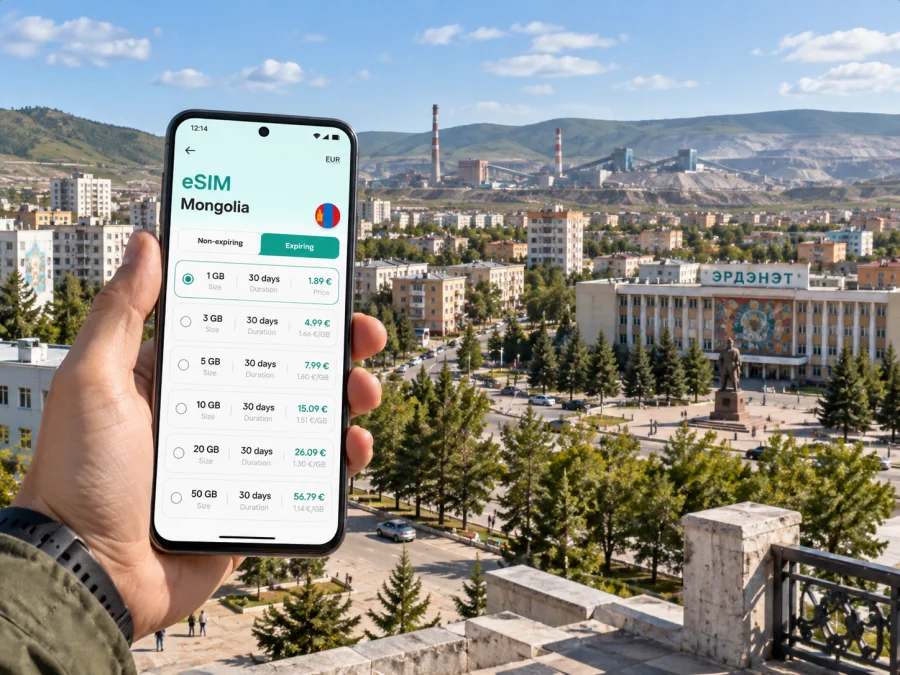
Erdenet eSIM: Mobile Connection and Internet for Your Trip
Erdenet is a mining city in northern Mongolia, surrounded by open landscapes. You might come for a business visit, to meet family, to explore a less-visited city, or as one stop on a longer Mongolian itinerary. A mobile connection helps with practical details: confirming a hotel address, finding a driver, sharing an arrival time, or adjusting plans.
Preparing mobile internet before arrival can reduce the number of tasks waiting for you at a station or pickup point. An eSIM is a digital SIM profile installed on a compatible phone. It can provide mobile data under the selected plan’s terms, while your usual SIM may remain available for calls or messages if your device and operator allow it. Coverage and performance depend on the plan, local network, location, and device, so keep essential details available offline too.
What to expect from a visit to Erdenet
Erdenet developed alongside the Erdenet copper and molybdenum complex and is one of Mongolia’s principal urban centres outside Ulaanbaatar. It is not simply a compact sightseeing district: during a visit you may move between accommodation, business premises, shops, the railway station, and places on the edge of town. A destination may be described by a building, a business name, or a map pin rather than an address you already recognise.
Mobile data is useful for checking the spelling of a destination, comparing a pin with a driver’s message, sending your location to a colleague, or contacting a host if your arrival time changes. If you are travelling with others, a messaging app helps coordinate separate arrivals or a new meeting point. These are small tasks, but they matter when you are unfamiliar with local routes and do not have a printed itinerary to hand.
| Moment | How a connection can help |
|---|---|
| Before leaving your accommodation | Check the destination, route, and meeting details |
| Meeting a driver | Share a pin and message if the pickup changes |
| At the station | Retrieve a booking and notify the person meeting you |
| Between work appointments | Review calendar changes and send a message or document |
| On a walk | Look up a place and keep companions informed |
Arriving and getting oriented
Many international travellers reach Erdenet after arriving in Ulaanbaatar. The onward journey may be by rail or road, and some itineraries include domestic transport connections. Routes, departure points, and schedules can change; confirm the details with your carrier close to the travel date instead of relying on an old timetable. If Erdenet is one stop in a longer journey, save each booking and address separately so that a delay does not leave the next step buried in a message thread.
Before departure, save the name and address of your Erdenet accommodation in written form and as a map pin. If a host or colleague sends a Mongolian-language address, keep its original spelling. A transliteration may be handy, but the original can help someone match it to a local listing. For a pickup, agree on a recognisable meeting point and share the same pin; “near the station” can mean different things to different people.
A simple arrival sequence:
- Save your accommodation address, contact name, and pickup instructions.
- Confirm rail or road details with the provider; keep an offline booking copy.
- Message your contact if a delay changes your arrival.
- Match the map pin to the street and confirm an unclear entrance.
- Save the departure point and time for your return trip.
Moving around the city
Erdenet is more spread out than a compact historic centre. Destinations may be separated by broad roads or residential areas, so check the route before setting out and keep an eye on the streets around you as you travel. A location marker can drift or place an entrance on the wrong side of a large block. Compare a pin with the written address, the name of a nearby building, or a message from your host.
For a short journey, consider whether walking is practical in the day’s conditions. A distance that looks small on a zoomed-out map can take longer on foot, particularly in cold, windy, or icy weather. If you arrange a taxi or private ride, confirm the destination and pickup point before setting off. When the driver’s map differs from yours, a well-known nearby building or intersection may be a clearer reference than a pin alone. Ask your accommodation or local contact which options are suitable for the specific route and time.
Preserve battery and attention: charge before a long day, carry a power bank if available, and download an offline map. Stop somewhere safe to check directions rather than handling the phone while crossing a street. A written address helps if the battery runs low.
Map routine: search by destination name, compare the result with the written address, and save a nearby landmark. Recheck directions if your vehicle or pickup changes. If local advice differs from the map, pause and confirm with the destination or your accommodation.
Choosing an eSIM plan for Erdenet
Choose based on your actual dates, route, and data habits. A brief visit centred on maps and messages has different needs from several days of photo uploads, video calls, and remote work. If you will travel beyond Erdenet, check that the plan’s stated coverage includes each destination. Review the data allowance, validity period, activation conditions, and other plan details before payment; compare those terms with your trip rather than choosing by the headline data amount alone.
Kaspersky eSIM Store is an app and website where travellers can choose, purchase, and activate an eSIM with a suitable mobile data plan for an overseas trip. A data eSIM generally does not include a regular phone number, voice calls, or SMS unless the specific plan says otherwise. Internet-based calling and messaging apps may work over data, subject to their own requirements. If you need your usual number for calls or account messages, check your home operator’s roaming terms and your phone’s dual-SIM settings.
| Likely use | Question to ask while comparing plans |
|---|---|
| Maps, messages, and occasional searches | Does the validity period cover the whole stay? |
| Photo sharing and social apps | Is the allowance suitable for uploads as well as browsing? |
| Remote work or video calls | Is the allowance appropriate, and will your accommodation have Wi-Fi? |
| Trips beyond Erdenet | Does stated coverage include every stop on your route? |
If Mongolia is part of a wider itinerary, review the available mobile data options for Mongolia and compare their conditions with your route. Actual coverage, speed, and activation depend on the selected plan, partner network, device, and local conditions.
Prepare your phone before departure
Set up the eSIM while you have reliable Wi-Fi and enough time to read the instructions. First, check that your phone supports eSIM and is not restricted by a carrier lock. You can check whether your device supports eSIM before choosing a plan. Compatibility can vary by model, region, and software version, so do not rely on a general device list alone.
Confirm which SIM should handle mobile data in Mongolia. If you want to keep your usual SIM active for calls or messages, review your home operator’s roaming conditions and choose the correct data line in your settings. Some plans require data roaming to be enabled for the travel eSIM; follow the instructions for your plan rather than changing settings by guesswork. The travel eSIM is a data option, not a replacement for your regular number or a guarantee of ordinary voice service.
Installation and activation checklist
- Connect to stable Wi-Fi and open the instructions for your device and plan.
- Add the eSIM using the method provided. Keep your order details accessible until setup is complete.
- Label the new line clearly, such as “Mongolia data,” to distinguish it from your usual SIM.
- Select the intended line for mobile data and check when the plan’s validity begins. Some plans start at installation or activation; others have different conditions.
- If instructed, enable data roaming for the eSIM line rather than changing every line.
- Follow the plan’s testing steps while Wi-Fi is available and keep the purchase support details nearby.
For step-by-step help, use the Android eSIM installation instructions or the iOS eSIM installation instructions. Menu names vary, so follow the prompts for your phone and plan.
Work visits, stopovers, and trips beyond town
Business travel often involves several transitions between the station, accommodation, office, and departure point. Keep addresses, meeting times, and contact names in an offline note. If your company uses SMS authentication codes, confirm how you will receive them and whether your usual SIM can remain available. When a meeting place changes, verify the entrance rather than relying on a pin alone.
For a short stopover, choose one or two nearby priorities and leave room for delays. Save the next destination and pickup location before leaving the station or hotel. Agree whether you will message a colleague or meet at a fixed landmark; mobile data and voice service are not the same thing.
For a day trip outside Erdenet, note your starting point, expected return, transport contact, and backup arrangement. Long-distance routes may have limited services. Download maps and bookings in town, tell someone your plans, and follow local advice on road conditions and travel times. For an overnight trip, save your accommodation and check-in details offline.
If the connection does not work as expected
Start with a few basic checks: confirm the eSIM line is enabled and selected for data, check that the plan is active under its conditions, and see whether the phone shows a network connection. If the instructions require data roaming, verify that setting for the correct line. A restart or a brief airplane-mode toggle may help the phone reconnect; save anything you are working on first.
If the issue continues, check the plan instructions and contact the support channel associated with your purchase. You can share your device model, approximate location, and what the phone displays, but do not send passwords or verification codes. If you urgently need directions, ask your accommodation or a local business for help and use the offline address you saved. A temporary connection issue does not erase your booking or route.
| What you notice | First step |
|---|---|
| No data after arrival | Check the selected data line and activation steps |
| A pin seems inaccurate | Compare the written address and confirm the entrance |
| Battery is running low | Charge the phone and switch to offline information |
| A ride is delayed | Message the driver or host when service is available |
Quick checklist and common questions
Before travel: check eSIM support and any carrier restriction; compare plans against your dates, data use, and destinations; read activation rules; save your accommodation, meeting, and station details; download an offline map.
Before leaving for Erdenet: confirm the current train or road schedule with the transport provider; charge your phone; keep the address in its original spelling as well as a map pin; tell your host or colleague how and when you expect to arrive.
After arrival: confirm that the intended SIM is selected for data; check pickup and destination details before a ride; keep tickets and return plans accessible offline; share itinerary changes with anyone who needs to know.
Is an eSIM useful for a short visit?
It can be useful if you expect to use maps, messages, work apps, or trip coordination. Whether it suits you depends on your device, itinerary, data needs, and the plan conditions. Save essential details offline in case you cannot connect immediately.
Can I keep my usual number active?
Many phones support more than one SIM line, but available settings depend on the device and operator. Review roaming charges before departure. You may be able to use the eSIM for data and keep your regular line for calls or messages if your service allows it.
Does a travel eSIM include calls and SMS?
A data eSIM usually provides mobile internet rather than a regular phone number. Calls and SMS are included only if the selected plan specifically says so. Messaging and internet calls may be available through apps over data.
Will mobile data work everywhere around Erdenet?
No plan guarantees service in every location. Coverage and speed depend on the plan, partner network, terrain, device, and local conditions. Check coverage for your route and keep offline directions for travel outside town.
When should I install the eSIM?
Install it when you have stable Wi-Fi and can follow the instructions carefully. Check when the plan validity starts: if it begins at installation or activation, installing too early may use part of the travel period.
Make your Erdenet visit easier to navigate
Mobile internet is most useful when it helps with the next practical step: reaching the right pickup point, finding an unfamiliar address, keeping in touch with a host, or coordinating a regional journey. Save essential information offline, confirm transport close to departure, and choose a plan for the full itinerary rather than only one day in town.
If an eSIM fits your device and travel plans, use Kaspersky eSIM Store to select and activate a suitable plan before leaving. Choose a mobile data plan for Mongolia and review its coverage, allowance, validity, and activation conditions for your dates in Erdenet.


