
Travel connectivity guide
Esbjerg eSIM: Mobile Internet in Denmark
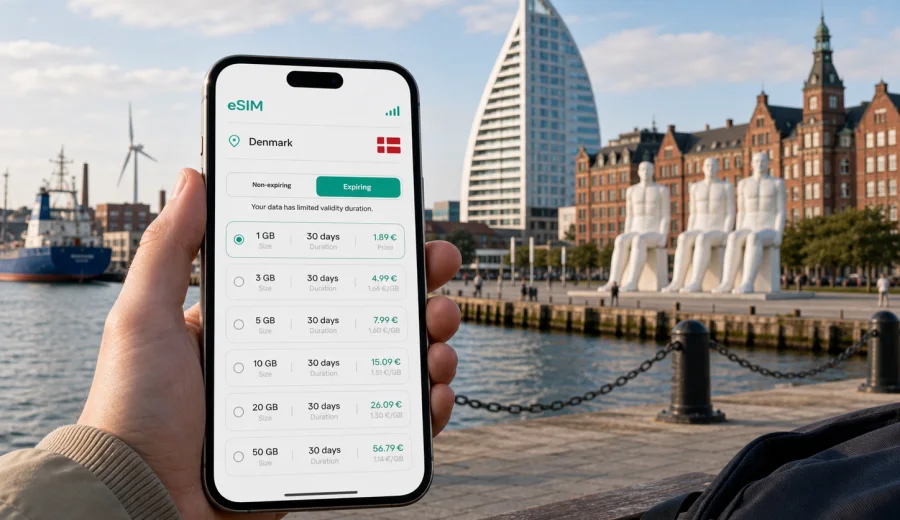
Esbjerg eSIM: mobile connection and internet for a Denmark city trip
Esbjerg is a practical Danish city: a North Sea port, an energy-industry base, a gateway to Fanø and the Wadden Sea, and a comfortable stop for travelers moving across western Denmark. It is also a place where mobile internet matters from the first hour. You may need maps after arriving by train, a ride from the station to the harbor, messaging for a hotel check-in, ferry times for Fanø, weather updates before the coast, or stable access to work tools between meetings.
An eSIM can make that first day easier because you do not need to find a physical SIM card after arrival. You choose a suitable data package before the trip or once you reach Denmark, install it on a compatible phone, and use mobile data for the everyday tasks that keep a city visit organized.
This guide focuses on Esbjerg rather than Denmark in general: where mobile data is useful, how to prepare your phone, what kind of package to consider, and how Kaspersky eSIM Store can help you arrange an eSIM for mobile internet during your trip.
Why mobile internet is useful in Esbjerg
Esbjerg is easy to navigate, but many useful travel decisions still happen on your phone. The city spreads between the railway station, the central shopping streets, the harbor, hotels, business areas, the ferry terminal for Fanø, and coastal landmarks such as Men at Sea. If you are visiting for work, you may also move between offices, conference venues, energy-sector sites, and restaurants where plans change quickly.
Mobile data is especially useful for:
- checking the route from Esbjerg Station to your hotel;
- confirming bus times before moving toward the harbor or airport;
- using maps around the city center and waterfront;
- receiving ferry and weather updates before a Fanø day trip;
- booking restaurants or changing a hotel arrival time;
- joining a video call from a lobby, train, or coworking space;
- using messaging apps when a standard voice call is not included in your travel data plan;
- keeping travel documents, tickets, and booking confirmations available.
Public Wi-Fi can help in hotels and cafés, but it is not a complete travel plan. You may need internet while walking with luggage, standing outside a venue, waiting for a bus, or trying to find the correct pier. In those moments, mobile data is less about entertainment and more about control.
Esbjerg arrival scenarios: where data helps first
Most visitors arrive in Esbjerg by train, car, regional bus, or through a nearby airport connection. The city is compact enough that a short ride can solve many arrival tasks, but you still need fresh information: platform changes, bus stops, walking routes, check-in messages, and payment confirmations.
| Arrival situation | What you may need online | Practical eSIM use |
|---|---|---|
| Train arrival at Esbjerg Station | Hotel route, local buses, taxi apps, walking navigation | Activate data before leaving the station |
| Business arrival with a meeting soon after | Calendar, messaging, file access, route sharing | Keep mobile data ready before the first transfer |
| Harbor or ferry connection | Ferry status, pier location, weather, tickets | Use maps and messages while moving along the waterfront |
| Family or group trip | Shared location, restaurant search, booking details | Avoid relying on one person’s roaming connection |
| Late arrival | Hotel access instructions, door codes, ride details | Keep confirmations available even outside business hours |
If you install an eSIM before the trip, the arrival process becomes simpler. You can switch on the line when the plan terms allow it, enable data for the eSIM, and use maps immediately after reaching Denmark. Always check the activation rules of the selected plan: some packages start when installed, while others start when they first connect to a supported network.
City movement: station, center, harbor, and coast
Esbjerg’s city center is walkable, but your trip may involve several different zones. A typical day can start near the station, continue through Kongensgade or nearby cafés, move to the harbor for a meeting, and end near the waterfront or Men at Sea. If you have a ferry to Fanø, your timing depends on the terminal, weather, and your onward plan.
Mobile internet helps you make small adjustments without turning every change into a problem:
- compare walking and bus routes when the weather changes;
- check whether a restaurant is open before crossing town;
- send a live location to a colleague or friend;
- translate a short notice or menu if needed;
- use cloud documents during a meeting day;
- check tide, wind, or rain forecasts before coastal walks;
- find the correct bus stop after leaving a hotel or office.
For travelers who are used to larger capitals, Esbjerg may feel simple. The practical challenge is not the size of the city; it is the mix of urban, port, ferry, coastal, and business travel. A data connection keeps these pieces connected.
What to prepare before your trip
Before you choose an eSIM data package for Esbjerg, check three things: your device, your route, and your likely data use. This is more reliable than choosing only by price or picking the largest package by default.
Start with your phone. It must support eSIM and should not be locked to another carrier. If you are unsure, use the compatibility check before arranging a plan: check your device. Also confirm that you know how to choose which SIM line handles mobile data. Many travelers keep their physical SIM active for calls or banking messages and use the eSIM line for travel data.
Then look at the route. A visitor spending one night near the station and city center may need less data than someone combining Esbjerg with Fanø, Ribe, the Wadden Sea area, and remote work. A business traveler who opens cloud files and joins calls needs a different package from someone who mainly uses maps and messaging.
Finally, estimate how you use data. Navigation and messaging are light. Video calls, cloud backups, streaming, social media uploads, and hotspot sharing use much more.
Choosing an eSIM data package for Esbjerg
For a short city break, a smaller package can be enough if you use hotel Wi-Fi for heavy updates and keep mobile data for maps, messaging, bookings, and transport. For a longer stay or a work trip, choose a package with enough data for calls, documents, and unexpected changes. If you plan to use your phone as a hotspot for a laptop, check whether tethering is supported in the selected plan terms.
Here is a practical way to think about data:
| Trip style in Esbjerg | Typical online behavior | What to prioritize |
|---|---|---|
| One-day stopover | Maps, ferry checks, messaging, tickets | Short validity and modest data |
| Weekend visit | Navigation, restaurant search, photos, weather | Enough data for two or three active days |
| Business trip | Email, cloud files, ride coordination, calls via apps | More data and a validity period that covers the full stay |
| Esbjerg plus Fanø or Ribe | Navigation outside the center, weather, routes, bookings | Data for city and day trips |
| Family travel | Shared locations, bookings, entertainment for downtime | Higher data allowance or separate plans for key devices |
When you are ready to compare options, you can use Kaspersky eSIM Store to choose an eSIM data plan for Denmark before your Esbjerg trip. The page lets you review available data amounts, validity periods, destinations, and prices, so you can select a package that fits your route instead of arranging mobile internet after you arrive.
Business travel in Esbjerg
Esbjerg is an important business destination in western Denmark, especially for port, energy, offshore, logistics, and maritime work. A business trip here often has a different rhythm from a leisure visit. You may move between a hotel, a meeting room, an industrial area, a restaurant, and the station in one day. You may also need to answer messages while a taxi is delayed, join a call from a quiet corner, or share documents before a meeting starts.
For this type of trip, mobile internet should be treated as part of the travel setup, not as an afterthought. Prepare the eSIM before departure, keep installation instructions accessible, and avoid using the full data allowance on background app updates. If your laptop may need internet, check plan conditions for hotspot use and reduce automatic cloud sync until you are on trusted Wi-Fi.
A useful business checklist:
- install the eSIM profile before travel if the plan terms allow it;
- save hotel, meeting, and taxi details offline as a backup;
- keep your primary SIM available if you need bank or company SMS codes;
- set the eSIM as the mobile data line after arrival;
- disable automatic app updates on mobile data;
- test messaging, maps, and email before leaving the station or hotel;
- keep customer support details available in case you need help with setup.
This approach is especially useful if your first meeting is soon after arrival. A few minutes of preparation can prevent a rushed setup in a station hall, hotel lobby, or taxi queue.
Day trips from Esbjerg: Fanø, Ribe, and the coast
Esbjerg is often a base for short trips. Fanø is the classic nearby island trip, while Ribe is a popular historic destination in the region. Travelers may also head toward Wadden Sea landscapes, beaches, nature areas, or smaller towns in southwest Jutland. These routes make mobile internet more useful because you are less likely to have the same predictable Wi-Fi access as in a hotel.
For a Fanø day trip, data helps with ferry timing, weather, maps, and messages if your group splits up. Around the coast, wind and rain can change plans quickly. For Ribe or regional routes, mobile data helps with train or bus checks and walking navigation after arrival.
Before leaving Esbjerg for a day trip:
- download or cache the key map area if your app supports it;
- check ferry or transport information before departure;
- charge the phone and bring a power bank for longer coastal days;
- keep the eSIM data line enabled for maps and messaging;
- save your hotel address and return route;
- avoid large uploads until you are back on Wi-Fi.
The goal is not to be online every minute. The goal is to avoid losing the practical tools that make a short regional trip easy to manage.
How to install and activate your eSIM
The exact steps depend on your device and the selected plan, but the basic process is usually straightforward. You choose the destination and data package, complete the setup, install the eSIM profile, and then select it for mobile data when you are ready to use it.
General steps:
1. Check that your phone supports eSIM and is not carrier-locked.
2. Choose Denmark as the destination and select a data package that matches your Esbjerg route.
3. Follow the installation flow and keep a stable internet connection during setup.
4. Add the eSIM profile to your phone.
5. Set the eSIM as the mobile data line when you want to use the package.
6. Turn on data roaming for the eSIM if the plan instructions require it.
7. Keep your primary SIM available if you need calls or SMS outside the data package.
For device-specific setup, follow the official installation pages for Android or iOS. Read the instructions before departure if you expect to arrive late, travel with children, or go straight from Esbjerg Station to a meeting.
Remember that many travel eSIM packages are designed for mobile data. They may not include a local phone number, voice calls, or SMS unless this is clearly stated in the selected plan terms. For calls and messages, you can often use internet-based apps while the eSIM handles mobile data.
Data-saving habits for Esbjerg
Good habits can make a modest data package work well. Esbjerg is a city where you may alternate between hotel Wi-Fi, walking navigation, harbor visits, and regional movement, so a few settings matter.
Use this quick checklist:
- turn off automatic app updates on mobile data;
- disable automatic photo and video backup until you are on Wi-Fi;
- download offline maps for Esbjerg and nearby day-trip areas;
- reduce video quality when using mobile data;
- close navigation when you no longer need live directions;
- use Wi-Fi for large work files at the hotel;
- monitor data use during the first day so you can adjust habits early.
If you travel for work, pay attention to cloud storage apps. They can use more data than expected when syncing presentations, large PDFs, images, or shared folders. If you travel for leisure, social video uploads and streaming are usually the main data users.
Short Esbjerg planning examples
One-night business trip: You arrive by train, check in near the center, attend a meeting near the harbor, and leave the next morning. Choose enough data for maps, email, messages, and a few app-based calls. Install before travel and test mobile data before leaving the station.
Weekend with Fanø: You spend one day in Esbjerg and one day crossing to Fanø. You will use maps, ferry information, weather, restaurant searches, and photo sharing. Keep heavier uploads for hotel Wi-Fi.
Regional route through southwest Jutland: You combine Esbjerg with Ribe, coastal areas, or other stops. Prioritize validity period and enough data for navigation outside the city center.
FAQ: eSIM and mobile internet in Esbjerg
Do I need an eSIM specifically for Esbjerg?
No. For a city article, the practical choice is usually a Denmark eSIM data package that covers your stay in Esbjerg and any nearby trips. Choose based on data amount, validity, and your route.
Can I install the eSIM before I arrive in Denmark?
In many cases, yes, but check the selected plan’s activation rules. Some packages start on installation, while others start when they connect to a supported network.
Will an eSIM give me a Danish phone number?
Many travel eSIM data packages are for mobile internet only and do not include a standard phone number, voice calls, or SMS unless the plan terms say otherwise.
Is public Wi-Fi enough for Esbjerg?
It can help in hotels and cafés, but it is not reliable for every travel moment. Mobile data is useful between locations, near the harbor, on day trips, and when plans change.
Should I keep my regular SIM active?
Often, yes. You may need it for calls, banking messages, or account verification. Set the eSIM for mobile data and keep your primary line configured according to your needs.
Final preparation before Esbjerg
Before you leave, make your phone travel-ready rather than solving everything after arrival. Check eSIM compatibility, choose a Denmark data package that fits the length and style of your Esbjerg visit, read the installation steps, and decide which SIM line will handle mobile data.
Esbjerg is a city where practical connectivity pays off: the station-to-hotel route, harbor meetings, ferry plans, weather changes, coastal walks, and regional trips all depend on small online checks. With an eSIM prepared in advance, you can spend less time looking for a connection and more time managing the trip itself.
Use Kaspersky eSIM Store to prepare an eSIM data plan for your trip to Esbjerg and Denmark, then install it on a compatible device and keep mobile internet ready for the moments when your itinerary changes.