Travel connectivity guide
Evora eSIM: Mobile Internet and Travel Guide
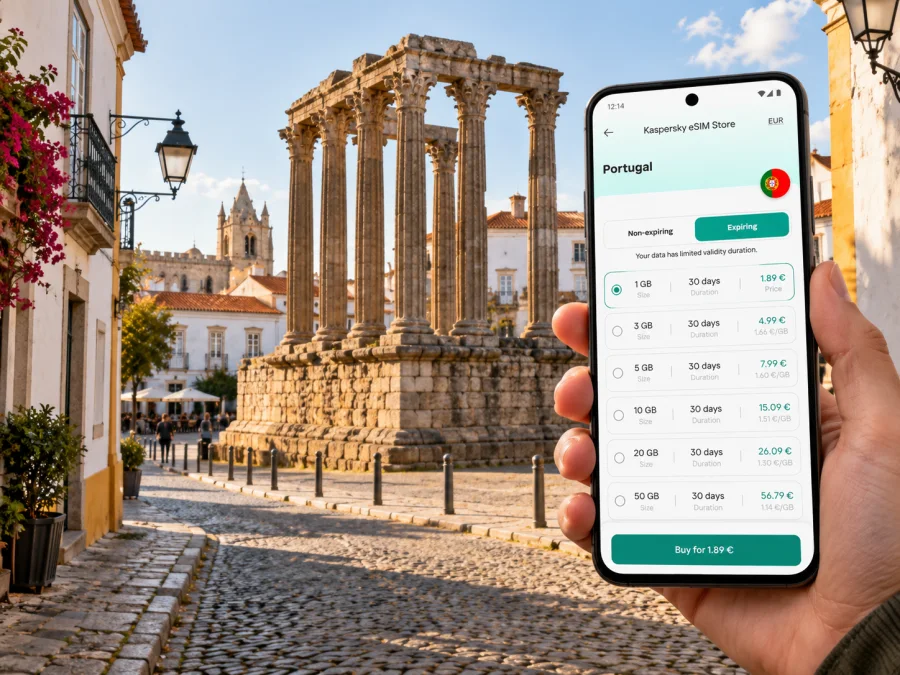
Evora eSIM: Mobile Connection and Internet for a City Trip
Evora rewards an unhurried visit: the Roman Temple, the cathedral, whitewashed streets and small squares are close enough to connect into a walk, while the wider Alentejo landscape invites trips beyond the centre. A working mobile connection helps with the practical parts of that visit—finding your accommodation, checking a train, translating a menu, messaging your host or saving a route before you leave Wi-Fi. An eSIM can provide mobile data without taking out your usual physical SIM, provided your device and the selected Portugal plan support it.
Service varies by plan, device, underlying network and local conditions, especially indoors.
Where Evora is—and what that means for your trip
Evora is a city and municipality in Portugal’s Alentejo region. Its historic centre is recognized on UNESCO’s World Heritage List. The city’s built heritage includes the Roman Temple, the cathedral, São Francisco and the Chapel of Bones, the Água da Prata Aqueduct, and a close-knit pattern of white façades, tiled roofs and narrow streets. The historic centre is practical to explore on foot. Turn-by-turn orientation can help because lanes can look similar and a mapped route may end at a pedestrian street rather than a hotel entrance.
The Roman Temple stands on the higher part of the historic centre. It is widely nicknamed the “Temple of Diana,” although the municipality notes that a dedication to Diana is not established. The formal name Roman Temple avoids presenting that familiar nickname as a verified dedication.
The station and some accommodation are outside the most compact lanes, so save an offline map if you plan to walk beyond the centre or take a day trip.
Arriving in Evora: plan the handoff from Lisbon
Many international visitors reach Alentejo through Lisbon and continue overland. CP (Comboios de Portugal) lists Intercidades services between Lisboa Oriente and Evora; the current timetable is subject to change, so check the operator’s live journey planner for your travel date rather than relying on a copied departure time. CP describes Evora station as about one kilometre from Praça do Giraldo, the central square. Whether to walk depends on your luggage, weather and accommodation location.
Think about connectivity as a handoff across separate stages:
- At the airport or in Lisbon: confirm your onward transport, ticket details, station and departure time while you have a reliable connection.
- Before boarding: save the accommodation address in Portuguese, pin it on a map and capture any check-in instructions. Keep your booking details available offline.
- On arrival at Evora station: use mobile data to confirm the route and tell your host when you are close. If you prefer not to walk, arrange transport using the options available locally and verify the pickup point.
- At the accommodation: connect to trusted Wi-Fi if available, then check the next day’s opening hours, reservations and transport separately.
Save your accommodation address and check-in instructions offline, confirm the latest train information, and decide whether you want to walk from the station with your luggage. Keep enough battery for navigation.
Walking, wayfinding and getting around the centre
The historic core is best approached as a sequence of short walks, not as one long route to follow without looking up. Praça do Giraldo works as a useful reference point. From there, you can orient yourself toward the Roman Temple and cathedral, then make a loop toward São Francisco and other sights. The exact order depends on opening times, mobility needs and where you are staying. Use a current map for street-level navigation, and check official opening information before travelling to a specific interior or museum.
The centre’s historic street pattern is part of the experience. It can also affect navigation: GPS may place you on the wrong side of a wall, a lane may be pedestrian-only, or a door may face a small side street. When a route seems implausible, pause at a recognizable square, compare the street name with your saved destination and follow local signs rather than repeatedly crossing narrow lanes. A data connection can refresh directions, but a downloaded map and written address remain useful if location data is slow or unavailable.
For longer distances, use the local transport options that suit your exact origin and destination. Timetables, routes and availability can vary; check current information locally. Avoid assuming that every attraction outside the centre is a short walk just because the city centre itself is compact. If a day’s plan includes a site beyond the walls, confirm the return option before you set off.
| Situation | Why mobile internet helps | A sensible backup |
|---|---|---|
| Walking from the station | Check the route and message your accommodation | Saved address and offline map |
| Finding a small hotel entrance | Compare the pin with the street name and check-in note | Screenshot of the booking instructions |
| Visiting several monuments | Recheck locations and current visitor details | A paper or offline list of stops |
| Meeting a driver or travel companion | Share a location and confirm the pickup point | Agree on a named square or landmark |
| Leaving the city for a day trip | Review connections and return plans | Save tickets and timetable details before departure |
Choosing an eSIM plan for Portugal and an Evora itinerary
Evora is a city within Portugal, so select a plan whose stated coverage includes Portugal. A city-specific plan is not required simply because your destination is Evora. If your itinerary also includes Spain or another country, check whether a regional plan covers every stop; do not infer cross-border coverage from a Portugal label. The plan details shown at purchase are the source of truth for destination, data allowance, validity, price, activation conditions and any restrictions. A Portugal destination label identifies the country, not necessarily the Portuguese mobile operator used by a particular plan. Check the plan details for network information if it is listed, and do not assume a named operator or coverage at a specific Evora address when those details are not shown.
Kaspersky eSIM Store is an app and website where you can choose, arrange and activate an eSIM with a suitable plan for mobile internet during an international trip. It does not operate the mobile network. Actual service depends on the plan’s network arrangements, the device, location and local conditions. You can review eSIM plan options for Portugal and compare the terms that matter to your own itinerary; the country page does not imply a separate Evora tariff.
Choose a data allowance based on what you will do, rather than treating a city name as a usage estimate. Messaging, maps and web searches usually need less data than repeated video calls, cloud photo uploads or streaming. For a short stay, think about whether your accommodation and cafés provide Wi-Fi and how much you rely on mobile data while outside. For a longer stay or a working trip, include video meetings, tethering and backups in your estimate—and confirm that the plan permits any use you need.
Estimate data by your own routine: maps and messages differ from video calls, tethering or repeated photo uploads. For a short stay, consider how often you will be away from Wi-Fi; for work, check data and tethering terms and plan a backup. If you cross a border, verify each destination explicitly.
Before checkout, compare the plan’s validity period with your dates and read how validity starts. Depending on the offer, a plan may begin on installation, activation, first network connection or another stated event. Do not install early unless you understand the start rule. Check whether the allowance is fixed or renewable, what happens when it is used up, and whether top-ups are available under that plan. Prices and offers can change, so use the current product screen rather than old screenshots or travel advice.
Check the phone before you pay
An eSIM needs a device that supports eSIM and is not restricted by a carrier in a way that prevents adding or using another profile. Support varies by exact model and by the country or region where a device was sold. A model family name alone is not enough to confirm eligibility, and the presence of an eSIM menu does not prove that a particular travel plan will work on it. Check whether your device is compatible, then confirm the exact model variant and carrier-unlock status in your phone settings, manufacturer documentation or with the seller or carrier.
If your phone uses a regional hardware variant, keep that modifier in view when checking support. Do not rely on a generic “this model supports eSIM” statement if your own variant may differ. Also confirm that you can access Wi-Fi or another internet connection during installation, and that you can receive or retrieve the activation details after purchase.
A practical pre-purchase check:
- Find the full model number in Settings, About or the device box.
- Confirm eSIM support for that exact model and sales region.
- Check whether the phone is carrier-unlocked.
- Make sure the operating system is current enough for the manufacturer’s eSIM flow.
- Read the Portugal plan’s validity, data and activation terms.
- Keep your primary SIM active if you need its number for calls or verification messages.
If any of these points is unclear, resolve it before buying or installing. It is easier to check a model number at home than troubleshoot an unsupported variant after arrival.
Install and activate before the trip or after you arrive
You can prepare the eSIM in advance if the plan’s terms allow it. Installation and activation are separate ideas: adding a profile to the phone does not necessarily mean its data allowance starts immediately. The plan may define a different start event, so follow its instructions. Use a stable internet connection for setup and keep the QR code or manual activation details accessible on a second screen or printed copy if the installation method requires it.
A general setup sequence is:
- Check compatibility and carrier-unlock status.
- Choose a Portugal plan and read its activation rule and validity.
- Install the eSIM using the purchase instructions while connected to Wi-Fi.
- Label the new line clearly, for example “Portugal data,” so it is easy to identify.
- Keep your usual number selected for calls and SMS if you still need it.
- Set the travel eSIM as the mobile-data line when you want to use it.
- Enable data roaming for that eSIM only if the plan instructions require it; confirm which line is selected before enabling roaming.
- After arrival, allow the phone to register and check that mobile data works before relying on it for navigation.
Menu names differ across devices and operating-system versions. Follow the steps for your phone: eSIM installation instructions for Android and eSIM installation instructions for iOS. If service does not start, check that the eSIM line is enabled, the correct line is selected for mobile data, airplane mode is off, and the plan is active for Portugal. Restarting the phone may help it search again, but repeated deletion and reinstallation can create a problem if the profile is single-use. Contact the relevant support channel and do not remove the eSIM unless instructed.
Common Evora travel scenarios
For a short city break, mobile data is useful for maps, messages and reservations around Praça do Giraldo, the Roman Temple and the cathedral. Save the station-to-accommodation route before boarding. For a late arrival or work trip, confirm the pickup point, check-in instructions, tethering terms and a backup connection before leaving Lisbon. If you plan a day beyond the centre, save the return details and remember that rural signal depends on local conditions.
Frequent questions
Is Evora in Portugal or Spain?
Evora is in Portugal, in the Alentejo region. If a wider itinerary crosses into Spain, check the selected plan’s country list rather than assuming Portugal data includes Spain.
Will my eSIM provide a Portuguese phone number?
Do not assume so. A travel data eSIM may provide mobile internet without a conventional voice number or SMS. Check the selected plan’s details. You can generally continue using your usual SIM for calls and messages if your device supports dual SIM and your home carrier’s terms allow it; data and roaming charges for that line are separate.
Can I install the eSIM before travelling?
Often an eSIM can be installed before departure, but the plan’s own instructions determine when it can be installed and when validity begins. Read those details first, and avoid switching the eSIM on early if its validity could start before your trip.
What if the phone shows no service in Evora?
Check that the plan is active for Portugal, the eSIM line is enabled and selected for data, and the device has restarted its network search. Review the plan instructions for any roaming setting. If the issue remains, contact support for the plan and keep offline navigation available while you troubleshoot.
A practical plan for staying connected
For Evora, plan the Lisbon connection, confirm eSIM support for your exact device variant and choose a plan whose terms explicitly cover Portugal. Read when validity starts and save tickets, addresses and essential routes offline. In the city, mobile data is especially useful for the handoffs between the station, accommodation and day trips; keep offline details available as a backup.
When ready, use Kaspersky eSIM Store to review current Portugal options, compare validity and data terms, and choose a plan for your trip. Choose an eSIM plan for travel in Portugal, then install it using the instructions for your device and activate it according to the plan conditions.


