Travel connectivity guide
Ezulwini eSIM for Mobile Internet in Eswatini
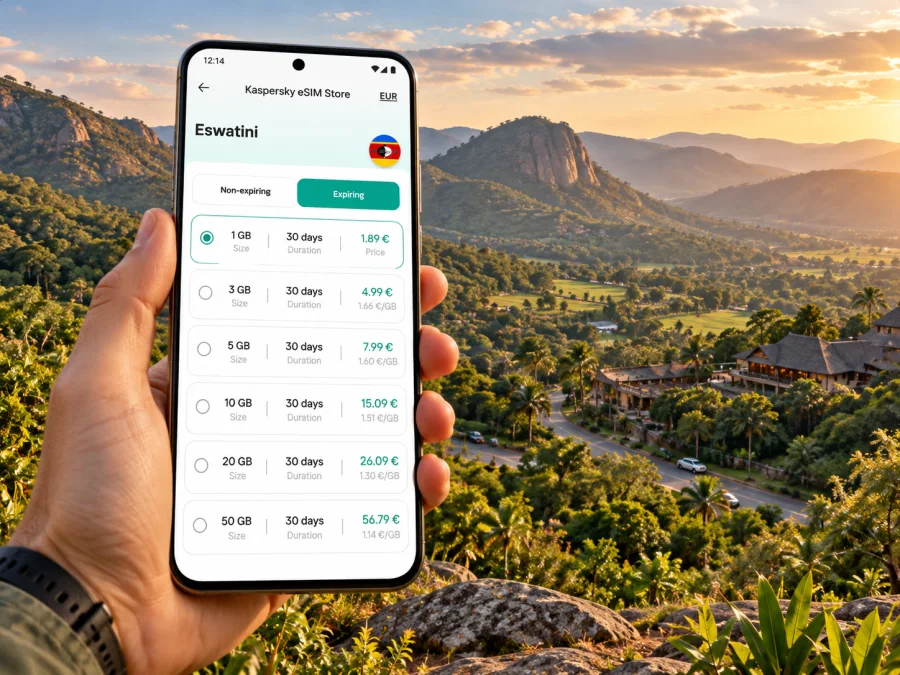
Ezulwini eSIM: mobile connection and internet for your trip
Ezulwini is a tourism town and municipality in Eswatini, set within the wider Ezulwini Valley. Lodges, restaurants, craft stops and visitor attractions sit among green slopes, with Mbabane to the north and Lobamba at the southern end. The municipal town and the broader valley are not interchangeable map points: your day may involve a hotel, a market, a reserve and a road transfer rather than one compact centre.
An eSIM can make the practical parts of that trip easier. With mobile internet available on a compatible phone, you can check directions, confirm a pickup, message your accommodation and look up opening details without first finding a shop for a physical SIM. Coverage and performance still depend on the local network, location, device and plan, so prepare for the route rather than assuming one signal level everywhere.
First, locate Ezulwini on your route
Ezulwini Valley lies between Mbabane and Lobamba and follows the MR3 corridor toward Manzini. It is in the Kingdom of Eswatini, formerly known internationally as Swaziland. “Ezulwini” can mean the municipality or the wider valley and tourism zone. When you book lodging or a driver, use the specific property name and map pin as well as “Ezulwini”; two places described as being in the valley may not be next door to one another.
The distinction matters at arrival. King Mswati III International Airport is at Sikhuphe, not in Ezulwini. The airport authority places it about 50 km from Manzini; the onward trip to a valley hotel is a separate road transfer. Depending on your itinerary, you might also arrive through South Africa and cross a land border. In either case, do not treat the airport name or a regional itinerary as proof that a South African data plan covers Eswatini.
| Trip detail | What to plan for |
|---|---|
| Destination | Ezulwini Valley, Kingdom of Eswatini |
| Area layout | A spread-out valley between Mbabane and Lobamba, alongside the MR3 route |
| International airport | King Mswati III International Airport at Sikhuphe |
| Typical digital tasks | Confirming a transfer, map navigation, messaging, bookings and route updates |
| Main connectivity check | The selected plan must list Eswatini as a covered destination |
The valley is a base for cultural stops, shopping, outdoor activities and accommodation. Visitor attractions are distributed along the valley and surrounding roads, so a confirmed pickup time and the venue’s current directions are more useful than estimating a walk from a general “Ezulwini” search result.
What mobile internet helps with in Ezulwini
A phone is most useful here as a small trip organiser. Before leaving your lodge, check the next stop’s pin, save its address, and message the driver or host if your timing changes. Navigation often means following a road between sites and knowing where to turn off it. Download an offline map of Eswatini as a backup; keep the live connection for route changes, messages and updated booking details.
A few common moments illustrate the value:
- At check-in: open the booking confirmation, send an arrival update and locate the property entrance. Some lodges sit away from the main road, so retain the host’s written directions as well as the pin.
- Before a craft market or cultural visit: confirm hours and arrangements with the venue or tour provider. Listings can change, and a map result alone may not tell you whether a visit needs advance coordination.
- On a day trip: share your planned return time with your accommodation, check the route before setting out and keep the driver’s contact details available offline.
- For work: download meeting files before travelling, use a stable connection for short calls when available and avoid relying on a remote valley location for a large upload or uninterrupted video meeting.
- When plans change: send a concise message with the name of your next stop. A shared pin is clearer than “near the valley” when distances between properties matter.
Mobile data is also useful for transfer coordination, mobile banking, translation and checking weather. Automatic photo backup, app updates, video autoplay and cloud syncing can use data in the background. Set them to update over Wi-Fi, and switch off automatic media downloads if you want your allowance to last longer.
The valley is not one coverage point
Ezulwini’s green slopes, side roads and more open areas make it unwise to promise a uniform signal from one place name. A phone may behave differently indoors, on the main road, at a property set back from the road or on an excursion beyond the valley. Network availability is local and can also vary with congestion, terrain, building materials and the handset’s supported bands. Treat online maps and calls as useful when available, not as a substitute for meeting details and a backup plan.
Eswatini has its own mobile market. The national communications regulator lists MTN Eswatini and Eswatini Mobile among licensed operators; the regulator’s sector reporting also states that eSIM services have been introduced by the mobile operators. That information describes the Eswatini market. It does not identify which network a particular international travel eSIM will use in Ezulwini. The network partner, allowed services and regional coverage depend on the chosen plan and its current terms.
Before paying, check the destination label and coverage notes in the plan details. If your itinerary includes a border crossing or another country, make sure the plan explicitly includes every country where you expect to use data. A package for South Africa alone should not be assumed to include Eswatini, and a plan for Eswatini should not be assumed to include South Africa. Where a regional package is offered, read its included destinations rather than relying on the word “regional.”
When you are ready to compare an option for the trip, review the available eSIM plans for Swaziland and read the included destination and validity conditions before choosing. The page is the country-level destination page; your use in Ezulwini depends on the selected plan’s terms and the local network conditions.
Choose a plan around your itinerary
Start with what you will actually do online. A visitor who mainly checks maps and sends messages has a different pattern from someone who works remotely, shares video or backs up a photo library. Note the trip length, days away from Wi-Fi, and whether the route crosses another border.
| Your use in Ezulwini | Planning approach |
|---|---|
| Maps, messages and booking checks | Estimate the number of active travel days; keep downloads and backups on Wi-Fi |
| Photos and social posts | Upload selected images when connected to Wi-Fi; disable automatic full-resolution sync |
| Remote work | Check whether your accommodation offers dependable Wi-Fi and keep mobile data for calls, messages and interruptions |
| Multi-stop route | Confirm that every country on the itinerary is included in the same plan, or plan separate connectivity for each leg |
| Short stopover | Prioritise maps, transfer coordination and essential messages; save directions before arrival |
The plan’s data allowance, validity period, activation rules and coverage list should fit the journey. Check when validity begins; depending on the terms, it may start at purchase, installation or first connection. Review whether hotspot use is allowed if you intend to connect a laptop. A travel data eSIM may not provide an ordinary local number, voice calls or SMS; use internet-based messaging apps over data where appropriate.
If your accommodation has Wi-Fi and your days are mostly guided outings, a modest allowance may be enough. If you rely on data for navigation or work, choose with a buffer and track consumption in your phone settings. Compare the published allowance and period with your own route and habits.
Keep the route usable when data drops
Before setting off, save the following on your phone:
- accommodation name, address, map pin and host’s contact details;
- confirmation numbers and essential booking messages;
- the day’s sequence of stops, with a pin for each one;
- driver or tour contact details and any agreed pickup point;
- an offline map covering Ezulwini, Mbabane, Lobamba and the roads on your planned excursion.
If the signal weakens, an offline map can still show your position and saved locations, though live traffic, fresh searches and messages need a connection. Ask your host or guide to confirm the next pickup. For an isolated excursion, share the plan and expected return time before you leave.
A simple data-saving setup can also reduce surprises:
- Turn off automatic app updates over mobile data.
- Limit cloud photo backup to Wi-Fi.
- Download navigation areas and entertainment before leaving reliable Wi-Fi.
- Use standard-definition video or avoid streaming while travelling.
- Check your phone’s data counter after the first day and adjust app settings if needed.
- Keep the eSIM line selected for mobile data and confirm which line handles voice calls and SMS.
Prepare your phone before departure
An eSIM is a digital SIM profile stored in a compatible device. Device capability can vary by exact model and sales region, and an operator lock can prevent use of another provider’s service. Look up the model number in your phone settings, verify that eSIM installation is supported for that variant, and confirm that the device is unlocked. Check whether your device supports eSIM before selecting a plan.
Regional variants are a real consideration: manufacturers sometimes sell different cellular configurations under a familiar product name. For example, Apple’s current support guidance specifies a limited set of iPhone models for eSIM use with mainland China carriers; this illustrates why the model identifier and purchase region matter. It does not mean the same restriction applies to every destination or every phone. Check your manufacturer’s information for your exact variant and the requirements of the travel plan.
Install the eSIM while you have dependable Wi-Fi and enough time to follow the on-screen steps. Keep the QR code or activation details accessible on another screen or printed copy if the setup flow requires scanning. Do not delete an installed profile just to troubleshoot unless the plan instructions tell you to; some activation codes are one-time use. Depending on the eSIM, mobile data roaming may need to be enabled for that line after arrival. Follow the product’s setup instructions, then test data with Wi-Fi turned off when it is appropriate to do so.
For guided steps, use the Android eSIM installation instructions or the iOS eSIM installation instructions. The wording on your screen can differ by operating system version, so follow the device prompts and the plan-specific activation guidance together.
Arrival checklist
- [ ] Confirm the plan names Eswatini in its covered destinations.
- [ ] Check your phone’s exact model variant and that it is not carrier-locked.
- [ ] Install the eSIM over Wi-Fi before travel if the plan’s instructions allow it.
- [ ] Save the airport transfer, accommodation pin and contact details offline.
- [ ] Confirm which SIM line will use mobile data and which will handle your regular number.
- [ ] Read when plan validity begins and whether data roaming must be enabled.
- [ ] Keep a small amount of offline information for the first hours after landing.
If you arrive at King Mswati III International Airport
The international airport is at Sikhuphe, while Ezulwini is in the central part of the country. Arrange onward transport before the flight if possible, and save the driver’s name, meeting point and phone number. Confirm facility availability and opening hours directly if you need to rely on a particular service at the terminal.
A data connection can help you message a driver and check a shared route once you have landed. Keep pickup details offline and agree what to do if you cannot reach the driver. If your flight arrives in South Africa, check the plan against both the landing country and Eswatini.
When the eSIM connects, open a simple webpage or send a short message before leaving the terminal area. If it does not connect, check that the eSIM line is switched on, mobile data is assigned to it, airplane mode is off, and the selected network settings follow the plan’s instructions. Restarting the phone may help in some cases. If the issue continues, use airport Wi-Fi if available or contact the plan’s support channel; avoid repeatedly deleting and reinstalling the eSIM profile.
Moving between stays, attractions and nearby centres
Because the valley is elongated, think in terms of stops and transfers rather than walking from one central square to everything. Confirm whether an attraction or restaurant is close to your accommodation or requires a separate ride. Check the return journey too, especially for an evening pickup.
Mbabane, Lobamba and Manzini are useful reference points for a wider itinerary, but they are distinct places with their own destinations and services. Actual travel time depends on your starting point, traffic, road conditions and transport. Avoid relying on a generic estimate when timing a flight or appointment.
For a day outside the valley, confirm arrangements with a guide or accommodation and download directions beforehand. Start with a full charge and bring a power bank on a long day out, especially if you will use navigation continuously.
Business trips and longer stays
For a meeting in or near Ezulwini, decide in advance which connection is primary. Ask the venue about Wi-Fi before relying on it for a call. If your work involves large files, sync them in advance and use mobile data for essential communication rather than assuming uninterrupted uploads.
Keep calendar details and meeting addresses offline, send the host an arrival estimate, and use a hotspot only if your plan permits tethering. For a longer stay, monitor usage during the first few days and check renewal or top-up conditions before relying on more data.
A digital data plan can complement a primary SIM, but dual-SIM behavior differs by model. Check which line is set for data and whether calls on your usual number could trigger roaming charges. Unless the plan says otherwise, treat the eSIM as mobile data rather than a local voice number.
Frequently asked questions
Is Ezulwini a city?
Ezulwini is a tourism town and municipality within the broader Ezulwini Valley. Use the exact lodging or attraction name and map pin when planning a transfer, since “Ezulwini” can refer to the wider area too.
Is Ezulwini in Swaziland or Eswatini?
It is in the Kingdom of Eswatini, which was formerly known internationally as Swaziland. The destination page linked here uses the legacy English label “Swaziland”; check that the plan’s details identify the country you need.
Does a South Africa eSIM automatically work in Ezulwini?
No such assumption is safe. Eswatini and South Africa are separate destinations and mobile markets. Check the plan’s included countries and current coverage terms before purchase.
Will one eSIM work throughout the valley?
No plan can promise an identical connection at every property, indoor space or road. Signal depends on the local network, terrain, building and device. Keep offline maps and key contacts available.
Does a travel eSIM include calls and SMS?
A data-only eSIM generally provides internet access rather than a standard local phone number. Review the selected plan’s terms. Internet-based calling and messaging apps can work over data when the connection is available.
Can I install the profile after I arrive?
That depends on the plan’s setup rules and whether you have Wi-Fi and the required activation details. Installing before departure gives you time to resolve compatibility or setup questions. Follow the activation timing stated for the plan so validity starts when intended.
What if I use a phone bought in another region?
Check the exact model number with the manufacturer and confirm that the handset is unlocked. The same retail name can have regional variants with different eSIM capabilities. Do not rely only on the brand or model family name.
A practical way to stay connected
For a smooth Ezulwini visit, prepare around the valley’s spread-out layout: save exact pins, confirm transfers, and keep the next stop’s details offline. Select a data plan whose destination list, allowance and validity match your Eswatini itinerary, and install it on a compatible, unlocked device. Leave large downloads and backups to Wi-Fi where possible.
When you are ready, choose an eSIM plan for your Eswatini trip in Kaspersky eSIM Store, the app and website for selecting, arranging and activating an eSIM plan for mobile internet abroad. Review the selected plan’s coverage, data allowance, validity and setup conditions, then install the eSIM using the instructions for your device.


