
Travel connectivity guide
Famagusta eSIM for Mobile Internet in Cyprus
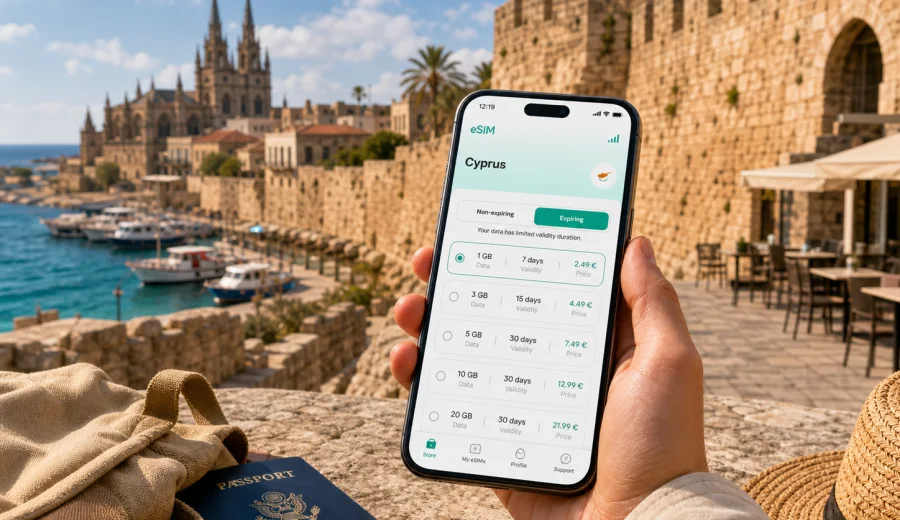
Famagusta eSIM: mobile connection and internet for a trip to Cyprus
Famagusta is a city where mobile internet becomes useful before the trip has properly started. You may need maps from the moment you leave the airport transfer, a messenger to meet a host near the old town walls, mobile banking for card checks, or a hotel app to confirm late arrival. An eSIM can help you prepare mobile data for Famagusta without looking for a physical SIM card after a flight.
This guide is focused on Famagusta, not on Cyprus in general. It covers arrival scenarios, local movement, hotel stays, business trips, beach days, short stopovers, and routes from Famagusta to other parts of Cyprus. It also explains how to choose an eSIM tariff for the trip, what to check before purchase, and how Kaspersky eSIM Store can help you select, arrange, install, and activate an eSIM with a suitable mobile data package for travel.
Why mobile internet matters in Famagusta
Famagusta is not a city where every movement is solved by one simple metro line or a single airport rail link. Travellers often combine airport transfer, local taxis, intercity buses, walking routes, hotel shuttles, beach trips, and day journeys along the eastern coast. Mobile data is helpful because many small decisions happen while you are already moving.
Typical moments when an eSIM is useful in Famagusta include:
- checking the route from Larnaca or another arrival point to your hotel;
- messaging a driver, host, colleague, or tour operator;
- opening maps around the walled city, beach areas, and hotel districts;
- confirming restaurant reservations, apartment check-in details, or ferry and bus information;
- using translation apps when local signage, menus, or service messages are unclear;
- keeping access to airline, bank, and travel insurance apps;
- sharing location with companions when your group separates for sightseeing or meetings.
An eSIM is especially practical when you want mobile internet before you find stable Wi-Fi. Hotel Wi-Fi is useful, but it does not help while you are waiting outside a building, walking to dinner, crossing between districts, or confirming a pickup location.
Arrival scenarios: when you may need data first
Many visitors reach Famagusta through other transport hubs in Cyprus. Depending on your itinerary, you may arrive after a flight, a regional transfer, a cruise stop, or a road trip from another city. The first hour often involves small tasks that are hard to complete offline.
| Arrival situation | Why mobile data helps | Practical use in Famagusta |
|---|---|---|
| Airport transfer | Driver details and route checks may change | Keep messenger, maps, and booking apps available |
| Late hotel arrival | Reception instructions may be sent digitally | Open check-in codes, address notes, and contact numbers |
| Business visit | Schedules can change while you are travelling | Join calls, read email, and update meeting locations |
| Short stopover | There is little time to solve connectivity after arrival | Navigate directly to the old town, beach, or meeting point |
| Family trip | Several people may rely on one organiser | Share location and coordinate transport without Wi-Fi |
If you install an eSIM before departure, you can switch to the travel data profile when the tariff conditions allow it. If you prefer to install after arrival, keep in mind that you will need an internet connection for setup, such as airport Wi-Fi, hotel Wi-Fi, or another available connection.
Famagusta city focus: where mobile data is most useful
Famagusta combines several travel patterns. A visitor may spend the morning inside the walled city, the afternoon near the coast, and the evening returning to a hotel or apartment. A business traveller may move between offices, conference venues, restaurants, and accommodation. A stopover visitor may have only a few hours and need accurate route decisions.
Mobile internet is helpful in these city-specific situations:
- Old town and landmarks. Maps help with walking routes near the walls, gates, churches, museums, cafes, and viewpoints.
- Beach and coastal areas. Data helps with taxi pickup points, weather checks, ride coordination, and sharing location with companions.
- Hotels and apartments. Many check-in details, payment confirmations, and host messages arrive through apps or email.
- Business districts and meetings. A stable data plan gives you a backup for email, calendar updates, and route changes.
- Trips beyond Famagusta. If your itinerary includes Larnaca, Nicosia, Ayia Napa, Protaras, or other Cyprus destinations, a country-level eSIM tariff is usually easier to manage than a city-only mindset.
The main point is not to stay online for its own sake. The practical value is control: you can see where you are going, check the details of your plan, and contact the right person without waiting for the next Wi-Fi network.
How much data to plan for Famagusta
Your data needs depend on how you travel. Famagusta can be light on mobile data if you mainly use maps and messages, or heavier if you upload video, work remotely, or rely on navigation every day.
| Trip style | Typical mobile data use | What to consider |
|---|---|---|
| One-day visit | Low to moderate | Maps, messaging, ride coordination, tickets, quick photo sharing |
| Weekend in Famagusta | Moderate | More navigation, restaurant searches, hotel apps, social media |
| Business trip | Moderate to high | Email, calendars, file access, video calls, hotspot use if allowed by the tariff |
| Family holiday | Moderate to high | Several devices may need data, but each eSIM is tied to a compatible device |
| Multi-city Cyprus route | Moderate to high | Navigation between cities, transport updates, bookings, and maps |
Video calls, cloud backup, video uploads, and streaming can use traffic quickly. If you are staying for more than a few days, check the tariff volume and validity period carefully. A larger package may be more convenient than trying to preserve a very small allowance during a busy itinerary.
Choosing an eSIM tariff for Famagusta
For a city trip, the country matters because the eSIM tariff must match the destination where you will use mobile data. For Famagusta, choose a Cyprus tariff unless your route requires a wider regional or global option. The city is the travel scenario; the country is the tariff destination.
Before you choose, answer five questions:
1. How many days will you spend in Famagusta and Cyprus?
2. Will you stay mostly in the city, or travel to Larnaca, Nicosia, Ayia Napa, Protaras, or other places?
3. Do you need mobile data only for maps and messages, or also for work calls and file access?
4. Will you use your phone as a hotspot, and does the selected tariff allow it?
5. Do you need the eSIM ready before arrival, or will you install it after you have Wi-Fi?
Kaspersky eSIM Store helps you choose a destination and review available tariff details such as traffic volume, validity period, destination, and price before you arrange the eSIM. This is useful for Famagusta because the right choice is usually not just "some internet"; it is a package that matches the number of days, the route, and the way you use mobile apps in the city.
If your itinerary is already clear, you can choose an eSIM tariff for your trip to Famagusta and Cyprus before you travel. This keeps the country landing page aligned with the city scenario and lets you review the options for Cyprus rather than searching for a separate city-only product.
Local movement: maps, taxis, buses, and walking routes
Famagusta rewards walking, but the day often starts and ends with transport. You may walk through the historic centre, move toward coastal areas, return to a hotel, or arrange transport for a trip outside the city. Mobile data helps because local movement is a chain of small checks.
Use mobile internet in Famagusta for:
- loading walking directions before you enter narrow streets;
- checking the exact pickup point for a taxi or transfer;
- sharing your live location with companions;
- confirming whether a restaurant, museum, shop, or office is open before you go;
- translating address details or service messages;
- checking weather before a beach visit or outdoor meeting;
- saving offline maps as a backup while still using live navigation when data is available.
If you are travelling with children, older relatives, or a group, one person often becomes the default navigator. That device should be prepared before the trip: charged, compatible with eSIM, unlocked for mobile data profiles, and set up with the right travel apps.
Hotels, apartments, and remote check-in
Accommodation in and around Famagusta can involve hotels, resorts, apartments, villas, and smaller guest properties. Some check-ins are simple reception visits; others require messages, door codes, map pins, or arrival-time updates. This is where mobile data can prevent a small arrival issue from becoming a long delay.
Before the trip, save these details offline as well:
- hotel name and full address;
- host or reception contact details;
- booking confirmation;
- payment confirmation if relevant;
- check-in window and late-arrival instructions;
- map pin or screenshot of the entrance;
- emergency contact for your travel group.
An eSIM does not replace good preparation. It supports it. The best setup is to have essential details saved offline and mobile data available for changes, live maps, and messages.
Business trips to Famagusta
For business travellers, mobile internet is less about sightseeing and more about continuity. You may need to confirm a meeting location, reply to a colleague, join a call from a hotel lobby, open a shared file, or check a calendar change while crossing town.
A practical business setup for Famagusta includes:
- an eSIM tariff with enough data for email, maps, messaging, and light calls;
- offline copies of key documents in case signal or Wi-Fi is poor in a specific building;
- a power bank for long transfer days;
- a clear rule for which SIM handles mobile data and which SIM remains active for calls or SMS;
- a check that corporate security policies allow eSIM use and mobile hotspot use, if needed.
Remember that many travel eSIM tariffs are focused on mobile data. They may not include a regular phone number, voice calls, or SMS unless this is stated in the conditions of the selected tariff. For calls and messages, many travellers use internet-based apps through mobile data.
Device compatibility and setup checks
Before you choose a tariff, make sure your phone or tablet can use eSIM. Not every device supports eSIM, and some devices may be locked by an operator. You should also check whether your device allows more than one mobile plan and how it handles data roaming for the travel eSIM.
Use this checklist before purchase:
- Check your device for eSIM support.
- Confirm that the device is not locked to one operator.
- Check whether your model supports eSIM in the country where it was purchased.
- Make sure your operating system is updated enough to install a mobile data profile.
- Keep access to Wi-Fi or another internet connection for installation.
- Read the selected tariff conditions: destination, data volume, validity period, activation rules, and hotspot availability.
Compatibility is not a formality. It is the difference between a smooth setup and trying to solve a device issue after arrival. If you are travelling for work or with family, check the main navigator's device first, then any secondary devices.
How to install an eSIM before or during the trip
The exact installation flow depends on your device and the selected tariff. In general, the process is simple: choose a destination and tariff, arrange the eSIM, install the profile, and activate mobile data according to the instructions. After purchase, the eSIM details are available in your profile or app, and you may also use a QR code where supported.
For device-specific setup, follow the official guides: Android installation instructions and iOS installation instructions.
A careful setup sequence for Famagusta looks like this:
1. Check that your device supports eSIM and is not operator-locked.
2. Choose Cyprus as the destination if Famagusta is the main city in your trip.
3. Select a tariff by data volume and validity period.
4. Install the eSIM profile while you still have a reliable internet connection.
5. Keep your primary SIM available if you need your usual phone number for bank confirmations or calls.
6. Set the eSIM as the mobile data line when the tariff is ready to be used.
7. Turn on data roaming for the eSIM if the instructions for the selected tariff require it.
Do not delete an installed eSIM profile unless you are sure you no longer need it. In many cases, an eSIM cannot simply be moved to another device after activation; the exact rules depend on the tariff and profile conditions.
Famagusta itineraries and eSIM planning
Different Famagusta trips create different connectivity needs. A one-day visit can be simple, while a longer stay with side trips needs more preparation.
| Itinerary | Connectivity priority | Suggested preparation |
|---|---|---|
| Old town walking day | Maps, camera uploads, restaurant searches | Download offline map, keep data for live navigation and messaging |
| Beach and hotel stay | Weather, taxis, group coordination | Check coverage needs, manage background uploads |
| Business visit | Email, calendars, cloud files | Choose enough data, carry a charger, confirm hotspot rules |
| Family holiday | Shared plans and transport | Prepare the main navigator's device first |
| Cyprus road route | Navigation between cities | Choose a Cyprus or wider regional option based on the full route |
If your route includes several Cyprus cities, think in terms of the whole country rather than Famagusta alone. A traveller moving between Famagusta, Larnaca, Nicosia, and coastal resorts should choose based on total trip length and data use across the full route.
Quick preparation checklist
Use this list one or two days before travelling to Famagusta:
- Confirm the correct country for the tariff: Cyprus.
- Check eSIM support and operator lock status on your device.
- Choose a data volume that fits maps, messages, bookings, and any work tasks.
- Read when the tariff validity period starts and how activation works.
- Install the eSIM while you have a reliable connection, if the conditions allow it.
- Save hotel address, booking confirmation, and emergency contacts offline.
- Download offline maps for Famagusta and any planned Cyprus routes.
- Decide which SIM will handle mobile data and which line will stay active for calls or SMS.
- Bring a charger or power bank for long transfer days.
FAQ: eSIM and mobile internet in Famagusta
Is there a separate eSIM just for Famagusta?
For a city trip to Famagusta, choose the tariff by destination country: Cyprus. A country tariff is the practical match for moving around the city and travelling elsewhere in Cyprus.
Can I install the eSIM before I travel?
In many cases, you can install the eSIM before departure, but activation and validity rules depend on the selected tariff. Read the conditions before you travel so you know when the data period starts.
Will an eSIM give me a local phone number in Cyprus?
Many travel eSIM tariffs are data-focused and do not include a regular phone number, voice calls, or SMS unless this is stated in the tariff conditions. You can usually use messengers and calling apps over mobile data.
Do I need Wi-Fi to install the eSIM?
You need an internet connection to complete installation. It can be Wi-Fi or another available connection. For a smoother trip, install the profile before departure or while you still have reliable Wi-Fi.
Can I use the same eSIM outside Famagusta?
If the selected tariff covers Cyprus, it is intended for the destination shown in the tariff conditions, not just one city. Check the destination, validity, and any usage rules before purchase.
Can I keep my usual SIM active?
Most compatible phones let you keep your primary SIM for calls or SMS while using the eSIM for mobile data, but behaviour depends on the device. Check your phone settings before the trip.
Choose an eSIM tariff for Famagusta
Famagusta is easier to enjoy when your phone is ready for maps, messages, transport details, hotel check-in, and day trips around Cyprus. An eSIM can help you prepare mobile internet without buying a physical SIM card after arrival.
Before you go, check device compatibility, choose Cyprus as the destination, review data volume and validity period, and install the eSIM while you still have a reliable connection. When you are ready, you can prepare an eSIM tariff for your trip to Famagusta through Kaspersky eSIM Store and keep your mobile internet plan aligned with the city and the wider Cyprus route.