
Travel connectivity guide
Faroe Islands eSIM: mobile internet guide
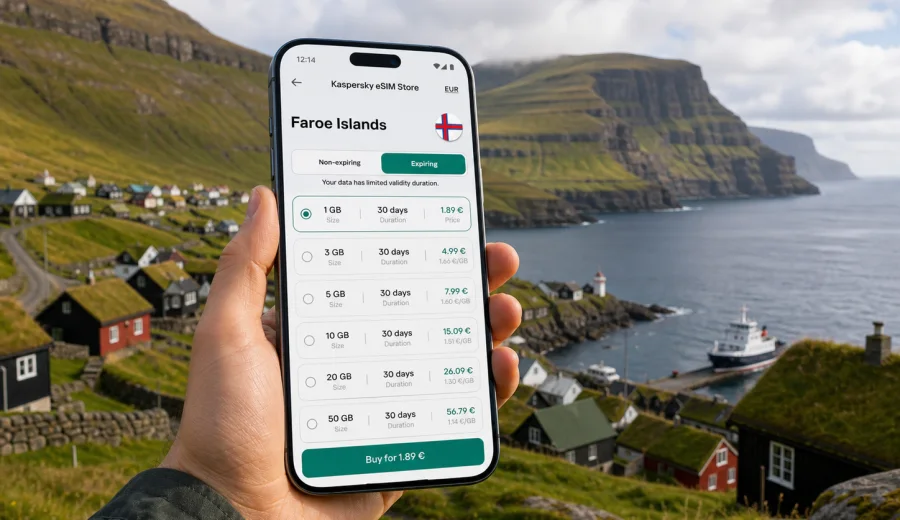
eSIM for the Faroe Islands: mobile connection and internet for your trip
The Faroe Islands are a compact destination, but they are not a place where you want to improvise your mobile internet after landing. A trip can move quickly from Vágar Airport to Tórshavn, from a hotel check-in to a ferry schedule, or from a scenic road to a small village. An eSIM can make that first online moment easier because you do not need to search for a physical SIM card before you can use mobile data.
For travelers, eSIM is mainly about control. You choose a suitable data plan for the destination, install a digital SIM profile on a compatible phone, and use mobile internet through that profile during the trip. It is especially practical in the Faroe Islands, where routes often depend on tunnels, ferries, changing weather, and short decision windows. A stable preparation routine matters more than having a long list of apps.
Kaspersky eSIM Store is an app and website where you can quickly choose, arrange, and activate an eSIM with a suitable data plan for mobile internet in an international trip. It helps you compare destination, traffic allowance, validity period, and cost. The eSIM itself is for mobile data, so ordinary phone calls and SMS are not included unless the selected plan says otherwise.
Why eSIM is useful in the Faroe Islands
The Faroe Islands reward flexible travel. You may drive between islands, check ferry times, follow road tunnel information, message a guesthouse, or adjust plans because the weather changes. Mobile internet is useful not only for sightseeing, but also for the small operational tasks that keep the trip smooth.
With eSIM, you can prepare the connection before departure and avoid depending only on public Wi-Fi at the airport, hotel, café, or ferry terminal. That does not mean you should expect coverage in every remote spot or treat mobile data as a substitute for planning. It means you start the trip with a clear option for getting online when local network conditions allow it.
Typical travel tasks where mobile data helps:
- opening maps and saved routes after arrival;
- checking ferry and bus information while moving between islands;
- using messengers for accommodation, tours, and family updates;
- managing bookings, boarding passes, and payment confirmations;
- checking weather before hikes, viewpoints, or boat trips;
- using translation, restaurant search, and taxi or rental car details;
- sharing a hotspot with a laptop when your plan and device settings allow tethering.
The islands are small on a map, but the travel pattern is not always simple. Weather, tunnels, ferry crossings, and limited service hours can change the timeline, so choose mobile internet for your real itinerary, not only for the number of days away.
What to consider before choosing a data plan
Start with the way you will travel. A weekend in Tórshavn with occasional maps and messages needs less data than a longer road trip with navigation, photo backups, video calls, and remote work. If you plan to upload many photos or use cloud storage, remember that these tasks can consume much more traffic than messaging or maps.
Use this planning table as a starting point:
| Travel style | Likely mobile data needs | What to check before buying |
|---|---|---|
| Short city break | Low to moderate | Validity period, enough data for maps and messages |
| Road trip across islands | Moderate | Route coverage expectations, navigation, ferry updates |
| Hiking-focused trip | Moderate | Offline maps, weather checks, battery use |
| Remote work or frequent calls | Higher | Data allowance, hotspot rules, video call habits |
| Family travel | Higher | Multiple devices, shared hotspot, top-up options |
Traffic use depends on your apps and settings. Offline maps, downloaded playlists, lower video quality, and disabled photo backups can reduce consumption. The best eSIM plan is the one that fits your trip length, habits, and comfort margin.
Before you choose a plan, check four details:
1. The plan is valid for the Faroe Islands or for a region that includes your route.
2. The data allowance fits how you use navigation, messaging, calls, and media.
3. The validity period covers arrival day, travel days, and the return journey if needed.
4. Your phone supports eSIM and is not locked to a mobile operator.
Mobile connection in real travel scenarios
A good mobile internet setup should support the moments when Wi-Fi is not available or is inconvenient. In the Faroe Islands, those moments can arrive at the beginning of the trip and repeat during short transfers between places.
| Scenario | Why mobile data helps | Practical note |
|---|---|---|
| Arrival at Vágar Airport | Maps, rental car details, hotel messages | Install the eSIM before you need it |
| Driving to Tórshavn or villages | Navigation, searches, route changes | Keep offline maps as backup |
| Ferries and island-hopping | Schedules, delays, accommodation updates | Check data before leaving larger towns |
| Hikes and viewpoints | Weather checks and quick messages | Do not treat mobile signal as a safety plan |
| Work or longer stays | Video calls, files, hotspot use | Choose a larger data margin |
These scenarios have different data patterns. Navigation and messaging are usually moderate, while video calls, cloud backups, and hotspot use can consume traffic quickly. For remote areas, plan for both mobile data and offline access.
How to prepare your phone before the trip
The most important step happens before payment: check whether your device can use eSIM. Many recent iPhone, Samsung Galaxy, Google Pixel, and other flagship models support eSIM, but support depends on the exact model, region, and operator lock status. If the phone was bought through a carrier, it may have restrictions.
Before selecting a plan, check your device and confirm that it supports eSIM. Also make sure you know which SIM profile will handle calls and which profile will handle mobile data. Many travelers keep their usual physical SIM or primary eSIM active for receiving messages, then use the travel eSIM for data.
Preparation checklist:
- update your phone system before departure if an update is already planned;
- save the QR code or installation details in a place you can access;
- confirm that your device is not locked to one operator;
- download offline maps for the Faroe Islands;
- disable automatic cloud backups on mobile data if you want to save traffic;
- pack a power bank for long driving or hiking days.
Some eSIM profiles can be installed before the trip and activated when you arrive, while exact validity rules depend on the selected plan. Read the conditions before installation so you know when the validity period or data use starts.
Choosing an eSIM plan for the Faroe Islands
Once you know your itinerary and data needs, you can choose a plan with less guesswork. In Kaspersky eSIM Store, select the destination, compare available data plans, review the traffic allowance and validity period, and arrange the option that fits your trip.
For a dedicated trip to the islands, you can choose an eSIM plan for the Faroe Islands after you have checked your device and estimated your data needs. This is the main planning step: match the destination, amount of data, and validity period with your real route, not with a generic travel average.
When comparing plans, avoid choosing only by price. A plan that is too small can be inconvenient for navigation, ferry checks, or work calls, while a plan that is too large may be unnecessary if you mainly use maps and messages.
Questions to ask before confirming:
- How many days will I need mobile data?
- Will I use video calls or mostly text messages?
- Do I need hotspot for a laptop or another traveler?
- Can I reduce data use with offline maps and downloaded media?
- Do I need a plan only for the Faroe Islands or for a wider route?
- What happens if I use the data earlier than expected?
How to install and activate eSIM
The exact steps depend on your phone and the selected plan. In general, you choose a plan, complete the order, receive installation details, add the eSIM profile to your phone, and select it for mobile data when you are ready to use it.
For detailed setup, use the official guides for your device type: Android installation instructions or iOS installation instructions. Keep Wi-Fi available during installation because the phone may need to download and register the eSIM profile.
Basic installation flow:
1. Check that your phone supports eSIM and is not operator-locked.
2. Choose a suitable data plan for the Faroe Islands.
3. Open the eSIM installation details in your account, app, or email.
4. Add the eSIM profile using the QR code or manual details.
5. Name the profile clearly, for example Travel Data.
6. Set the travel eSIM as the mobile data line when you want to use it.
7. Enable data roaming for the eSIM if the instructions or plan conditions require it.
8. Test mobile data after arrival where local network conditions allow it.
Do not delete the eSIM profile casually after installation. In many cases, a used or activated eSIM profile cannot simply be moved to another phone or reinstalled after deletion.
Practical data-saving tips for the Faroe Islands
The easiest way to control mobile internet use is to prepare heavy content before the trip. Download maps, music, documents, boarding passes, and travel notes while you are still on Wi-Fi. Then use mobile data for live updates and communication rather than large background transfers.
Good habits for keeping data under control:
- download offline maps for Tórshavn, Vágar, Streymoy, Eysturoy, and your planned routes;
- turn off automatic video playback in social apps;
- set cloud photo backup to Wi-Fi only;
- check app data usage in your phone settings every evening;
- use hotel Wi-Fi for large uploads, system updates, and streaming.
eSIM, roaming, and local SIM: what is different?
Travelers usually compare three options: standard roaming from their home operator, a local physical SIM card, or a travel eSIM. Each can make sense, but they solve the problem differently.
| Option | Main advantage | Possible limitation |
|---|---|---|
| Home roaming | Uses your existing number and account | Conditions and costs depend on your operator |
| Local physical SIM | Familiar format, sometimes useful for longer stays | Requires finding, buying, and inserting a SIM card |
| Travel eSIM | No physical card, can be prepared before arrival | Requires an eSIM-compatible, unlocked device |
eSIM is often attractive because it reduces the number of practical steps after arrival. You do not need to replace your SIM card, keep a tiny plastic card safe, or spend the first hour searching for a shop. At the same time, eSIM is not magic: it still depends on device compatibility, the selected plan, and local network conditions.
If you need a local phone number for calls or SMS, read the plan details carefully. Many travel eSIM data plans are intended for mobile internet only.
Common mistakes to avoid
The most common eSIM problems usually come from skipped checks or unclear expectations.
Avoid these mistakes:
- buying before checking device compatibility;
- assuming the eSIM includes voice calls and SMS;
- installing the profile on the wrong phone;
- deleting the eSIM profile when troubleshooting;
- forgetting to select the eSIM line for mobile data;
- leaving cloud backup or app updates active on mobile data;
- choosing a validity period that ends before the return journey;
- expecting mobile signal in every remote place.
A few minutes of preparation can prevent most of these issues. Check the phone, read the plan details, and keep the installation instructions accessible during the first day.
FAQ about eSIM in the Faroe Islands
Can I install eSIM before I fly to the Faroe Islands?
In many cases, you can install the eSIM profile before departure and activate or use it when appropriate. The exact timing depends on the selected plan, so read when the validity period starts.
Does eSIM give me a Faroese phone number?
Usually, travel eSIM data plans are for mobile internet. Voice calls and SMS are not included unless the plan conditions specifically say so. You can use messengers and internet calling apps over mobile data.
Should I use roaming data for the eSIM?
Some eSIM plans require data roaming to be enabled on the travel eSIM line. Follow the setup instructions for your selected plan, and make sure roaming is enabled only for the line you intend to use.
What if I run out of data?
Options depend on the selected plan and account settings. Check whether top-up or another plan is available before you need it, especially if you are traveling outside larger towns.
Final preparation before you go
Before the trip, make one short connectivity plan. Confirm that your phone supports eSIM, choose the right data allowance, install the profile with a reliable Wi-Fi connection, and save offline maps for your route. Decide which SIM line will handle mobile data and which one will receive your usual calls or messages.
The Faroe Islands are a destination where small details matter: ferry timing, weather windows, road changes, and accommodation messages can all affect the day. With eSIM prepared in advance, your phone is ready for the practical side of travel without needing a physical SIM card search after arrival.
To finish your preparation, select an eSIM plan for your Faroe Islands trip in Kaspersky eSIM Store, review the data allowance and validity period, and install the eSIM on a compatible device before you need mobile internet on the road.