Travel connectivity guide
Farwaniya eSIM: Mobile Internet in Kuwait
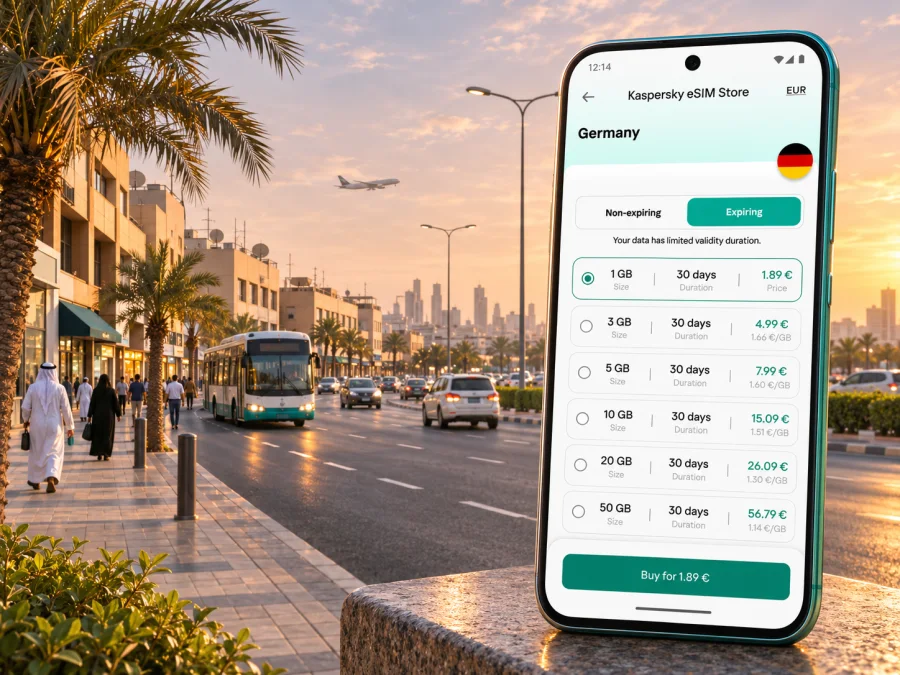
Farwaniya eSIM: mobile connection and internet for your trip
Farwaniya is a useful base for a Kuwait trip that begins or ends at Kuwait International Airport, and mobile data can make the first transfer, hotel check-in, and everyday errands easier to coordinate. An eSIM lets you add a digital data profile without replacing the physical SIM in your phone. In Kaspersky eSIM Store, you can review a Kuwait destination plan, its data allowance and validity, then choose and activate an eSIM for your trip.
One location detail matters when you plan: Al-Farwaniya is both the name of a residential area and of a governorate in Kuwait’s administrative geography. The airport’s official site lists public transport connections from the airport to Farwaniya and other nearby districts. This guide uses “Farwaniya” for the urban area and its immediate travel context; the exact boundary and the service area of an eSIM plan are not the same thing. A Kuwait plan is country-level, so check its terms rather than expecting a Farwaniya-only product.
Why mobile data helps in Farwaniya
The practical value of an eSIM here is less about a sightseeing checklist and more about moving through a connected urban area with fewer setup steps. You may need a map for a hotel entrance, a ride or bus detail, a message from a host, a restaurant’s location, or a change in your onward plan. Having mobile data available can help with these tasks while you are away from your home network.
Farwaniya also sits in an airport-facing travel corridor. Kuwait International Airport’s published transport information lists bus routes that call at Farwaniya, Al-Omariya, Al-Rabiya and nearby places, as well as routes that connect the airport with Jleeb Al-Shuyoukh, Khaitan and other districts. Route details, operating times and fares can change; check the latest airport and transport information before relying on a particular service. For a taxi or pre-arranged pickup, mobile access is useful for sharing your location and confirming the meeting point.
A working data connection can be handy for:
- opening maps and checking a route before leaving your accommodation;
- contacting a driver, hotel reception, colleague or travel companion;
- looking up current transport information and saving a route for later;
- receiving booking updates and using messaging or voice calls in apps;
- checking work messages or joining a call when your accommodation’s Wi-Fi is unavailable;
- translating a short sign or menu, while keeping an offline copy of key addresses as a backup.
An eSIM is not a substitute for planning. Keep the hotel name and address in a note, know which airport terminal you are using, and save an offline map if you expect to travel through areas where you may not have a data signal. Maps and live services use data, battery and location permissions, so a small power bank can also be useful on a long arrival day.
Arriving at Kuwait International Airport
Before departure, save your accommodation’s address in a format you can show to a driver, and agree on a pickup point if someone is meeting you. At the airport, use the terminal map and the current arrival information rather than assuming that every flight uses the same building or exit. The airport publishes maps for its terminals and separate information on taxis, buses, car services and airport limousine options.
If you expect to take a bus toward Farwaniya, confirm the route and stop against the latest timetable or airport information. The official airport transport page currently names routes 99 and 501 among the services linking the airport with Farwaniya and surrounding areas. This is a routing reference, not a promise about frequency, service hours or a stop beside your exact destination. Recheck the current details on the day you travel, then use a map to match the stop to your address.
If you will take a taxi or a ride arranged in advance, an eSIM can help you receive driver messages and share a pin. Check that your phone has the right data line selected before you leave the terminal. If you keep your home SIM active for calls or verification messages, make the travel eSIM the mobile-data line and review your home operator’s roaming settings so that background data does not create unexpected charges.
A simple arrival checklist
- Keep the eSIM installation details available offline or in your email.
- Confirm the accommodation address and the name of the district.
- Check the airport terminal and meeting point for your specific flight.
- Verify the latest bus, taxi or pickup details before choosing a route.
- Turn on the travel eSIM’s mobile data only when you are ready to use it, following the plan’s activation terms.
- Keep enough battery for navigation and messages after landing.
Choosing a plan for Farwaniya and Kuwait
The right plan depends on your itinerary, how long you will stay, and what you do on your phone. A visitor who mainly checks maps and messages may use less data than someone who uploads video, joins frequent calls or shares a connection with another device. Do not estimate only from the number of travel days: consider your ordinary daily habits and whether your accommodation and workplace provide reliable Wi-Fi.
Kaspersky eSIM Store is an app and website for choosing, arranging and activating an eSIM plan for mobile data on an international trip. It is not a mobile network operator. The actual service is subject to the selected plan’s country coverage, local network arrangements, compatibility requirements and terms. Review the plan details in the store before purchase, including its allowance, validity, activation rules and whether tethering is supported. A Kuwait destination plan is not an area-specific guarantee for every building or street in Farwaniya.
For a short visit, compare the total data allowance with your expected use and the period of validity. For a longer stay or a trip that continues beyond Farwaniya, check that the plan remains suitable for your full route across Kuwait. If you cross a border during the same trip, a country plan for Kuwait may not cover the next country; look at the plan’s destination list or choose another suitable option for the next leg.
| Your travel pattern | What to consider before choosing |
|---|---|
| Airport transfer and a short stay | Enough data for maps, messages and booking updates; confirm when the plan starts and how long it remains valid. |
| Several days in Farwaniya | Estimate daily use, including photos, navigation and app calls; leave room for unexpected changes. |
| Work trip | Check whether the allowance suits email, document access and video calls; use trusted Wi-Fi for large downloads where practical. |
| Kuwait road trip | Confirm that the country coverage and validity match every stop on your itinerary. |
| Data sharing with a laptop | Check the selected plan’s tethering terms and your device’s hotspot support before relying on it. |
You can review the available eSIM options for a trip to Kuwait and compare the current plan terms. The page is for Kuwait as a destination; it should not be read as a promise of a particular local operator, coverage level, speed or city-specific tariff. Availability and plan details may change, so use the information shown at the time you choose.
Installing and activating your eSIM
Install the profile while you have a stable internet connection, preferably before travel if the plan instructions allow it. Keep the QR code or in-app installation details accessible on a second screen or printed copy if you will need to scan them with the phone being configured. Some plans start their validity or data use at a particular point, so read the activation wording before installation and avoid guessing when the clock begins.
Before you start, confirm that your device supports eSIM and is not locked to a carrier in a way that prevents another profile from working. Regional versions of the same phone family can differ. Check whether your device supports eSIM and confirm the exact model variant in your device settings or with the seller if you are unsure.
A typical setup sequence is:
- Connect to Wi-Fi or another working internet connection.
- Open your phone’s cellular or mobile-network settings and choose the option to add an eSIM.
- Scan the QR code or follow the installation flow shown in your Kaspersky eSIM Store profile.
- Label the new profile clearly, for example “Kuwait travel data.”
- Choose which line handles mobile data. Keep your usual number for calls or messages if you need it, and check your home operator’s roaming conditions.
- When you are ready to use the travel plan, enable the eSIM and select it for mobile data. Follow the plan instructions about data roaming; some eSIM profiles require that setting to be enabled.
- If service does not start, wait briefly, check the selected data line and network settings, then follow the plan’s troubleshooting instructions or contact support.
For device-specific steps, use the Android eSIM installation guide or the iOS eSIM installation guide. Menu names can vary by operating-system version and manufacturer. Do not delete a profile to troubleshoot unless the plan instructions or support team tell you to; some eSIM profiles cannot simply be installed again after removal.
Using mobile data around Farwaniya
When you move between your accommodation, the airport and nearby districts, plan with the destination address rather than relying only on a place name. A name such as “Farwaniya” may refer to the governorate or the residential area, and map results can show locations with similar names. Confirm the building, block, street or a nearby landmark with your host or driver, then share the exact pin if needed.
Kuwait’s urban areas are organized into named districts and blocks, so a complete address can be more useful than a broad neighborhood label. Save both the written address and a map pin. If you are meeting someone at a large site, agree on a specific entrance or recognizable point; “near the airport” or “in Farwaniya” may not be precise enough for a driver to find you quickly.
Public transport can be useful for some airport-to-area trips, while a taxi or arranged ride may be more direct when you have luggage, arrive late, or need to reach a specific building. The best option depends on your arrival time, exact destination and current service. Check the latest transport details and allow time for traffic; do not plan a tight connection around a route description that you have not confirmed.
For a day based in Farwaniya, a practical phone setup is simple: keep maps and messages available, save your next destination before you leave, and use Wi-Fi for data-heavy tasks when appropriate. If you are working remotely, test the video-call setup at your accommodation and keep a second way to contact colleagues in case of a temporary interruption. An eSIM supports mobile-data tasks, but it does not automatically guarantee indoor reception or a stable connection in every location.
Common connection issues and sensible checks
A newly installed eSIM may need a moment to register on a local network. If you see no data service, check the basics before changing or deleting anything:
- Is the eSIM profile installed and switched on?
- Is it selected as the line for mobile data?
- Is the plan valid for Kuwait and active according to its stated terms?
- Does the device have a usable signal at your current location?
- Do the plan instructions require data roaming for that eSIM profile?
- Is your phone unlocked and the exact regional model compatible?
- Have you restarted the device or briefly toggled airplane mode as a basic refresh?
If those checks do not help, use the plan’s support route and provide the device model, operating-system version, location and the steps you already tried. Avoid sharing passwords or one-time verification codes. A support specialist can help interpret installation or account issues, while network availability itself depends on the local network and the selected plan.
eSIM, local SIM and home-network roaming
These options solve slightly different needs. A travel eSIM is convenient when you want to set up mobile data digitally and keep your physical SIM in place. A local SIM may suit someone staying longer, needing a local number or comparing local voice and data options. Roaming on your home SIM can be easiest to use, but the charge depends on the home operator’s current terms.
| Option | Useful when | Check before relying on it |
|---|---|---|
| Travel eSIM | You want a digital data profile for a defined destination and trip period. | Device compatibility, plan coverage, allowance, validity, activation and data-roaming instructions. |
| Home SIM roaming | You need to keep your usual number active and your operator has a suitable roaming arrangement. | Current roaming prices, included data and whether background usage is billed. |
| Local SIM | You need a local number, local voice service or a longer-term arrangement. | Purchase requirements, registration rules, device compatibility and current operator terms. |
You can keep your regular SIM installed while using a travel eSIM for data, but make sure your phone’s default lines are set intentionally. Settings differ between devices; review which line handles mobile data, calls and messages, and whether automatic data switching is on. This prevents an unnoticed switch back to a roaming home SIM.
Frequently asked questions
Is Farwaniya a city or a governorate?
Both uses appear in Kuwait’s geographic context. Al-Farwaniya is an administrative governorate, and Farwaniya is also used for a residential area within the country’s urban geography. For a trip, check the full address and distinguish the specific area from the broader governorate.
Does a Kuwait eSIM plan cover only Farwaniya?
No city-only coverage should be assumed. The destination page is for Kuwait, and the plan’s terms determine its country coverage and other conditions. Check the current plan details and remember that reception can vary by building and local network conditions.
Will an eSIM give me a Kuwait phone number?
Usually a travel data eSIM is for mobile internet and does not include a regular local phone number, calls or SMS. Check the specific plan description. You can continue using supported messaging and calling apps over data, subject to their account and internet requirements.
Can I keep my home SIM active?
Often you can keep it installed, but the exact dual-SIM behavior depends on your phone. Select the travel eSIM for mobile data and review roaming settings for your home SIM to avoid unexpected charges. You may keep the home line available for calls or verification if your operator’s conditions permit it.
Should I install the eSIM before arriving?
Installing before departure can reduce setup work after landing if the plan permits it and you have stable internet. Read when the plan activates and when its validity begins. If the plan’s instructions say to install or activate only at the destination, follow those directions.
What if my phone does not support eSIM?
You will need another compatible unlocked device or a different way to access mobile service, such as a physical SIM or your home operator’s roaming option. Confirm the exact device variant before purchase; model names alone may not show regional differences.
Can I use the eSIM for a call to a hotel or taxi?
A data-only eSIM does not normally provide ordinary cellular voice calls. You can use an internet calling or messaging app where the other person can receive it, or call through your regular mobile line under your home operator’s terms.
Does the eSIM work in every building in Farwaniya?
No coverage guarantee should be assumed for every address or indoor location. Service depends on the plan’s local network arrangements, signal conditions and device. Check the plan coverage information and have a backup for essential directions or contact details.
Before you travel: final checklist
- Confirm that the phone is eSIM-compatible, unlocked and the exact model version is supported.
- Compare the Kuwait plan’s data allowance, validity, activation terms and coverage information with your dates and itinerary.
- Install the eSIM using a stable connection and keep setup information accessible.
- Save your address, airport terminal, pickup details and an offline map.
- Choose the correct line for mobile data and review your home SIM’s roaming settings.
- Check current bus, taxi or pickup information for the arrival time and destination.
- Keep an eye on data use, battery level and the remaining validity during the trip.
Farwaniya travel is easier to organize when your address, transport plan and mobile-data settings are ready before you leave the airport. Kaspersky eSIM Store helps you choose, arrange and activate an eSIM for mobile data abroad; the selected plan’s terms determine where and how it can be used. When you are ready, compare current eSIM plans for Kuwait and choose the option that fits your route and expected data use.


