
Travel connectivity guide
Fes eSIM Guide for Mobile Internet
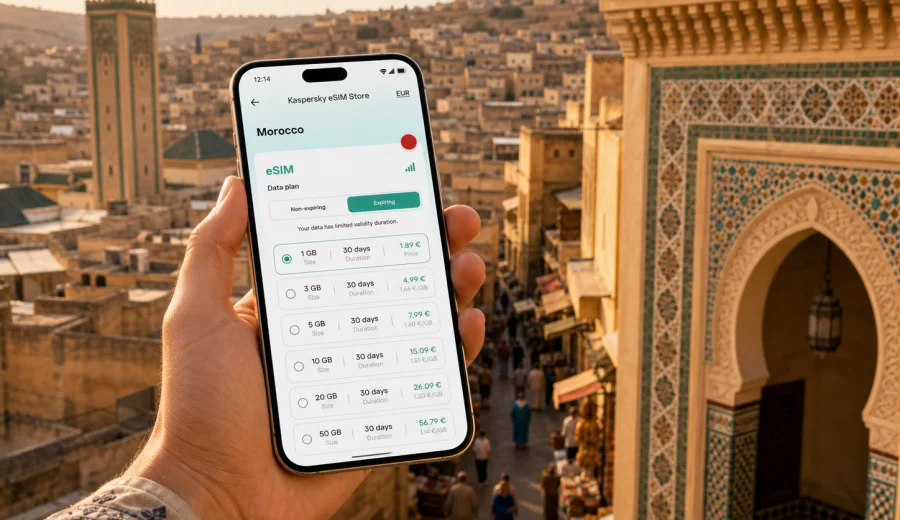
Fes eSIM guide: mobile connection and internet for your trip
Fes is one of Morocco's most rewarding cities, but it is also a place where mobile internet quickly becomes practical rather than optional. The medina is dense, street names can be inconsistent, riad entrances are often hidden behind small doors, and many useful routes involve short walks through lanes where a car cannot follow. An eSIM helps you keep maps, messages, bookings, ride apps, and translation tools available from the moment you arrive.
This guide focuses on using an eSIM in Fes: airport arrival, local transport, medina navigation, hotel check-in, business travel, short stopovers, and day trips from the city. Morocco is the country context, but the travel problem is local: how to stay online in Fes without spending the first part of the trip looking for a physical SIM card or relying on public Wi-Fi.
Why mobile internet matters in Fes
Fes is not difficult if you prepare, but it rewards travelers who can check details in real time. A route that looks simple on a map may include stairs, a covered passage, a market street, or a gate that is easier to identify by a nearby landmark than by an address. Mobile internet is useful for:
- finding your riad after dark or after a taxi drops you near the closest accessible gate;
- messaging the hotel or host before arrival, especially in the medina;
- checking train and intercity bus details for routes to Rabat, Casablanca, Marrakech, Chefchaouen, or Meknes;
- using translation when buying tickets, asking for directions, or confirming a pickup point;
- sharing your live location with a travel companion;
- checking restaurant reservations, museum hours, and walking times between districts;
- handling work email or video calls during a business trip.
Fes also has a different rhythm from cities built around wide avenues. In Fes el-Bali, the old medina, walking is the main way to move. In Ville Nouvelle, taxis and wider roads become more convenient. A data connection lets you switch between these modes without guessing.
Arrival scenarios: airport, train station, and road transfers
Many visitors reach Fes through Fes-Saiss Airport, by train from Casablanca, Rabat, Tangier, or Marrakech, or by private transfer from another Moroccan city. Each arrival point has a different connectivity need.
| Arrival point | What you usually need internet for | Practical eSIM use |
|---|---|---|
| Fes-Saiss Airport | Hotel messages, transfer confirmation, map check, ride coordination | Activate mobile data after landing and contact your driver or riad |
| Fes train station | Walking or taxi route, onward ticket checks, hotel location | Keep maps and booking apps ready before leaving the station |
| Intercity bus stop | Pickup point, timing updates, route to the medina | Send your location if the meeting point is unclear |
| Private transfer | Messaging the hotel, checking arrival time, family updates | Use data during the road journey without changing SIM cards |
If you are staying in a riad inside the medina, ask in advance which gate or square is best for arrival. Cars cannot enter many inner lanes, so the most useful destination may be Bab Boujloud, Batha, Rcif, or another nearby landmark rather than the property door. Having mobile internet makes this coordination much easier.
Fes districts and what they mean for connectivity
Fes is best understood as several travel zones. In Fes el-Bali, the old medina, mobile data is most useful for walking routes, offline map backups, translation, and messages from accommodation staff. In Fes el-Jdid, internet helps with taxi pickup points and movement between landmarks. In Ville Nouvelle, business travelers and hotel guests often rely on mobile data for email, cloud files, and navigation between appointments. For excursions to Meknes, Volubilis, Moulay Idriss Zerhoun, Sefrou, or Ifrane, a Morocco data plan is more practical than a setup that only helps inside the hotel.
Choosing how much data for a Fes trip
The right data amount depends on travel style. Fes is walkable, so many visitors use maps and messaging more than streaming. Business travelers, remote workers, and families usually need more.
| Trip type | Typical duration | Data use pattern | What to consider |
|---|---|---|---|
| Stopover in Fes | 1 day | Maps, taxi messages, hotel check-in | Small data allowance may be enough |
| City break | 2-4 days | Navigation, restaurant searches, photos, messaging | Choose enough data for daily maps and uploads |
| Morocco route with Fes | 5-10 days | Intercity travel, maps, bookings, calls via apps | Select a Morocco plan that covers the full route |
| Business visit | 2-5 days | Email, documents, calls, hotspot if supported | Check data volume, validity, and tethering conditions |
| Family trip | 4-7 days | Multiple devices, maps, video, messaging | Consider whether each traveler needs their own eSIM |
Video, cloud backups, and social media uploads can use far more data than navigation. If you take many photos in the medina, disable automatic cloud upload on mobile data unless you have chosen a larger package.
Before you travel: a quick connectivity checklist
Use this checklist before leaving for Morocco:
- Check whether your device supports eSIM and is not locked to a mobile operator.
- Make sure your phone software is up to date.
- Save your hotel address in English and, if available, Arabic or French.
- Download an offline map of Fes as a backup.
- Keep your booking confirmations available offline.
- Install the eSIM while you still have a stable connection, if your chosen activation flow allows it.
- Read the tariff conditions: destination, data volume, validity period, and whether hotspot use is included.
- Keep your primary SIM active only if you need calls or SMS from your home number.
An eSIM for travel usually provides mobile data. It may not include a regular local phone number, voice calls, or SMS unless those options are clearly stated in the selected tariff conditions. For calls and messages in Fes, many travelers use internet-based messaging apps.
Preparing an eSIM for Fes with Kaspersky eSIM Store
Kaspersky eSIM Store is an app and website where you can quickly choose, arrange, and activate an eSIM with a suitable data plan for mobile internet in an international trip. For Fes, you should choose Morocco as the destination because the city belongs to Morocco and the data plan needs to match the country you are visiting.
The practical flow is simple:
1. Confirm that your phone supports eSIM.
2. Choose Morocco as the destination.
3. Compare the available data volume and validity period.
4. Arrange the selected eSIM data plan.
5. Install the eSIM on your compatible device.
6. Activate mobile data for the eSIM according to the plan instructions.
If you want to prepare before arrival, you can choose a data plan for your trip to Fes in Morocco and keep the installation details ready before you leave. This is especially useful if your first stop is a riad inside the medina, a late arrival at Fes-Saiss Airport, or a direct transfer from another Moroccan city.
How to use mobile internet after landing in Fes
After landing or arriving by train, take a minute before leaving the terminal or station to confirm the basics:
1. Turn on the eSIM line for mobile data.
2. Check that data roaming is enabled for the eSIM if the installation instructions require it.
3. Open a map and confirm your hotel or meeting point.
4. Message your accommodation or driver if the arrival time has changed.
5. Keep your original SIM settings unchanged unless you need to avoid roaming charges from your home operator.
Do not wait until you are already in the medina to solve setup questions. It is easier to check settings in a calm place with space to stand, especially if you are carrying luggage.
Navigation inside the medina
Fes el-Bali is one of the world's great old urban centers, and it does not behave like a grid. A map can help, but it should be used with common sense. Some alleys are covered, some are too narrow for vehicles, and GPS can be less precise between high walls.
Mobile internet helps you combine several signals:
- the map route;
- nearby landmarks, gates, mosques, fountains, or squares;
- messages from your riad or guide;
- recent reviews and photos of entrances;
- walking time estimates;
- saved pins for restaurants, shops, and museums.
A good approach is to save the nearest gate or square to your accommodation and treat it as your main orientation point. From there, use a combination of offline notes and live messaging. If you get turned around, step into a wider lane or square before checking your phone.
Transport in and around Fes
Fes travel often combines walking, petits taxis, trains, and private transfers. Mobile internet helps at the transition points.
Petit taxis are useful for Ville Nouvelle, the train station, and medina gates. You may need to show the destination on a map or confirm the closest car-accessible point. A riad address alone may not be enough.
Walking is essential in the medina. Keep your phone charged and avoid holding it loosely in crowded places. Use one earbud or short map checks instead of walking while staring at the screen.
Trains connect Fes with other Moroccan cities. Mobile data helps you check departure times, platform information, and hotel routes after arrival in the next city.
Private transfers and tours are common for Volubilis, Meknes, Chefchaouen, Ifrane, and Middle Atlas routes. Internet helps you confirm pickup time and share location if the meeting point changes.
Hotels, riads, and Wi-Fi expectations
Most hotels and many riads provide Wi-Fi, but mobile internet still matters. Wi-Fi quality can vary by room location, wall thickness, router placement, and evening demand. Use hotel Wi-Fi for heavier tasks such as photo backup, long calls, streaming, and software updates. Use eSIM mobile data for time-sensitive moments: finding the property on arrival, messaging reception from the street, checking a route before leaving, confirming a booking, using translation, or staying reachable when Wi-Fi drops.
Business trips to Fes
For business travelers, Fes may involve meetings in Ville Nouvelle, university areas, industrial zones, hotels, or government and cultural institutions. Connectivity needs are more predictable than in leisure travel, but the cost of being offline is higher.
Before the trip, prepare:
- offline copies of meeting addresses and contact names;
- a data plan with enough allowance for email and documents;
- backup authentication methods if your work accounts require SMS or app verification;
- a power bank for full meeting days;
- a headset for calls over internet apps;
- hotspot settings if your selected tariff allows tethering.
If you need to join video calls, test the connection before the meeting and prefer hotel or office Wi-Fi when available. Keep mobile data as a backup, not as the only option for long calls.
Day trips from Fes
Fes is a strong base for northern and central Morocco. Common trips include Meknes, Volubilis, Moulay Idriss Zerhoun, Ifrane, Sefrou, and sometimes Chefchaouen on a long day. For these routes, mobile internet is useful before departure and during the return.
| Day trip | Why data helps | Preparation tip |
|---|---|---|
| Meknes | Train times, station routes, restaurant searches | Save both Fes and Meknes stations |
| Volubilis | Driver coordination and weather checks | Confirm pickup point and return time |
| Ifrane or Sefrou | Road timing and return transport | Keep enough battery for the return journey |
If Fes is part of a longer Morocco itinerary, choose a plan based on the whole route, not just the first city. Validity period matters as much as data volume.
Installing and managing the eSIM
Install your eSIM only on the device you plan to use during the trip. After activation, transfer rules can be limited by the eSIM profile and tariff conditions. If you need setup guidance, follow the official Android eSIM installation instructions or iOS eSIM installation instructions.
After installation, give the eSIM a clear label such as "Morocco travel" or "Fes data". This helps avoid using the wrong line for mobile data. Before leaving home, also check which SIM is set for calls, messages, and mobile data. If your home operator charges for roaming, keep data roaming off for your primary SIM.
In Morocco, some eSIM profiles may require data roaming to be enabled for the eSIM line. That does not mean you should enable roaming for every line on your phone. Apply the setting only where the instructions tell you to.
Practical data-saving tips in Fes
Download offline maps, turn off automatic app updates on mobile data, pause cloud photo backup until hotel Wi-Fi is available, and use audio calls instead of video when possible. Save hotel, station, and airport locations as favorites. The goal is not to avoid using data; it is to spend it on arrival, navigation, messages, bookings, and urgent checks.
FAQ: eSIM, mobile connection, and internet in Fes
Is an eSIM useful if my hotel in Fes has Wi-Fi?
Yes. Hotel Wi-Fi helps indoors, but an eSIM is useful for arrival, walking routes, taxis, stations, day trips, and messages when you are away from the property.
Should I choose Fes or Morocco as the destination?
Choose Morocco. Fes is the city you are visiting, but the eSIM data plan should match the country destination shown in the store.
Can an eSIM replace my normal phone number?
Usually no. Travel eSIM plans are mainly for mobile data. Calls and SMS are included only if the selected tariff conditions say so.
When should I install the eSIM?
Install it before departure if you can do so with a stable connection. Activate data according to the instructions for your selected plan, so the validity period works for your trip.
Do I still need offline maps?
Yes. Offline maps are a useful backup in the medina, where narrow lanes and thick walls can make navigation less predictable.
Can I use the eSIM for trips from Fes to other Moroccan cities?
A Morocco data plan is designed for the country destination, so it is a practical choice for routes that include Fes and other Moroccan stops. Always check the conditions of the selected plan.
Final preparation for your Fes trip
Fes is easier to enjoy when your phone is ready before the first taxi ride, station transfer, or walk through the medina. Check your device, install the eSIM correctly, save the important pins, and choose a data allowance that fits your actual route. For a city like Fes, mobile internet is not only about browsing; it supports arrival, navigation, hotel coordination, translation, transport, and day trips.
Before you travel, prepare an eSIM data plan for Morocco through Kaspersky eSIM Store, then keep the setup details and your key Fes addresses available offline. That combination gives you a practical backup for the moments when Wi-Fi is not nearby and the next turn in the medina matters.