
Travel connectivity guide
Fethiye eSIM for mobile internet in Turkey
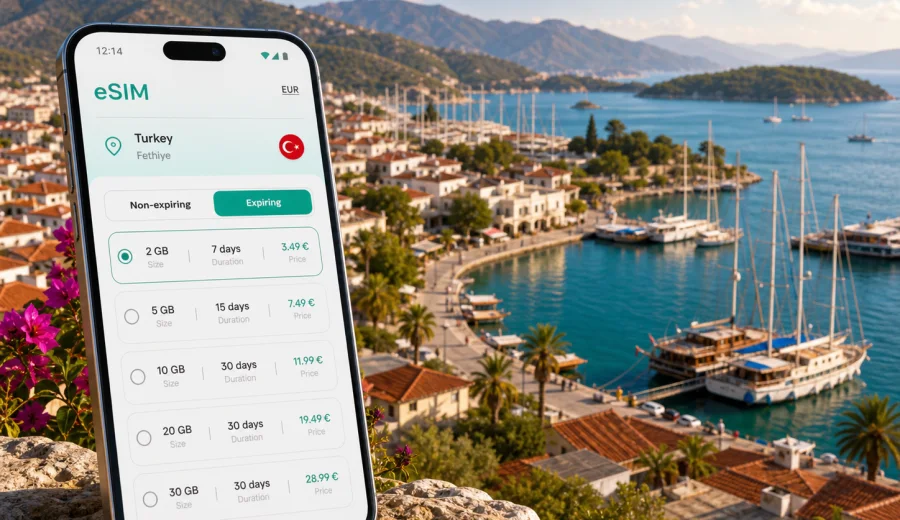
Fethiye eSIM: mobile connection and internet for your trip
Fethiye is a practical place to plan around mobile internet. The town sits between the marina, beaches, hillside hotels, boat-trip piers, minibus routes, and roads toward Oludeniz, Kayakoy, Gocek, and the Lycian coast. You may arrive through Dalaman Airport, take a transfer to your hotel, follow maps through the harbor area, check ferry or tour details, and message a driver before you even unpack. An eSIM can make those first hours easier because you can prepare mobile data without looking for a local SIM card shop after arrival.
This guide is focused on Fethiye, not Turkey in general. It explains where mobile data is useful in the city, how to estimate traffic needs, what to check before you buy, and how to use Kaspersky eSIM Store to choose and activate a suitable eSIM tariff for a trip to Turkey.
Why mobile data matters in Fethiye
Fethiye is spread out enough that a hotel address is not always the same as your daily route. A stay can include the marina, Calis Beach, the old town around Paspatur, hillside villas, boat tours from the harbor, day trips to Oludeniz, or a rental car route toward Saklikent Gorge. Public Wi-Fi may be available in hotels and cafes, but you often need data between those points.
Mobile internet is especially useful for:
- checking transfer pickup details after landing at Dalaman Airport;
- navigating from the bus station or marina to your accommodation;
- using ride-hailing, taxi messaging, or local transport maps;
- confirming boat-trip times, hotel check-in details, and restaurant reservations;
- sharing your live location with travel companions;
- translating menus, signs, and short messages;
- handling online banking or work messages without depending on public Wi-Fi.
An eSIM is not a magic travel tool and it does not replace every local service, but it can reduce the number of small connectivity problems that appear during a trip. Instead of waiting until you find a shop, you can install a digital SIM profile on a compatible phone and use a prepaid data tariff for the destination.
Arrival scenarios: Dalaman Airport to Fethiye
Many visitors reach Fethiye through Dalaman Airport, then continue by shuttle, private transfer, rental car, or taxi. The drive is long enough that you may want maps and messaging before you reach town. If your accommodation is in Calis, Karagozler, the marina area, Ovacik, Hisaronu, or near Oludeniz, your driver may need a specific pin rather than only a hotel name.
Here is where an eSIM can help during the arrival window:
| Moment | Why internet helps | Practical tip |
|---|---|---|
| After landing | You may need transfer messages, booking details, or maps | Install the eSIM before travel, then activate it when appropriate for your tariff |
| On the road | You can follow the route and share arrival time | Save your hotel address offline as a backup |
| At check-in | You may need passport details, booking emails, or payment confirmation | Keep key documents available offline too |
| First walk | You can find pharmacies, ATMs, supermarkets, and restaurants | Avoid depending only on public Wi-Fi in unfamiliar places |
If your plan includes a late arrival, mobile data becomes more important. Reception desks, transfer companies, and apartment hosts may communicate through messaging apps, and small delays are easier to manage when you can get online without searching for a network.
Local movement inside Fethiye
Fethiye is walkable in some central areas, but most trips involve several different zones. The marina and old town are close to each other. Calis Beach is a separate coastal area. Hillside stays can involve steep roads, short taxi rides, or minibuses. Oludeniz and Kayakoy are common day trips rather than simple city-center walks.
Mobile data helps you move between these areas with less guesswork:
- use maps for walking routes around the marina, Paspatur, and the fish market area;
- check minibus routes and approximate travel times toward Calis, Hisaronu, Ovacik, and Oludeniz;
- message your hotel or apartment host if road access is unclear;
- call or text through internet-based apps when a taxi pickup point is hard to describe;
- keep route options open if a beach, viewpoint, or boat tour plan changes.
For many travelers, the biggest benefit is not speed. It is continuity. You can step out of the hotel, open a map, check the next route, and continue without thinking about whether a cafe password is available.
How much data might you need in Fethiye?
Your data needs depend on your habits, not only on the length of the trip. Maps, messaging, email, ride coordination, and light browsing usually require modest traffic. Video calls, cloud photo backup, streaming, and hotspot use consume much more.
Use this simple planning table before choosing a tariff:
| Travel style | Typical online activity | Data planning approach |
|---|---|---|
| Weekend stop | Maps, transfers, messaging, restaurant searches | A smaller short-term data package may be enough |
| Beach holiday | Daily navigation, photos, bookings, social apps | Choose more traffic if you post or browse often |
| Boat trips and day tours | Maps, weather checks, meeting points, group messages | Keep data for the return route and unexpected changes |
| Remote work | Email, video calls, file access, hotspot use | Select a larger package and check hotel Wi-Fi quality |
| Family trip | Several devices, navigation, translation, entertainment | Consider who needs mobile data and avoid heavy streaming on mobile |
Try to separate essential use from optional use. Essential use includes maps, messages, booking access, and transport coordination. Optional use includes streaming video, large uploads, app updates, and cloud backups. Switching off automatic updates and delaying large uploads until trusted Wi-Fi can make a smaller package last longer.
Choosing an eSIM tariff for Fethiye
For a Fethiye trip, choose a tariff that matches Turkey as the destination unless your route clearly requires a regional or multi-country option. The key questions are straightforward:
1. How many days will you stay in Fethiye and nearby areas?
2. Will you visit only Fethiye, or also Antalya, Kas, Marmaris, Istanbul, or another country?
3. Will mobile data be a backup, your main connection, or a work connection?
4. Will you use hotspot mode for a laptop or another traveler?
5. Does your phone support eSIM and is it free from operator restrictions?
Kaspersky eSIM Store helps you choose, arrange, and activate an eSIM tariff for mobile internet in a foreign trip. It is an app and website for selecting a destination, checking tariff conditions, and installing the eSIM on a compatible device. It should not be treated as a mobile operator or network owner; the practical task is to choose a suitable prepaid data option for the trip.
Before buying, check the tariff conditions carefully. Look at the data allowance, validity period, destination coverage, price, activation rules, and whether hotspot use is supported by the selected tariff. If ordinary voice calls or SMS are important, read the conditions as well: travel eSIM data tariffs often focus on mobile internet, while calls and messages can usually be handled through internet-based apps.
A practical Fethiye data checklist
Use this checklist a day or two before departure:
- confirm that your phone supports eSIM and is not locked to a single operator;
- update your phone operating system while still on home Wi-Fi;
- save your hotel address, transfer confirmation, and booking references offline;
- download offline map areas for Fethiye, Oludeniz, and any planned road trips;
- decide whether you need data only for your phone or also for a laptop or tablet;
- check when the chosen eSIM tariff validity starts;
- keep the installation email, QR code, or app access available during travel;
- leave your physical SIM active if you need bank messages or your usual number.
If you are ready to compare options, you can choose a mobile internet tariff for your trip to Fethiye before you travel. Place this step after your route and data estimate, not before it: the right choice depends on how you will actually move around the city and nearby coast.
Installing and activating your eSIM
Installation is usually easiest before you leave home, when you still have stable Wi-Fi and time to follow the steps calmly. Activation rules can differ by tariff, so read the on-screen instructions and the conditions for the selected option.
A simple installation flow looks like this:
1. Check eSIM support on your phone.
2. Choose Turkey as the destination and select a tariff that fits your trip.
3. Complete the purchase flow and open the eSIM details in the app, website profile, or email.
4. Install the eSIM by following the device instructions or scanning the QR code if one is provided.
5. Set the eSIM as the mobile data line when you are ready to use it.
6. Enable data roaming for the eSIM if the instructions or device settings require it.
7. Test mobile data after arrival and keep your primary number available if you need it for calls or SMS.
If you need device-specific help, use the installation guide for Android or the installation guide for iOS. Menu names can vary by phone model and operating system version, so follow the instructions shown on your own device as the final reference.
Before buying, also check your device for eSIM compatibility. This is important for Fethiye because a late arrival or boat-trip morning is a poor time to discover that the phone cannot install an eSIM profile.
Districts and trip types in Fethiye
Different parts of Fethiye create different connectivity needs. A traveler staying by the marina may rely on walking routes and restaurant searches. Someone in Calis may check beach transport, water taxi schedules, and sunset plans. A guest in Ovacik or Hisaronu may use maps for hillside roads, taxi pickup points, and routes to Oludeniz. A villa stay outside the center may need more careful navigation and host messaging.
Common Fethiye scenarios:
- Marina and old town: navigation, restaurant bookings, boat-trip coordination, evening taxi routes.
- Calis Beach: beach days, water taxi plans, sunset timings, supermarket and pharmacy searches.
- Oludeniz route: beach transfers, paragliding meeting points, weather checks, return transport.
- Kayakoy and hillside areas: offline maps plus live navigation for rural roads and parking points.
- Business or remote work: email, calendar, video calls, backup connectivity, and hotspot planning.
- Family travel: group chats, live locations, child entertainment controls, and shared itinerary access.
For city movement, save critical information offline even if you have an eSIM. Mobile networks, device settings, battery level, and local conditions can all affect access. Offline backups make the trip more resilient.
Fethiye, stopovers, and trips beyond the city
Fethiye is often part of a wider route. You may arrive from Istanbul, connect through Dalaman, drive toward Kas or Antalya, spend a few nights in Gocek, or continue to Marmaris. If your trip stays within Turkey, a Turkey-focused tariff may be the simplest fit. If your itinerary crosses borders or includes several countries, compare destination coverage carefully before choosing.
For road trips, mobile internet is useful for:
- live navigation between coastal towns;
- fuel stops, parking, and restaurant searches;
- weather checks before beach, boat, or mountain routes;
- communication with hotels across different towns;
- emergency location sharing if plans change.
Do not rely on mobile data for every safety-critical detail. Keep your hotel address, passport copy, insurance information, and key phone numbers accessible offline. Use mobile internet as a practical layer, not as the only place where your trip information exists.
Public Wi-Fi, roaming, and local SIM cards
Travelers usually compare three options: roaming from a home operator, a local physical SIM card, and an eSIM tariff for the destination. Each can make sense in a different situation.
| Option | Strength | Trade-off |
|---|---|---|
| Home roaming | Keeps your usual setup simple | Costs and data limits depend on your home plan |
| Local physical SIM | Can be useful for longer stays | Requires finding a shop and handling a physical card |
| Travel eSIM | Can be prepared before or soon after arrival | Requires a compatible device and careful tariff selection |
Public Wi-Fi can still be useful at your hotel or a trusted workplace, especially for large downloads. The limitation is availability between places. An eSIM can reduce dependence on public networks in the airport, cafes, or unfamiliar streets, but you should still use sensible security habits and avoid unnecessary sensitive activity on unknown networks.
Common mistakes to avoid
Several eSIM problems are preventable:
- buying before checking whether the phone supports eSIM;
- choosing a tariff with too little validity for the whole stay;
- using mobile data for large video uploads and then running out early;
- forgetting to switch mobile data to the eSIM profile after arrival;
- disabling the primary SIM when you still need banking SMS or calls;
- assuming that every data tariff includes calls and SMS;
- waiting until a late-night arrival to read installation instructions for the first time.
The best approach is calm and boring: check compatibility, choose the destination, read the tariff conditions, install while you have Wi-Fi, and keep offline copies of critical travel details.
FAQ
Can I use an eSIM immediately after arriving in Fethiye?
You can often prepare the eSIM before travel and use it after arrival, but activation timing depends on the selected tariff and device settings. Read the validity and activation details before you leave.
Is an eSIM enough for maps and messaging in Fethiye?
For many travelers, a suitable data tariff is enough for maps, messaging, booking access, and light browsing. Heavy video, hotspot use, and cloud backups require more data.
Will an eSIM give me a Turkish phone number?
Many travel eSIM data tariffs are designed for mobile internet and may not include a standard phone number, voice calls, or SMS. Check the selected tariff conditions before purchase.
Should I install the eSIM before I fly?
Installing before departure is usually more convenient because you can use home Wi-Fi and avoid pressure after landing. Activation and validity rules can differ, so follow the instructions for your tariff.
Can I use the same eSIM for Oludeniz and day trips from Fethiye?
If the tariff covers Turkey and your route remains within Turkey, it can be suitable for Fethiye, Oludeniz, Kayakoy, Gocek, and other domestic side trips. Always check the destination coverage in the tariff details.
Choose mobile internet for your Fethiye trip
Fethiye is easier to enjoy when maps, transfers, hotel messages, beach plans, and trip changes are available on your phone. Prepare the basics before you go: check device compatibility, estimate your data needs, save key details offline, and choose a tariff that matches Turkey and the length of your stay.
With Kaspersky eSIM Store, you can prepare an eSIM tariff for mobile internet in Turkey and install it on a compatible device before or during your trip. Review the tariff conditions, activate it according to the instructions, and use mobile data as a practical travel tool from your first hours in Fethiye.