Travel connectivity guide
Fianarantsoa eSIM: Mobile Internet & Travel Guide
Fianarantsoa eSIM: Mobile Connection and Internet for Your Visit
Fianarantsoa is a highland city where plans often involve more than one kind of journey. You may arrive along the RN7, settle into a hotel in the lower town, walk uphill to the historic Haute-Ville, and then continue toward the tea-growing hills, Ranomafana or the south. A mobile connection helps with the practical moments between those plans: confirming a pickup, checking a route, messaging your host, or finding your way back after an evening walk.
An eSIM can make mobile internet easier to prepare for a visit to Fianarantsoa without changing the physical SIM in your phone. Kaspersky eSIM Store is an app and website where you can choose, purchase and activate an eSIM with a suitable data plan for an international trip. The plan’s destination, data allowance, validity and other conditions depend on the option you select, so review them before purchase.
Why mobile internet is useful in Fianarantsoa
Fianarantsoa climbs over a series of hills rather than following a flat grid. A nearby destination may mean a steep walk, and a vehicle route can take a different way through town. Maps help with orientation; your host or driver can explain which lanes and stairs are practical.
Mobile data is especially useful for confirming a pickup, messaging accommodation when arrival plans change, checking a route, keeping booking details to hand and coordinating the next leg. Save key information offline too: a connection is a helpful aid, not a substitute for local directions or a backup plan.
Getting to Fianarantsoa and planning your arrival
Many visitors reach Fianarantsoa overland on the RN7, the main southbound route from Antananarivo. Road time can shift with stops, weather and road conditions, so treat estimates as flexible. If you have a transfer, confirm the meeting point and exchange contact details before departure. Save your lodging name, address and phone number offline as well as in your map app.
The railway station is another useful landmark, but service and timetables can change. Check current local information before planning a tight connection around the Fianarantsoa–Côte Est line. A map pin shows a location; it does not confirm a service is running.
A practical arrival checklist
- Save your accommodation address and contact details.
- Confirm whether your driver will meet you at the lodging, station or another point.
- Share a pin and a written description in case the pin is imprecise.
- Keep enough battery for messages and navigation.
- Send one clear update if your arrival time changes.
After arriving, ask your host which routes are simplest on foot and which are better by vehicle. In this hillside city, that can matter more than straight-line distance.
Understanding the city: lower town, newer centre and Haute-Ville
Fianarantsoa is often described in lower, middle and upper parts. Names and boundaries vary, but the useful point for a visitor is that the city is layered: the lower town is busy with transport and commerce, central streets serve everyday errands, and the historic Haute-Ville has older buildings, churches, narrow lanes and hillside views.
| Area | What a visitor may notice | Helpful habit |
|---|---|---|
| Lower town | Transport activity and shops | Confirm the pickup point and vehicle |
| Central streets | Services, markets and accommodation | Save the exact entrance or meeting place |
| Haute-Ville | Historic architecture, steps and views | Wear comfortable shoes and allow time uphill |
Explore the upper town at an unhurried pace. Stairs are part of many routes, and a short distance on a screen may involve a climb. Save your lodging pin before walking; for a return after dark or in poor weather, arrange transport with your host. Pause somewhere safe before checking directions, then compare the map with visible landmarks and local guidance.
Choosing an eSIM plan for time in Fianarantsoa
The right plan depends on how long you will be in Madagascar and how you use your phone. A one-night stop has different needs from a multi-day stay with work, excursions and frequent navigation. Maps and messages generally need less data than repeated photo uploads or video streaming. Check whether the plan allows an add-on or top-up before relying on one.
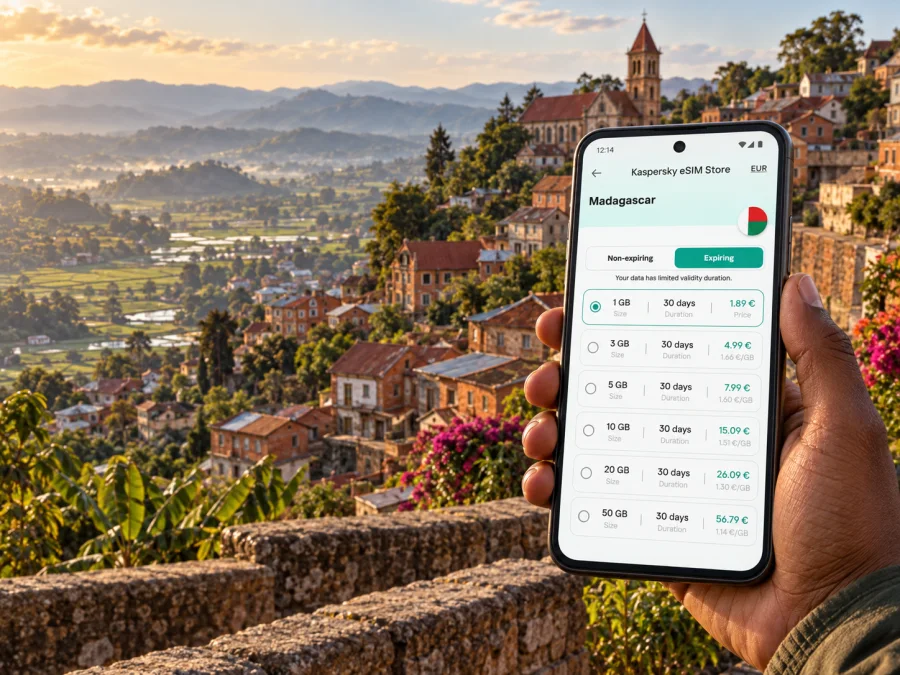
Compare the destination, data allowance, validity, price and activation conditions shown for each option. Check when validity begins and confirm the destination covers the rest of your route if you will leave Fianarantsoa. You can review eSIM data plan options for Madagascar while planning your stay.
| Travel pattern | What to consider |
|---|---|
| One-night RN7 stop | Directions, messages and booking details may be the main uses |
| Several days in town | Plan for repeated navigation and coordination for day trips |
| Work visit | Consider maps, email and messaging; save large uploads for a suitable connection |
| Longer itinerary | Confirm the destination and validity cover all travel days |
A data eSIM does not automatically include a local phone number, voice calls or SMS. Check the chosen plan’s terms. Internet-based calls and messages may use data; keep your usual SIM available if you need its number and your carrier’s conditions allow it.
Moving around: maps, drivers and day trips
For short distances within the city, walking can be a rewarding way to explore when the route, weather and terrain suit you. Hills and stairs can make a short map distance feel longer, so avoid scheduling consecutive walks as if the streets were level. Ask your accommodation which sections are comfortable on foot and where it is better to arrange a vehicle. A local driver can also help you understand how long a route takes at the time of day you plan to travel.
When getting into a car or taxi, confirm the destination before setting off. A useful routine is to say the place name, show the address or pin, and agree on the fare or payment arrangement in advance where relevant. Save the vehicle or driver details if you have arranged transport through your accommodation. Maps are useful for checking that the route is broadly headed in the right direction, but local road conditions and drop-off points are not always represented perfectly.
Fianarantsoa is also a base for trips into the surrounding highlands. Visitors may plan time around the tea-growing area near Sahambavy, the road south toward Ambalavao, or an excursion toward Ranomafana. These journeys involve separate transport decisions and should not be treated as quick urban rides. Ask a local provider about road conditions, departure times and realistic return plans. Download offline maps for the wider area before leaving town, and share the day’s outline with someone at your accommodation.
The Fianarantsoa–Côte Est railway is a distinctive part of the region’s travel story, with the line traditionally linking the highlands and the east coast. Its operation and timetable can vary. Confirm the latest local information, ticket arrangements and the actual destination served before committing to a connection or booking accommodation around a particular arrival time. Keep a flexible alternative in mind if your onward transport depends on it.
Before a trip out of town
- Confirm the departure point, start time and expected return with the driver, guide or transport provider.
- Save the accommodation’s contact details and your route offline.
- Take note of fuel, meal and rest arrangements for a longer road day.
- Carry water, suitable clothing and any personal essentials for changing highland conditions.
- Tell your host if you expect to return later than planned.
- Avoid making an important connection depend on an unverified timetable or a single map estimate.
The more remote the route, the less sensible it is to assume that mobile data will remain available at every point. Save key details in advance and ask your local contact what to expect along the route.
Set up your eSIM before you need directions
Installing an eSIM before a long road journey can make arrival planning more comfortable, provided your phone supports eSIM and is not restricted by a carrier lock. Use a stable internet connection during setup and follow the instructions for your device. If the plan requires an activation step, check the plan details so you know when its validity starts. Keep access to the QR code or installation information until setup is complete.
- Check that your phone supports eSIM and is eligible for use with another carrier. Check your device’s eSIM compatibility.
- Choose the Madagascar plan that matches your intended use and travel dates.
- Read the plan’s activation instructions and validity conditions before installation.
- Add the eSIM in your phone settings using the method shown for your purchase.
- Label the eSIM clearly, then select it for mobile data when you are ready to use it.
- Keep your primary SIM settings available if you still need your usual number for calls or messages.
For step-by-step help, follow the Android eSIM installation instructions or the iOS eSIM installation instructions. The labels in your phone settings can differ by device and operating-system version. Follow the on-screen steps and the directions supplied with the plan.
Before departure, test that you can open the eSIM settings and locate the installed profile. Avoid deleting an eSIM profile unless the plan instructions or support team tell you to do so; reinstalling may not be possible under every plan. When you reach Fianarantsoa, select the intended line for mobile data and check the phone’s status. Some devices or plans may require data roaming to be enabled for the travel eSIM; confirm this in the plan instructions. Your ordinary SIM may have separate roaming charges, so review its settings and carrier terms too.
Common questions
Is Fianarantsoa easy to explore on foot?
Parts of the city are enjoyable on foot, especially the historic upper town. Hills and steps make some routes more demanding than the map distance suggests. Ask locally about the route and use a vehicle for steep sections or luggage.
Should I rely on a map app for every journey?
Use it to orient yourself and save locations, then confirm important details with your host, driver or guide. An offline map and saved address help if data is unavailable. A map cannot confirm road conditions, service changes or an entrance’s status.
Can an eSIM be used for ordinary calls?
A data plan does not necessarily include a local number, standard voice calls or SMS. Check the plan terms. Internet-based calling apps may use data; your usual number remains on your primary SIM if it is active and your carrier allows it.
Is the Fianarantsoa–Côte Est train running?
Check locally for the latest operating status, timetable, ticket process and destination before planning a connection. Leave room for changes.
What if mobile data is unavailable outside the city?
Use your offline map and saved route details, and follow the arrangements made with your driver or host. Share important messages before departure and tell someone your route and expected return.
A simple connection plan for Fianarantsoa
The most useful preparation is modest: save the address of your lodging, settle how you will meet your driver, keep a map available offline and choose a data plan that suits the full Madagascar itinerary. In Fianarantsoa, allow extra time for the slopes between the lower streets and Haute-Ville, and verify transport details before depending on them for an onward connection.
Kaspersky eSIM Store can help you choose, purchase and activate an eSIM with a suitable data plan for an international trip. Review the destination, data allowance, validity and activation conditions, then choose a Madagascar eSIM plan for your trip before you set off. Keep local contacts and offline travel details close at hand so your plans remain usable even when you are away from a connection.


