
Travel connectivity guide
Fiji eSIM: mobile internet for travel
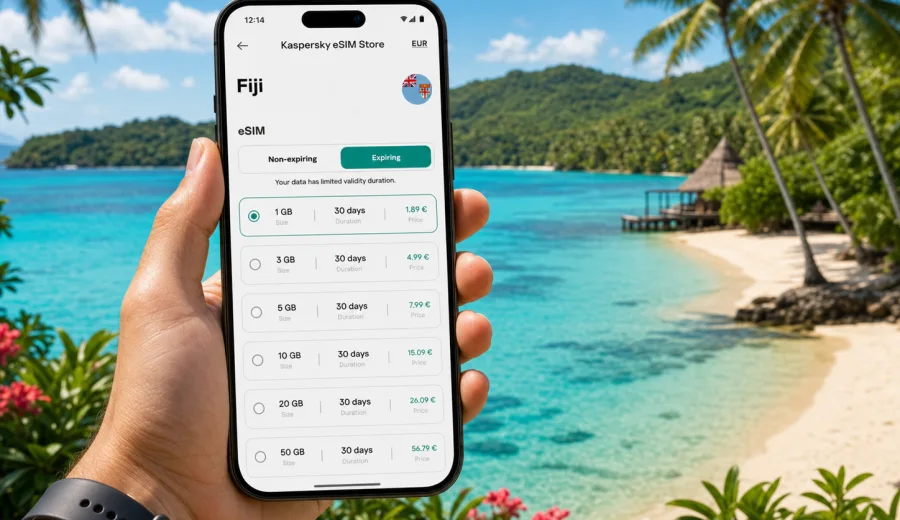
eSIM in Fiji: mobile connection and internet for your trip
Fiji is a trip where mobile internet becomes useful before you reach the beach. You may need maps after landing at Nadi International Airport, hotel messages in a transfer queue, weather updates before an island boat, and mobile check-in details when Wi-Fi is slow or busy. An eSIM helps you prepare that part of the journey without looking for a physical SIM card after arrival.
For most visitors, the practical goal is simple: keep mobile connection and internet available for travel tasks while avoiding unnecessary roaming surprises. A suitable eSIM plan gives you a data package for the trip, installed on a compatible phone or tablet. You can keep your regular SIM for calls or banking messages and use the eSIM line for data when you are in Fiji.
Kaspersky eSIM Store is an app and website where you can choose, arrange and activate an eSIM with a suitable data plan for international travel. It is not a mobile operator and does not own the local network. The value is in making the preparation easier: choose the destination, compare the plan size and validity period, install the eSIM, and manage the plan through the site or app.
Why an eSIM is useful for Fiji
Fiji travel often combines several connection scenarios in one itinerary. You might spend one night near Nadi, move to a resort island, take a day trip by boat, then fly or drive to another part of Viti Levu. Public Wi-Fi can help in hotels and cafes, but it is not always the best option for navigation, transport updates, banking confirmations or messaging while you are outside.
An eSIM is useful because it is digital. You do not need to remove your usual SIM card, cut a plastic card to size or keep track of a small tray pin during the trip. Once the eSIM is installed, you can switch the data line in your phone settings and use mobile internet according to the conditions of the selected plan.
Typical uses in Fiji include:
- opening maps from the airport to your hotel or marina;
- messaging a transfer driver or accommodation host;
- checking ferry, domestic flight or tour updates;
- using translation, banking and travel apps;
- sharing photos when hotel Wi-Fi is overloaded;
- calling through internet-based messengers when voice calls are not included;
- checking weather before reef, beach or island activities.
An eSIM plan is mainly about mobile data. It usually does not include a regular phone number, voice calls or SMS unless those features are clearly stated in the selected plan conditions. For many travellers, that is enough: messaging apps, maps, email, booking apps and cloud documents all work through mobile internet.
What to check before you buy
Before choosing an eSIM plan for Fiji, check three things: your device, your route and your expected data use. This avoids the two most common problems: buying a plan for a device that cannot use eSIM, or choosing too little data for a trip that depends heavily on maps, photos and messaging.
Device compatibility
Not every phone supports eSIM, and some phones are locked to a specific mobile operator. Before you pay for a plan, check your device and make sure it supports eSIM installation. If your phone is operator-locked, the eSIM may not activate correctly even if the model technically supports eSIM.
Also check whether your device can keep your primary SIM active while using an eSIM for data. Many modern phones can do this, but the exact menu names differ by brand and operating system. If you use two-factor authentication by SMS, keep your regular SIM available for those messages while the eSIM handles mobile internet.
Route and timing
Fiji is not one single travel pattern. A short resort stay near Nadi is different from a longer route through Suva, Coral Coast, Pacific Harbour, Taveuni or the Yasawa and Mamanuca islands. Coverage and speed depend on the local network, your location, weather, terrain, buildings and the selected plan. Treat any mobile plan as a practical travel tool, not as a guarantee that every beach, road or boat route will have the same signal.
Data habits
Your data need depends less on the country and more on behaviour. Maps, messaging and email are light. Video calls, cloud photo backup, streaming and hotspot use can consume data quickly. If you plan to use your phone as a hotspot for a laptop, choose a larger package and confirm that tethering is allowed by the plan conditions and your device settings.
| Traveller profile | Common tasks | Practical data approach |
|---|---|---|
| Short resort stay | Transfers, messaging, maps, restaurant searches | A small or medium package may be enough if hotel Wi-Fi is reliable |
| Island hopping | Boat updates, maps, tour messages, photo sharing | Choose more data and download key documents offline |
| Remote work | Email, documents, video calls, hotspot | Pick a larger plan and keep backup Wi-Fi options |
| Family trip | Multiple devices, maps, booking apps, photos | Estimate data per person and avoid relying on one phone only |
How much mobile data do you need in Fiji?
There is no universal amount that fits every trip. A cautious estimate is better than a guess based only on the number of days. Think about what you will do online each day and whether Wi-Fi will cover the heavier tasks.
For a light user, mobile data may mostly cover messaging, maps and bookings. A medium user may also upload photos, browse restaurants, use social media and make occasional internet calls. A heavy user may stream video, join work calls, use cloud storage or share a hotspot.
Use this quick planning checklist:
- Download offline maps for Nadi, Suva and your resort area before departure.
- Save hotel, ferry, flight and tour confirmations offline.
- Turn off automatic cloud photo and video backup on mobile data.
- Set app updates to Wi-Fi only.
- Check whether your plan validity starts at purchase, installation or first network connection.
- Keep the QR code or installation details somewhere accessible.
- Make sure your phone has an internet connection when installing the eSIM.
If you want to prepare before departure, Kaspersky eSIM Store lets you review available options and choose an eSIM plan for Fiji based on data volume, validity period and trip length. This is usually easier than comparing choices for the first time in an airport queue or after a long flight.
eSIM versus roaming and local SIM cards
Roaming, local physical SIM cards and eSIM plans can all be reasonable in different situations. The best choice depends on your operator, your device, your length of stay and how much control you want over spending.
| Option | Strengths | What to watch |
|---|---|---|
| Standard roaming | Uses your usual number and operator relationship | Costs and daily fees can be high depending on your home operator |
| Local physical SIM | Can be useful for longer stays or local calls | Requires a store visit, physical card handling and local setup |
| Travel eSIM | Can be prepared before or during the trip and keeps your main SIM in place | Requires eSIM-compatible, unlocked device and careful plan selection |
An eSIM can be a practical alternative when you mainly need mobile internet and do not want to depend on public Wi-Fi or a physical SIM card. It also makes sense if you want to see the data amount and validity period before you start using the plan. Still, compare it with your home roaming package if your operator offers a special Fiji travel bundle.
How to install and activate an eSIM for Fiji
The exact installation flow depends on your phone. In general, you choose a plan, complete the order, receive installation details, add the eSIM profile to your device and select it for mobile data. Do this while you have a stable internet connection, preferably before you leave home or while connected to reliable Wi-Fi.
For device-specific setup, use the Android installation guide or the iOS installation guide. The menu labels may vary by model and system version, but the core steps are similar: add the eSIM, name the line clearly, choose it for mobile data, and enable data roaming for the eSIM if the plan instructions require it.
A practical setup sequence:
1. Confirm your phone supports eSIM and is not operator-locked.
2. Choose Fiji as the destination and select a plan by data size and validity.
3. Install the eSIM using the QR code or manual details.
4. Keep your regular SIM as the default line for calls and SMS if needed.
5. Set the eSIM as the mobile data line when you are ready to use it.
6. Check whether data roaming must be enabled for the eSIM line.
7. Open a web page or map app to confirm that mobile data is working.
Do not delete the eSIM profile after installation unless you are sure you no longer need it. Many eSIM profiles cannot be moved to another device after activation, and reinstalling may not be possible depending on the plan terms.
Fiji travel scenarios where mobile internet matters
Arrival at Nadi International Airport
Nadi is the main arrival point for many international travellers. Mobile internet is useful for transfer messages, hotel contact, maps and ferry or domestic flight updates. If your eSIM is already installed, you can switch the data line after landing instead of comparing SIM options while tired.
Resort stays in Denarau, Coral Coast or the islands
Resorts often provide Wi-Fi, but quality can vary by room, beach area or time of day. Mobile data gives you another option for messaging, maps and quick searches when you leave for a market, marina or tour pickup point.
Suva and business travel
If your trip includes meetings in Suva, mobile internet helps with transport coordination, calendar updates, email, documents and messaging. For work trips, choose a data package that fits the workload, not only the number of travel days.
Island transfers and day trips
Boat routes, weather and pickup times are easier to manage when you can receive updates on the move. Signal can vary offshore or around remote islands, so download essential documents and maps in advance.
Settings that help control data use
Good eSIM preparation is not only about buying the plan. A few phone settings can make the data package last longer and reduce surprises.
- Turn on low data mode for the eSIM line if your device offers it.
- Disable automatic app updates on mobile data.
- Pause cloud photo backup until you are on Wi-Fi.
- Download playlists, maps and documents before travel.
- Check which apps are allowed to use mobile data in the background.
- Avoid long video calls unless your plan size supports them.
- Track data use in your phone settings and in the service interface when available.
Quick troubleshooting
If mobile data does not work immediately, do not delete the eSIM first. Work through basic checks in order.
| Issue | What to check first |
|---|---|
| No mobile data after landing | Confirm the eSIM is selected for mobile data and data roaming is enabled if required |
| eSIM cannot be added | Check compatibility, operator lock status and whether the QR code was already used |
| Slow connection | Move location, restart mobile data, check signal strength and avoid heavy apps |
| Apps still use the wrong SIM | Set the eSIM as the data line and keep your primary SIM for calls if needed |
| Data is running out quickly | Review background app use, hotspot activity and cloud backup settings |
If the issue continues, collect the details before contacting support: device model, operating system version, destination, installed eSIM status, error message if any, and whether the phone has detected a local network.
Frequently asked questions
Can I use an eSIM in Fiji before I arrive?
You can usually install the eSIM before travel if you have a stable internet connection and your device supports eSIM. Whether the plan starts at installation, purchase or first connection depends on the selected plan terms, so check the validity rules before activation.
Will an eSIM give me a local phone number in Fiji?
Most travel eSIM plans are data-focused and do not include a regular phone number, voice calls or SMS unless the plan clearly says otherwise. You can use internet-based calling and messaging apps over mobile data.
Can I keep my normal SIM card active?
On many compatible phones, yes. You can keep your regular SIM for calls and SMS and use the eSIM for mobile data. Check your device settings because dual SIM behaviour differs by model.
Does eSIM coverage stay the same everywhere in Fiji?
No mobile option can promise identical signal in every location. Coverage and speed depend on the local network, your exact location, terrain, buildings, weather and the selected plan. Download important documents and maps before remote routes or boat trips.
Choose your Fiji travel internet setup before departure
A good eSIM setup for Fiji is practical: a compatible unlocked device, a data package that matches your itinerary, installation completed on reliable Wi-Fi, and phone settings adjusted before you need mobile data. This gives you more control during transfers, resort stays, city visits and island routes.
Before your trip, review the available data options in Kaspersky eSIM Store and prepare an eSIM plan for your Fiji trip. Choose the plan by data volume and validity, install it on a compatible device, and keep your travel apps ready for the moments when Wi-Fi is not close by.