
Travel connectivity guide
Finland eSIM: mobile internet for travel
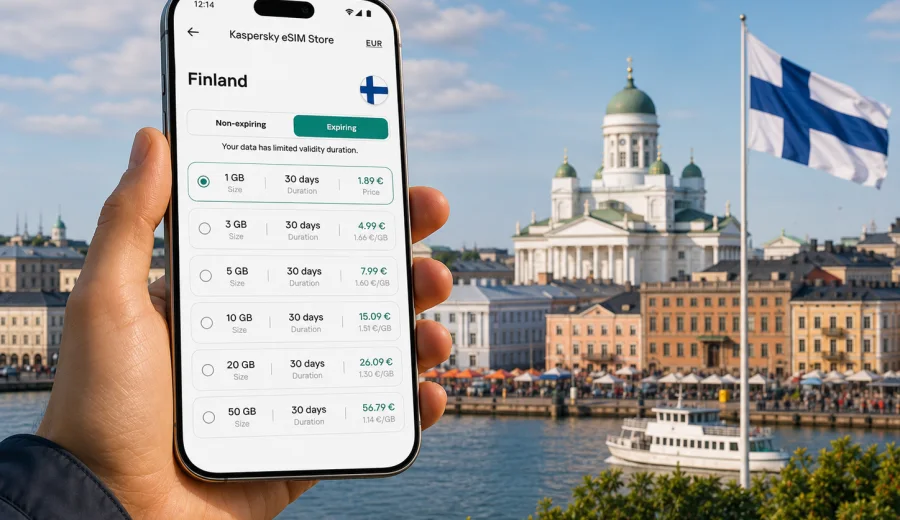
eSIM in Finland: mobile connection and internet for your trip
Finland is easy to navigate when your phone is ready from the first day. Trains, ferries, buses, contactless payments, hotel check-ins, maps, translation, weather alerts, and tickets often sit in one place: your smartphone. An eSIM helps you prepare mobile internet for Finland without looking for a physical SIM card after arrival or relying on public Wi-Fi for every step.
This guide explains how to think about eSIM for a trip to Finland, how much data you may need, what to check before purchase, and how to set up your phone for Helsinki, Lapland, the lake region, the west coast, and cross-border routes in Northern Europe.
Why mobile internet matters in Finland
Finland is a highly digital travel destination. That does not mean you should arrive unprepared. A visitor may need a stable data connection before reaching a hotel, before finding a ticket machine, or before understanding which train platform changed at the last minute.
Common online tasks during a Finland trip include:
- navigating from Helsinki Airport to the city center;
- checking local train, tram, metro, bus, and ferry routes;
- using maps in Helsinki, Tampere, Turku, Rovaniemi, Oulu, or smaller towns;
- receiving hotel, apartment, tour, and car rental messages;
- loading QR codes for attractions, events, and transport;
- checking weather changes before outdoor plans;
- using messaging apps for calls and family updates;
- sharing photos without waiting for hotel Wi-Fi.
Finland is also a country where travel routes can be spread out. A trip may combine Helsinki, a ferry to Suomenlinna, a train to Tampere, a lakeside cottage, or a winter journey to Lapland. For that kind of itinerary, mobile internet is not only a convenience. It is part of how you keep plans flexible.
What an eSIM does for a Finland trip
An eSIM is a digital SIM profile installed on a compatible phone or tablet. Instead of inserting a plastic SIM card, you add the eSIM profile to the device, choose it for mobile data, and use the data package under the conditions of the selected plan.
For travel in Finland, an eSIM is useful because you can prepare it before departure or shortly after arrival. You keep your regular SIM in the phone for your home number if your device supports dual SIM use, while the eSIM handles mobile data for the trip.
An eSIM plan for travel usually focuses on data. It normally does not include a local Finnish phone number, regular voice calls, or SMS unless the plan conditions say otherwise. For calls and messages, most travelers use internet-based apps over the data connection.
Quick planning table
| Trip style in Finland | Typical online needs | Practical data approach |
|---|---|---|
| Weekend in Helsinki | Maps, transport, restaurant search, messaging | A small data package may be enough if you also use hotel Wi-Fi |
| One week across several cities | Navigation, tickets, bookings, photo sharing, ride apps | Choose a package with room for daily use, not only emergencies |
| Winter trip to Lapland | Maps, weather, tours, transfers, messaging, photo uploads | Pick a plan with extra data because outdoor days create more phone use |
| Work plus travel | Video meetings, email, cloud files, hotspot use | Check whether tethering is allowed and choose more data |
| Family trip | Several devices, child entertainment, shared maps | Consider separate plans or a larger package if one device shares data |
The right amount of data depends on behavior more than geography. Navigation and messaging are light. Video, cloud backup, social media uploads, and hotspot use consume much more.
Before you buy: device and trip checks
Start with compatibility. Not every phone supports eSIM, and some devices are locked to one mobile operator. Before choosing a plan, check your device and confirm that it can add an eSIM profile.
Also check these details:
- your device is unlocked for use with another mobile data profile;
- your phone operating system is updated enough for eSIM setup;
- you have access to email or the app where installation details are delivered;
- you understand when the plan validity starts;
- your trip dates fit the plan duration;
- the data allowance matches your expected use;
- you know whether hotspot use is available for the selected plan;
- your primary SIM can stay active if you need your home number for banking or calls.
Do these checks while you still have a reliable home connection. It is easier to read instructions, confirm settings, and solve account issues before you are in an airport queue.
How much data do you need in Finland?
Use data planning as a travel checklist, not as a guess. A person who uses maps, messaging, tickets, and browsing may need far less than someone who uploads videos from snowy landscapes every day.
Here is a practical way to estimate:
| Activity | Data impact | Tip |
|---|---|---|
| Messaging without large media | Low | Keep automatic downloads off in group chats |
| Maps and route checks | Low to medium | Download offline map areas before long train or road days |
| Web search and booking pages | Medium | Fine for daily travel planning |
| Photo sharing | Medium to high | Upload in batches on trusted Wi-Fi if you want to save data |
| Video streaming | High | Use Wi-Fi or lower video quality |
| Video calls | High | Keep calls short on mobile data |
| Laptop hotspot | Very high | Use only when your plan and allowance make sense |
For a short city break, a smaller package can work if you avoid streaming. For a multi-city itinerary or winter travel, more data gives you margin. In Lapland, for example, you may check transport, weather, aurora apps, tour messages, and maps more often than expected.
Finland travel scenarios where eSIM helps
Arrival at Helsinki Airport. You may need route planning immediately: train to Helsinki Central Station, hotel directions, ride pickup details, or a message to your host. A prepared eSIM means you can switch on mobile data without searching for a store.
City days in Helsinki. Mobile internet helps with tram routes, museum tickets, ferry times to Suomenlinna, restaurant bookings, and translation. Public Wi-Fi can be useful, but you should not build the whole day around finding it.
Rail travel to Tampere, Turku, Oulu, or Rovaniemi. A data connection helps you monitor platform changes, delays, accommodation messages, and onward routes. It also makes it easier to keep tickets and maps accessible.
Outdoor and winter travel. In cold weather, batteries drain faster and plans can change because of daylight, snow, or transport timing. Keep a power bank and download key maps, but also have mobile data available for updated information.
Work during travel. If you need email, cloud files, or occasional hotspot use, choose your data amount carefully. A travel eSIM can support lighter work tasks, but video meetings and laptop updates may consume data quickly.
Choosing an eSIM plan for Finland
When you compare plans, look at conditions rather than only the headline data amount. A plan that matches your dates and usage is better than a larger package that expires too early or has conditions you did not check.
Focus on:
- Data allowance: enough for navigation, messages, bookings, and your media habits.
- Validity period: aligned with your arrival and departure dates.
- Destination: Finland only, regional Europe, or a broader route if your trip includes nearby countries.
- Activation timing: understand whether validity starts at installation or when the eSIM first connects.
- Hotspot support: important if you plan to share data with a laptop or another device.
- Top-up options: useful for longer trips or uncertain schedules.
- Device rules: some eSIM profiles cannot be moved after activation.
If your route includes Finland plus Sweden, Estonia, Germany, or another European stop, check whether a regional plan is more convenient than separate country plans. If Finland is the main destination, a country plan is often simpler to manage.
At the planning stage, you can use Kaspersky eSIM Store to choose an eSIM plan for Finland and compare the available data amount, duration, destination, and price before you travel.
Installation: a simple preparation flow
Install the eSIM while you have a stable internet connection. Many travelers do this at home, at the airport before boarding, or in hotel Wi-Fi after arrival. Read the exact plan instructions before activating mobile data, because timing can differ by plan.
Basic flow:
1. Check that your device supports eSIM and is not locked.
2. Choose Finland as the destination and select a suitable data package.
3. Complete the order and open the installation details.
4. Add the eSIM profile to your phone.
5. Label it clearly, for example "Finland data".
6. Keep your primary SIM active if you need your normal number.
7. Set the eSIM as the line for mobile data when you are ready to use it.
8. Turn on data roaming for the eSIM if the instructions require it.
9. Test the connection after arrival.
For step-by-step setup, use the Android installation guide or the iOS installation guide. Follow the instructions for your device and avoid deleting the eSIM profile unless you are sure the plan can be reinstalled.
Phone settings to check in Finland
After installation, your phone settings matter. A small setting can decide whether the eSIM uses data correctly or whether your home SIM starts roaming by accident.
Use this checklist:
- name the eSIM line clearly so you can identify it;
- set mobile data to the travel eSIM;
- keep voice and SMS on your main SIM if needed;
- turn off data roaming on your home SIM unless you intentionally use it;
- enable data roaming on the eSIM only if the plan instructions require it;
- disable automatic app updates on mobile data;
- pause cloud photo backup until Wi-Fi if you want to save data;
- download offline maps for the cities and regions you will visit;
- keep the QR code or installation details available until setup is complete.
If the eSIM does not connect immediately, wait a few minutes, restart the phone, check that mobile data points to the eSIM, and confirm the roaming setting required by the plan. Do not repeatedly delete and reinstall the profile.
eSIM, roaming, local SIM, and Wi-Fi: what to choose?
There is no single best option for every traveler. The right choice depends on how long you stay, whether you need a phone number, and how much control you want before arrival.
| Option | Strengths | Limits |
|---|---|---|
| Travel eSIM | Can be prepared before or during the trip, no physical SIM swap, clear data package | Requires compatible unlocked device, usually data only |
| Home roaming | Uses your existing SIM and number | Conditions and costs depend on your home operator |
| Local physical SIM | May include local services depending on the product | Requires finding a point of sale and changing SIM cards |
| Public Wi-Fi | Useful in hotels, airports, cafes, and some public spaces | Not always available when moving, may require extra caution |
Many visitors combine options. For example, keep the home SIM for calls or banking messages, use eSIM for everyday mobile data, and use trusted Wi-Fi for large uploads or video calls.
Practical data-saving tips
You can make a moderate data package last longer with a few settings:
- download offline maps for Helsinki, Tampere, Turku, Rovaniemi, or your road route;
- save hotel addresses and transport tickets offline;
- turn off automatic video playback in social apps;
- send photos in standard quality while on mobile data;
- update apps only on Wi-Fi;
- restrict background data for cloud storage and streaming apps;
- use messaging calls instead of video when signal or allowance is limited;
- check your remaining data before long travel days.
For Finland specifically, weather and transport checks are worth keeping on mobile data. They are usually light and useful. Save heavier tasks, such as full-resolution photo backup, for a trusted Wi-Fi connection.
Regional routes: when a Finland-only plan may not be enough
Finland is often part of a wider Nordic or Baltic itinerary. You might fly into Helsinki, take a ferry to Tallinn, continue to Stockholm, or cross into northern Sweden or Norway. In that case, a Finland-only plan may cover the main part of the trip but not every border crossing.
Before choosing, write down:
- countries where you will sleep overnight;
- airports or ferry ports used in transit;
- whether you need data during border crossings;
- total trip length;
- the device that will hold the eSIM;
- whether one plan or several plans will be easier to manage.
If Finland is only one stop, compare the destination coverage carefully. If Finland is the main country and other stops are short, a Finland plan plus trusted Wi-Fi or a separate plan for another country may be enough.
Security and reliability habits for travelers
Mobile data does not remove the need for basic digital hygiene. It helps you reduce dependence on unknown public Wi-Fi, but you should still manage accounts and devices carefully.
Good habits:
- lock your phone with biometrics or a strong passcode;
- keep travel documents backed up securely;
- avoid entering payment details on unknown Wi-Fi networks;
- use official apps or saved booking links where possible;
- keep your phone charged before long outdoor days;
- save emergency contacts offline;
- do not share your hotspot with unknown devices;
- monitor your data balance during the trip.
An eSIM is part of travel preparation, not a guarantee that every digital task will always work in every location. Coverage, speed, and availability depend on local network conditions, the selected plan, the device, and the area where you travel.
Common mistakes to avoid
Buying before checking compatibility. Always confirm eSIM support first, especially if your phone was purchased through a mobile operator.
Installing without reading activation timing. Some plans begin validity under specific conditions. Know the timing before you add or activate the profile.
Letting the home SIM use roaming data. Check mobile data settings after landing.
Using all data on backups. Cloud photo backup and app updates can consume a package quickly.
Deleting the eSIM profile too soon. Removal may prevent reuse or reinstallation depending on plan rules.
Choosing only by data amount. Duration, destination, and hotspot rules matter as much as gigabytes.
Short checklist before departure
Use this as a final review:
- Device supports eSIM.
- Device is unlocked.
- Finland travel dates are confirmed.
- Data package matches your itinerary and habits.
- Installation instructions are saved.
- Offline maps are downloaded.
- Home SIM roaming settings are understood.
- Important tickets and booking details are available offline.
- Power bank and charging cable are packed.
- Family or work contacts know how to reach you online.
If you complete these steps before the trip, mobile internet becomes one less thing to solve after arrival.
FAQ about eSIM and internet in Finland
Can I use an eSIM for regular calls and SMS in Finland?
Most travel eSIM plans focus on mobile data. They usually do not include a local phone number, voice calls, or SMS unless the selected plan says so. You can use internet-based calling and messaging apps over mobile data.
Should I install the eSIM before flying to Finland?
You can often install it before departure if you have stable internet and understand the activation timing. Some travelers install the profile early but switch mobile data to the eSIM after arrival.
Can I keep my usual SIM active?
On many dual SIM devices, yes. You can keep your normal SIM for calls or verification messages and use the eSIM for data, but you should check your phone settings carefully.
Is public Wi-Fi enough for a trip to Finland?
It can help in hotels, airports, and cafes, but it is less convenient while moving between transport, attractions, and accommodation. Mobile data gives more flexibility.
What if I run out of data?
Check whether top-up or another suitable plan is available for your account and destination. For heavy tasks, switch to trusted Wi-Fi when possible.
Does eSIM work on every phone?
No. You need a compatible, unlocked device. Check support before choosing a plan.
Prepare your Finland eSIM before you travel
Finland is a country where a prepared phone makes the trip smoother: airport transfers, city transport, ferries, winter weather, train routes, maps, and messages all become easier when mobile internet is ready. An eSIM lets you organize travel data without a physical SIM card and manage the connection from a compatible device.
Before you leave, review your route, estimate your data use, check device compatibility, and choose a plan that fits your dates. With Kaspersky eSIM Store, you can prepare an eSIM plan for your Finland trip in advance, then install and activate it according to the instructions for your device.