
Travel connectivity guide
Five Islands Village eSIM for Travel Internet
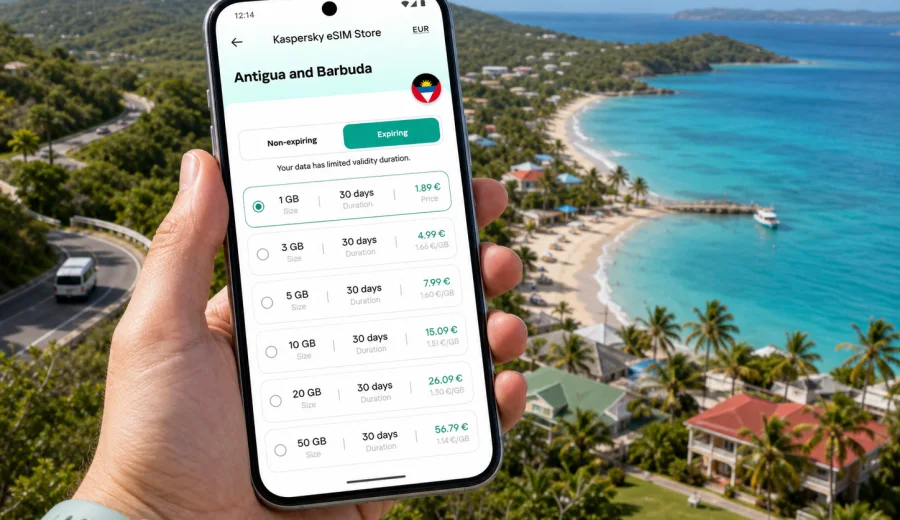
Five Islands Village eSIM: mobile connection and internet for your trip
Five Islands Village is a practical base for a trip to Antigua and Barbuda when you want the sea close by, St. John's within easy reach, and enough quiet space to plan each day without rushing. The village sits on Antigua's west side, near beaches, resort areas, boat trips, viewpoints, and roads that lead back toward the capital. That mix makes mobile internet especially useful: you may use maps to move between the airport, a hotel, a beach, a marina pickup point, a restaurant, and a day trip without always knowing where the next reliable Wi-Fi network will be.
An eSIM can make that first day simpler. Instead of looking for a local SIM shop after landing or depending on hotel Wi-Fi before you can check directions, you prepare a digital SIM profile on a compatible phone and use a prepaid data plan for your trip. Kaspersky eSIM Store is an app and website where you can choose, arrange, and activate an eSIM with a suitable mobile internet plan for travel abroad. It is not a mobile operator and does not own the local network, but it helps you prepare a data option before or during your stay.
This guide focuses on Five Islands Village as a city destination: arrival, local movement, beaches, hotels, short business stays, navigation, and trips from the village to other parts of Antigua. It also explains how to think about data volume, validity, device compatibility, and installation before you arrive.
Why mobile internet matters in Five Islands Village
Five Islands Village is not a dense city where every task happens on one walkable high street. A typical stay can involve several small movements each day: from a resort to a beach, from the village toward St. John's, from a restaurant back to your hotel after dark, or from the west coast to a tour departure point. Even if the distances are not long, the trip is easier when your phone can handle navigation, ride coordination, messaging, and reservations without waiting for Wi-Fi.
Mobile data is useful in Five Islands Village for:
- checking the route from V. C. Bird International Airport to the west coast;
- sending your arrival time to a hotel or villa host;
- using maps around Five Islands, Galley Bay, Deep Bay, Fort Barrington, and St. John's;
- confirming pickup times for boat trips, island tours, or restaurant transfers;
- keeping family or colleagues updated when plans change;
- checking opening hours and booking details while away from your hotel;
- using messenger calls if your eSIM plan includes data but not a regular phone number.
The main point is control. With an eSIM plan, you can prepare your mobile internet before you need it most: at arrival, during transfers, and while moving between nearby places.
Arrival: from the airport to Five Islands Village
Most international visitors arrive at V. C. Bird International Airport on the northeast side of Antigua. Five Islands Village is on the opposite side of the island, close to St. John's and the west coast. The drive is usually straightforward, but a first visit can still involve unfamiliar road layouts, local traffic, and a need to coordinate with a driver or accommodation desk.
If your phone is online when you land, the arrival sequence is calmer:
1. Turn off airplane mode after landing and let the phone register on a local network.
2. Check that the eSIM line is selected for mobile data.
3. Open your hotel address, villa pin, or saved map route.
4. Message your host or driver if baggage collection takes longer than expected.
5. Keep the address visible during the drive in case the driver asks for confirmation.
If you plan to activate the eSIM only after landing, make sure you already know where the activation details are stored. A screenshot of installation steps, a saved QR code, or access to your email can help if airport Wi-Fi is slow or busy. For many travelers, installing the eSIM before departure and activating data on arrival is the more convenient sequence, provided the plan terms allow it.
Local movement around the village
Five Islands Village is close to attractive beach areas, but visitors often move by taxi, rental car, organized transfer, or hotel transport rather than relying only on walking. Mobile internet helps because the day is rarely a single fixed route. You may start at breakfast, move to a beach, return for a call, go to St. John's, and then choose dinner based on the weather, traffic, or reservation availability.
The most useful mobile tools are simple:
| Travel moment | What mobile data helps with |
|---|---|
| Airport transfer | Route checks, driver messages, hotel address confirmation |
| Beach day | Weather checks, tide notes where relevant, messenger updates |
| Trip to St. John's | Maps, restaurant searches, opening hours, return route planning |
| Rental car day | Navigation, fuel stops, saved pins, emergency contact access |
| Hotel stay | App messages, booking updates, digital documents |
| Business call | Hotspot backup if hotel Wi-Fi is unstable, subject to plan and device settings |
Because the area is coastal and spread out, it is sensible to download offline maps as a backup before you travel. Offline maps are not a replacement for mobile data, but they reduce stress if signal conditions vary or you need to conserve data.
Choosing an eSIM data plan for Five Islands Village
The right eSIM plan depends less on the size of Five Islands Village and more on how you travel. A short resort break with occasional messaging needs a different data volume from a week of video calls, cloud photo backup, and driving around Antigua every day.
Use this practical planning method:
- For a two or three day stop: choose enough data for maps, messaging, booking apps, and light browsing.
- For a beach holiday of about a week: add extra data for photos, social apps, restaurant searches, and navigation outside the hotel.
- For remote work or business calls: check whether your plan allows tethering, then budget more data for video meetings and document sync.
- For family travel: remember that each traveler may need separate connectivity unless one phone is used as a hotspot.
- For road trips around Antigua: leave a margin for maps, route changes, and searching for services away from the hotel.
Before you buy, read the plan details carefully: country or regional coverage, data amount, validity period, activation conditions, price, and whether top-ups are available. An eSIM for travel usually provides mobile data. It may not include a regular local phone number, voice calls, or SMS unless the plan terms say so. For calls, many travelers use internet-based messengers over mobile data.
When to set up your eSIM
The best time to set up an eSIM is usually before you are under pressure. For Five Islands Village, that often means before the flight, not at the hotel desk after a long transfer. You can prepare the eSIM profile at home, keep your primary SIM for calls if needed, and switch mobile data to the travel eSIM when you arrive.
A simple timeline works well:
1. Several days before departure: check whether your phone supports eSIM and is not locked to one carrier.
2. One or two days before departure: choose a data plan for Antigua and Barbuda based on trip length and expected use.
3. Before the flight: install the eSIM profile while you still have stable Wi-Fi.
4. On arrival: select the eSIM line for mobile data and enable the settings required by your device and plan.
5. During the trip: monitor remaining data and validity so you do not run out before the return transfer.
If your travel plans include Five Islands Village plus other Caribbean destinations, check whether a country plan or a regional plan is more suitable. Do not assume that one plan covers every island or every stopover; always verify the destinations listed in the plan details.
A practical data checklist before you leave
Use this checklist before flying to Antigua and Barbuda:
- Your phone supports eSIM.
- Your phone is not carrier-locked.
- You can access the email or app where your eSIM details appear.
- You know whether the plan starts on installation or on first network connection.
- You have saved the hotel address in Five Islands Village.
- Offline maps are downloaded for Antigua as a backup.
- Your regular SIM roaming settings are under control, so you do not create unexpected charges.
- Important booking references are saved outside email as well as inside email.
- You know whether your data plan can be topped up.
If you have not checked device support yet, use the compatibility check before buying: Check your device. This is especially important if you use an older phone, a device bought through a carrier contract, or a phone model that has different eSIM support depending on market or region.
Using Kaspersky eSIM Store for a Five Islands Village trip
Kaspersky eSIM Store helps you choose and arrange an eSIM with a suitable data plan for travel. For Five Islands Village, the relevant destination is Antigua and Barbuda, because city trips use the country plan for the country where the city is located. After you review plan conditions, data volume, and validity, you can prepare an eSIM plan for Antigua and Barbuda before the trip or when you are already on the island.
Keep the product role clear: Kaspersky eSIM Store helps with selecting, arranging, installing, and activating an eSIM plan for mobile internet in travel. The quality and availability of mobile service depend on the local network, location, device, and selected plan. That is why it is worth reading the plan terms and keeping basic backups such as offline maps and saved addresses.
Installation steps in plain English
The exact installation flow depends on your device, but the basic logic is similar:
1. Choose the destination and plan.
2. Complete the order.
3. Open the eSIM installation details in your profile, app, or email.
4. Add the eSIM profile to your phone.
5. Name the eSIM line clearly, for example "Travel data".
6. On arrival, select it for mobile data.
7. Check whether data roaming must be enabled for that eSIM line.
8. Test a small page or map search before leaving the airport.
For device-specific setup, use the official Kaspersky eSIM Store guides: Android installation instructions and iOS installation instructions. Follow the steps for your operating system and keep your phone connected to stable Wi-Fi while installing the eSIM profile.
Do not delete the eSIM profile during your trip unless you are sure you no longer need it and understand the plan conditions. Some eSIM profiles cannot simply be moved to another phone after activation.
How much data to plan for common Five Islands Village scenarios
There is no single correct data amount, but you can estimate your needs by looking at behavior rather than by guessing. The table below is a practical guide, not a guarantee.
| Scenario in Five Islands Village | Typical data pattern | Planning note |
|---|---|---|
| Resort stay with light outings | Messaging, maps, restaurant searches | A modest plan may be enough if hotel Wi-Fi handles heavy use |
| Beach and sightseeing week | Maps, photos, social apps, bookings | Add a margin for navigation and media uploads |
| Business stopover | Email, calls, files, hotspot backup | Choose more data and check hotspot rules |
| Family trip | Several phones, shared plans, frequent messages | Separate plans can be easier to manage than one shared hotspot |
| Island exploration | Navigation, saved pins, searches on the road | Offline maps help conserve data but do not replace live search |
Video streaming, cloud photo backup, and long video calls can consume data quickly. If you want to keep a plan available for maps and messages, set large app updates and automatic backups to Wi-Fi only before you travel.
Hotels, resorts, and villa stays
Many visitors use Five Islands Village as a quiet base for a resort or villa stay. Accommodation Wi-Fi may be enough for work in your room, but mobile data is still useful outside the property: on the beach, during transfers, on a restaurant run, or while waiting for a pickup at a meeting point.
For hotel stays, mobile internet helps with:
- check-in messages when arrival time changes;
- map pins for reception, villa entrances, and beach access points;
- restaurant reservations and confirmation messages;
- two-factor authentication if you need to log in to work tools;
- contacting support or travel providers without asking for Wi-Fi passwords;
- using messenger calls when a regular voice line is not included.
If you are traveling for work, test your setup before the first important call. Check your laptop tethering settings, battery level, charger access, and data plan rules. A travel eSIM can be a useful backup, but it should not be your only preparation for a critical meeting.
Beach days and short trips from Five Islands Village
The west coast of Antigua makes Five Islands Village useful for relaxed beach days and short trips. You may plan time around Galley Bay, Deep Bay, Fort Barrington, St. John's, marinas, or viewpoints, then adjust the route as weather and energy change. Mobile internet is helpful because small decisions happen throughout the day.
For a beach day, keep this light routine:
- Save your return address before leaving the hotel.
- Take a power bank if you will use maps and photos for several hours.
- Keep mobile data on for messages, but pause heavy app backups.
- Save meeting points clearly if a taxi or tour pickup is involved.
- Use hotel Wi-Fi later for large uploads if you want to conserve data.
For trips into St. John's, live maps can help with route choices and walking directions. For drives around Antigua, mobile data helps when you decide to add a stop, look for fuel, or confirm a restaurant before you arrive. Still, keep offline information available because signal, battery, weather, and local conditions can affect any mobile setup.
eSIM, roaming, local SIM, and Wi-Fi: what changes for travelers
Each connectivity option has a place. The best choice depends on trip length, phone compatibility, budget, and how much you value preparation before arrival.
| Option | Useful when | Watch out for |
|---|---|---|
| Travel eSIM | You want mobile data ready without a physical SIM swap | Requires a compatible, unlocked device and correct setup |
| Standard roaming | You prefer using your home operator plan | Costs and included data vary widely by operator |
| Local physical SIM | You want a local in-person option | Requires shop time and may not suit late arrivals |
| Public or hotel Wi-Fi | You need large downloads at the property | Not available everywhere and may require logins |
For Five Islands Village, eSIM is attractive because many tasks happen while you are between fixed Wi-Fi points. You can keep your regular SIM in the phone, use the eSIM for travel data, and avoid handling a small plastic SIM card during the trip. Before relying on it, check compatibility and plan terms.
Troubleshooting if mobile data does not work
If your eSIM line is installed but data does not work after arrival, work through the basics calmly:
1. Confirm that the eSIM line is turned on.
2. Confirm that the eSIM is selected for mobile data.
3. Check whether data roaming must be enabled for that eSIM line.
4. Restart the phone if the network does not register.
5. Move outside or closer to an open area if you are inside thick walls.
6. Check that the plan is active and has remaining data.
7. Review the installation instructions for your device.
8. Contact support if the issue continues.
Avoid deleting the eSIM profile as a first troubleshooting step. Deletion can make recovery harder depending on the profile and plan conditions. It is usually better to check settings, restart, and review the official instructions first.
Short FAQ
Is an eSIM useful for Five Islands Village?
Yes, if you want mobile data for maps, messages, hotel coordination, beach days, and trips to St. John's or other parts of Antigua without relying only on Wi-Fi.
Does a travel eSIM usually include calls and SMS?
Many travel eSIM plans are data-only. If calls or SMS are important, check the specific plan terms before buying. Messenger calls can work over mobile data.
Can I install the eSIM before flying?
Often yes, and it can be convenient. Check whether your chosen plan starts on installation or on first connection, then follow the device instructions.
Will my phone work with eSIM?
It depends on the model, region, and carrier lock status. Check compatibility before purchase, especially on older or carrier-provided devices.
Can I use one eSIM for all Caribbean stops?
Only if the plan explicitly covers those destinations. If your route includes more than Antigua and Barbuda, compare country and regional plan details.
Final preparation before your trip
Five Islands Village is a destination where the practical value of mobile internet appears in small moments: finding your transfer, confirming a villa address, navigating to St. John's, checking a beach plan, or sending a quick message when a pickup point changes. Preparing an eSIM before the trip can reduce dependence on airport Wi-Fi, hotel networks, and last-minute SIM shopping.
Before you leave, check your device, choose a plan that matches your stay, install the eSIM while you have stable Wi-Fi, and keep the activation steps close at hand. If Antigua and Barbuda is your destination, you can choose a suitable eSIM plan for your Five Islands Village trip through Kaspersky eSIM Store and arrive with a clearer mobile internet plan.