
Travel connectivity guide
Flatts Village eSIM for Bermuda travel
Flatts Village eSIM: mobile connection and internet for your Bermuda trip
Flatts Village is one of Bermuda's most compact travel bases, but it asks a lot from your mobile connection. You may arrive through L.F. Wade International Airport, ride across the island toward Hamilton Parish, check a hotel message on the way, look up the next bus from North Shore Road, reserve a table near Harrington Sound, and send arrival updates before you have unpacked. For a small village, that is a full digital itinerary.
An eSIM can make this part of the trip easier. Instead of searching for a physical SIM card after landing, you can prepare mobile internet for Bermuda in advance, install the eSIM on a compatible phone, and use data for maps, bookings, messages, ride coordination, and travel updates when you need them. Kaspersky eSIM Store is an app and website where you can choose, set up, and activate an eSIM with a suitable data plan for international travel.
This guide focuses on Flatts Village rather than Bermuda in general. The island is small, but your connectivity needs change by moment: airport transfer, narrow roads, bus stops, waterfront walks, hotel check-ins, remote work calls, day trips to Hamilton or St. George's, and short stopovers where every minute online matters.
Why mobile internet matters in Flatts Village
Flatts Village sits around Flatt's Inlet, close to the Bermuda Aquarium, Museum and Zoo, Harrington Sound, and the roads that connect the eastern and central parts of the island. It is not a large city with endless transport hubs on every corner. That is exactly why dependable mobile data is useful: you often need to confirm one detail quickly before moving.
Common moments when eSIM data helps in Flatts Village:
- checking the route from the airport before your taxi or transfer leaves;
- confirming bus times on routes that pass through or near the village;
- using walking navigation around the inlet, bridges, waterfront paths, and nearby attractions;
- messaging a hotel, host, tour operator, or colleague without waiting for Wi-Fi;
- opening booking confirmations for restaurants, activities, and accommodation;
- sharing photos and trip updates from the village without using hotel Wi-Fi;
- checking weather before a boat trip, beach visit, or scooter ride;
- using maps when you continue toward Hamilton, St. George's, or other parts of Bermuda.
Flatts Village is also a place where travelers mix practical tasks with leisure. One person may be visiting the aquarium with family, another may be staying nearby for a quiet break, and another may be moving between meetings in Hamilton and the airport. A prepared eSIM helps keep those scenarios simple because the same mobile data setup can support navigation, messaging, and travel admin across the trip.
Arrival: from the airport to Flatts Village
Most international visitors reach Bermuda through L.F. Wade International Airport on the eastern side of the island. Flatts Village is not far by Bermuda standards, but you still need to coordinate the first part of the journey. After passport control and luggage collection, mobile internet can be useful before you leave the terminal.
Use data at arrival for:
- checking the address and map pin for your accommodation;
- messaging the hotel or host if your flight is delayed;
- confirming pickup instructions with a driver or transfer service;
- saving the route in case signal quality changes during the ride;
- reviewing local transport options if you are not using a private transfer.
The first hour is where pre-trip eSIM preparation often pays off. Airport Wi-Fi may be enough for a short message, but it is not ideal if you need continuous navigation, a transfer conversation, or access to several travel apps at the same time. With an installed eSIM, you can switch to the travel data profile when ready and avoid making connectivity your first task in Bermuda.
Local movement around the village
Flatts Village is small, but Bermuda's road layout can feel unusual to first-time visitors. Roads curve around water, hills, stone walls, residential lanes, and bridges. Distances may look short on a map, yet route choices matter, especially if you are walking, using buses, arranging taxis, or planning a stop near the inlet.
Mobile data is useful for:
| Situation in Flatts Village | What you may need online |
|---|---|
| Walking from accommodation to the waterfront | Turn-by-turn maps, opening hours, weather |
| Visiting the aquarium and nearby attractions | Tickets, schedule checks, family messages |
| Taking a bus toward Hamilton or St. George's | Route planning, stop locations, transfer timing |
| Coordinating a taxi or pickup | Live messaging and location sharing |
| Dining near the inlet | Reservations, menus, payment alerts |
| Continuing around Bermuda | Maps, ferry or bus planning, hotel updates |
Because Flatts Village is close to both scenic and practical routes, a phone often becomes the center of the trip. It shows where you are, where to meet, when to leave, and whether the plan still makes sense after rain, traffic, or a changed reservation.
Choosing an eSIM data plan for Flatts Village
For a Flatts Village trip, choose an eSIM data plan based on how you will actually use your phone in Bermuda. A short stopover is different from a week of remote work and family travel. The goal is not to guess the largest plan, but to match data volume and validity period to the way you move around the island.
Consider these questions before selecting a plan:
- How many days will you stay in or near Flatts Village?
- Will you use mobile maps every day, or only on arrival and departure?
- Do you need video calls for work?
- Will you upload photos and videos over mobile data?
- Are you also visiting Hamilton, St. George's, beaches, golf courses, or marinas?
- Will your hotel Wi-Fi cover most evening use?
- Are several people sharing travel planning on separate devices?
For light use, mobile data may mainly cover maps, messages, booking confirmations, and occasional browsing. For heavier use, plan for video calls, cloud documents, photo backup, hotspot use where allowed by the plan, and longer days away from hotel Wi-Fi. Always check the exact conditions shown for the selected tariff, including data amount, validity, destination, and any hotspot or activation details.
Device compatibility before you travel
Before you rely on eSIM for Bermuda, check two basics: your device must support eSIM, and it must not be locked in a way that prevents the travel eSIM profile from working. Many newer iPhone, Samsung Galaxy, Google Pixel, and other premium phones support eSIM, but model, region, and carrier restrictions can differ.
Use this quick check before purchase:
- Confirm that your phone supports eSIM.
- Make sure the device is not carrier-locked.
- Update the operating system before the trip if needed.
- Keep your primary SIM active if you need your regular number for calls or banking messages.
- Save your eSIM installation details somewhere you can access during travel.
- Check your device before choosing a tariff if you are unsure.
An eSIM data plan normally focuses on mobile internet. It does not automatically replace your regular phone number, voice calls, or SMS unless those features are specifically included in the chosen plan conditions. For calls and messages, many travelers use internet-based apps over mobile data.
How much data to prepare
Your Flatts Village data needs depend on behavior more than distance. Bermuda is compact, yet a traveler who uses maps, messaging, cloud storage, and video calls can use far more data than someone who checks directions twice a day.
Practical planning guide:
| Trip style | Typical mobile data use | What to watch |
|---|---|---|
| Short stopover | Maps, messages, transfer coordination | Validity period and quick activation |
| Weekend stay | Navigation, restaurants, photos, bookings | Enough data for days away from Wi-Fi |
| Family visit | Maps, messaging, attraction planning | Several devices may multiply usage |
| Business trip | Email, calls, documents, taxi coordination | Video meetings and hotspot rules |
| Island route | Navigation across Bermuda, weather, tickets | Coverage needs outside the village |
To keep data use predictable, download offline maps before departure, limit automatic photo backup on mobile data, update apps on Wi-Fi, and keep video streaming for hotel Wi-Fi when possible. This does not mean avoiding mobile internet. It means using the eSIM for the moments when mobility matters most.
When to set up eSIM for Bermuda
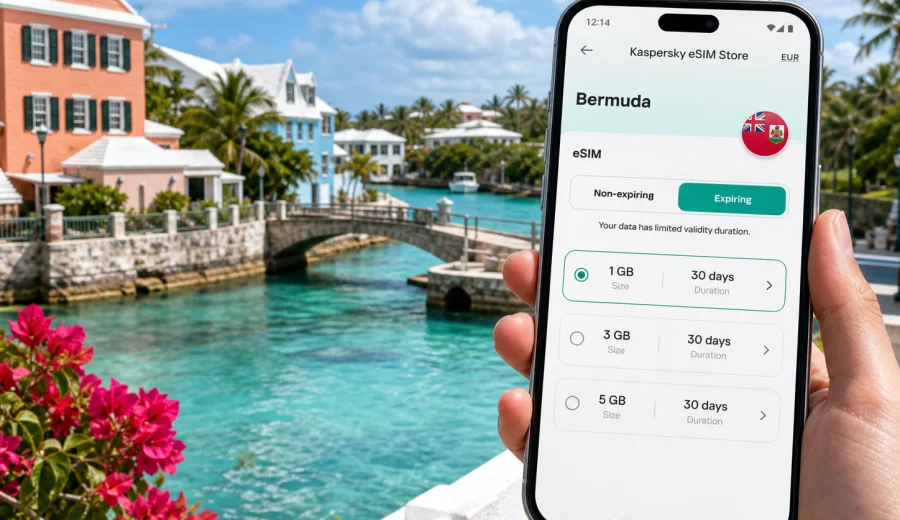
You can prepare most eSIM steps before departure, while you still have stable home Wi-Fi. That is often the smoothest option for a trip to Flatts Village because you arrive with fewer tasks. In Kaspersky eSIM Store, choose Bermuda as the destination, review available tariff conditions, and follow the installation steps for your device.
When you are ready to compare options, you can review eSIM data plans for Bermuda before your Flatts Village trip. Choose the plan based on your stay length, data needs, and wider Bermuda route, not only on the village name.
Installation steps are device-specific. If you need a walkthrough, use the Android eSIM installation guide or the iOS eSIM installation guide. Install the eSIM while you have a reliable internet connection, then activate and use it according to the instructions shown for the selected plan. Some devices may require data roaming to be enabled for the eSIM profile.
Flatts Village scenarios where eSIM is useful
A quiet waterfront stay
If your accommodation is in or near Flatts Village, you may rely on hotel Wi-Fi in the room but still need mobile internet outside. Morning walks, waterside photos, restaurant reservations, weather checks, and routes toward Hamilton Parish all become easier when your phone has data without a public Wi-Fi search.
A business trip with a quieter base
Flatts Village can work as a calmer base for travelers who also have meetings elsewhere on the island. Mobile data helps with email, taxi coordination, video call backup, document access, and calendar changes while moving between accommodation, Hamilton, and the airport. If you plan to use hotspot, check whether it is allowed by the selected plan and monitor data consumption carefully.
A stop between Hamilton and St. George's
Because Flatts Village sits along important island routes, it can be part of a day moving between Hamilton, St. George's, beaches, and attractions. In that case, eSIM data is less about the village alone and more about continuity. You can check a bus stop, message a pickup point, open a restaurant booking, and update your route without treating every location as a new connectivity problem.
What to check in the tariff details
Before paying for any travel eSIM plan, read the plan details carefully. The important points are straightforward, but they matter.
Check:
- destination: the plan should cover Bermuda or the relevant region;
- data volume: enough for your expected use;
- validity period: long enough for the full stay;
- activation rule: when the validity period starts;
- hotspot support: if you plan to share data with a laptop or another device;
- top-up options: if available for the selected plan;
- device compatibility: especially if your phone model differs by region.
The Kaspersky eSIM Store app and website help you choose and set up an eSIM data plan for travel. The mobile network experience itself depends on the selected plan, local network conditions, device support, and the settings on your phone.
Quick checklist for Flatts Village
Use this before you leave for Bermuda:
- Confirm your phone supports eSIM and is not carrier-locked.
- Choose a Bermuda data plan with enough validity for arrival and departure.
- Install the eSIM on Wi-Fi before travel when possible.
- Save the QR code or installation information in a secure place.
- Download offline maps for Bermuda as a backup.
- Turn off automatic app updates over mobile data.
- Keep hotel, transfer, and booking confirmations available offline.
- Pack a power bank for longer days around the island.
FAQ: eSIM and internet in Flatts Village
Is Flatts Village large enough to need an eSIM?
Yes, because the value is not only city size. You may need internet for airport transfer, maps, bus planning, messaging, accommodation details, restaurants, and day trips across Bermuda. A small village can still create many moments where mobile data is useful.
Should I buy a city plan or a country plan?
For a city article, the practical destination is still Bermuda. Flatts Village does not require a separate city-only plan. Choose a tariff that covers Bermuda and fits your stay, then use it in Flatts Village and during wider island travel according to the selected plan conditions.
Prepare your eSIM before visiting Flatts Village
Flatts Village is a calm place, but the travel day around it can be busy: airport arrival, transfer messages, narrow roads, waterfront walks, attraction visits, restaurant plans, and island routes. Preparing an eSIM before the trip gives you one less task to solve after landing.
In Kaspersky eSIM Store, you can choose Bermuda as your destination, compare available data amounts and validity periods, install the eSIM on a compatible device, and activate it according to the plan instructions. Before you travel to Flatts Village, choose an eSIM data plan for Bermuda and keep mobile internet ready for the parts of the trip where Wi-Fi is not enough.