
Travel connectivity guide
Foz do Iguacu eSIM for Mobile Internet
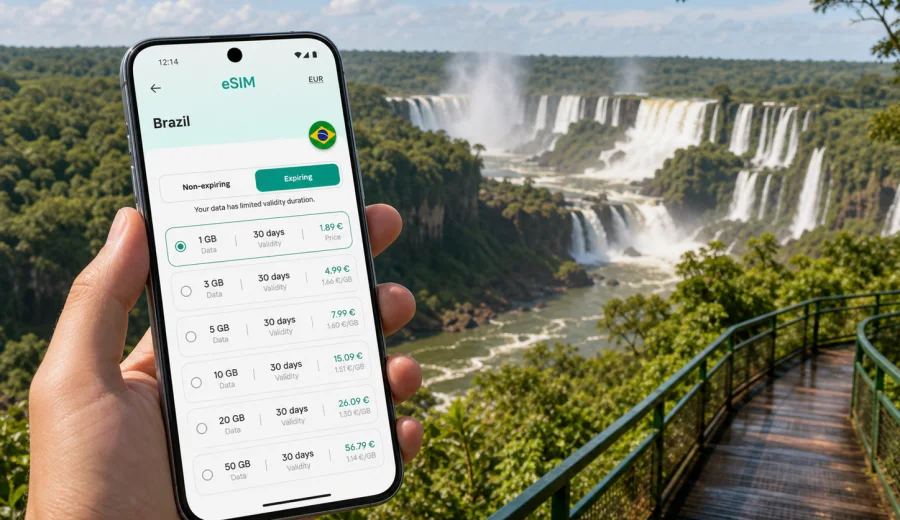
Foz do Iguacu eSIM: mobile connection and internet for a smooth Brazil trip
Foz do Iguacu is a city where mobile internet quickly becomes part of the travel plan. You may land at Foz do Iguacu International Airport, head straight to the falls, cross toward Argentina or Paraguay, call a ride from Avenida Brasil, or check a trail map before entering the national park. In each moment, prepared data is more practical than waiting for hotel Wi-Fi or looking for a local SIM card shop after a long flight.
An eSIM lets you prepare mobile internet before the trip, install a digital SIM profile on a compatible phone, and choose a data package for Brazil without handling a physical card. That matters in Foz do Iguacu because the main travel points are spread across the airport, downtown, the Brazilian side of Iguazu Falls, Cataratas Avenue hotels, the bus station, shopping areas, and border routes.
This guide explains how to plan mobile connection and internet use in Foz do Iguacu: when you will need data, what to check before travel, how to estimate usage, and how Kaspersky eSIM Store can help you choose and activate an eSIM tariff for a Brazil trip.
Why mobile internet matters in Foz do Iguacu
Foz do Iguacu is not only a sightseeing stop. It is a transport hub, a border city, a base for visiting one of the world's most famous waterfall systems, and a practical stop for business travelers moving between southern Brazil, Paraguay, and Argentina. The city works best when you can use maps, messaging, booking apps, translation, and transport information without depending on open Wi-Fi.
Typical situations where mobile data helps:
- confirming your hotel transfer after landing at IGU airport;
- checking the route from downtown to the Brazilian side of Iguazu Falls;
- sharing your location with a driver or travel companion;
- translating restaurant menus, signs, and service messages;
- managing tickets, vouchers, and QR codes on the way to attractions;
- checking opening hours and weather before a falls visit;
- using messaging apps if your regular roaming is expensive;
- staying connected during a short stopover or business day.
Arrival: what to do before leaving the airport
Many visitors arrive through Foz do Iguacu International Airport, officially Cataratas International Airport. The airport is close to the road toward Iguazu Falls, so some travelers go directly to the national park or to Avenida das Cataratas hotels. Others head downtown first. In both cases, mobile internet makes the first hour easier.
Before you leave the airport building, use mobile data or airport Wi-Fi to:
1. Confirm your hotel address and check-in time.
2. Save your route to the hotel, downtown, or the falls area.
3. Message your driver, tour operator, or host.
4. Download your booking confirmation and tickets.
5. Check whether your payment cards and travel apps are working as expected.
If you install an eSIM before departure, you can avoid a rushed setup after landing. If you prefer to activate it after arrival, keep the instructions available offline or open them while you still have Wi-Fi. An eSIM for travel data is not the same as a local phone number; if your tariff does not include calls or SMS, use internet-based apps.
Where visitors use data most in the city
Foz do Iguacu is easy to navigate, but the day can involve several separate zones. The table below shows where mobile internet is especially useful.
| Area or route | Why data helps | Practical tip |
|---|---|---|
| IGU airport | Transfers, ride apps, hotel messages, arrival coordination | Set up your eSIM before leaving the terminal if you did not activate it earlier. |
| Avenida das Cataratas | Hotels, resorts, restaurants, routes to attractions | Save your hotel location and a backup route. |
| Brazilian side of Iguazu Falls | Tickets, maps, weather, photo backup, messaging | Download key information before entering busy areas. |
| Downtown Foz do Iguacu | Restaurants, banks, pharmacies, local buses, shopping | Keep translation and map apps ready. |
| Bus terminal routes | Intercity trips, local buses, onward travel | Check platform details and departure times before moving. |
| Border day trips | Coordination, documents, maps, transport updates | Check whether your selected data package covers only Brazil or a broader region. |
How much data to plan for Foz do Iguacu
Your data needs depend on how you travel. Foz do Iguacu is not a city where most visitors need constant high-volume streaming, but maps, photos, messaging, ride apps, and video calls can add up. Estimate your usage before choosing a tariff.
| Trip style | Typical data use | What to prioritize |
|---|---|---|
| Short stopover, 1-2 days | Low to moderate | Maps, messaging, ticket access, airport transfer. |
| Falls-focused weekend | Moderate | Navigation, photo backup on Wi-Fi, messaging, weather checks. |
| Family trip, 3-5 days | Moderate to high | Several devices, transport apps, translation, shared logistics. |
| Business trip | Moderate to high | Email, video calls, files, hotspot use where allowed. |
| Cross-border itinerary | Variable | Coverage area, validity period, and regional options. |
For a light traveler, a smaller package may be enough if maps are saved offline and hotel Wi-Fi handles large uploads. For business travelers or families sharing many photos, choose more room. Compare data volume, validity, destination coverage, activation rules, and device support.
Preparing an eSIM before your Brazil trip
An eSIM is a digital SIM profile installed on a compatible smartphone or tablet. For a trip to Foz do Iguacu, the preparation is simple but should be done carefully. You need a compatible device, an unlocked phone, a selected tariff for Brazil or a suitable region, and enough time to install the eSIM before you need data.
Before buying a tariff, check your device and make sure it supports eSIM. Also check that the device is not locked to one mobile operator. If the device is locked or does not support eSIM, the profile may not work as expected.
Pre-trip checklist:
- confirm that your phone supports eSIM;
- check whether your phone is unlocked for mobile service;
- decide whether your itinerary stays in Brazil or includes Argentina and Paraguay;
- choose a data volume and validity period that match the trip length;
- install the eSIM while you still have a reliable internet connection;
- keep your primary SIM available if you need your usual number for banking or messages;
- save hotel addresses, tickets, and emergency contacts offline.
Kaspersky eSIM Store is an app and website where you can choose, arrange, and activate an eSIM with a suitable mobile internet tariff for travel. It helps you review the destination, data volume, validity, and price before you set up the profile. If your trip is Brazil-only, you can choose an eSIM tariff for your Foz do Iguacu trip and compare the available Brazil options before departure.
Choosing a tariff for Foz do Iguacu
When you compare eSIM tariffs, look at your real city itinerary rather than the country name alone. A traveler spending one afternoon at the falls and one night near the airport needs a different package from someone working remotely for a week or using Foz do Iguacu as a base for cross-border trips.
Use these questions:
1. How many days will you be in Foz do Iguacu?
2. Will you visit only the Brazilian side or also cross to neighboring countries?
3. Will you use video calls, cloud backup, or tethering?
4. Do you need data immediately after landing?
5. Will you rely on ride apps and maps every day?
6. Will your hotel Wi-Fi cover heavy uploads and downloads?
Do not choose only by the lowest price. A short waterfall visit may need less data than a business trip with calls and file sharing, but the best fit still depends on validity, destination coverage, activation rules, and usage limits. Travel eSIM tariffs may be data-only, so read the details before payment.
Installation and activation: keep it simple
Install your eSIM when you have a reliable connection, ideally before the trip or at your hotel. The process usually means adding the eSIM profile to your phone and enabling it for mobile data when you are ready to use it. Do not delete the profile after installation unless instructed.
Basic installation flow:
1. Choose the destination and tariff.
2. Complete the order.
3. Open the eSIM installation details.
4. Add the eSIM profile to your device.
5. Label it clearly, for example Brazil travel data.
6. Set the eSIM as the line for mobile data when you arrive or when the tariff should start.
7. Check whether data roaming must be enabled for the eSIM line.
For device-specific steps, use the Android installation instructions or the iOS installation instructions. Keep the instructions open while installing, because switching between settings screens can be easier when you know the next step in advance.
If mobile data does not start immediately, check that the eSIM line is enabled, mobile data is assigned to it, data roaming is enabled if required, airplane mode is off, and the phone has had time to register on the local network.
Moving around Foz do Iguacu with data
The city is spread out enough that navigation matters. Hotels near Avenida das Cataratas are convenient for the falls and airport. Downtown is useful for restaurants, shops, and local services. The bus station and road links matter if you continue through Parana or move toward another city. Mobile internet lets you adapt as the day changes.
Common movement scenarios:
- Airport to hotel: use maps and messaging to confirm the route.
- Hotel to Iguazu Falls: check traffic, ticket time, and weather.
- Downtown dinner: find restaurants, check reviews, and translate menus.
- Family logistics: share locations when people split up.
- Business schedule: coordinate pickups, venue changes, and document access.
- Rainy-day adjustment: switch plans between falls, Itaipu, shopping, or indoor stops.
Data-saving habits for the falls and city days
Waterfall photos and videos can use data quickly, especially if cloud backup runs automatically. Before the first sightseeing day, download offline maps, limit photo backup to Wi-Fi, update apps only on Wi-Fi, turn off video autoplay, and check your phone's data usage screen in the evening. These small settings keep your package available for navigation, messages, tickets, and transport.
Business trips and remote work in Foz do Iguacu
For business travelers, an eSIM is less about sightseeing and more about continuity. Messages, maps, documents, and meeting changes need to work when hotel or venue Wi-Fi is weak. Choose a larger data allowance if you expect video calls, cloud files, ride coordination, or hotspot use for a laptop. Check the tariff conditions before relying on tethering, because hotspot use depends on the selected package and device settings.
Stopovers and short stays
For a one-night stay or a tight stopover, mobile internet protects the schedule. Set up the eSIM before arrival, keep hotel and flight details offline, and save data for maps, rides, messages, and tickets rather than heavy entertainment. A short validity period can be enough if it matches your real travel dates.
Cross-border plans from the city
Foz do Iguacu sits near Argentina and Paraguay, so some itineraries go beyond Brazil. A Brazil-only tariff may fit a stay in Foz do Iguacu and the Brazilian side of the falls. If you cross a border, confirm that your selected tariff covers the destination or choose a suitable regional option. Save maps and documents offline, keep your primary SIM available for verification messages, and choose the tariff for the whole route rather than only for the hotel location.
Quick answers
Is an eSIM useful for Foz do Iguacu?
Yes. It helps with airport arrival, navigation, ride coordination, tickets, translation, hotel messages, and trips to the falls.
Can I use eSIM for calls and SMS?
Travel eSIM tariffs may be data-only unless the tariff says otherwise. Use internet-based calling and messaging apps when needed.
What should I check before buying?
Check device compatibility, operator lock status, destination coverage, data volume, validity period, activation rules, and hotspot conditions.
Final checklist before you travel
Use this short checklist the day before departure:
- your phone supports eSIM and is unlocked;
- the eSIM profile is installed or ready to install;
- the chosen tariff matches Brazil and your travel dates;
- offline maps and hotel addresses are saved;
- mobile data backup for photos is limited;
- tickets and booking confirmations are available offline;
- you know how to switch mobile data to the eSIM line;
- you have checked whether data roaming must be enabled for the eSIM.
Foz do Iguacu rewards a well-prepared phone. With maps, messages, ticket access, and translation ready, you can focus on the waterfall day, the city route, and the next part of your Brazil trip instead of searching for connection options after arrival.
To prepare before you fly, use Kaspersky eSIM Store to review eSIM tariffs for Brazil and choose a data package that fits your Foz do Iguacu itinerary, trip length, and mobile internet needs.