
Travel connectivity guide
France eSIM: mobile internet for travel
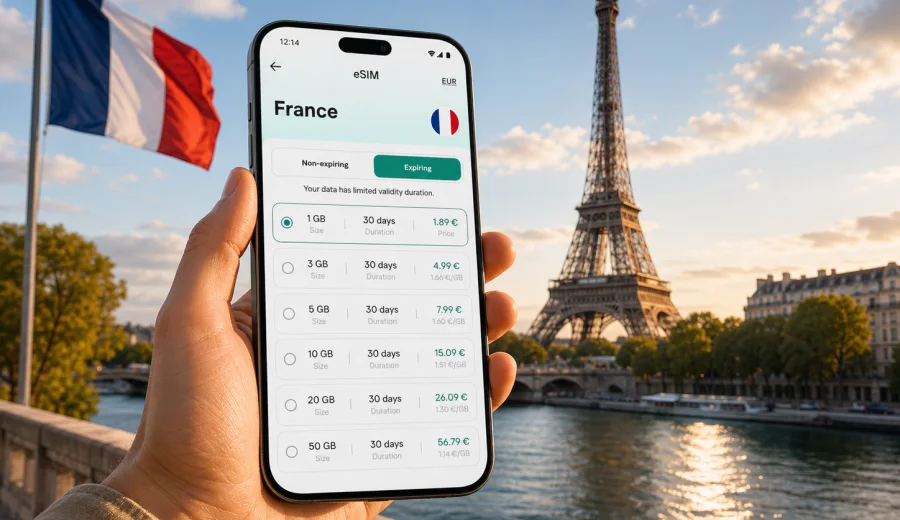
eSIM in France: mobile connection and internet for your trip
France is easy to navigate when your phone is ready before the first metro ride, train transfer, hotel check-in or restaurant reservation. An eSIM helps you prepare mobile internet for the trip without looking for a physical SIM card after landing. You choose a data plan for the destination, install the digital SIM profile on a compatible device, and use mobile data while keeping your usual SIM for calls, banking messages or contacts if your phone supports dual SIM use.
Kaspersky eSIM Store is an app and website where you can quickly choose, order and activate an eSIM with a suitable data plan for mobile internet during an international trip. It is useful for France because travel often moves across several situations in one day: airport arrivals, city transport, museum tickets, rail journeys, taxi apps, maps, translation, remote work and family messaging.
This guide explains how to prepare an eSIM for France, what to check before buying, how to estimate data needs, and how to avoid common connection mistakes during the trip.
Why mobile internet matters in France
France rewards a traveler who can stay online calmly. You may need mobile data before you reach a hotel Wi-Fi network, while changing trains, or when a booking confirmation is buried in your email. Public Wi-Fi can help in airports, hotels and some cafes, but it is not a reliable plan for a full itinerary.
Typical moments when mobile internet is useful:
- landing at Paris Charles de Gaulle, Paris Orly, Nice, Lyon, Marseille or Toulouse airports;
- checking train platforms and delays on the way to another city;
- opening apartment access instructions or hotel messages;
- using maps in Paris, Bordeaux, Lyon, Strasbourg, Lille, Marseille, Nice or Toulouse;
- booking restaurants, tickets and taxis;
- translating menus, signs and local messages;
- sharing location with family or colleagues;
- using messengers for calls when ordinary voice minutes are not included in the eSIM plan.
An eSIM can be especially convenient if you plan to arrive late, travel with children, work during the trip, or move between cities by train. The main benefit is not glamour. It is control: you prepare your connection before you need it.
What an eSIM gives you in France
An eSIM is a digital SIM profile built into a compatible smartphone or tablet. For travel, it usually provides mobile data through the selected plan. It does not necessarily include a local phone number, voice calls or SMS. If those services matter, read the exact plan conditions before you order.
For many visitors, data is the priority. With mobile data you can use:
- maps and route planning;
- messengers and internet calls;
- email and booking apps;
- ride-hailing and car-sharing apps;
- museum, train and event tickets;
- cloud documents and work tools;
- translation apps;
- mobile banking and payment confirmations, depending on your home SIM and bank settings.
The eSIM should be treated as a practical data layer for the trip. It does not replace every function of a local mobile subscription, and conditions vary by selected plan. Always check data volume, validity period, destination coverage and activation rules before payment.
eSIM, roaming or local SIM: which is better for a France trip?
There is no single answer for every traveler. The right option depends on your phone, trip length, data habits and need for a local number.
| Option | Best for | Main advantage | What to check |
|---|---|---|---|
| Travel eSIM | Visitors who mainly need data | Can be prepared before or soon after arrival | Device compatibility, data amount, validity, activation steps |
| Home operator roaming | Short trips with predictable roaming prices | Uses your current SIM and number | Daily fees, data caps, speed limits, surprise costs |
| Physical local SIM | Longer stays or users who need local services | May include local voice/SMS if available | Store opening hours, ID rules, language, phone SIM slot |
| Public Wi-Fi only | Very light users with fixed locations | No mobile data purchase | Gaps between locations, security, login friction |
For a weekend in Paris, an eSIM with a modest data allowance may be enough if you mostly use maps and messages. For a two-week route through Paris, Normandy, the Loire Valley and the French Riviera, you may need a larger package or a plan with a longer validity period. If you work from a laptop using your phone as a hotspot, choose more data than you would for sightseeing alone.
Check your device before choosing a plan
Before you order anything, confirm that your phone or tablet supports eSIM and is not locked to a single mobile operator. This step matters because an eSIM cannot work on a device that does not support it. Device support also varies by model, region and carrier configuration.
Check your device before buying a plan for France. Also check these points:
- your device supports eSIM installation;
- your device is not carrier-locked;
- your operating system is up to date enough for eSIM setup;
- you have a stable internet connection for installation;
- you know which SIM will handle mobile data after activation;
- you understand whether the plan starts when installed, when connected to a network, or according to another condition shown in the plan details.
If you use dual SIM, decide what each SIM should do. Many travelers keep their home SIM active for calls or SMS and use the eSIM for mobile data. On some phones, data roaming must be enabled for the eSIM line to work correctly abroad. This does not mean roaming from your home operator; it is often a setting required for the travel eSIM profile.
How much data do you need in France?
Data use depends more on behavior than on the country. A traveler who downloads maps, avoids video streaming and uses hotel Wi-Fi for large updates may use very little. A traveler who uploads videos, attends video calls and shares a hotspot can use several gigabytes quickly.
Use this planning table as a practical starting point:
| Travel style | Typical data behavior | Plan logic |
|---|---|---|
| Light city break | Maps, messages, tickets, restaurant searches | Smaller data package can be enough |
| Standard holiday | Daily maps, photos, social apps, browsing | Mid-size package gives more comfort |
| Multi-city route | Navigation, train apps, frequent research | Choose more data or longer validity |
| Work trip | Email, cloud documents, video calls | Larger package and careful hotspot use |
| Family travel | Several devices, kids' entertainment, sharing | Consider separate eSIMs or bigger data allowance |
Before the trip, reduce unnecessary data use:
- download offline maps for Paris and other planned regions;
- save hotel addresses and booking confirmations;
- download museum tickets, train tickets and boarding passes;
- turn off automatic cloud photo upload on mobile data;
- disable app auto-updates over mobile data;
- set video apps to lower quality or Wi-Fi only;
- check which apps use data in the background.
These small steps make any plan easier to manage. They also help you avoid running out of data at the least convenient moment, such as when leaving a train station or trying to reach accommodation.
When to install and activate your eSIM
You can often install an eSIM before departure while you have reliable Wi-Fi at home. Activation rules depend on the selected plan, so read them before installing. Some plans begin validity only after the eSIM connects to a supported network in the destination. Others may start earlier. The plan details are the authority for your specific purchase.
A calm setup flow looks like this:
1. Check that your device supports eSIM.
2. Choose France as the destination.
3. Compare data volume, price, validity period and plan conditions.
4. Order the selected eSIM plan.
5. Install the eSIM using the instructions shown after purchase.
6. Name the line clearly, for example "France data".
7. Before or after arrival, set the eSIM as the mobile data line.
8. Enable data roaming for the eSIM line if the instructions require it.
9. Test mobile data after arrival before leaving the airport or station.
If you are ready to compare options, choose an eSIM plan for France before your trip and keep the setup instructions available for the moment you install it.
Installation help for Android and iOS
The exact installation path differs by device and operating system version. In general, you will add a mobile plan, scan a QR code or use the in-app installation flow, then select how the line should be used. Follow the instructions for your device instead of guessing through menus.
Use the official setup guides when installing:
During installation, avoid deleting the eSIM profile unless the instructions or support team tell you to do so. In many cases, an activated eSIM profile cannot simply be moved to another device. If something does not work, check settings first: mobile data line, data roaming for the eSIM, airplane mode, network selection and APN instructions if provided.
Practical France travel scenarios
Arrival in Paris
Paris airports are busy, and the first hour can involve passport control, baggage, transport tickets, train platforms, ride apps and hotel messages. If your eSIM is already installed, you can switch mobile data to the eSIM after landing and check that the phone connects before you leave the terminal. This is better than discovering a setup issue on a train platform.
Business trip to La Defense or central Paris
For work travel, connection reliability is tied to schedule. You may need maps, email, meeting links and transport changes before you reach office Wi-Fi. Choose enough data for documents and messaging. For video calls, use stable Wi-Fi where possible because video can consume data quickly.
Rail route across several cities
Many France trips combine Paris with Lyon, Bordeaux, Marseille, Nice, Strasbourg, Nantes or Lille. Train stations are easier when tickets, platform information and accommodation messages are available on your phone. A data plan with enough validity for the full route is usually more convenient than a plan that expires before the final leg.
Road trip through regions
If you drive through Provence, Normandy, Brittany, the Alps or the Loire Valley, mobile data helps with maps, parking apps, weather checks and last-minute bookings. Coverage can vary in rural or mountainous areas, so download offline maps and key documents in advance. An eSIM helps you prepare mobile internet, but it cannot guarantee signal in every location.
Family holiday
Families often use more data than expected. One phone may handle maps, restaurant searches, tickets and messaging, while another uploads photos or entertains children. Decide whether each traveler needs an individual eSIM or whether one person will manage navigation and bookings. If you share a hotspot, monitor data use carefully.
What to check in the plan details
Do not choose only by headline data volume. A good plan fit depends on the full set of conditions.
Checklist before ordering:
- Destination: the plan includes France or the route you will actually travel.
- Data volume: enough for your apps and habits.
- Validity: covers the whole trip, including arrival and departure days.
- Start rule: you understand when the validity period begins.
- Recharge options: you know whether you can add data if needed.
- Hotspot use: allowed if you plan to share data with a laptop or another phone.
- Device support: your phone supports eSIM and is unlocked.
- Calls and SMS: not expected unless the plan explicitly includes them.
- Support path: you know where to ask for help if setup is unclear.
This checklist is especially useful for travelers who cross borders. If your itinerary includes France plus Spain, Italy, Switzerland, Germany or Belgium, compare whether a country plan or regional plan fits the route better. Use the destination and validity information shown in the selected plan before buying.
How to reduce data use during the trip
Even a generous data plan benefits from sensible settings. France trips often include heavy photo sharing, route planning and ticket apps, so background use can add up.
Recommended settings:
- keep operating system updates on Wi-Fi only;
- disable automatic app updates on mobile data;
- pause cloud backups until Wi-Fi;
- download playlists, podcasts and maps before leaving the hotel;
- use lower video quality if you must stream;
- close navigation after the route is complete;
- check mobile data statistics every few days;
- keep boarding passes and hotel confirmations saved offline.
If you travel for work, separate essential data from optional data. Email, maps and messaging usually matter more than automatic photo backups. If you use a laptop hotspot, watch meeting length and file sync settings. A short video call may be fine, but repeated calls can change your data estimate quickly.
Troubleshooting: if mobile data does not connect
Most setup issues are caused by settings rather than the eSIM itself. Work through the basics calmly before deleting anything.
Try this sequence:
1. Confirm the eSIM is installed and turned on.
2. Make sure the eSIM is selected for mobile data.
3. Enable data roaming for the eSIM line if required by the instructions.
4. Turn airplane mode on and off.
5. Restart the phone.
6. Check whether the plan is active and valid.
7. Review any APN or network selection instructions shown for the plan.
8. Test in a location with better signal, such as outside a station or building.
9. Contact support with screenshots of settings and the error message if the issue remains.
Avoid repeatedly deleting and reinstalling the eSIM profile. This can make recovery harder, especially after activation. If you are unsure, pause and follow the support path instead.
France eSIM preparation checklist
Use this checklist one or two days before departure:
- confirm your device supports eSIM;
- update your phone while on Wi-Fi;
- choose a plan that covers France and your travel dates;
- install the eSIM using a stable internet connection;
- label the line so you can recognize it later;
- save installation instructions offline;
- download maps and travel documents;
- set your home SIM and eSIM roles clearly;
- check whether data roaming must be enabled for the eSIM;
- test the connection after arrival before leaving the airport or station.
The goal is simple: when you need directions, tickets, messages or translation, your phone should already be ready.
Quick answers
Can I use an eSIM in France for calls?
Travel eSIM plans are usually focused on mobile data. Voice calls and SMS are not included unless the selected plan explicitly says so. You can use messengers and internet calling apps over mobile data.
Can I keep my regular SIM active?
On many dual SIM phones, yes. You can keep your regular SIM for calls or messages and use the eSIM for mobile data. Check your phone settings carefully so data goes through the intended line.
Should I install the eSIM before leaving home?
Often this is convenient because home Wi-Fi is stable. However, activation rules depend on the selected plan. Read the plan conditions so you know when validity begins.
Is public Wi-Fi enough in France?
It may be enough for very light use, but it is not dependable for moving around. Mobile data is more practical for maps, tickets, station changes and urgent messages.
What if my trip includes more than France?
Check the destinations listed in the plan. For a route across several countries, a regional plan may be more convenient than separate country plans, depending on data volume, validity and price.
Can I share eSIM data with a laptop?
Hotspot availability depends on the selected plan and device settings. Check the plan details before relying on tethering for work.
Final advice before you travel
For France, mobile internet is part of the travel toolkit: not exciting on its own, but important when plans change. Prepare it before you need it. Check device compatibility, choose a data allowance that matches your real habits, install the eSIM over stable Wi-Fi, and keep instructions available offline.
Kaspersky eSIM Store helps you choose, order and activate an eSIM with a suitable plan for mobile internet in an international trip. For France, that means you can arrive with a clearer setup for maps, tickets, messaging and everyday travel tasks.
Choose your eSIM plan for France in Kaspersky eSIM Store, install it on a compatible device, and start the trip with mobile data prepared in advance.