
Travel connectivity guide
Freeport eSIM for Bahamas travel
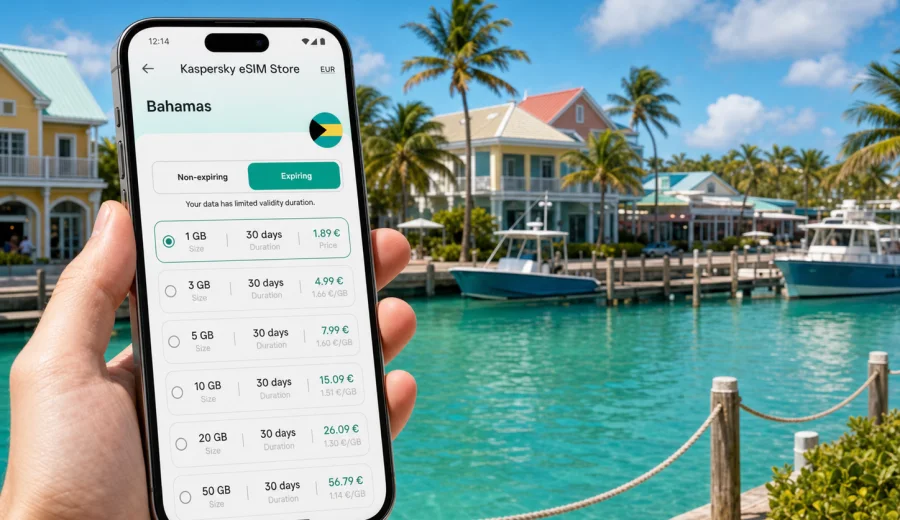
Freeport eSIM: mobile connection and internet for your Bahamas trip
Freeport is a practical Bahamas destination: easy to reach, spread across Grand Bahama Island, and built around beaches, marinas, resorts, business visits, cruise arrivals, and short trips beyond the city. That layout makes mobile internet especially useful. You may need maps after landing at Grand Bahama International Airport, a ride to Lucaya, messages with a hotel, directions to Port Lucaya Marketplace, or a video call before a meeting.
An eSIM can help you prepare mobile data for Freeport without looking for a physical SIM card after arrival. You choose a tariff for the Bahamas before the trip or once you have internet access, install it on a compatible phone, and use mobile data for navigation, bookings, ride coordination, messengers, email, and travel apps.
This guide focuses on Freeport itself: arrival, local movement, hotel zones, beach days, business travel, cruise stopovers, and day trips across Grand Bahama. The country matters because your eSIM plan should cover the Bahamas, but the everyday use case is city-based: staying online while moving between the airport, Lucaya, the harbor, resorts, restaurants, offices, and beaches.
Why mobile internet matters in Freeport
Freeport is not a dense walking city where every service sits on the same street. Many visitors move between several areas during one trip: the airport, downtown Freeport, Lucaya, beach hotels, the cruise port, marinas, and nature spots outside the city. Even a simple day can include a taxi pickup, a hotel check-in, a beach transfer, a restaurant booking, and a map check on the way back.
Mobile internet is useful in Freeport for tasks that happen in real time:
- finding your hotel or villa after arrival;
- messaging a driver or tour operator;
- checking ferry, cruise, or flight updates;
- using maps around Lucaya and the waterfront;
- confirming bookings for beaches, diving, fishing, or boat trips;
- keeping family or colleagues updated;
- using banking, email, cloud documents, and travel apps;
- sharing a hotspot with a laptop when your tariff and device allow it.
Public Wi-Fi can help in hotels, cafes, and terminals, but it is not always available exactly when you need it. A prepared eSIM gives you another option when you leave the lobby, walk to a marina, wait for a transfer, or need to send a message from a parking area.
Freeport arrival scenarios
Your first hour in Freeport often sets the tone for the rest of the trip. Mobile data can help you move from arrival point to accommodation without relying on guesswork.
Arriving by air
If you land at Grand Bahama International Airport, you may need mobile internet before you reach your hotel. Typical tasks include contacting a driver, checking the address of your resort, opening a map, and sending your arrival time to someone waiting for you. If your eSIM is installed before departure, you can switch mobile data to the travel profile after landing and follow the activation steps shown by your device and tariff.
The airport is close to Freeport, but the island layout still rewards preparation. A hotel may be in Lucaya, near a beach, near the harbor, or in a quieter residential area. Having the address, booking confirmation, and route available on your phone reduces friction when you are tired after a flight.
Arriving by cruise ship or ferry
Freeport is also a common stop for cruise passengers and travelers arriving by sea. A short stopover is one of the clearest eSIM use cases: you may have only a few hours, so waiting for Wi-Fi or searching for a local SIM card is rarely worth it. Mobile data helps you coordinate a taxi, check the return time, keep maps open, and stay reachable while you visit Lucaya, a beach, a restaurant, or a tour meeting point.
For cruise visitors, the main question is not only data volume. It is timing. Choose a tariff duration that covers the day in Freeport and any other Bahamas stops in your itinerary. If your cruise continues to other countries, check whether you need a Bahamas tariff, a regional option, or a separate plan for the next destination.
Where an eSIM helps most around Freeport
Freeport trips often combine practical movement with relaxed plans. You may not need mobile data every minute, but you will notice its value at transition points.
| Freeport situation | Why mobile data helps | Practical tip |
|---|---|---|
| Airport to hotel | Route checks, driver messages, booking details | Save your hotel address offline too |
| Lucaya and Port Lucaya Marketplace | Maps, restaurant searches, group coordination | Mark your pickup point before walking around |
| Beach day | Messaging, weather checks, ride timing | Keep a power bank if you take many photos |
| Business visit | Email, calendar, document access, video calls | Choose more data if you expect hotspot use |
| Cruise stopover | Time-sensitive movement and return planning | Set a reminder for your ship or ferry return |
| Day trip beyond Freeport | Navigation and contact with guides | Download key map areas before departure |
This is also why Freeport is not just a “Bahamas internet” problem. You need a plan that fits the way the city and island work: short drives, several separate districts, outdoor activities, and travel services that often depend on messaging.
Choosing a data volume for Freeport
The right eSIM tariff depends on trip length and phone habits. A traveler who only uses maps and messages needs much less data than someone who works from a laptop or uploads videos from the beach.
Use this planning guide as a starting point:
| Trip style | Typical use | Data planning approach |
|---|---|---|
| Cruise stop or one-day visit | Maps, messages, ride coordination, light browsing | A small data package may be enough |
| Weekend in Freeport | Maps, restaurant searches, messaging, occasional photos | Choose a moderate package with room for daily use |
| Resort stay | Messaging, maps, calls over apps, social media | Estimate data by day, especially outside hotel Wi-Fi |
| Business trip | Email, documents, calendar, calls, hotspot if allowed | Choose more data and check tethering conditions |
| Family trip | Several devices, photos, maps, children’s entertainment | Consider each person’s usage, not only one phone |
| Island exploration | Navigation, tour messages, weather, photos | Add a buffer for routes outside hotel areas |
Video streaming, large cloud backups, system updates, and social media uploads can use data quickly. Before travel, disable automatic app updates on mobile data and download maps, playlists, boarding passes, and hotel documents over home Wi-Fi. That simple preparation can make a smaller plan last longer.
Districts, hotels, and local movement
Freeport and nearby Lucaya are often discussed together, but they do not feel like one compact downtown. Accommodation can be near the beach, near a marina, around Lucaya, in a resort area, or farther from the places you plan to visit. Mobile internet helps because you can adjust during the day instead of relying only on printed directions.
In Lucaya, you may use your phone for walking directions, restaurant hours, taxi coordination, and meeting points. Around beach hotels, mobile data helps when you leave the property, arrange a pickup, or decide whether to stay nearby or move to another part of Grand Bahama. In downtown Freeport, it can help with errands, banking, office visits, and navigation between addresses that may not be obvious to first-time visitors.
If you are traveling with a group, agree on two things before you split up: a physical meeting point and a messaging app. eSIM mobile data can keep the messaging app available, but a named landmark or hotel entrance is still useful if a phone battery runs low.
Preparing your eSIM before the trip
The smoothest approach is to prepare your eSIM before you fly or board a ship. You can check compatibility, choose a tariff for the Bahamas, install the eSIM while you still have stable internet, and keep the travel profile ready for arrival.
A simple preparation checklist:
1. Check that your phone or tablet supports eSIM.
2. Check that the device is not locked to one operator.
3. Choose a tariff that covers the Bahamas and matches your trip length.
4. Install the eSIM while connected to reliable Wi-Fi.
5. Keep your primary SIM active if you need your usual number for banking or messages.
6. On arrival, select the eSIM profile for mobile data.
7. Follow the tariff instructions for activation and data roaming settings.
If you are planning a Freeport trip and want to prepare mobile internet before arrival, you can choose an eSIM plan for the Bahamas through Kaspersky eSIM Store and review the available data volumes and validity periods for your travel dates.
Device compatibility and installation
Before buying a travel eSIM, confirm that your device supports eSIM and can use it with your current setup. Some phones are sold with regional differences, and some devices may be locked by an operator. If you are not sure, use the compatibility check before you pay: check your device.
Installation usually means adding the eSIM profile to your phone, then selecting it for mobile data when you are ready to use it. The exact steps depend on the operating system and device model. Kaspersky eSIM Store provides separate setup guidance: use the Android installation guide or the iOS installation guide when you need step-by-step instructions.
Keep these details in mind:
- eSIM is mainly for mobile internet in travel scenarios.
- Voice calls and SMS are not included unless a specific tariff says so.
- You can usually keep your regular SIM for calls and messages while using eSIM for data.
- Some devices require data roaming to be enabled for the eSIM profile.
- Activation and data usage rules depend on the selected tariff.
- An eSIM profile may not be transferable to another device after activation.
Do not delete an installed eSIM profile unless you are sure you no longer need it. If something does not work immediately, check the profile selection, mobile data settings, roaming setting for the eSIM, and whether you are in an area with local mobile coverage.
Freeport use cases by traveler type
Different visitors use mobile internet in Freeport differently. Matching the tariff to your scenario is more useful than choosing by price alone.
Vacation traveler
For a beach or resort trip, mobile data is most useful outside the hotel: arrival, restaurant searches, maps, taxi messages, photo sharing, and weather checks. You may use hotel Wi-Fi for large uploads and streaming, while eSIM data covers movement around the city and island.
Business traveler
Freeport business trips often involve calendar changes, document access, messaging, and calls over work apps. If you expect to use a laptop hotspot, check whether your selected tariff and device allow tethering. Choose a data volume that can handle email attachments, cloud documents, and video calls if hotel Wi-Fi becomes unreliable.
Cruise passenger
For a cruise stop, speed and simplicity matter. Install before arrival, check the activation instructions, and keep the eSIM ready for your day ashore. Save the ship return time and meeting point. Use mobile data for maps, taxi coordination, and quick searches, then turn off high-data background activity.
Family or group traveler
Families often underestimate shared data needs. One person may use maps, another uploads photos, and someone else streams video during downtime. Decide whether each traveler needs a separate plan or whether one phone will handle essential navigation and messages. If you rely on one device, keep it charged.
Remote worker
If you need to work from Freeport, treat mobile data as a backup and mobility tool rather than your only connection. Use stable Wi-Fi for long calls when available, but keep eSIM data ready for email, authentication prompts, transport changes, and short meetings when you are away from the hotel.
Short trips from Freeport
Many Freeport visitors spend part of the trip outside the central city area. Popular plans can include Lucayan National Park, Gold Rock Beach, beach clubs, fishing trips, diving, boat excursions, or a drive toward other parts of Grand Bahama. These are exactly the moments when a phone connection can be useful for maps, guide messages, pickup times, and weather updates.
Before leaving the hotel area, prepare a small offline backup:
- download the map area you expect to use;
- save the address of your hotel;
- keep the tour operator’s phone number and meeting point;
- screenshot booking confirmations;
- charge your phone and power bank;
- tell someone in your group where you are going.
An eSIM helps with mobile data, but preparation still matters. Beaches, parks, and quieter roads may have different signal conditions than a resort lobby or marina. Avoid promising yourself that every task can wait until later; save key information before you leave.
Practical data-saving tips in Freeport
You can make a travel eSIM last longer by controlling background usage. This is especially useful if you choose a smaller package for a short Freeport stay.
- Download offline maps before departure.
- Turn off automatic app updates over mobile data.
- Pause cloud photo backup until you are on Wi-Fi.
- Use lower video quality for calls when possible.
- Send compressed photos in messengers when quality is not important.
- Close navigation apps after you arrive.
- Check which apps are using mobile data in the phone settings.
- Use hotel Wi-Fi for large downloads, but avoid sensitive tasks on networks you do not trust.
For many travelers, the best pattern is simple: use eSIM data for movement and urgent tasks, and use trusted Wi-Fi for heavy downloads. That keeps mobile data available when you need it most.
Common mistakes to avoid
The most common eSIM problems in city travel are preventable.
| Mistake | Why it creates trouble | Better approach |
|---|---|---|
| Buying after landing with no internet | You may need Wi-Fi before you can complete setup | Install before departure when possible |
| Choosing too little data | Maps, photos, and calls can use more than expected | Add a buffer for unplanned use |
| Ignoring compatibility | Not every device supports eSIM | Check the device before buying |
| Deleting the eSIM profile | Reinstallation may not be available for every tariff | Keep the profile unless support advises otherwise |
| Using mobile data for updates | System and app updates can consume data quickly | Update at home or on trusted Wi-Fi |
| Forgetting roaming settings | Some eSIM profiles need data roaming enabled | Follow the setup instructions for your device |
FAQ about eSIM in Freeport
Is an eSIM useful for a short Freeport stopover?
Yes, especially if you are arriving by cruise ship or ferry and have limited time ashore. Mobile data can help with maps, taxi coordination, restaurant searches, and messages. Install the eSIM before arrival so you do not spend your stopover setting it up.
Do I need a Freeport-specific eSIM plan?
Usually you choose a plan for the Bahamas, not a separate city-only plan. For a Freeport article, the city is the travel scenario, while the tariff coverage should match the country or region where the city is located.
Can I use my regular number with an eSIM?
In many dual-SIM phones, you can keep your regular SIM active for calls or SMS and use the eSIM for mobile data. Check your device settings and your home operator’s roaming conditions before travel.
Does a travel eSIM include phone calls and SMS?
Travel eSIM tariffs are commonly focused on mobile data. Calls and SMS are not included unless the tariff conditions explicitly say otherwise. For voice and messages, many travelers use internet-based apps over mobile data.
Should I install the eSIM before leaving home?
That is usually the most convenient option. Install it while you have reliable Wi-Fi, read the activation instructions, and switch mobile data to the eSIM profile when you arrive in Freeport or when the tariff conditions say it is appropriate.
How much data do I need for Freeport?
For light maps and messaging, a small package may work for a short visit. For several days, social media, business use, or hotspot sharing, choose more data. Your real usage depends on apps, video calls, uploads, and whether you use hotel Wi-Fi for heavy tasks.
Before you go: a Freeport eSIM checklist
Use this checklist the day before travel:
- Confirm that your destination is Freeport, Bahamas, and that your tariff covers the Bahamas.
- Check your phone’s eSIM support and operator lock status.
- Install the eSIM profile over stable Wi-Fi.
- Save the airport, hotel, cruise terminal, or marina address.
- Download offline maps for Freeport and Grand Bahama.
- Turn off mobile-data app updates and cloud backups.
- Keep installation instructions available.
- Charge your phone and pack a power bank.
- Decide which SIM handles mobile data and which SIM handles calls or SMS.
Freeport is easier to enjoy when your phone is ready for arrival, transfers, maps, and plans that change during the day. With Kaspersky eSIM Store, you can review available Bahamas options, choose a suitable tariff, install the eSIM on a compatible device, and prepare mobile internet before your trip. If Freeport is your next stop, prepare an eSIM plan for the Bahamas before you leave so your first hours in the city are simpler.