
Travel connectivity guide
French Guiana eSIM for mobile internet
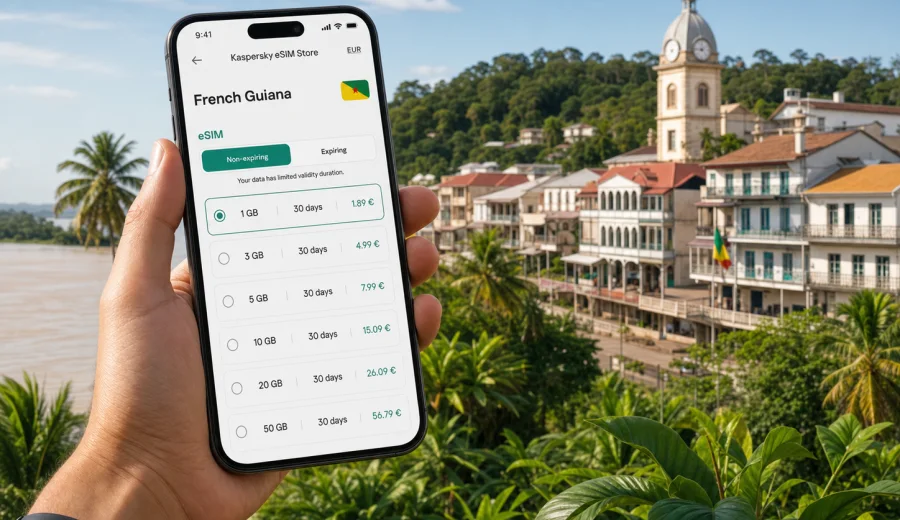
eSIM for French Guiana: mobile connection and internet for your trip
French Guiana is not a typical South America destination. It is an overseas department of France on the Atlantic coast, with Amazonian forest, coastal towns, river routes, the Guiana Space Centre near Kourou, and long distances between practical services. For travelers, that mix makes mobile internet more than a convenience. You may need maps in Cayenne, messaging on the road to Kourou, translation in a shop, a ride update after landing, or weather checks before a nature excursion.
An eSIM can make that preparation simpler. Instead of looking for a physical SIM card after arrival, you can set up a digital SIM profile on a compatible smartphone and use a data tariff for your trip. Kaspersky eSIM Store is an app and website where you can choose, arrange, install, and activate an eSIM with a suitable mobile internet tariff for international travel.
This guide explains how to plan mobile connection and internet for French Guiana, when an eSIM is useful, how much data to consider, what to check before purchase, and how to avoid common mistakes during the trip.
Why mobile internet matters in French Guiana
French Guiana combines urban, coastal, and rainforest travel scenarios. A short business stay in Cayenne is very different from a route that includes Kourou, Sinnamary, Saint-Laurent-du-Maroni, river areas, or remote nature sites. Your data needs can change quickly: one day you may mostly use messaging, and the next day you may rely on navigation, cloud documents, video calls, or photo backups.
Mobile internet is especially useful for:
- finding your hotel, rental office, restaurant, or meeting location after arrival;
- using maps between Cayenne, Kourou, Remire-Montjoly, Matoury, and other towns;
- checking transport updates, opening booking confirmations, and contacting hosts;
- using translation, banking apps, and two-factor authentication;
- staying reachable when public Wi-Fi is unavailable or inconvenient;
- sharing location with relatives or colleagues during day trips.
Public Wi-Fi can help in hotels, airports, cafes, and offices, but it is not always available where you need it. It can also be slower than expected, require registration, or be unsuitable for tasks that involve personal accounts. A prepared eSIM gives you another option for mobile data on your own device.
What an eSIM does during a trip
An eSIM is a digital SIM profile installed on a compatible phone or tablet. For travel, it is usually used for mobile data. You do not need to insert a plastic SIM card, and you can often keep your home SIM active for calls or messages while using the eSIM for internet.
In practical terms, an eSIM for French Guiana can help you:
1. Choose a data tariff before travel or shortly before arrival.
2. Install the eSIM profile on a compatible device.
3. Activate the tariff according to its conditions.
4. Use mobile data for maps, messaging, browsing, and apps.
5. Monitor remaining data and validity period.
Most travel eSIM tariffs focus on internet access. They usually do not include a regular phone number, voice calls, or SMS unless the specific tariff conditions say otherwise. For calls and messages, many travelers use internet-based apps. Before buying, read the tariff details carefully: data amount, validity period, destination, price, activation rules, and any usage limitations.
French Guiana travel scenarios and data needs
Your best eSIM choice depends less on the country name alone and more on what you will actually do there. Use the scenarios below as a practical starting point.
| Travel scenario | Likely data use | What to prioritize |
|---|---|---|
| 2-3 days in Cayenne | Low to medium | Maps, messaging, bookings, light browsing |
| Work trip with video calls | Medium to high | Larger data allowance, stable setup before meetings |
| Cayenne plus Kourou | Medium | Navigation, transport updates, photos, messaging |
| Nature excursions | Variable | Offline maps plus enough mobile data for updates |
| Longer stay or flexible route | High | More data, longer validity, option to top up if available |
If you mainly need messaging, maps, email, and occasional browsing, a smaller package may be enough. If you plan video calls, streaming, hotspot use, frequent cloud sync, or heavy social media uploads, choose more data. Video and automatic backups can consume a data allowance quickly, so check app settings before you rely on mobile internet every day.
Before you buy: compatibility and device checks
Not every phone supports eSIM, and some devices can be locked to a mobile operator. This check is important because an eSIM can only be installed on a compatible, unlocked device. Before choosing a tariff, check your device and confirm that eSIM is available in your phone settings.
Also review these points:
- your phone supports eSIM and the model is not restricted by region or carrier;
- your device is unlocked for mobile network use;
- you have a stable internet connection when installing the eSIM profile;
- your operating system is up to date enough for eSIM setup;
- you know which SIM will be used for mobile data after activation;
- you understand whether data roaming must be enabled for the eSIM profile.
If your main phone is not compatible, you may still be able to use an eSIM on another supported device, but do not assume that an activated eSIM profile can be moved between devices. Transfer rules depend on the eSIM profile and tariff conditions.
How to estimate data for French Guiana
Data planning is easier when you separate essential use from optional use. Essential use includes maps, messages, travel documents, email, banking, transport apps, and basic browsing. Optional use includes streaming, large uploads, long video calls, and automatic photo backup.
Here is a simple planning model:
- Light use: messaging, maps, email, and occasional browsing.
- Moderate use: regular navigation, social media, short calls through internet apps, photo sharing.
- Heavy use: video calls, hotspot for a laptop, streaming, cloud sync, large uploads.
For a short stay, a compact package may be enough if you keep streaming and backups on Wi-Fi. For a week or more, or for work travel, choose a larger allowance so you do not have to ration basic tasks. If your route includes places where you may not want to search for public Wi-Fi, having extra data can reduce friction.
Small habits can make a big difference:
- download offline maps before departure;
- disable automatic cloud backup on mobile data;
- update apps over Wi-Fi before the trip;
- reduce video call quality when possible;
- avoid using hotspot for background laptop updates;
- monitor data use daily in your phone settings.
Choosing a French Guiana eSIM tariff
After you know your route and approximate data use, compare tariffs by practical criteria rather than by headline size alone. A larger package is useful only if the validity period, destination, and activation terms match your trip.
Look at:
- data allowance: enough for your expected use, with a reasonable buffer;
- validity: matched to your arrival and departure dates;
- destination: suitable for French Guiana or the required region;
- activation timing: when the validity period starts;
- price: clear total cost for the tariff you choose;
- top-up options: useful for longer or uncertain trips;
- device requirements: eSIM support and unlocked status.
At this point in planning, it is practical to choose an eSIM tariff for French Guiana and compare the available data amounts and validity periods before you travel. Do this after you have checked your device, because compatibility should come before payment.
A practical setup timeline
The most comfortable approach is to prepare your eSIM before the trip and activate it according to the tariff instructions. That way you avoid searching for a SIM shop when you are tired, carrying luggage, or trying to find your accommodation.
| When | What to do |
|---|---|
| 1-3 days before departure | Check device compatibility, choose a tariff, install the eSIM profile if recommended |
| Before boarding | Download offline maps, save booking details, update important apps |
| On arrival | Select the eSIM for mobile data, enable data roaming if the instructions require it |
| First hour in country | Test messaging, maps, browser, and travel apps |
| During the trip | Monitor data use and reduce background traffic if needed |
Do not wait until you urgently need internet to learn where the eSIM settings are on your phone. Open the cellular settings in advance and understand which line is your home SIM and which line is your travel eSIM.
How to install and activate an eSIM
The exact setup depends on your device and operating system, but the process usually follows a familiar pattern: choose the tariff, receive installation details, add the eSIM profile, then select it for mobile data. For device-specific steps, use the Android installation guide or the iOS installation guide.
A typical setup checklist:
1. Connect your phone to stable Wi-Fi.
2. Open the eSIM installation details.
3. Add the eSIM profile in your device settings.
4. Give the line a clear label, such as "Travel data".
5. Keep your primary SIM for calls or messages if you need it.
6. Set the eSIM as the mobile data line when you are ready.
7. Enable data roaming for the eSIM if the instructions say it is required.
8. Test a browser page, map search, and messaging app.
If something does not work, do not delete the eSIM profile immediately. First check the selected data line, roaming setting, airplane mode, APN instructions if provided, and whether the tariff has started. Removing a profile can make troubleshooting harder, depending on the conditions of the eSIM.
eSIM vs roaming vs local SIM
There is no single perfect option for every traveler. The right choice depends on your trip length, phone, budget, and how much setup effort you want after arrival.
| Option | Strengths | Trade-offs |
|---|---|---|
| Travel eSIM | Can be prepared before arrival, no plastic SIM, convenient for data | Requires eSIM-compatible unlocked device |
| Home roaming | Uses your existing SIM and number | Price and data conditions depend on your home operator |
| Local physical SIM | May suit longer stays or specific local needs | Requires in-person purchase and SIM swap, conditions may vary |
| Public Wi-Fi | Useful for large downloads in hotels or offices | Not always available, may be inconvenient for personal accounts |
For many short trips, an eSIM is attractive because it reduces arrival tasks. You can land with the setup mostly ready, keep your physical SIM in place, and use mobile data for everyday travel apps. For longer stays, compare the tariff validity and data allowance carefully.
Common mistakes to avoid
The most common eSIM problems usually come from preparation gaps rather than from the concept itself. Avoid these mistakes:
- buying before confirming that your phone supports eSIM;
- installing the profile on the wrong device;
- assuming the eSIM includes voice calls or SMS;
- forgetting to switch mobile data to the eSIM line;
- leaving cloud backup or app updates active on mobile data;
- deleting the eSIM profile while troubleshooting;
- waiting until arrival without any Wi-Fi access or saved instructions;
- choosing a validity period that does not cover the full trip.
Another mistake is overestimating public Wi-Fi. It can be useful, but it should not be your only plan if you need maps, banking, ride coordination, or work messages while moving around.
Practical examples
For a weekend in Cayenne, a smaller tariff can be enough if you use mobile data for maps, messaging, restaurants, booking confirmations, and light browsing. For a work visit, choose more data, install the eSIM before departure, and test the line before your first meeting. For Cayenne plus Kourou, navigation and location sharing matter more, so download maps in advance and keep tickets offline. For nature-focused trips, treat mobile internet as useful for planning and updates, but save maps, contacts, and essential information before leaving urban zones.
What to check in the tariff details
Before confirming a tariff, read the conditions as if you were already at the airport and needed the internet to work smoothly:
- Is French Guiana included in the destination?
- How much data is included?
- How long is the tariff valid?
- When does the validity period start?
- Is top-up available if you need more data?
If a tariff is data-only, plan voice calls through internet apps. If validity starts on activation, activate at the right moment. If it starts after installation or first network connection, follow the instructions carefully.
Frequently asked questions
Is an eSIM useful for French Guiana?
Yes, if your device supports eSIM and you want mobile internet without buying a physical SIM card after arrival. It is especially useful for maps, messaging, bookings, translation, email, and travel apps.
Can I keep my regular SIM active?
In many dual-SIM phones, yes. You can keep your primary SIM for your usual number and use the eSIM for mobile data. Check your device settings and your home operator's roaming charges before travel.
Should I install the eSIM before I travel?
Often, yes. Installing in advance over stable Wi-Fi gives you time to check the setup. Activation timing depends on the tariff conditions, so follow the instructions and avoid starting the validity period too early.
What if mobile data does not start immediately?
Check that the eSIM is selected for mobile data, data roaming is enabled if required, airplane mode is off, and the tariff is active. Restarting the phone can also help. Do not delete the eSIM profile unless support instructions tell you to do so.
Final preparation checklist
Before you leave for French Guiana, make sure you have:
- confirmed that your phone supports eSIM and is unlocked;
- selected a data allowance and validity period that match your trip;
- installed the eSIM profile using stable Wi-Fi;
- saved installation details and support information;
- downloaded offline maps and key documents;
- reviewed which apps can use mobile data;
- understood how to switch mobile data between SIM lines;
- checked whether data roaming must be enabled for the eSIM.
This preparation turns mobile internet from a last-minute task into part of your travel setup. You can arrive with maps, messages, bookings, and work tools ready on your own phone.
Choose mobile internet for French Guiana before departure
For a smoother arrival, prepare your eSIM while you still have time, Wi-Fi, and access to all travel documents. Kaspersky eSIM Store helps you choose, arrange, install, and activate an eSIM with a suitable tariff for mobile internet in an international trip. Check your device first, compare data and validity, then prepare an eSIM tariff for your French Guiana trip before you go.