
Travel connectivity guide
Fuglafjordur eSIM for mobile internet
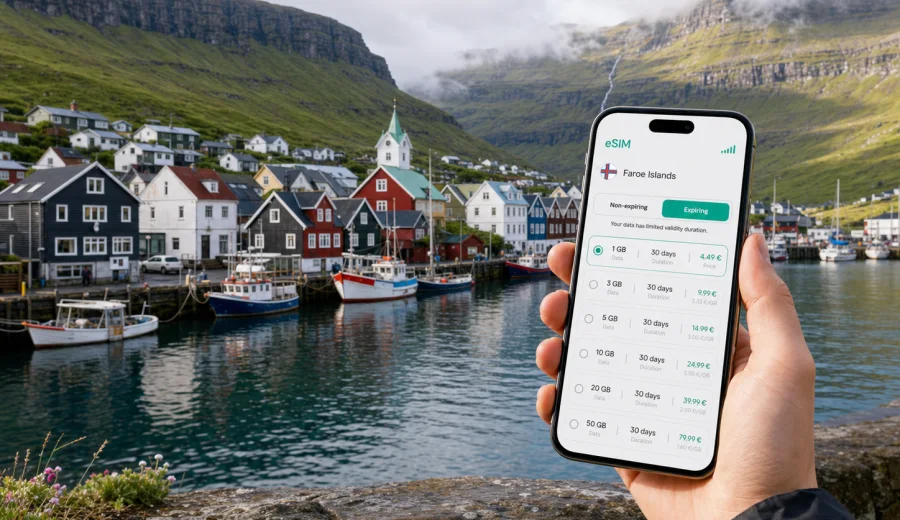
Fuglafjordur eSIM: mobile connection and internet for your Faroe Islands trip
Fuglafjordur is not the kind of place where you want to start your trip by hunting for a SIM card. The town sits on Eysturoy, tucked into a sheltered fjord with a working harbor, steep green slopes and compact streets that are easier to enjoy when your maps, messages and booking details are already available. For many visitors, an eSIM is a practical way to prepare mobile connection and internet for Fuglafjordur before the first drive across the islands.
This guide focuses on real travel scenarios in Fuglafjordur: arriving through Vagar Airport, driving across Eysturoy, finding your guesthouse, checking ferry or tunnel routes, coordinating with local contacts, and using mobile data when the weather changes your plans. It also explains how to choose an eSIM tariff for the Faroe Islands, what to check on your phone, and how to avoid common mistakes when you rely on mobile internet abroad.
Why mobile internet matters in Fuglafjordur
Fuglafjordur is small, but a trip here is rarely simple in the same way a large-city break is simple. You may arrive after an international flight, pick up a rental car, cross several islands, stop for viewpoints, and reach town when shops or reception desks have limited hours. Mobile internet helps with the small decisions that make this journey smoother.
In Fuglafjordur, mobile data is useful for:
- navigation from Vagar Airport, Torshavn, Runavik, Klaksvik or nearby villages;
- checking accommodation messages before you reach the door;
- using maps around the harbor, town center and hillside streets;
- following road, tunnel, ferry and weather updates during day trips;
- coordinating hikes, meetings or family travel without relying only on hotel Wi-Fi;
- using messaging apps when a regular phone number is not included in your travel data tariff;
- translating menus, local notices or transport information when needed.
An eSIM does not make the Faroe Islands less remote. It simply gives you a prepared mobile data option on a compatible device, so your first online task is not finding a shop or asking for a Wi-Fi password.
Arriving for a Fuglafjordur trip
Most international visitors reach the Faroe Islands through Vagar Airport. Fuglafjordur is on Eysturoy, so the journey usually continues by rental car, private transfer, coach connection or a combination of local transport and pickup. The route can involve tunnels, bridges and narrow roads where offline preparation is useful, but live navigation still helps when visibility, wind or schedule changes affect your plans.
If you are driving, mobile internet can support:
| Travel moment | Why data helps |
|---|---|
| Airport pickup | Opening rental documents, checking pickup instructions and messaging your host |
| First drive | Navigating tunnels, roundabouts, road numbers and fuel stops |
| Arrival in town | Finding the right street, parking area or guesthouse entrance |
| Weather changes | Rechecking routes before exposed coastal drives |
| Evening arrival | Contacting accommodation without searching for public Wi-Fi |
Fuglafjordur itself is compact, but the broader travel day can be longer than expected. The Faroe Islands reward flexible planning: a viewpoint stop may take longer, a road may feel slower in fog, or a planned hike may shift to a town walk. With an eSIM installed before departure, you can activate mobile data when conditions make it useful instead of treating connectivity as a separate errand.
eSIM or roaming for Fuglafjordur
Standard roaming can be convenient, especially if your home plan has clear conditions for the Faroe Islands. The challenge is that roaming prices, fair-use limits and included destinations vary by operator. Some travelers also prefer to keep their home SIM available for calls or banking messages while using a separate eSIM profile for travel data.
An eSIM can be useful when you want:
- a prepaid data option for the Faroe Islands;
- clear data volume and validity before you travel;
- no physical SIM card swap;
- the ability to keep your home SIM installed for calls or SMS if your phone supports dual SIM settings;
- less dependence on public Wi-Fi in airports, cafes, guesthouses and ferry terminals.
It is still important to read the tariff conditions before choosing. eSIM tariffs usually focus on mobile internet. A regular phone number, voice calls and SMS are not included unless the specific tariff says otherwise. For most city-travel tasks in Fuglafjordur, messaging apps, maps, email and browser access are the main needs.
City scenarios where an eSIM helps
Fuglafjordur is a practical base for Eysturoy and a meaningful stop on a wider Faroe Islands route. The town has a harbor, local services, cultural stops and access to surrounding landscapes. Your mobile data needs depend on how you use the town.
Short stay or stopover
If Fuglafjordur is a stop on a day route, you may only need enough data for maps, photos backup over selected moments, messaging and quick searches. Avoid letting background apps consume data all day. Download offline maps before the trip, then use mobile data for live checks.
Two or three nights in town
For a short stay, plan for navigation, restaurant searches, weather checks, cloud documents, video calls on Wi-Fi when available, and mobile data for outdoor movement. If you use your phone as a hotspot for a laptop, choose a larger data package and check whether tethering is allowed under the tariff conditions.
Business visit
Business trips to smaller towns often depend on reliable coordination. You may need email during the drive, calendar updates, shared documents, ride coordination and messaging with colleagues. For this scenario, choose a data volume that leaves room for unexpected video calls or file downloads, but try to move heavy downloads to trusted Wi-Fi.
Hiking and photography
Fuglafjordur and Eysturoy are closely tied to landscapes, viewpoints and changing weather. Mobile data helps you recheck route notes, meet-up locations and forecast changes. It should not replace proper offline preparation, downloaded maps, charged batteries and local advice, especially away from town.
How much data to plan
There is no single correct data amount for Fuglafjordur because travelers use phones differently. A photographer uploading many files needs more than a traveler who only checks maps and messages. Use this practical estimate as a starting point, then choose a tariff with enough margin.
| Trip style | Typical mobile data use | Practical eSIM approach |
|---|---|---|
| Light traveler | Maps, messages, occasional browsing | Smaller package for the full stay |
| Active explorer | Navigation, weather, bookings, photo sharing | Medium package with room for daily use |
| Remote worker | Email, documents, hotspot, calls over data | Larger package and careful app settings |
| Family coordinator | Several bookings, shared plans, messaging | Enough data for constant communication |
Before departure, reduce avoidable data use:
- download offline maps for the Faroe Islands;
- save hotel address, check-in notes and booking PDFs;
- disable automatic cloud photo upload on mobile data;
- update apps before the trip;
- download playlists, podcasts and translation packs over Wi-Fi;
- set your travel eSIM as the mobile data line only when you are ready to use it.
These steps make a smaller prepaid data package more predictable and help you keep mobile internet available for tasks that matter in Fuglafjordur.
Choosing an eSIM tariff for Fuglafjordur
For a city article, the relevant destination is the country the city belongs to. Fuglafjordur is in the Faroe Islands, so you should choose a tariff that covers the Faroe Islands rather than searching for a separate city-only option. Check the data volume, validity period, destination, activation rules and any tethering notes before you confirm.
At this stage of planning, you can use Kaspersky eSIM Store to choose an eSIM tariff for your trip to Fuglafjordur. The site and app help you select the destination, review available data packages, and prepare an eSIM for mobile internet on a compatible device.
A good choice usually matches three things:
1. Trip length: a weekend, a week, or a longer route across several islands.
2. Data behavior: light maps and messages, regular browsing, or laptop hotspot use.
3. Route shape: Fuglafjordur only, Eysturoy plus Torshavn, or a wider Faroe Islands itinerary.
If your route includes several countries before or after the Faroe Islands, compare whether a country tariff or a broader regional option makes more sense. Do not assume a plan covers every stop in your journey. The destination list in the tariff conditions is the part that matters.
What to check before buying
eSIM is built into many modern phones and tablets, but not all devices support it. Some devices also have operator locks or regional limitations. Before you choose a tariff, check your device and make sure it can install and use an eSIM profile.
Use this checklist:
- Your phone supports eSIM.
- Your phone is not locked to a mobile operator in a way that blocks another SIM profile.
- You have a stable internet connection for installation.
- You know which SIM line will be used for mobile data.
- Data roaming can be enabled for the eSIM if the tariff instructions require it.
- You understand when the tariff validity period starts.
- You know whether voice calls, SMS and tethering are included or excluded.
For dual SIM phones, keep labels clear. Name your home SIM something like "Home" and your travel eSIM "Faroe Islands" or "Travel data". This reduces the chance of using the wrong line for mobile data after arrival.
How to install an eSIM for Fuglafjordur
Installation is usually easier before the travel day, while you have reliable Wi-Fi and time to read each screen carefully. After purchase, the eSIM details appear in your profile or app, and you may also receive a QR code or installation instructions. Follow the device-specific flow and avoid deleting the eSIM after activation unless the support instructions tell you to do so.
For step-by-step setup, use the official Android installation guide or iOS installation guide. The exact screens can differ by device model and operating system version, but the basic logic is the same: add the eSIM, select it for mobile data, and turn on the settings required by the tariff.
Recommended timing:
| When | What to do |
|---|---|
| A few days before departure | Check device compatibility and choose the tariff |
| Before leaving home | Install the eSIM while connected to trusted Wi-Fi |
| At departure airport | Keep your home SIM active if you need airline or banking messages |
| After arriving in the Faroe Islands | Select the eSIM for mobile data and check connection |
| During the trip | Monitor data use and top up if the tariff allows it |
Do not wait until you are standing outside a guesthouse in rain or wind to read installation screens for the first time. Fuglafjordur is a calm town, but arrival logistics are easier when your phone is already prepared.
Getting around Fuglafjordur with mobile data
Fuglafjordur is walkable in the central area, especially around the harbor and local services. The hills around town can make distances feel different from a flat map, and weather can turn a short walk into something that needs a better jacket or a quick change of plan. Mobile internet helps you adjust without overplanning.
Useful tasks in town include:
- finding your accommodation from the harbor area or bus stop;
- checking opening hours before walking across town;
- sharing your location with travel companions;
- confirming restaurant or cafe plans;
- translating short notices;
- checking whether a route is better by foot, taxi, rental car or local transport.
If you stay in a guesthouse or apartment, save the check-in instructions offline. Then use mobile data for changes, not for information that could have been downloaded in advance. This is especially useful if you arrive outside normal reception hours.
Day trips from Fuglafjordur
Fuglafjordur works well as part of a route across Eysturoy and the northern islands. Travelers often connect it with Runavik, Leirvik, Klaksvik, Gjogv, Eidi, Torshavn or scenic drives across mountain roads. These trips are exactly where prepared mobile internet becomes more valuable than it seems from the size of the town.
For day trips, use mobile data to:
- recheck road choices before entering tunnels or remote roads;
- coordinate pickup points with local guides or drivers;
- follow changing weather before hikes and viewpoints;
- keep digital tickets, confirmations and maps available;
- tell your accommodation if your arrival time changes.
Keep in mind that mobile coverage and performance can depend on local network conditions, terrain, weather and the tariff used. Download key route information before leaving town, and treat mobile data as part of your travel kit rather than the only safety tool.
Practical setup for dual SIM travel
Many eSIM travelers keep their regular number on one SIM line and use a travel eSIM for mobile data. Decide this before landing so your phone does not switch back to your home line unexpectedly.
Suggested setup:
| Phone function | Recommended line |
|---|---|
| Mobile data in the Faroe Islands | Travel eSIM |
| Calls to your regular number | Home SIM, if roaming conditions are acceptable |
| SMS for banking or verification | Home SIM, if needed |
| Messaging apps | Travel eSIM data |
| Hotspot | Travel eSIM, only if tariff conditions allow |
Turn off data switching if your phone might automatically move mobile data back to your home line. On some devices, you may also need to allow data roaming for the travel eSIM. That does not mean you are using your home roaming plan; it can be a required setting for the eSIM profile to connect through local partner networks.
Common mistakes to avoid
The most common eSIM problems are usually preparation problems. They are easier to prevent than to fix while tired after travel.
- Buying before checking device compatibility.
- Installing the eSIM on the wrong phone.
- Deleting the eSIM profile after installation.
- Forgetting to switch mobile data to the travel eSIM.
- Leaving automatic cloud backup active on mobile data.
- Assuming the tariff includes calls and SMS.
- Assuming a country tariff covers a multi-country route.
- Waiting until arrival with no Wi-Fi to start installation.
If something does not work immediately, check the selected data line, roaming setting for the eSIM, APN instructions if provided, airplane mode, and local signal before changing several settings at once.
Fuglafjordur travel data checklist
Before your trip:
- Choose a tariff for the Faroe Islands.
- Install the eSIM on the device you will carry.
- Save QR codes and instructions.
- Download maps and booking details.
- Label SIM lines clearly.
On arrival:
- Select the eSIM as your mobile data line.
- Enable the required data settings.
- Open a browser or map app to confirm data works.
- Keep your home SIM settings aligned with your roaming preferences.
- Monitor data use during the first day.
During your stay:
- Use Wi-Fi for heavy uploads.
- Keep mobile data for movement and route changes.
- Check weather before drives or hikes.
FAQ about eSIM in Fuglafjordur
Can I buy a separate eSIM just for Fuglafjordur?
City-specific tariffs are not usually the right way to think about eSIM coverage. For Fuglafjordur, choose a tariff that covers the Faroe Islands and use it for your time in the city and wider route.
Should I install the eSIM before flying?
In most cases, yes. Install it while you have reliable Wi-Fi, then activate or select it for mobile data according to the tariff instructions. This is easier than handling setup during the airport-to-Eysturoy transfer.
Will an eSIM give me a local phone number?
Most travel eSIM tariffs are designed for mobile internet. Voice calls and SMS are not included unless the specific tariff clearly says they are. Use messaging apps over data for most trip communication.
Can I use hotspot in Fuglafjordur?
It depends on the tariff and device settings. Check the tariff conditions before relying on tethering for a laptop or another traveler.
Is public Wi-Fi enough?
Public or accommodation Wi-Fi can be useful, but it does not cover every travel moment. Mobile internet is especially helpful for navigation, arrival messages, road checks and changes of plan.
What if my trip includes Torshavn or Klaksvik too?
If those stops are also in the Faroe Islands, the same country tariff may fit the route, subject to the plan conditions. If your route includes another country, check whether you need an additional tariff or a regional option.
Prepare your eSIM for Fuglafjordur
Fuglafjordur is a place where good preparation feels practical rather than excessive. Roads, weather, ferry or tunnel plans, guesthouse messages and day trips across Eysturoy all become easier when your phone has a ready mobile data option. An eSIM lets you keep your physical SIM in place, avoid a shop visit for a plastic SIM card, and manage travel internet through a digital profile.
Before you leave, review your device compatibility, choose the right data volume and validity period, and install the eSIM while you have stable Wi-Fi. When you are ready to plan mobile internet for the trip, Kaspersky eSIM Store can help you prepare an eSIM tariff for the Faroe Islands and keep your Fuglafjordur itinerary manageable.