
Travel connectivity guide
Fujairah eSIM for Mobile Internet
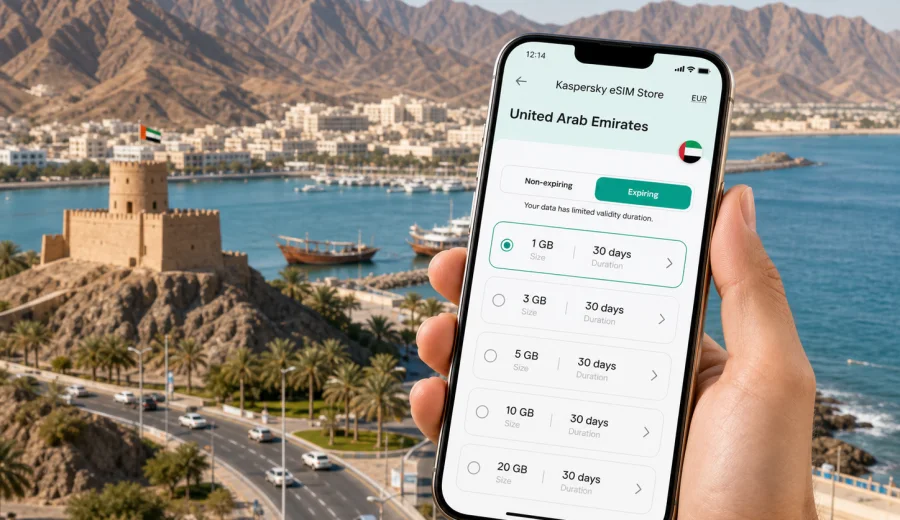
Fujairah eSIM: mobile connection and internet for your trip
Fujairah is a different kind of United Arab Emirates trip. Instead of the large-city rhythm of Dubai or Abu Dhabi, you get the Hajar Mountains, the Gulf of Oman coast, quiet beach hotels, diving spots near Al Aqah, road trips through mountain passes, and business visits that often involve port, logistics, hospitality, construction, or regional government offices. In this setting, mobile internet is not just a convenience. It helps you manage arrivals, transfers, maps, hotel check-ins, messaging, bookings, and work tasks without depending on public Wi-Fi at every stop.
An eSIM can make that first day simpler because it lets you prepare mobile data before you travel or shortly after arrival, without searching for a physical SIM card. Kaspersky eSIM Store helps you choose, arrange, and activate an eSIM with a suitable data plan for mobile internet in an international trip. For Fujairah, the practical question is not only "Will I have internet in the UAE?" but "Will I be able to use maps, ride apps, hotel messages, and work tools while moving between the coast, the mountains, the airport, and nearby emirates?"
This guide focuses on that city scenario: arriving in Fujairah, moving around locally, staying connected at hotels and beaches, planning short transfers, and preparing mobile data for a route that may include Dubai, Sharjah, Ras Al Khaimah, or Oman border-area roads.
Why mobile internet matters in Fujairah
Fujairah is spread between coastal districts, mountain approaches, resorts, port areas, and roads that connect the emirate with the rest of the UAE. Many visitors do not spend the whole trip in one walkable downtown area. You may arrive by car from Dubai International Airport or Sharjah, check in at a beach resort, take a taxi into the city, visit Fujairah Fort, continue to Al Aqah, or make a day trip through mountain scenery.
Reliable mobile data helps with ordinary travel tasks:
- checking your hotel address and arrival instructions before the transfer starts;
- following navigation when roads split between coastal and mountain routes;
- messaging a driver, colleague, hotel reception, or tour operator;
- using maps for Fujairah city, Dibba, Al Aqah, Khor Fakkan, and nearby beaches;
- confirming restaurant hours, marina bookings, diving schedules, or meeting locations;
- keeping work apps available during business travel;
- translating short messages or menus when needed;
- avoiding the need to join a public Wi-Fi network for every small action.
Public Wi-Fi can be useful in hotels, airports, cafes, and business venues, but it is not a full travel plan. You often need internet before you reach the lobby, while you are in a taxi, or when you are deciding whether to change your route. An eSIM gives you a way to prepare mobile data for those moments, subject to the terms of the selected plan and local network conditions.
Fujairah arrival scenarios where eSIM helps
Fujairah has its own airport, but many international visitors reach the city by road after landing elsewhere in the UAE. That makes the first connection window important. You may need mobile data before you see your hotel Wi-Fi password or before a local contact meets you.
| Arrival scenario | Why mobile data is useful | Practical eSIM note |
|---|---|---|
| Transfer from Dubai or Sharjah | Navigation, driver messages, route timing, hotel check-in details | Choose a plan that covers the United Arab Emirates, not only a single city |
| Arrival at Fujairah International Airport | Maps, ride coordination, business contact messages | Install the eSIM before travel if you want fewer steps on arrival |
| Resort arrival in Al Aqah | Hotel messages, beach activity bookings, restaurant searches | Check how much data you expect to use for maps, calls over apps, and photos |
| Business visit to port or industrial areas | Messaging, email, document access, meeting location changes | Pick a data allowance that fits work use, not only casual browsing |
| Road trip through the Hajar Mountains | Maps, route checks, weather-aware planning, contact with companions | Download essential maps offline as a backup as well |
The main advantage is continuity. You do not have to treat every transfer, cafe, or hotel lobby as a separate internet problem. You can prepare a data plan for the country, install it on a compatible device, and use the phone settings to select that eSIM for mobile data when you need it.
Quick planning checklist before you travel
Use this checklist before you leave for Fujairah:
- Confirm that your phone supports eSIM and is not locked to one mobile operator.
- Check whether your trip is only in the United Arab Emirates or includes another country.
- Estimate your data use: maps and messaging are lighter than video, cloud backup, and hotspot use.
- Install the eSIM while you still have stable internet, if the plan conditions allow it.
- Keep your primary SIM active if you need to receive bank messages or calls on your usual number.
- Download key hotel addresses, booking PDFs, and offline map areas as a backup.
- Review the selected plan's data volume, validity period, destination, and activation conditions.
The most useful preparation is not complicated. You want your phone to be ready before the moment when you need directions, a booking code, or a message from a driver.
How to choose an eSIM data plan for Fujairah
For a Fujairah city article, the country matters because the data plan should match the country where the city is located. A UAE plan is usually the relevant starting point for a Fujairah trip. If your itinerary also includes another country, review whether you need a regional or global option, and compare the plan conditions carefully.
Think about four variables:
1. Destination coverage. The plan should include the United Arab Emirates for Fujairah, Al Aqah, Khor Fakkan routes, and cross-emirate travel inside the country.
2. Validity period. A weekend resort stay, a five-day business visit, and a two-week family trip do not need the same duration.
3. Data allowance. Messaging, maps, and email use less data than video calls, streaming, cloud photo backup, and hotspot sharing.
4. Activation timing. Some plans start counting validity after activation, while others may have specific conditions. Read the terms before installing and activating.
If your trip is already planned and you want to prepare mobile data before departure, you can choose an eSIM plan for travel to the United Arab Emirates through Kaspersky eSIM Store. Check the data amount, validity, destination, and device compatibility before completing your setup.
How to install and activate an eSIM
The exact steps depend on your device, operating system, and selected plan, but the travel workflow is usually straightforward:
1. Check that your device supports eSIM and is not carrier-locked.
2. Choose the destination and a suitable data plan.
3. Complete the purchase flow and open the eSIM details in your profile, app, or email.
4. Install the eSIM by following the device instructions or scanning the QR code if provided.
5. Select the eSIM as the line for mobile data when you want to use it.
6. If the plan instructions require it, enable data roaming for the eSIM profile.
7. Wait a few minutes for the connection to register on a local network.
For device-specific setup, use the Android installation guide or the iOS installation guide. Install while you have stable internet, and avoid deleting an eSIM profile unless you are sure the plan conditions allow reinstallation.
Device compatibility and phone settings
Not every phone supports eSIM, and some phones differ by region of purchase. Before choosing a plan, check your device and confirm that it is not locked to a single operator. This is especially important if your phone was bought through a carrier contract or in a market where model variants differ.
Also review these settings:
- Mobile data line: choose the eSIM profile for data when you are ready to use the travel plan.
- Primary SIM: keep your usual SIM for calls or SMS if you need it, unless your device setup requires a different arrangement.
- Data roaming for eSIM: some travel eSIM plans require this setting for mobile data to work.
- Low data mode: use it if you want to reduce background app activity.
- Hotspot: check whether your selected plan and device allow tethering before relying on it for a laptop.
An eSIM for mobile internet usually does not include a normal local phone number, voice calls, or SMS unless the selected plan explicitly says otherwise. For calls and messages, many travelers use internet-based apps over mobile data.
Local movement in Fujairah: where mobile data helps most
Fujairah rewards flexible movement. A plan for mobile data helps most when your day is not limited to one hotel.
In the city center, mobile data helps with maps to Fujairah Fort, heritage areas, mosques, markets, cafes, and meeting points. Around Al Aqah and the coast, it helps with dive timing, marina or activity confirmations, restaurant searches, and ride coordination between a hotel and nearby places. For business travelers, the most important requirement is usually predictable access to email, chat, calendars, maps, and documents while moving between hotels, offices, port-related sites, and airport transfers.
Routes from Fujairah can include Khor Fakkan, Dibba, Hajar Mountain roads, Sharjah, Dubai, or Ras Al Khaimah. The eSIM plan should match the country and region of your actual route. If your itinerary goes outside the UAE, check whether the same plan applies or whether you need another destination.
How much data should you prepare?
There is no single correct allowance for every traveler. The safer method is to match the plan to your behavior.
- Light use: maps, chat, ride apps, email previews, and quick searches.
- Moderate use: maps, social media, photo uploads, app calls, restaurant research, and work messages.
- Heavy use: video calls, streaming, hotspot for a laptop, cloud backups, and frequent media uploads.
For Fujairah, navigation and messaging may be more important than constant entertainment because many trips involve road movement. Still, beach holidays often create heavy photo and video use. If you are traveling with family, remind everyone that hotspot sharing can use data quickly.
Practical settings to save data during the trip
Before the first full day in Fujairah, adjust your phone:
- disable automatic photo and video backup over mobile data;
- download offline maps for Fujairah, Al Aqah, and your transfer route;
- update apps before the trip instead of using mobile data after arrival;
- reduce video streaming quality if you need to watch on mobile data;
- close navigation after arrival so it does not keep refreshing in the background;
- use hotel Wi-Fi for large files, but keep mobile data ready for movement outside the hotel;
- monitor data use in your phone settings or app profile if available.
These steps do not replace a suitable data plan. They simply reduce waste, which is helpful when you want data available for maps, messages, and bookings throughout the trip.
FAQ: eSIM and mobile internet in Fujairah
Can I use one UAE eSIM plan for Fujairah and Dubai?
Usually, if the selected plan covers the United Arab Emirates, it is meant for use within the country rather than only one city. Always check the destination and terms of the selected plan before travel.
Do I need a Fujairah-specific eSIM?
No. For a city trip, you normally choose a plan for the country where the city is located. For Fujairah, look for a United Arab Emirates plan unless your route requires a regional or global option.
Should I install the eSIM before I fly?
Installing before travel can be convenient if you have stable internet and understand when the plan's validity starts. Read the plan conditions first, because activation timing can differ.
Will an eSIM give me a UAE phone number?
Not necessarily. Travel eSIM plans for mobile internet usually focus on data and may not include a local number, voice calls, or SMS unless the plan details say so.
What if mobile data does not connect immediately?
Check that the eSIM is installed, selected for mobile data, and allowed to use data roaming if the plan instructions require it. Restarting the phone or waiting a few minutes can help, but support may be needed if the issue continues.
Final preparation before Fujairah
Before you leave, decide how you will stay online during the moments that matter most: airport arrival, road transfer, hotel check-in, maps, business messages, beach bookings, and trips along the coast or through the mountains. An eSIM is useful because it lets you prepare mobile internet for the UAE without changing a physical SIM card.
If Fujairah is on your itinerary, review your route, check your device compatibility, and choose a suitable eSIM plan for the United Arab Emirates before you travel. Kaspersky eSIM Store helps you choose, arrange, and activate an eSIM with a data plan for mobile internet in an international trip, so you can focus on the city, the coast, and the journey between them.