
Travel connectivity guide
Gaborone eSIM: Mobile Connection and Internet
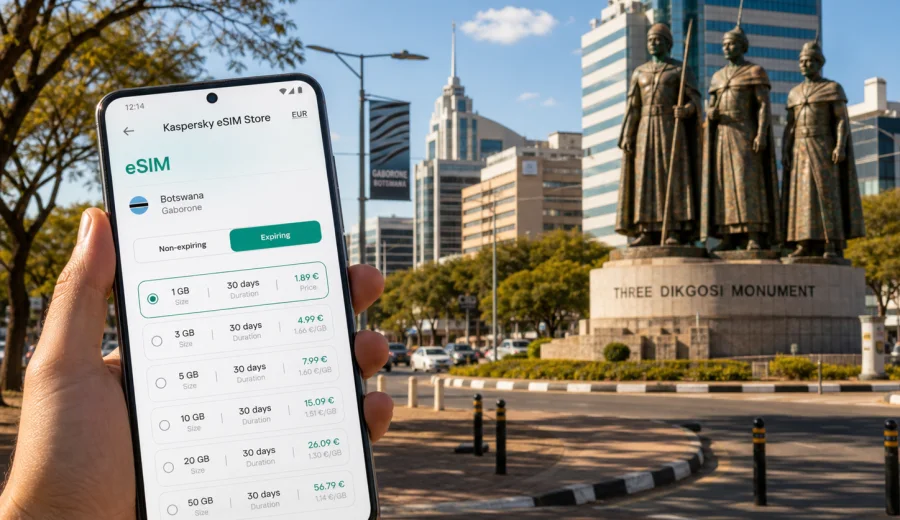
Gaborone eSIM: mobile connection and internet for a trip to Botswana's capital
Gaborone is a city where a reliable mobile connection matters from the first practical decision of the trip. You may land at Sir Seretse Khama International Airport, meet a driver, open the route to your hotel, confirm a meeting near the CBD, or check the address of a guesthouse in Broadhurst, Phakalane, Block 6, or the Fairgrounds area. In each of these moments, mobile internet is not a luxury. It is the tool that keeps the trip orderly.
For many visitors, Gaborone is a business destination, a stop before a safari route, a family visit, a university trip, or a short city break connected with South Africa. The city is spread out, sunny, and car-oriented. Distances between the airport, the government area, malls, offices, residential districts, and nature stops are not always convenient on foot. A working eSIM helps you use maps, messaging apps, transport updates, hotel confirmations, email, and online payments without waiting to find Wi-Fi.
This guide explains how to prepare mobile internet for Gaborone with eSIM, what to check before you travel, how much data you may need, and where connectivity is most useful during a stay in Botswana's capital.
Why eSIM is useful in Gaborone
Gaborone is not a city where every visitor follows the same route. One traveller may go straight from the airport to a hotel near the Central Business District. Another may stay near Riverwalk, travel to the University of Botswana, visit offices in the Government Enclave, and spend an afternoon at Mokolodi Nature Reserve. A third may use Gaborone as a stopover before driving toward the Kalahari, Maun, or the South African border.
The common need is simple: you need mobile internet before the trip becomes complicated. With eSIM, you can prepare a digital SIM profile in advance on a compatible phone and activate a suitable data plan when you need it. There is no physical SIM card to collect, and you do not have to make your first task in the city a search for a mobile shop.
Typical Gaborone travel moments where mobile internet helps:
- checking the route from Sir Seretse Khama International Airport to your hotel;
- messaging a host, driver, colleague, or tour organiser after landing;
- comparing travel times between the CBD, Riverwalk, Airport Junction, and Phakalane;
- opening a booking confirmation at reception;
- using maps for offices, malls, restaurants, and residential addresses;
- staying reachable on messaging apps during meetings or day trips;
- checking weather before walking up Kgale Hill or visiting outdoor sites;
- managing flight changes, gate updates, and online check-in before departure.
An eSIM is especially useful if your main SIM card is needed for calls or banking messages. Many phones allow you to keep the home SIM active for calls and SMS while using the eSIM for mobile data. Before relying on that setup, check your phone settings and the conditions of your home operator.
Arrival at Sir Seretse Khama International Airport
Sir Seretse Khama International Airport is north of central Gaborone. The drive into the city is usually straightforward, but your first hour can still involve several online tasks: confirming pickup details, checking the hotel address, sharing your arrival time, and opening navigation for the route into town.
If your eSIM is already installed before departure, arrival is easier. You can switch on the eSIM line, enable mobile data for it, and wait for the phone to register on a local partner network according to the plan conditions. On some devices, data roaming must be enabled for the eSIM line, even though you are using a prepaid travel data plan. Check this setting before assuming something is wrong.
For a smooth arrival in Gaborone:
1. Install the eSIM while you still have stable Wi-Fi at home or at your departure airport.
2. Save the QR code or activation details in case you need to reopen them.
3. Keep your hotel address and first route available offline as a backup.
4. After landing, set mobile data to the eSIM line.
5. Check that data roaming is enabled for the eSIM if the plan instructions require it.
6. Use a small test, such as opening a map or sending a message, before leaving the terminal.
This preparation is useful even if airport Wi-Fi is available. Public Wi-Fi can be crowded, limited, or inconvenient when you are handling luggage and transport. A prepared eSIM gives you a direct path to the information you need.
Where mobile internet helps most inside the city
Gaborone is practical rather than dense. Visitors often move between separated zones: the airport corridor, the CBD, government offices, shopping centres, hotels, university areas, and residential neighbourhoods. Mobile internet helps because addresses may be described by district, road, mall, plot number, or landmark, and it is easier to confirm the route in real time.
| Gaborone situation | Why mobile internet matters | Practical tip |
|---|---|---|
| Airport arrival | Route, pickup messages, hotel confirmation | Activate data before leaving the terminal |
| CBD and business meetings | Email, calendar updates, ride coordination | Keep maps and meeting addresses pinned |
| Riverwalk and malls | Restaurant searches, payments, messaging | Use Wi-Fi only when you trust the network |
| Phakalane or residential stays | Longer rides, gated addresses, host contact | Share live location with your driver if needed |
| Kgale Hill and outdoor stops | Weather, route checks, emergency contact | Download maps before walking |
| Day trips from Gaborone | Navigation, fuel stops, hotel messages | Carry a power bank for longer drives |
For business travellers, the most important benefit is continuity. You can move from a hotel lobby to a meeting room, from the Government Enclave to the CBD, and from lunch to an airport transfer without depending on separate Wi-Fi networks. For leisure travellers, the value is in navigation and coordination: finding a restaurant, changing plans, checking opening hours, or keeping in touch with a guide.
Choosing a data amount for Gaborone
Your ideal data amount depends on how you travel. Gaborone trips can be light on data if you mostly use hotel Wi-Fi, or heavier if you rely on maps, messaging, email, video calls, and mobile hotspot. An eSIM plan should match your actual use, not just the number of days in the city.
Use these scenarios as a starting point:
| Traveller profile | Typical use in Gaborone | Suggested data thinking |
|---|---|---|
| Short stopover | Maps, messages, flight details, one hotel night | A small plan may be enough |
| Business visit | Email, calendar, maps, document access, messaging | Choose more data for working hours outside Wi-Fi |
| Family or city break | Navigation, restaurant searches, photos, messaging | Moderate data gives more flexibility |
| Remote work add-on | Video calls, tethering, cloud files | Pick a larger package and monitor usage |
| Road trip from Gaborone | Navigation, route changes, booking updates | Allow extra data and download maps offline |
Avoid judging your needs only by the length of the stay. A two-day business trip with video calls can use more data than a week where you mostly connect at the hotel. Video streaming, cloud backups, automatic photo uploads, app updates, and hotspot use can consume data quickly. Before the trip, turn off automatic updates on mobile data and set messaging apps to download media only when you choose.
Device compatibility before you buy
Not every phone supports eSIM, and not every eSIM-capable phone is ready for every travel setup. Before you choose a plan, check your device. This is one of the most important steps, especially if you are travelling with a work phone, a phone bought through an operator, or an older model.
Check three things:
- your device supports eSIM;
- your device is not locked to one mobile operator;
- you know where to find SIM, cellular, or mobile data settings on your phone.
If you are using dual SIM, decide which line should handle mobile data, which line should remain available for calls or SMS, and whether your home operator charges roaming fees when the physical SIM stays active. eSIM plans for travel usually focus on mobile data. They do not normally include a local phone number, traditional voice calls, or SMS unless this is clearly stated in the selected plan conditions. For calls and messages in Gaborone, many travellers use internet-based messaging apps.
When to choose and install your eSIM
The best time to prepare eSIM for Gaborone is before you leave home. Installation needs a stable internet connection, and that is easiest on trusted Wi-Fi. Activation timing can depend on the selected plan, so read the plan details carefully before you turn it on. Some plans start validity when installed, while others start when they connect to a supported network.
Kaspersky eSIM Store is an app and website where you can quickly choose, arrange, and activate an eSIM with a suitable mobile internet plan for an international trip. For Gaborone, use the destination and plan details to compare data volume, validity period, and price before you travel. If Botswana is part of a wider regional route, it is especially important to check that the selected destination coverage matches your itinerary.
When you are ready to prepare mobile internet for the trip, you can view eSIM options for travel in Africa and choose a plan that fits your route and data needs. Review the plan conditions before purchase, including destination coverage, validity, data volume, and activation rules.
How to install eSIM for the trip
The exact installation path depends on your phone. Usually you add the eSIM from the device's mobile network settings, scan a QR code or follow the in-app instructions, then choose which line should handle mobile data. If you need platform-specific steps, use the Android installation guide or the iOS installation guide.
A practical installation checklist:
- use trusted Wi-Fi during installation;
- keep the phone charged;
- do not delete the eSIM profile after installation unless support instructions tell you to;
- name the line clearly, for example "Travel data";
- keep your home SIM available only for the services you need;
- test mobile data after arrival with a simple map or browser check.
If the eSIM does not connect immediately after landing, wait a few minutes, check that mobile data is assigned to the eSIM line, and confirm whether data roaming must be enabled for that line. Restarting the phone can also help it register correctly after a flight.
Gaborone districts and travel patterns
Gaborone's layout makes mobile data useful because the city is built around roads, malls, offices, and residential areas rather than a single compact old centre. You may hear references to the CBD, Main Mall, Government Enclave, Extension areas, Broadhurst, Block 5, Block 6, Block 8, Phakalane, Tlokweng, Mogoditshane, Fairgrounds, and Airport Junction. A visitor can move through several of these areas in one day.
In the CBD, mobile internet helps with meeting rooms, office addresses, restaurant searches, and calendar updates. Around Main Mall and the government area, it helps with walking routes and contact details. Near Riverwalk and Airport Junction, it is useful for ride coordination, shopping errands, and food delivery apps where available. In Phakalane or other residential zones, it can be important for finding the correct gate, plot, or pickup point.
For hotel stays, check whether your accommodation gives clear map coordinates, not only a street or area name. If you are arriving after dark, save the route before you leave the airport and share arrival updates with the hotel or host. If you plan to use a taxi, hotel transfer, or arranged driver, mobile internet makes it easier to confirm the vehicle and share your location without long calls.
Transport, navigation, and offline backups
Gaborone transport is easiest when you combine preparation with live navigation. Hotel transfers and hired cars are common for visitors. Taxis and local minibuses may also be part of the trip, depending on your route and comfort level. If you drive, mobile data helps with road choices, fuel stops, and updated travel times. If someone else drives, it helps you track whether the route is going where you expect.
Do not rely only on live connectivity. Download offline maps for Gaborone and the surrounding area before the trip. Offline maps reduce data use and give you a backup if coverage is weak indoors, on the edge of the city, or on a road outside town. Keep important addresses copied into your notes app, including the hotel, first meeting location, airport, and any day-trip destination.
A sensible Gaborone navigation setup includes:
- offline maps for the city and nearby roads;
- saved hotel and airport pins;
- screenshots of booking confirmations;
- a charged power bank for day trips;
- the eSIM installed before departure;
- one trusted contact who knows your first arrival plan.
Business trips and short stays
Gaborone is a frequent destination for government, finance, mining, education, development, and regional business travel. Business visitors often move between hotels, offices, meeting rooms, restaurants, and the airport in one compact schedule. Save meeting addresses, download key documents, and use mobile data for coordination while reserving large file transfers or video calls for trusted Wi-Fi when possible.
For a one-night stopover, the value of eSIM is not high data volume. It is the ability to solve small travel problems quickly: contact the driver, open the hotel route, check the next flight, find dinner nearby, and send an update without searching for a shop or relying on a public network.
Day trips and routes from Gaborone
Gaborone can be a base for short outings. Travellers may visit Mokolodi Nature Reserve, Kgale Hill, Gaborone Game Reserve, Gabane, Manyana, or routes toward Lobatse and the South African border. These trips are close enough to feel simple, but mobile planning still matters.
Before leaving the city, check your route, download offline maps, confirm opening times through your booking or organiser, and keep enough battery for the return. If you are travelling with a guide or driver, agree on pickup points and timing before you enter an area where signal may be less consistent. Mobile data can help with navigation, but it should not be your only safety plan for outdoor stops.
For short trips from Gaborone, use mobile internet for:
- route checks before departure;
- messaging the driver or host;
- weather updates before outdoor walks;
- sharing your location with a trusted contact;
- checking return traffic;
- changing restaurant or hotel plans after the outing.
FAQ: eSIM and mobile internet in Gaborone
Can I install eSIM before flying to Gaborone?
Yes. In most cases, installing before departure is the most convenient option because you can use stable Wi-Fi and avoid setup pressure after landing. Check the selected plan's activation rules so you understand when validity begins.
Will eSIM give me a Botswana phone number?
Usually, travel eSIM plans are designed for mobile data. They do not normally include a local phone number, traditional calls, or SMS unless the selected plan clearly says so. For calls and messages, you can use internet-based apps.
Is eSIM useful if my hotel has Wi-Fi?
Yes, because the most important moments often happen outside the hotel: airport arrival, transport, meetings, restaurants, malls, and day trips. Hotel Wi-Fi is helpful, but it does not cover movement around the city.
How much data do I need for a few days in Gaborone?
Light users may need only a small package for maps and messaging. Business travellers, hotspot users, and anyone making video calls should choose more data. Offline maps and disabled automatic backups can reduce usage.
What should I do if mobile data does not start after landing?
Check that the eSIM line is turned on, mobile data is assigned to it, and data roaming is enabled if required by the plan instructions. Wait a few minutes, restart the phone if needed, and review the installation steps.
Final checklist before your Gaborone trip
Before travelling, make sure your mobile internet plan matches the way you will use the city. A person staying near the CBD for meetings has different needs from someone driving to Mokolodi, visiting family in a residential district, or using Gaborone as the first stop on a longer Botswana route.
Use this final checklist:
- confirm that your phone supports eSIM and is not operator-locked;
- choose a data volume that fits maps, messaging, work, and day trips;
- install the eSIM on trusted Wi-Fi before departure;
- read the activation and validity rules;
- save offline maps for Gaborone and nearby roads;
- keep hotel, airport, and meeting addresses available offline;
- decide whether your home SIM should stay active for calls or SMS;
- carry a charger or power bank for long days.
Gaborone is easier to navigate when your mobile connection is ready before the first ride from the airport. With Kaspersky eSIM Store, you can choose and arrange an eSIM plan for mobile internet in an international trip, then manage the setup through the app or website. Before you fly, prepare an eSIM option for your route in Africa, check the plan details carefully, and arrive in Botswana's capital with your maps, messages, and travel plans within reach.