Travel connectivity guide
Gabu eSIM Guide: Mobile Data for Your Trip
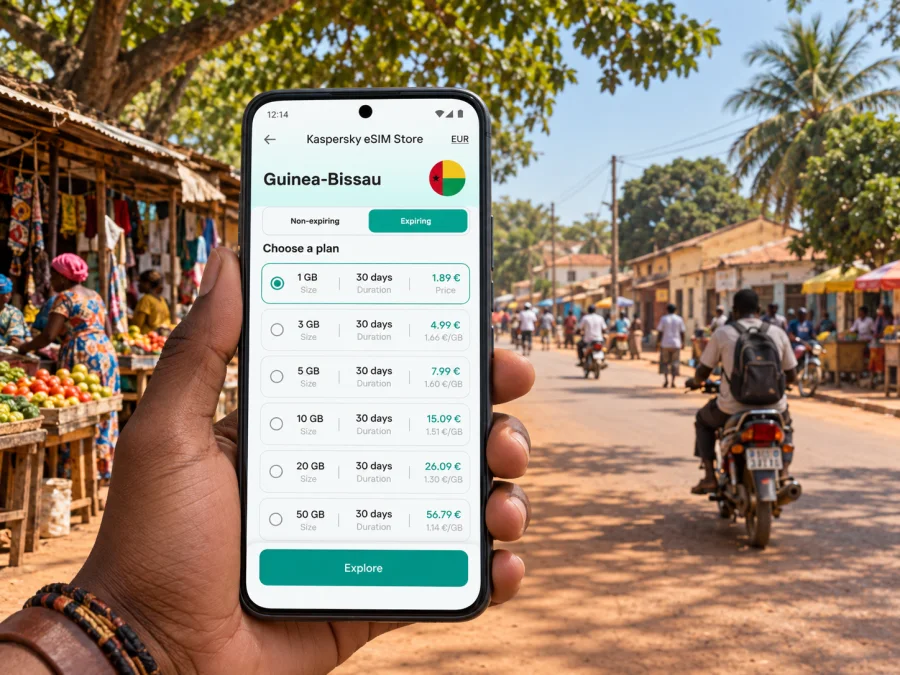
Gabu eSIM: a practical guide to mobile connection and internet
Gabu is a regional centre in eastern Guinea-Bissau, and a visit here often involves more than moving between airport, hotel and a few central sights. You may arrive overland from Bissau, continue toward nearby towns or border areas, meet colleagues in the city, or use Gabu as a base for local errands. In each case, a working mobile internet connection makes it easier to check arrangements, read a map, contact a host and adapt when plans change.
An eSIM can be useful if your phone supports it and you want to prepare mobile data before travelling. It is a digital SIM profile installed on a compatible device, so there is no need to handle a separate plastic card for that data plan. Before choosing one, check the destination, data allowance, validity period, activation conditions and supported networks shown for the specific offer. Availability and performance depend on the plan, local network coverage, your device and conditions at the time.
Plan for the way you will reach Gabu
Gabu does not have the same arrival pattern as a large international hub. Many international itineraries begin in Bissau, followed by a separate road journey east; others approach the region overland from elsewhere in Guinea-Bissau or nearby countries. Confirm the details of your own itinerary with the transport provider or host. Do not assume that a flight, shared vehicle or onward connection will run at a particular time unless you have confirmed it directly.
For a journey that includes several stages, mobile data can help with practical tasks at each hand-off: opening a saved reservation, messaging the person meeting you, checking the next location and sharing an updated arrival estimate. Keep the key information available offline as well. A phone battery, signal or road schedule can become a constraint, particularly when you are outside the main urban area.
Before leaving for Gabu, save or write down:
- the accommodation name and its location pin;
- a local contact number and an agreed meeting point;
- the address or description of your next stop;
- transport arrangements, including any pickup instructions;
- a backup route or contact if the first plan changes.
If you arrive in Bissau first, treat the transfer to Gabu as a separate leg. Check where your onward transport departs from, how you will reach that point, and how much time you need between arrival and departure. When a driver or host is meeting you, send the terminal or meeting-point details in advance and confirm the final plan shortly before setting off. A data connection is helpful for messages and live map searches, but it should not be the only place where your arrangements are stored.
Getting oriented after arrival
Start with the exact location of your accommodation or first appointment rather than searching only for “Gabu.” A city name may return a broad area, while a precise pin helps distinguish a hotel, business, market or meeting point. Ask your host to send a map pin or a short written description, and compare it with the address you have. If the pin appears imprecise, confirm a recognizable nearby landmark before you begin moving.
Once you have reached the city, take a moment to orient yourself before setting out. Check where you are, identify the destination, then decide whether walking or arranging local transport makes sense for the distance, time of day, weather and what you are carrying. In a compact town centre, a short walk may be convenient; for an unfamiliar route, late arrival or a trip with luggage, ask your accommodation or local contact about a suitable option. Local advice is more useful than assuming that a map alone tells you which streets or paths are appropriate.
A simple arrival routine keeps the first trip manageable:
- Confirm that you have reached the right accommodation or meeting point.
- Send a short arrival message to your contact.
- Save the place in your map app and note a nearby reference point.
- Check the route to your next planned stop while you have time and battery.
- If directions are unclear, ask your host before leaving rather than trying to solve everything while in transit.
Keep maps useful, not dependent on a continuous connection. If your map app supports offline areas, download the part of the region you expect to visit while connected to reliable Wi-Fi. Save important pins, and take a screenshot of any route or address that will matter later. Offline maps may not show current conditions or every small road, so combine them with local guidance and confirm a driver understands the destination.
Moving around the city
Gabu is a regional town rather than a city with a complex public-transit network for visitors to navigate. Day-to-day movement may involve walking, a vehicle arranged locally or a shared form of transport, depending on the route and circumstances. Ask your hotel, host or meeting organizer what is practical for the specific trip. Names and pickup points can be easier to clarify by sharing a pin, but agree on the fare and destination with the driver before setting off where relevant.
| Situation | Useful preparation | What to confirm locally |
|---|---|---|
| Hotel to a central errand | Save the destination pin and hotel contact | Walking conditions or pickup point |
| Meeting across town | Share the pin and planned arrival time | The best entrance and a recognizable landmark |
| Journey to a nearby settlement | Keep the destination name written down | Vehicle, departure time and return plan |
| Late arrival with bags | Message the host before moving | Who is meeting you and exactly where |
| Border-area excursion | Save the route and key contacts offline | Current route, documents and crossing arrangements |
When you have the route and length of stay in mind, you can review eSIM options for Guinea-Bissau and compare the conditions displayed for each available offer. Kaspersky eSIM Store is an app and website that helps travellers choose, arrange and activate an eSIM with a suitable data plan for an international trip. Read each offer carefully; coverage, supported networks and terms depend on the selected plan.
For any trip beyond the central area, allow flexibility. A route that looks short on a screen can take longer than expected because of the road, a stop along the way or a change in transport. Check whether your driver expects to wait or return later, and agree how you will reconnect if the plan changes. When visiting a work site, farm, market or community outside the centre, share your destination and expected return time with someone you trust.
Gabu is close to Guinea-Bissau’s eastern borders, and onward travel can involve a different country or a remote area. Treat a cross-border trip as a separate itinerary: confirm the route, entry requirements, transport and communications arrangements in advance. A Guinea-Bissau data plan should not be assumed to include service in another country; check the destination list and conditions for the exact eSIM plan before you travel. Keep offline access to your border and accommodation details in case mobile data is unavailable during part of the trip.
Choose mobile data around your actual itinerary
The right amount of data depends on what you expect to do, not on a generic label such as “city break.” A short visit with saved directions and occasional messages has different needs from several days of navigation, video calls and photo sharing. Estimate the activities that matter to you, then compare the listed allowance and validity period with the length of your stay. Review whether the plan covers the whole country and whether its conditions mention any limits that affect your use.
For a Gabu visit, common data uses include:
- opening maps and checking a destination before leaving;
- messaging a driver, host, colleague or family member;
- receiving itinerary updates and confirming a pickup;
- looking up practical information while moving between appointments;
- using work tools or joining a call when a stable connection is available;
- sharing photos or backing up files when connected to Wi-Fi.
Maps and messages generally require less data than frequent video streaming, large downloads or automatic cloud backup. If your device is set to upload photos over mobile data, review that setting before the trip. Download entertainment, documents and offline map areas over Wi-Fi when possible. These habits make it easier to keep your mobile allowance for things you need while moving around.
A useful way to compare plans is to ask four questions:
- Destination: Is Guinea-Bissau listed for this exact plan, and does it suit any onward travel?
- Duration: Will the validity period cover your arrival, stay and departure dates?
- Data: Does the allowance match your expected maps, messages, work and media use?
- Activation: When does validity begin, and what steps are required to start using the plan?
Prepare your phone before the trip
An eSIM works only when the device supports eSIM and is not restricted in a way that prevents adding another mobile profile. Check your phone’s settings or manufacturer information before purchasing, and check whether your device supports eSIM. If you use a work-managed phone, ask the administrator whether you are allowed to install an additional profile. Also confirm that you can access the email address or account used for the order while travelling.
Complete the setup when you have a stable internet connection and enough time to follow the instructions. Keep your home SIM active if you rely on it for calls or one-time codes, and check which line is selected for mobile data after installing the travel profile. Menu names differ by device and operating-system version, so follow the prompts on your screen and use the instructions for your platform:
Use this setup order: review the plan terms; install the profile as instructed; label the travel line; select it for mobile data when ready; apply any required settings; test the connection before relying on it.
Installation and activation are not always the same step. Adding a profile to your phone does not necessarily mean that its validity period has begun; check the exact terms shown with the plan. Avoid deleting an installed profile unless the instructions or support team tell you to do so, because reinstalling an eSIM may not always be possible. If a setting does not work as expected, pause and review the plan instructions before changing multiple lines or network options.
If mobile data does not connect
First check that the travel eSIM is enabled and selected for mobile data. Review the plan’s activation and roaming instructions, then try again from another location. If the issue continues, check the displayed balance or validity and contact the support channel listed with your order. Keep your accommodation address and essential contacts available offline while you troubleshoot.
A practical packing and departure checklist
Before leaving, check that you have:
- [ ] Confirmed the arrival point, onward transport and meeting details.
- [ ] Saved accommodation, pickup and appointment locations.
- [ ] Checked device compatibility, data allowance and activation terms.
- [ ] Installed the eSIM using the instructions for your device.
- [ ] Saved maps, bookings and essential contacts for offline use.
- [ ] Packed a charging cable or power bank.
- [ ] Checked border requirements separately if leaving Guinea-Bissau.
On arrival, make sure you can open the accommodation pin and contact your host. If not, use Wi-Fi or ask a local contact for help before continuing.
Common questions
Is Gabu an international arrival airport?
Plan using the airport and transport details confirmed for your itinerary. International visitors commonly arrive through Bissau and continue by road, but verify your own onward arrangements with the provider or host.
Can I use an eSIM from Bissau to Gabu?
A plan that includes Guinea-Bissau may help with maps and messages if your device supports eSIM and a local network is available along the route. Coverage can vary, so save key directions and contacts offline.
Will my plan work across a border?
Check the exact plan’s destination list and conditions. Do not assume a Guinea-Bissau plan includes another country; prepare offline information for any section without service.
Should I install the eSIM before arrival?
Follow the plan’s instructions and check when validity begins. Installing over Wi-Fi before departure may give you time to complete setup, but some activation steps may be intended for the destination.
Make the connection part of your travel plan
For a visit to Gabu, the most useful preparation is practical: keep your route and accommodation details close at hand, confirm transport locally, save key map locations offline and choose a data plan that matches your actual time in Guinea-Bissau. Leave room for coverage and schedule changes, especially when travelling outside the town centre or onward toward a border.
Before departure, use Kaspersky eSIM Store to choose an eSIM plan for your trip to Guinea-Bissau. Review the current allowance, validity and activation conditions, then follow the setup instructions for your device. With a compatible phone and a clear backup plan, mobile internet can support the practical parts of arriving, getting around and staying in touch during your time in Gabu.


