
Travel connectivity guide
Gadong eSIM for Mobile Internet in Brunei
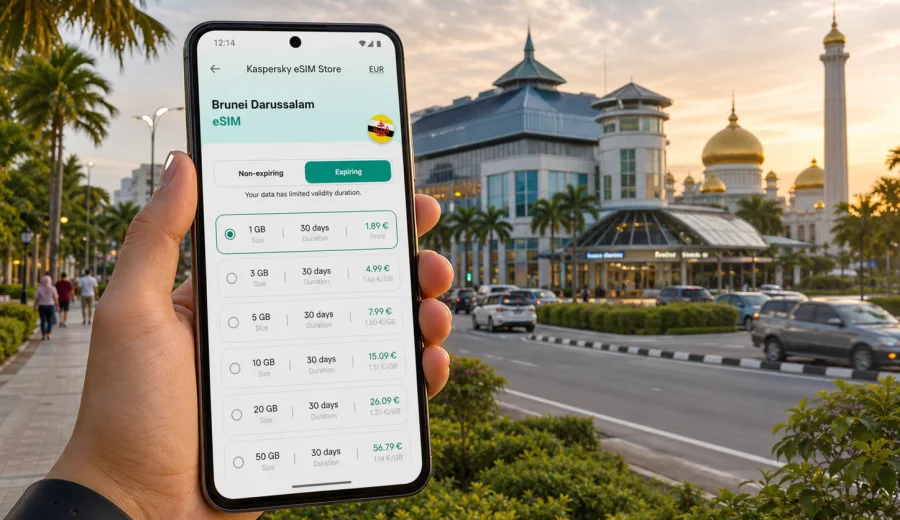
Gadong eSIM: mobile connection and internet for your Brunei trip
Gadong is one of the most practical places to base yourself in Brunei Darussalam. It is close to Bandar Seri Begawan, linked to business districts such as Kiulap and Kiarong, and useful for shopping, food, hotels, meetings, and short city transfers. It is where many visitors check into a hotel, find dinner after arrival, open a map, order transport, message colleagues, and plan the next move across Brunei.
That is why mobile internet matters from the first hour. A working eSIM can help with maps, ride-hailing apps, hotel confirmations, messenger calls, mobile banking checks, translation tools, and flight updates without looking for a physical SIM card counter.
This guide focuses on using eSIM for Gadong: arrival, transport, local movement, hotels, business trips, stopovers, and trips from the city area. It also explains what to check before you choose a data plan for Brunei Darussalam.
Why eSIM is useful in Gadong
Gadong is a compact but busy urban area. A typical visitor may move between a hotel, The Mall area, restaurants, offices, a mosque visit, central Bandar Seri Begawan, and the airport within a short stay. Mobile data keeps these small decisions easy.
You may need internet in Gadong when you:
- confirm your hotel address and check-in details after landing;
- use maps between Gadong, Kiulap, Kiarong, Beribi, and Bandar Seri Begawan;
- book transport or coordinate pickup points;
- find food courts, cafes, shops, and late opening places;
- manage email, calls over messenger apps, and cloud documents on a business trip;
- plan a half-day visit to Kampong Ayer, the city centre, Jerudong, Muara, or Temburong.
An eSIM is not a replacement for every local telecom service. In most travel scenarios it is mainly a data connection. Voice calls and SMS are usually not included unless the conditions of a specific tariff say otherwise. For many travellers, that is enough: messaging apps, maps, email, QR tickets, and browser searches work over mobile internet.
Arrival: from Brunei International Airport to Gadong
Brunei International Airport is the usual arrival point for visitors staying in Gadong. The trip is short by regional standards, but the first few minutes after landing can be inconvenient if your phone has no data. You may want to check a hotel map, contact your host, load a ride app, or confirm whether your accommodation is in Gadong, Kiarong, Kiulap, or another nearby area.
If you install an eSIM before travel, you can switch on the correct mobile data line after arrival and avoid relying only on airport Wi-Fi. If you activate after landing, make sure you still have internet access for setup.
For a smooth arrival, prepare these items before your flight:
- a saved offline map of Bandar Seri Begawan and Gadong as a backup;
- your eSIM QR code or app access details;
- your passport and travel documents stored offline;
- a power bank if you will use maps and messaging during transfers;
- nearby area names, because some addresses may be described as Gadong, Kiarong, or Kiulap.
The goal is simple: when you step out of the airport, your phone should already be ready for maps, messages, and transport coordination.
Gadong travel scenarios where mobile data helps
Gadong is often used as a practical base rather than a single sightseeing destination. Your data needs depend on how you will use the area.
| Travel scenario | Why internet helps | Practical eSIM note |
|---|---|---|
| First evening in Gadong | Maps, restaurant searches, hotel messages, ride pickup points | A small data plan may be enough for a short stop |
| Business meetings | Email, cloud documents, calendar updates, messenger calls | Choose more data if you will tether a laptop |
| Stopover in Brunei | Airport updates, quick city route, transport coordination | Install before travel to save time after landing |
| Longer stay | Daily maps, messaging, work tasks, videos, app updates | Compare data volume and validity period carefully |
| Trips from Gadong | Routes to Bandar Seri Begawan, Jerudong, Muara, or Temburong | Confirm the tariff is for Brunei Darussalam or a suitable region |
Public Wi-Fi can be useful in hotels, cafes, and shopping areas, but it is not always available exactly when you need it. Mobile internet is most valuable in the gaps: outside the hotel lobby, during pickup, while walking to dinner, or when you need to confirm a change quickly.
How to estimate data for a Gadong trip
You do not need to calculate every megabyte, but it helps to match the plan to your actual behaviour. Maps and messages use much less data than video calls, hotspot sharing, or large uploads.
Use this rough planning approach:
1. Count your days in Brunei Darussalam, not only nights in Gadong.
2. Decide whether the eSIM is for one phone only or also for tethering.
3. Estimate how often you will use maps, ride apps, email, and cloud files.
4. Avoid large app updates, cloud backups, and video streaming on mobile data if you choose a small plan.
5. Check the tariff validity period, because unused data may not help if the plan expires before the end of the trip.
Choosing an eSIM tariff for Gadong and Brunei Darussalam
For a city article, the correct tariff direction is the country where the city is located. Gadong is in Brunei Darussalam, so you should look for a plan that covers Brunei Darussalam or a broader region that explicitly includes it. Do not choose a plan only because it mentions a nearby country or a regional name. Always check the destination, data volume, validity period, and activation conditions.
When you compare options, focus on details that affect the trip:
- Destination: the tariff should match Brunei Darussalam or the region you will actually visit.
- Data volume: choose enough for maps, messaging, work, and any hotspot use.
- Validity: match the duration to your stay, including arrival and departure days.
- Activation rules: check when validity starts and whether you must activate after arrival.
- Device support: confirm that your phone supports eSIM and is not locked by an operator.
If you want to prepare before departure, Kaspersky eSIM Store helps you choose and activate an eSIM with a suitable data tariff for international travel. For Gadong, use the Brunei Darussalam destination page to choose an eSIM tariff for your trip to Gadong and check the conditions before purchase.
Kaspersky eSIM Store should be understood as an app and website for selecting, arranging, and activating an eSIM tariff for mobile internet during foreign travel. The actual connection conditions depend on the selected tariff, device settings, and local mobile network availability.
Local movement: Gadong, Kiulap, Kiarong, and Bandar Seri Begawan
Gadong works well as a base because many places are nearby by car. Mobile data helps you compare route times, message a driver, check the exact entrance to a building, and avoid standing outside while trying to load a map.
Useful local movement patterns include:
- Gadong to Bandar Seri Begawan: for waterfront areas, Kampong Ayer access points, museums, and central landmarks.
- Gadong to Kiulap: for cafes, restaurants, offices, and informal meetings.
- Gadong to Kiarong: for hotels, business addresses, and nearby commercial areas.
- Gadong to the airport: for early departures, pickup coordination, and flight status checks.
Keep a small offline backup too. Save the hotel address and a screenshot of your booking. Mobile data is convenient, but travel planning is better when one missing signal or low battery does not stop the whole route.
Hotels and business trips in Gadong
Gadong is convenient for business travellers because it is close to commercial districts and not far from the airport. A working data line helps you confirm meeting locations, update your calendar, use messenger calls, and check documents without asking for a Wi-Fi password at every stop.
For business travel, consider a larger data plan if you expect to:
- use your phone as a hotspot for a laptop;
- open cloud presentations or large attachments;
- join video meetings or long messenger calls;
- upload photos or scanned documents;
- keep navigation running while moving between meetings.
Hotel Wi-Fi is useful in the room. Mobile data is useful when you are checking out, waiting outside, or changing meeting locations.
Installing and activating your eSIM
The best time to install an eSIM depends on your device and tariff conditions. Many travellers install the eSIM before departure while they still have stable home internet, then activate mobile data for that eSIM after arriving in Brunei Darussalam.
Before you buy, check your device to confirm eSIM support. Your phone should also be unlocked for mobile network use. Some older or regional models may not support eSIM even if a similar model name does.
The basic setup flow is:
1. Choose a tariff for Brunei Darussalam or a suitable region.
2. Complete the purchase and open the eSIM details in your profile, app, or email.
3. Install the eSIM profile using the provided steps or QR code.
4. Keep your primary SIM for calls if you need it, but set mobile data to the eSIM line for travel data.
5. After arrival, turn on the eSIM line and data roaming for that eSIM if the instructions require it.
6. Test mobile data with a light page or map search before leaving the airport or hotel.
For device-specific setup, use the Android installation guide or the iOS installation guide. Menus and labels can vary by model and operating system version.
What to check before using eSIM in Gadong
A short checklist prevents most avoidable problems.
- Device compatibility: your smartphone or tablet must support eSIM.
- Operator lock: the device should not be locked to one mobile operator.
- Correct destination: the tariff should cover Brunei Darussalam or the correct region.
- Validity period: the plan should last through the final day of your stay.
- Data volume: allow extra data for maps, calls over messenger apps, and work tasks.
- Activation timing: check when the plan starts and whether it starts at installation or first network use.
- Roaming data setting: some eSIM profiles require data roaming to be enabled for that eSIM line.
- Primary number: if you need SMS from your bank or airline, keep your usual SIM available according to your phone settings and roaming conditions.
Do not delete the eSIM profile after activation unless the instructions say it is safe. Some profiles cannot be reinstalled or restored after removal.
Short stopover plan for Gadong
If you have only a short stop in Brunei, mobile data can make a city visit easier. Gadong is useful for food, shopping, and a practical break before returning to the airport or continuing to central Bandar Seri Begawan.
A simple stopover plan can look like this:
1. Install the eSIM before travel.
2. Save your airport, hotel, and Gadong destination offline.
3. After landing, activate mobile data for the eSIM and test maps.
4. Go to your hotel or first stop in Gadong.
5. Use mobile data for transport, opening hours, and messaging.
6. Keep enough battery and data for the airport return.
For trips from Gadong to Bandar Seri Begawan, Jerudong, Muara, or Temburong, keep essential addresses and booking details offline as a backup.
Practical ways to save data
Even if your plan has enough data, these habits help avoid waste:
- download offline maps for Brunei before the trip;
- disable automatic app updates on mobile data;
- pause cloud photo backup until Wi-Fi is available;
- close hotspot sharing when your laptop no longer needs it;
- check your remaining data in the app or profile if this option is available.
These steps are especially useful when one phone handles maps, messages, tickets, and work at the same time.
Quick answers about eSIM in Gadong
Is eSIM useful for Gadong if my hotel has Wi-Fi?
Yes. Hotel Wi-Fi helps in the room, but mobile data helps during transfers, route changes, restaurant searches, and meetings.
Do I need a Gadong-specific eSIM plan?
Usually no. Choose a tariff that covers Brunei Darussalam or a suitable broader region.
Can I use eSIM for normal phone calls and SMS?
Travel eSIM tariffs are usually focused on mobile data. Calls and SMS are not included unless the selected tariff conditions say so.
Should I install the eSIM before flying to Brunei?
Installing before departure is often more convenient. Check the tariff rules so you understand when validity starts.
Can I keep my usual SIM active?
On many dual-SIM phones, yes. Settings and roaming charges depend on your device and home operator.
What if mobile data does not work after arrival?
Check that the eSIM line is turned on, mobile data is assigned to the eSIM, and data roaming is enabled for that eSIM if required. Then restart the phone or follow the support instructions.
Choose mobile internet for your Gadong trip
Gadong is a practical base for Brunei Darussalam: close to the airport, useful for hotels and meetings, and convenient for moving into Bandar Seri Begawan or nearby districts.
Before you travel, confirm that your device supports eSIM, choose a data volume that fits your stay, check the validity period, and keep installation instructions available. When you are ready, use Kaspersky eSIM Store to prepare an eSIM tariff for mobile internet in Brunei Darussalam and set up your phone for Gadong before you need data on the road.