
Travel connectivity guide
Gambia eSIM: mobile internet for travel
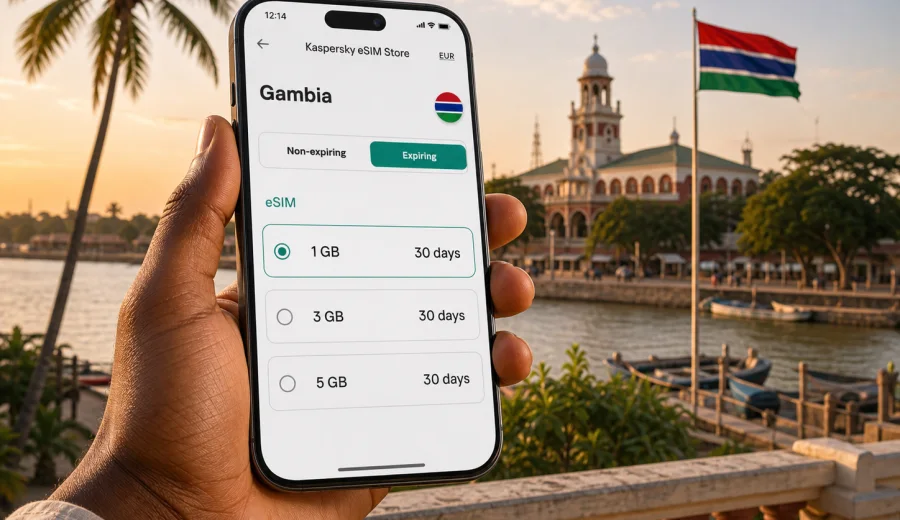
eSIM for Gambia: mobile connection and internet for your trip
Planning mobile internet for Gambia is easier when you treat it as part of the trip, not as a small task to solve after landing. A working connection helps with airport pickup, hotel messages, maps, ride coordination, restaurant searches, online banking checks, and staying in touch with family or colleagues. An eSIM can be a practical option because it lets you prepare a data plan without looking for a physical SIM card shop after arrival.
Gambia is a compact country, but travel scenarios can be very different. Some visitors stay around Banjul, Kololi, Kotu, Bakau, or the Senegambia area. Others move between the coast, river trips, nature reserves, business meetings, and family visits. Your data needs may change by day: a light city break can use little data, while a work trip with navigation, video calls, and cloud documents needs more careful planning.
Kaspersky eSIM Store is an app and website where you can choose, arrange, and activate an eSIM with a suitable data plan for mobile internet during an international trip. It does not replace a local mobile operator, and the exact conditions depend on the selected plan. The useful part for travelers is the clear preparation flow: check your device, choose the destination, review the data allowance and validity period, install the eSIM, and use it for mobile data when needed.
Why mobile internet matters in Gambia
Many travel moments in Gambia depend on quick access to online information. You may need to confirm a transfer from Banjul International Airport, message a hotel near Kololi, check a map before leaving Serrekunda, translate a menu, or share a location with a driver. Public Wi-Fi can be useful in hotels and cafes, but it may not be available exactly when you need it, especially during transit or away from your accommodation.
An eSIM helps reduce that uncertainty. You can prepare the mobile data setup before the trip and keep your physical SIM in your phone if your device supports dual SIM use. This is especially useful when you want to keep your main number available for banking alerts, messengers, or important calls while using a separate eSIM profile for data abroad.
For Gambia, a practical data plan is less about one dramatic feature and more about small daily tasks:
- opening maps and saved locations during transfers;
- checking hotel, tour, or meeting confirmations;
- using messengers for calls and texts through mobile data;
- sharing documents or photos when Wi-Fi is weak;
- using online translation in shops, transport, or restaurants;
- checking flight updates before leaving for the airport;
- keeping access to email during business travel.
The value of eSIM is preparation. You do not have to search for a SIM card counter immediately after arrival, compare unfamiliar local offers while tired, or remove your home SIM card from the phone. You still need to check device compatibility and plan conditions, but the overall path is simpler than arranging everything from scratch at the destination.
What an eSIM does and does not include
An eSIM is a digital SIM profile installed on a compatible smartphone or tablet. For travel, it is usually used for mobile internet. It can help you get online without inserting a physical SIM card, but it should not be treated as a complete replacement for all mobile services.
In most travel scenarios, an eSIM data plan is used for:
| Travel need | How eSIM can help |
|---|---|
| Maps and navigation | Use mobile data for routes, saved places, and live traffic where supported by your apps. |
| Messaging | Use internet-based apps to contact hotels, drivers, colleagues, and family. |
| Bookings | Open confirmation emails, reservation apps, and payment notifications. |
| Work | Check email, join short calls, and access documents if your data allowance is enough. |
| Safety and coordination | Share your location or contact someone if plans change. |
What you should check before relying on an eSIM:
- whether the selected plan includes data only or other services;
- whether ordinary voice calls and SMS are included, if you need them;
- when the validity period starts;
- whether data roaming should be enabled for the eSIM profile;
- whether top-up is available for the selected plan;
- whether your phone is unlocked and supports eSIM.
If your plan is data-only, you can still use messengers, email, maps, and travel apps through mobile internet. For traditional calls and SMS, check the conditions of your home SIM and the selected eSIM plan before the trip.
How to estimate data for a trip to Gambia
There is no single correct data allowance for every traveler. A person staying mostly at a hotel with reliable Wi-Fi may need much less mobile data than someone moving around daily, working remotely, or sharing video. The best estimate starts with your real habits.
Use this simple planning guide:
| Trip style | Typical mobile data behavior | What to consider |
|---|---|---|
| Short leisure stay | Maps, chats, email, light browsing | A smaller package may be enough if hotel Wi-Fi covers heavy use. |
| Beach and city trip | Maps, ride coordination, photos, restaurant searches | Choose enough data for daily movement between coastal areas and Banjul. |
| Business visit | Email, files, video meetings, hotspot use | Select a larger allowance and avoid depending only on public Wi-Fi. |
| Family visit | Messaging, video calls, sharing photos | Video can use data quickly; plan with extra margin. |
| Multi-country route | Gambia plus another country in the region | Check whether a country, regional, or broader plan fits the route. |
Video calls, cloud backups, app updates, and automatic photo syncing can use a lot of data. Before departure, download offline maps, update apps over home Wi-Fi, and adjust cloud backup settings. This keeps your travel data for tasks that matter during the trip.
If you are unsure, choose a plan by combining three factors: trip length, expected daily use, and availability of trusted Wi-Fi at your accommodation. It is usually better to leave a modest data buffer than to plan for the exact minimum, especially if you need your phone for work, banking, or transport coordination.
Where eSIM is useful during a Gambia itinerary
Gambia's size makes it possible to combine several types of travel in one trip. You might land at Banjul International Airport, stay near the coast, visit markets or business locations around Serrekunda, take a river excursion, or spend time in smaller towns. Your connection needs can shift quickly from relaxed browsing to urgent coordination.
Common moments when mobile data helps:
- Arrival at Banjul International Airport: message your driver, check the address, open booking details, or contact your hotel.
- Coastal stays around Kololi, Kotu, Bakau, and Senegambia: use maps, restaurant searches, ride apps where available, and messaging.
- Banjul and Serrekunda errands: keep access to addresses, banking notifications, and translation tools.
- Day trips and nature visits: save offline information, but keep mobile data available for updates and coordination.
- Work trips: use the eSIM for mobile data while keeping your primary SIM active for important messages.
Coverage and speed can depend on local networks, device settings, location, building materials, congestion, and the selected plan. Avoid planning around a promise that any mobile connection will behave the same in every place. A better approach is to prepare the eSIM, keep essential information downloaded offline, and use mobile data for the parts of the journey where it adds the most control.
Before you choose a plan
Start with the device, not the destination. If the phone cannot use eSIM, no travel plan will help. Device support can vary by model, region of sale, and carrier lock status. Before buying a plan, check your device and confirm that eSIM is available in your phone settings.
Then review these details:
1. Destination: make sure the selected plan covers Gambia or the region that matches your route.
2. Data allowance: choose enough GB for maps, messaging, browsing, and any work tasks.
3. Validity period: match the plan duration to your travel dates, including arrival and departure days.
4. Activation rules: check when the plan starts and whether it activates after installation or after connecting to a supported network.
5. Device lock: confirm your phone is not locked to one carrier.
6. Roaming data setting: some eSIM profiles require data roaming to be enabled for the eSIM line.
7. Hotspot needs: if you plan to share data with a laptop or another device, check whether this is supported by the selected plan.
This checklist is useful even for experienced travelers. Most eSIM issues happen because one of these details was skipped: the phone does not support eSIM, the device is locked, the wrong line is selected for mobile data, or the validity period does not match the trip.
A practical way to prepare mobile internet for Gambia
Once you know your dates and device status, the preparation flow is straightforward. Kaspersky eSIM Store helps you choose a suitable eSIM data plan for an international trip, review the main plan conditions, and install the eSIM on a compatible device. If you are ready to compare available options, you can choose an eSIM plan for your trip to Gambia before departure.
The benefit of doing this early is not only convenience. It gives you time to read the plan details, confirm the installation steps, and avoid solving mobile internet under airport pressure. If your itinerary changes, you can still review whether your selected data allowance and validity period remain suitable.
Keep the setup realistic:
- install the eSIM while you still have a stable internet connection;
- keep the QR code or installation details accessible until setup is complete;
- label the eSIM profile clearly, for example "Gambia data";
- set your regular SIM and eSIM lines intentionally;
- disable heavy automatic downloads on mobile data;
- keep hotel addresses, tickets, and emergency contacts available offline.
If you are traveling with family or colleagues, do not assume one person's phone will cover everyone. Each traveler who needs independent access should check device compatibility and choose a plan that matches their own usage. Shared hotspot use can be convenient, but it drains battery and data faster.
How to install and activate eSIM
Installation should be done calmly, preferably before you need the connection. The exact screens vary by phone model and operating system, but the general sequence is similar.
1. Check that your device supports eSIM and is not carrier locked.
2. Choose the plan for Gambia or the route that matches your trip.
3. Complete the order flow and open the installation details.
4. Add the eSIM profile using the QR code or manual details.
5. Name the profile so you can recognize it later.
6. Select the eSIM for mobile data when you are ready to use it.
7. Enable data roaming for the eSIM profile if the instructions for your plan require it.
8. Wait a few minutes for connection after arrival or activation.
For device-specific steps, use the Android installation guide or the iOS installation guide. Keep another internet connection available during installation, because your phone may need to download and register the eSIM profile.
Do not delete an installed eSIM profile unless you are sure it is no longer needed. In many cases, removing an eSIM cannot be undone by simply scanning the same code again. If something does not work, first check line selection, data roaming for the eSIM, airplane mode, and whether the plan has started according to its conditions.
eSIM versus roaming, local SIM, and Wi-Fi
The best option depends on your trip. eSIM is not automatically the right answer for every traveler, but it often gives a good balance of preparation and flexibility.
| Option | Strengths | Things to watch |
|---|---|---|
| eSIM | Prepare before the trip, keep your physical SIM, avoid searching for a SIM shop after arrival. | Requires a compatible unlocked device and careful plan selection. |
| Home roaming | Uses your existing number and operator settings. | Costs and included data depend on your home operator's roaming conditions. |
| Local physical SIM | Can be useful for longer stays or local voice needs. | Requires time to find a seller, understand conditions, and insert a physical card. |
| Public Wi-Fi | Often available at hotels, cafes, and airports. | Not always available in transit and may be inconvenient for urgent tasks. |
For many visitors, eSIM works best as the default travel data layer. You can still use hotel Wi-Fi for large downloads and keep your home SIM for important messages. This combination keeps mobile data available when you are moving, while reducing unnecessary usage when trusted Wi-Fi is available.
A quick setup checklist
Use this checklist a few days before departure:
- Confirm that your phone supports eSIM.
- Check that the device is not locked to one carrier.
- Review your Gambia itinerary and estimate mobile data needs.
- Choose a plan with a suitable data allowance and validity period.
- Install the eSIM while you have stable Wi-Fi.
- Save installation details until the eSIM is working.
- Download offline maps for Banjul, the airport area, and your accommodation.
- Turn off automatic app updates on mobile data.
- Decide which SIM line handles mobile data.
- Keep battery charging options ready for long travel days.
Use this checklist after arrival:
- Turn on the eSIM line if it is not already active.
- Select the eSIM as the mobile data line.
- Enable data roaming for the eSIM if required.
- Wait a few minutes for registration on a local network.
- Test a simple webpage or message before starting your transfer.
- Keep heavy downloads for trusted Wi-Fi unless your data allowance is large.
Common mistakes to avoid
The most common eSIM problems are avoidable. They usually come from rushing through setup or assuming that all phones handle eSIM the same way.
Avoid these mistakes:
- buying a plan before checking whether the phone supports eSIM;
- installing the eSIM on the wrong device;
- deleting the profile during troubleshooting;
- choosing a plan that expires before the trip ends;
- using mobile data for automatic cloud backups;
- forgetting to select the eSIM line for mobile data;
- assuming that a data-only plan includes a regular phone number;
- waiting until the airport transfer to begin installation.
If you use dual SIM, check which line handles calls, messages, and mobile data. Many travelers keep their primary SIM active for important alerts and use the eSIM only for data. This setup can work well, but only if you select the correct data line in settings.
Short answers for travelers
Can I use eSIM for mobile internet in Gambia?
Yes, if you choose a plan that covers Gambia and your device supports eSIM. Check the plan conditions before purchase and install the eSIM on the compatible device you will take on the trip.
Does eSIM give me a local phone number?
Not necessarily. Many travel eSIM plans are for mobile data only. If you need ordinary calls or SMS, check the exact conditions of the selected plan and your home operator's roaming options.
Should I install the eSIM before flying?
In many cases, yes. Installing before departure gives you time to complete setup over stable Wi-Fi. Check the activation rules so you understand when validity and data use begin.
Can I keep my regular SIM active?
Often yes, if your phone supports dual SIM with eSIM. You can usually keep your main SIM for calls or messages and select the eSIM for mobile data. Settings vary by device.
What if mobile data does not start immediately?
Wait a few minutes, confirm that the eSIM is selected for mobile data, check whether data roaming is required for the eSIM, and restart the phone if needed. If the issue continues, contact support with the plan and device details.
Is eSIM useful for a short trip?
Yes, it can be useful even for a short stay because arrival and transfer are often the moments when you most need maps, messages, and booking details. Choose a data allowance and validity period that match the short itinerary.
Final planning tips for Gambia
A good mobile internet setup for Gambia is simple: choose the right data allowance, install the eSIM before you need it, and keep your phone settings clear. Download offline maps, save hotel details, and avoid using travel data for heavy background tasks. If your route includes several countries, check whether a regional option fits better than a single-country plan.
Think of eSIM as part of your travel preparation, like checking documents, accommodation, or airport transfer details. It gives you a planned way to use mobile data abroad, while still requiring the normal checks: device compatibility, plan coverage, validity period, and activation instructions.
Before you leave, review the available options and choose an eSIM plan for Gambia that matches your dates, device, and expected data use. With the setup ready, you can spend less time solving connectivity after arrival and more time focusing on the trip itself.