
Travel connectivity guide
Gazipur eSIM for Mobile Internet
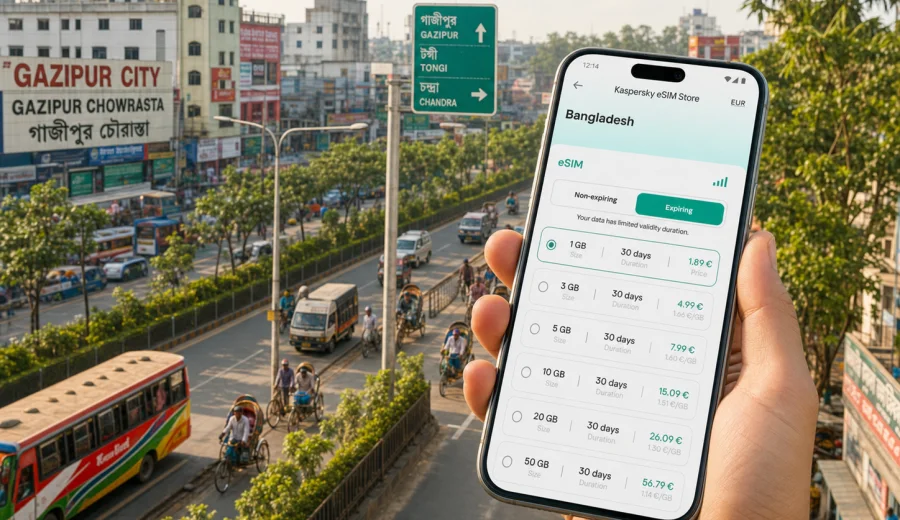
Gazipur eSIM: mobile connection and internet for a practical city trip
Gazipur is one of the busiest urban areas in central Bangladesh: close to Dhaka, packed with industrial zones, universities, family neighborhoods, markets, green edges, and road corridors that can change from calm to crowded very quickly. For travelers, that mix makes mobile internet more than a convenience. You may need it before your car leaves Hazrat Shahjalal International Airport, while checking the route toward Tongi or Joydebpur, when coordinating a factory visit, or when confirming a hotel address after dark.
An eSIM can help you prepare mobile data before you reach Gazipur, without looking for a physical SIM card immediately after arrival. It is especially useful if your trip involves airport transfers, meetings in different parts of the city, hotel check-ins, ride-hailing, messaging, translation, and short trips from Gazipur to Dhaka or other parts of Bangladesh.
This guide focuses on Gazipur itself: how a visitor may use mobile internet around the city, what to check before choosing an eSIM plan, and how to avoid common travel connectivity problems.
Why mobile data matters in Gazipur
Gazipur is not a compact sightseeing city where every stop is a short walk from the next one. Many trips involve road travel between Tongi, Board Bazar, Chowrasta, Joydebpur, industrial estates, university areas, resorts, and nearby transport links. Traffic can be heavy, journey times can change, and addresses may be easier to confirm by phone message or map pin than by a written street description.
Reliable mobile data is useful for:
- checking live routes before leaving Dhaka airport;
- sharing your location with a driver, colleague, hotel, or host;
- using ride-hailing and map apps between neighborhoods;
- translating short messages, signs, or address details;
- keeping work chats active during factory, supplier, or campus visits;
- confirming meeting times when traffic changes your schedule;
- using mobile banking, travel apps, airline apps, and cloud documents;
- avoiding dependence on hotel, cafe, or office Wi-Fi.
The practical point is simple: in Gazipur, mobile internet supports movement. It helps you adjust plans when the road, the meeting schedule, or the pickup point changes.
Arrival scenarios: from Dhaka airport to Gazipur
Most international visitors reach Gazipur through Dhaka. The drive from Hazrat Shahjalal International Airport can be straightforward on a quiet day and much slower when traffic builds near key junctions. You may need mobile data as soon as you leave the terminal, because your first tasks often happen before you reach a stable Wi-Fi connection.
Typical arrival tasks include:
1. Sending a message to your driver or host.
2. Opening the hotel or workplace location in a map app.
3. Checking whether the best route goes toward Tongi, Board Bazar, Chowrasta, or Joydebpur.
4. Sharing your live location if the pickup point changes.
5. Confirming your first meeting time after seeing the actual road conditions.
Airport Wi-Fi can help for a moment, but it is not ideal as your only connection. Once you leave the terminal, your plans depend on mobile data. If your phone supports eSIM, preparing a plan before the flight can make this first hour easier.
City movement: where an eSIM is most useful
Gazipur travel often means moving between practical destinations rather than visiting one central landmark. A traveler may stay near a highway hotel, visit a factory in an industrial area, attend a university event, meet a supplier, and then continue to Dhaka on the same day.
| Trip situation in Gazipur | Why mobile internet helps |
|---|---|
| Airport transfer from Dhaka | Track route changes, message the driver, share location. |
| Business visit to an industrial zone | Coordinate gates, meeting rooms, timing, and document access. |
| Hotel stay near a road corridor | Check nearby food, pharmacies, transport, and pickup points. |
| University or campus visit | Navigate larger areas and coordinate with local contacts. |
| Short stopover before Dhaka | Keep maps and messaging active without searching for Wi-Fi. |
| Day trip around green areas or resorts | Use maps and messaging where public Wi-Fi may not be available. |
For many visitors, the main value of an eSIM is not only the data allowance. It is the ability to start the trip with a working mobile internet setup and avoid spending the first local hours comparing physical SIM options, finding a shop, or asking a driver to wait.
Choosing data for a Gazipur trip
There is no single perfect data size for every visitor. The right eSIM plan depends on trip length, app habits, and whether you will rely on mobile data during transport. Use your itinerary first, then choose the data package.
For a short business visit of one or two days, light use may include messaging, maps, email, and ride-hailing. For a week of meetings, video calls, cloud files, and daily navigation, you may need a larger data allowance. If you plan to use your phone as a hotspot for a laptop, choose more data and check whether tethering is allowed by the selected plan terms.
Before choosing, estimate your main use:
- Light use: messaging, maps, email, hotel confirmations, ride-hailing.
- Medium use: frequent navigation, photo sharing, cloud documents, regular calls through messaging apps.
- Heavy use: video meetings, large file sync, hotspot use, streaming, long daily travel.
An eSIM for Gazipur should be treated as a mobile data tool for travel. It usually does not replace a local phone number, and voice calls or SMS are not included unless the selected plan states that they are. For calls, many travelers use internet-based messaging apps.
Prepare before you fly
The best time to think about mobile internet is before the airport day. A few checks can prevent problems when you are tired, carrying luggage, and trying to find a car in a busy arrival area.
Checklist before your trip:
- Confirm that your phone supports eSIM.
- Check that the device is not locked to one mobile operator.
- Make sure your phone operating system is up to date enough for eSIM setup.
- Keep your primary SIM active if you need banking codes or calls on your regular number.
- Save your hotel address, meeting address, and driver contact before departure.
- Download an offline map area as a backup.
- Choose a data plan that covers Bangladesh and fits your travel dates.
If you are unsure about the device, use the compatibility check before selecting a plan: Check your device. This is especially important for travelers using older phones, region-specific models, or company-managed devices.
Where Kaspersky eSIM Store fits into the trip
Kaspersky eSIM Store is an app and website where you can choose, arrange, and activate an eSIM with a suitable mobile data plan for an international trip. For Gazipur, the relevant destination is Bangladesh, because city articles use the country plan page for the place where the city belongs.
After you have checked your device and estimated your data needs, you can choose an eSIM plan for travel to Gazipur in Bangladesh. Review the data allowance, validity period, destination, price, and activation details before completing the setup.
This product framing matters: Kaspersky eSIM Store helps you prepare and manage an eSIM plan for travel. It is not a mobile network operator, and the actual availability and performance of mobile data depend on the selected plan, local network conditions, device settings, and the area where you are using the phone.
How to install an eSIM before using it in Gazipur
You usually install an eSIM through a QR code or on-screen instructions after selecting a plan. Keep a stable internet connection during installation, because your phone needs to download the eSIM profile. Many travelers install the profile before departure and activate mobile data according to the plan instructions when they arrive.
General setup flow:
1. Choose the destination and plan.
2. Confirm that your device supports eSIM.
3. Complete the order and open the setup instructions.
4. Install the eSIM profile on your phone.
5. Set the eSIM as the line for mobile data when needed.
6. Turn on data roaming for the eSIM if the plan instructions require it.
7. Test mobile data after arrival in Bangladesh.
For device-specific setup, follow the Android installation guide or the iOS installation guide. Keep your regular SIM line available if you need calls or SMS on your usual number, and avoid deleting the eSIM profile unless you are sure the plan rules allow reinstalling it.
Practical Gazipur use cases
Business travel
Gazipur is an important area for industry, manufacturing, and supplier visits. Business travelers often move between a hotel, an office, a factory gate, and a meeting point. Mobile data helps with maps, driver coordination, email, cloud documents, messaging, and last-minute schedule changes.
If your workday includes video meetings, document transfers, or hotspot use, choose a plan with enough data for more than navigation. A route that looks short on the map can still take time, and long car rides are often when travelers catch up on work.
Hotel and local movement
Hotel Wi-Fi may be useful inside the building, but it does not help when you leave for a meeting, food, shopping, or a transfer. With mobile data active, you can check opening hours, send a map pin, translate a short phrase, or find your return route without depending on a public network.
Save important addresses in both English and local formats if your host provides them. For pickups, a map pin is often more practical than a long written address.
Short stopovers
Some visitors pass through Gazipur on the way between Dhaka and other destinations. Even a short stopover can require mobile internet: checking traffic, contacting a driver, sharing a delay with colleagues, or finding a nearby place to wait.
For stopovers, a smaller data plan may be enough if you avoid streaming and large downloads. Keep the phone battery charged, because navigation and mobile data during long road movement can drain it faster than usual.
Trips from Gazipur
Gazipur can also be a base for trips toward Dhaka, industrial areas, parks, resorts, or transport links to other parts of Bangladesh. If your itinerary crosses city boundaries, choose a plan based on Bangladesh coverage rather than a single neighborhood. This keeps the article focus on Gazipur while matching how mobile networks and travel plans are usually organized.
Data-saving habits for the city
You can make a travel eSIM last longer with a few simple settings:
- Download offline map sections before a long car journey.
- Disable automatic cloud photo backup on mobile data.
- Update apps over Wi-Fi before the trip.
- Use lower video quality for calls when the connection is unstable.
- Turn off background data for apps you do not need.
- Save PDFs, hotel bookings, and meeting documents offline.
- Check your data balance regularly in the app or account area.
These habits are useful in Gazipur because much of the trip may happen on the road. You do not want a large app update or automatic media sync to consume data while you are navigating to a meeting.
eSIM, roaming, and local SIM: a practical comparison
| Option | Good for | Watch out for |
|---|---|---|
| Travel eSIM | Preparing mobile data before arrival, short trips, business visits, quick setup on compatible phones. | Requires eSIM support, correct settings, and enough data for your use. |
| Standard roaming | Keeping your usual number active and using your home operator's travel option. | Costs and included data vary by operator and may be high. |
| Physical local SIM | Longer stays, local number needs, or travelers with non-eSIM phones. | Requires time, a shop visit, and local setup after arrival. |
| Public Wi-Fi | Hotel work, large downloads, backup connection. | Not always available while moving and may require extra caution. |
For many visitors, the practical choice is not one option forever. You may keep your regular SIM for calls and messages, use an eSIM for mobile data in Bangladesh, and still use trusted Wi-Fi at the hotel for large downloads.
What to check if mobile data does not work
If the eSIM is installed but mobile data is not working after arrival, go through the basics calmly:
1. Confirm that the eSIM line is turned on.
2. Set the eSIM as the line for mobile data.
3. Check whether data roaming must be enabled for the eSIM.
4. Restart the phone if the device has just arrived from another country.
5. Move away from indoor areas with weak signal.
6. Review the plan status, validity period, and remaining data.
7. Contact support if the setup still does not work.
Do not delete the eSIM profile as a first troubleshooting step. Some eSIM profiles cannot be reinstalled after removal, depending on the plan conditions.
Quick planning table for Gazipur
| Traveler type | Suggested preparation |
|---|---|
| One-day business visitor | Install before departure, keep maps and messaging ready, choose enough data for transport and documents. |
| Factory or supplier visitor | Save gate contacts, meeting addresses, and route pins; prepare extra data for long car rides. |
| University or event guest | Download maps, keep contact numbers ready, use mobile data for campus navigation and updates. |
| Family visitor | Prepare messaging, navigation, and ride-hailing; keep backup address details offline. |
| Traveler using Gazipur as a base | Choose a plan for Bangladesh rather than planning only around one district. |
FAQ about eSIM mobile internet in Gazipur
Can I use an eSIM as soon as I land in Bangladesh?
You can install the eSIM before travel if your device supports it and the selected plan allows that setup flow. Activation behavior depends on the plan instructions, so read them before departure and test mobile data after arrival.
Does an eSIM give me a Bangladeshi phone number?
Usually, travel eSIM plans are focused on mobile data. They do not include a regular phone number, voice calls, or SMS unless those features are clearly listed in the selected plan terms. Use internet-based apps for calls and messages when mobile data is active.
Is an eSIM useful if my hotel has Wi-Fi?
Yes, because Gazipur trips often involve movement between the airport, roads, meetings, hotels, campuses, and local addresses. Hotel Wi-Fi helps inside the property; mobile data helps while you are outside.
How much data do I need for Gazipur?
For maps, messaging, and email, a smaller package may be enough for a short visit. For daily navigation, work documents, video calls, hotspot use, or several days of travel, choose more data. Always match the plan to your actual itinerary and app habits.
Should I activate the eSIM before or after arrival?
Install it while you have stable internet. Activation timing depends on the plan instructions and validity rules. If validity starts on activation or first network use, follow the guidance carefully so you do not waste days before the trip.
Final checklist before you travel to Gazipur
- Your phone supports eSIM and is not operator-locked.
- You have saved the hotel, meeting, and pickup addresses.
- Your regular SIM remains available if you need calls or SMS.
- Offline maps and key documents are saved.
- The eSIM profile is installed or ready to install with stable internet.
- The selected plan covers Bangladesh and matches your trip length.
- You understand whether data roaming should be enabled for the eSIM.
Gazipur is easier to manage when your mobile data is ready before the first road journey. With maps, messaging, hotel details, and work apps available on your phone, you can focus on the trip instead of searching for a connection. Before departure, choose an eSIM plan for Bangladesh in Kaspersky eSIM Store and prepare your mobile internet for Gazipur with the data allowance and validity period that fit your itinerary.