
Travel connectivity guide
Geneva eSIM for Mobile Internet in Switzerland
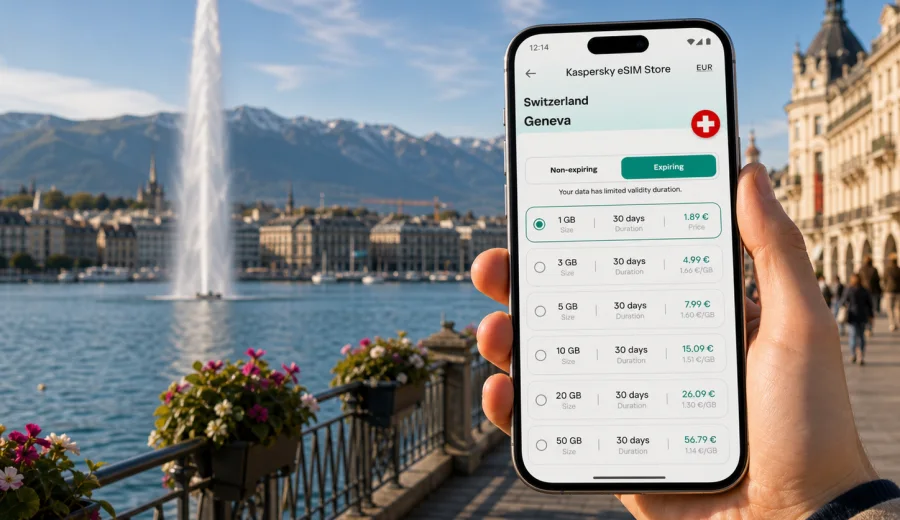
Geneva eSIM: mobile connection and internet for your Switzerland trip
Geneva is compact, international, and easy to cross, but it is also a city where mobile internet becomes useful almost immediately. You may need a data connection at Geneva Airport to confirm a hotel address, open a train timetable, message a colleague near the United Nations district, call a ride, or check the walking route from Cornavin station to the lake. If your phone supports eSIM, you can prepare a digital SIM profile before the trip and use mobile data in Switzerland without looking for a physical SIM card after arrival.
This guide focuses on Geneva rather than Switzerland in general. It covers the moments when travelers usually need internet in the city: the airport, train station, hotels, business areas, lakeside walks, short stopovers, and day trips from Geneva. It also explains how to choose a data plan, what to check before purchase, and how Kaspersky eSIM Store can help you select, set up, and activate an eSIM plan for mobile internet during your trip.
Why mobile internet matters in Geneva
Geneva feels organized, but the details of a trip still depend on your phone. Street names may be in French, hotel entrances can be tucked into narrow streets, and many travelers move between the lakefront, business districts, conference venues, and nearby towns in one day. A working data connection helps you make decisions without relying on public Wi-Fi in every location.
Typical Geneva scenarios where eSIM can be useful:
- checking transport from Geneva Airport to Cornavin station or your hotel;
- using maps around the Old Town, the lakefront, Paquis, Eaux-Vives, Plainpalais, Carouge, and Nations;
- confirming meeting locations near international organizations and Palexpo;
- messaging a hotel or apartment host after a delayed flight;
- opening train, tram, taxi, and ride-hailing apps;
- using translation tools in shops, pharmacies, and restaurants;
- checking boarding passes, reservations, and travel documents;
- sharing a hotspot with a laptop if your selected plan and device settings allow it.
An eSIM is especially practical if you arrive late, stay only a few days, or travel for work and do not want to spend time comparing physical SIM cards at the airport. You can choose a plan in advance, install the eSIM profile on a compatible device, and switch mobile data to that profile when it is time to use it.
Arrival in Geneva: where the connection helps first
Geneva Airport is close to the city, and many travelers move quickly from the terminal to a train, tram, taxi, hotel shuttle, or meeting venue. That first hour is when mobile internet often matters most. You may need to check a platform, update a colleague, follow a route to the right hotel entrance, or find out whether your room is ready.
If you have an eSIM prepared, your arrival workflow can be simple:
1. Land in Geneva and keep your primary SIM active for calls if you need it.
2. Turn on the eSIM profile for mobile data when your device settings allow it.
3. Check whether data roaming must be enabled for the eSIM profile.
4. Open your map, hotel booking, transport app, or work chat.
5. Keep your primary number available for banking codes or important messages, if your device supports dual SIM use.
This is not only about convenience. In a city where many visitors come for conferences, finance, diplomacy, health organizations, exhibitions, and connecting trains, being online at arrival reduces small problems: a gate change, a new meeting room, a hotel message, a delayed transfer, or a change in dinner plans.
Geneva neighborhoods and common internet needs
Different parts of Geneva create different data habits. A visitor staying near the lake may use maps, photos, and restaurant apps. A business traveler around Nations may spend more data on email, calendar updates, document previews, and calls over messaging apps. Someone based near Cornavin may use transport apps repeatedly because the station connects airport trains, city trams, buses, and regional routes.
| Geneva area | Why travelers go there | Mobile internet use |
|---|---|---|
| Airport and Cointrin | Arrival, departure, car rental, hotels | Transport updates, hotel messages, boarding passes |
| Cornavin and Paquis | Main station, hotels, restaurants, lake access | Maps, train times, taxi apps, messaging |
| Old Town | Walks, museums, cafes, viewpoints | Navigation through small streets, translations, reservations |
| Eaux-Vives and lakefront | Jet d'Eau, parks, promenade | Maps, photos, restaurant search, weather checks |
| Nations and international district | UN area, missions, meetings | Calendar, email, secure logins, video or voice calls over data |
| Plainpalais and Carouge | Markets, nightlife, local cafes | Routes, payments, group chats, local search |
| Palexpo | Exhibitions and conferences | Registration emails, event apps, team coordination |
The important point is not to buy the largest data package by default. It is to match the plan to how you will actually use Geneva: a one-night stopover, a five-day conference, a lake weekend, or a longer Switzerland route with trains to Lausanne, Bern, Basel, Zurich, or the Alps.
How much data you may need in Geneva
Data use depends on your apps, settings, and habits. The table below is a practical planning tool, not a guarantee. Video streaming, cloud backup, large file sharing, and long video calls can change the picture quickly.
| Trip style | Typical phone use | Planning approach |
|---|---|---|
| Short stopover | Maps, messaging, transport, boarding pass | A small data plan may be enough if you avoid streaming |
| Weekend in the city | Maps, restaurant search, photos, messaging | Choose enough data for navigation and daily app use |
| Business trip | Email, calendar, chat, document previews, calls over apps | Consider a larger allowance and check hotspot rules |
| Conference at Palexpo | Event app, QR codes, team messages, route checks | Plan for steady daytime use and possible top-ups |
| Switzerland route from Geneva | Trains, hotels, maps, translation, weather | Choose a plan valid for Switzerland or a suitable regional route |
Before you decide, review what you usually do on mobile data. If you keep cloud photo backup, app updates, or automatic video playback enabled, your allowance can disappear faster than expected. For travel, it is often worth turning off background updates, downloading offline maps, saving hotel details, and using hotel Wi-Fi for large files when you trust the network.
Choosing an eSIM plan for Geneva
For a Geneva city trip, the relevant destination is Switzerland. The city itself does not need a separate city plan; you need a plan whose destination and validity match your stay in Switzerland. If Geneva is only the first stop before France, Italy, Germany, or another country, check whether a country plan, regional plan, or broader route option fits your itinerary better.
Use this checklist before choosing:
- Destination: does the plan cover Switzerland for your Geneva stay?
- Validity period: does it cover all travel days, including arrival and departure?
- Data allowance: does it fit navigation, messaging, work, and sharing needs?
- Activation rules: when does the validity period begin for the selected plan?
- Device compatibility: does your phone support eSIM and is it not locked to one operator?
- Hotspot use: do you need to share data with a laptop or tablet?
- Calls and SMS: do you understand whether the plan is data-only or includes additional services?
Kaspersky eSIM Store is an app and website where you can choose, set up, and activate an eSIM with a suitable data plan for mobile internet during a foreign trip. It is not a mobile network operator and does not replace the local network. The practical benefit is that you can review destination, data volume, validity, and price before you travel, then install the eSIM on a compatible device.
If you are planning a Geneva trip and want to prepare mobile internet before arrival, you can choose an eSIM plan for Switzerland and check the options that fit your dates, data needs, and route.
Setup before you fly
Airport time is rarely relaxed, so prepare the basics before departure. Confirm that your phone supports eSIM and is not restricted by an operator lock, choose Switzerland as the destination if Geneva is your main city, compare data allowance and validity, then install the eSIM profile while you still have a stable internet connection.
On arrival, select the eSIM profile for mobile data and check whether data roaming must be enabled for that profile. Keep your primary SIM active if you need your usual phone number for banking codes, calls, or work messages. For device-specific setup, use the Android eSIM installation guide or the iOS eSIM installation guide. Before purchase, also check your device compatibility, because support depends on the exact model, region, and operator restrictions.
Transport, meetings, and stopovers
Geneva is walkable, but mobile data helps when plans change. Use it to find the correct exit at Cornavin, compare routes from the airport, locate a hotel entrance after dark, message a host, or save the last route back after dinner in Carouge. For transport-heavy days, reduce map satellite view, avoid automatic app updates, and carry a small power bank.
For business travel around Nations, Palexpo, banks, missions, or conference venues, think about email, calendar updates, chat, document previews, two-factor authentication, and possible hotspot use. Keep your regular SIM available if you depend on calls or SMS codes, and check in advance which SIM profile your device uses for mobile data.
Geneva is also a common short-stop city. For a one-day visit or connection between flights and trains, the useful data tasks are simple: maps, messages, boarding passes, transport updates, and hotel communication. If Geneva is the first city in a longer route through Lausanne, Montreux, Zurich, Basel, Bern, or the Alps, choose a validity period that covers the whole Swiss route. If you cross into France or continue through several European countries, read country and regional plan conditions carefully.
An eSIM is a digital SIM profile for mobile data, but it does not remove every travel limitation. Many travel eSIM plans are data-focused and may not include a local phone number, voice calls, or SMS unless the selected plan says so. Signal quality and speed depend on local network conditions, your device, and the plan.
Data-saving checklist for Geneva
- download offline maps for central Geneva and your hotel area;
- save airport, station, hotel, and meeting addresses;
- turn off cloud photo backup and app updates on mobile data;
- keep PDFs of tickets, bookings, and insurance documents;
- use hotel or office Wi-Fi for large files when appropriate;
- monitor your data balance if the service or device shows usage;
- top up or choose another plan before the allowance runs out, if available.
Frequently asked questions
Is Geneva a separate eSIM destination?
Usually you choose a plan by country or region, not by city. For Geneva, the relevant country is Switzerland. If your itinerary goes beyond Switzerland, check whether a regional plan or another country plan is more appropriate.
Can I install eSIM before arriving in Geneva?
In many cases, yes. It is often practical to install the eSIM profile before departure while you have a stable internet connection. Read the activation rules for the selected plan, because validity may start according to that plan's conditions.
Will eSIM give me a Swiss phone number?
Do not assume that. Many travel eSIM plans are data-focused and do not include a regular local phone number, voice calls, or SMS unless the plan details state otherwise. You can usually use internet-based calling and messaging apps over mobile data.
What should I do if mobile data does not start?
Check that the eSIM profile is installed, selected for mobile data, and allowed to use data roaming if the plan instructions require it. Restarting the phone can help in some cases. If the problem continues, review the setup instructions and contact support through the available Kaspersky eSIM Store support channel.
Prepare mobile internet for Geneva
Geneva rewards travelers who stay flexible: a meeting can move from Nations to the lakefront, a train can become the easier airport transfer, and a short walk through the Old Town can turn into an evening in Carouge. Mobile internet helps you handle those changes without searching for a shop or depending on public Wi-Fi in every place.
Before your trip, check your device, choose the destination and validity period carefully, install the eSIM profile with a stable connection, and keep your primary number available if you need calls or verification codes. When you are ready to prepare data for the trip, review eSIM options for Switzerland in Kaspersky eSIM Store and choose the plan that matches your Geneva dates, data use, and route.