Travel connectivity guide
George Town eSIM: Mobile Internet for Penang
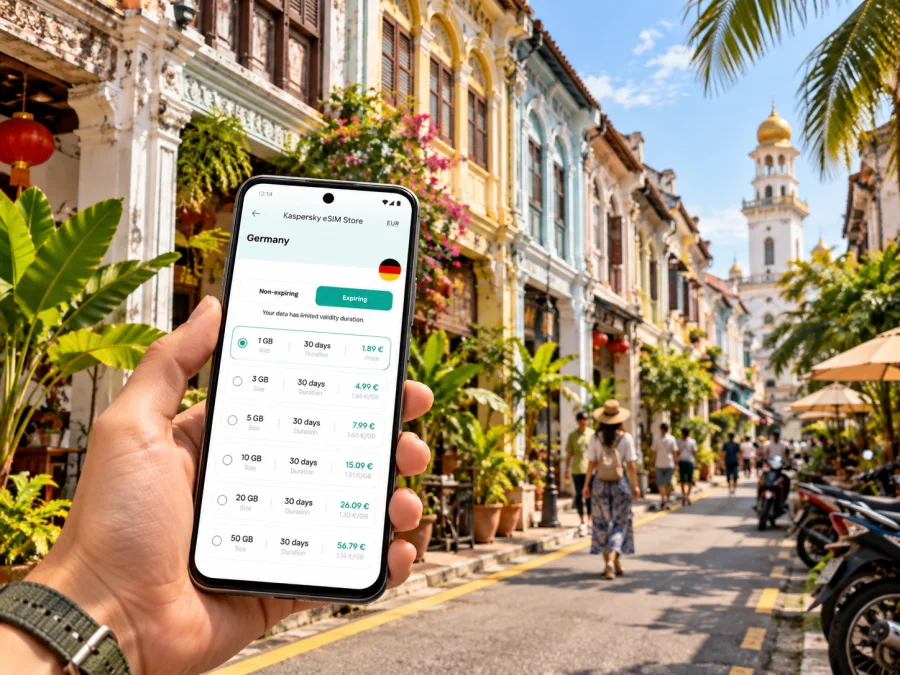
George Town eSIM: Mobile Connection and Internet for a Penang Trip
George Town is the historic centre of Penang, a city where a day can move from a heritage lane to a waterfront, a food stop, a meeting, and back to your hotel. A working mobile connection helps with maps, ride bookings, opening times, translation, and messages as you move between them. An eSIM can be a practical way to prepare mobile internet for the Malaysia part of your trip without swapping your primary physical SIM, if your device and chosen plan support it.
The key is to plan for your actual route and usage. You may spend most of the visit walking around central George Town, or use the city as a base for Penang Hill, the airport, the mainland, or the island’s north coast. Your data needs and the right plan depend on those details, as well as the plan’s coverage area, validity, and activation terms.
What to know before using mobile internet in George Town
George Town is in Penang State on the Malaysian peninsula. UNESCO’s World Heritage Centre identifies the historic city as part of the “Melaka and George Town, Historic Cities of the Straits of Malacca” property, inscribed in 2008. UNESCO describes the city’s historic residential and commercial buildings, multicultural communities, and long trading history. These features are part of the practical travel setting: you may be walking through compact streets, moving between landmarks, or navigating to an address that has several spellings or nearby entrances. (Source: UNESCO World Heritage Centre, checked 1 November 2026.)
A mobile data connection can help you:
- pin your accommodation and save the route from the airport before you travel;
- check the latest directions for a bus, taxi, or ferry connection;
- message a driver or host if your arrival is delayed;
- look up a museum, heritage building, café, or service while you are nearby;
- translate a sign or menu and confirm an address before setting off;
- keep an online map available when you leave the hotel’s Wi-Fi.
Tourism Penang’s 2026 visitor map describes downtown as compact enough to explore on foot and shows the free Central Area Transit (CAT) shuttle. It also marks Komtar as a key bus transfer point. For destinations beyond the centre, such as Penang Hill or Batu Ferringhi, check current bus, taxi, or ride-hailing options before you go; schedules and fares can change. (Source: Tourism Penang, 2026 travel map, checked 1 November 2026.) The heat, rain, traffic, and unfamiliar street layout can make short trips feel longer than they look on a map. Download an offline map as a backup, and confirm the exact entrance or meeting point with your hotel or host.
Plan your arrival from the airport
Penang International Airport is in Bayan Lepas, south of George Town, so most air travellers continue toward the city by road. The airport and nearby destinations are marked on Tourism Penang’s 2026 travel map. Your best transfer depends on landing time, luggage, budget, and final address. (Source: Tourism Penang, 2026 travel map, checked 1 November 2026.) If you are arriving late, carrying bulky bags, or travelling with children, a pre-arranged transfer or ride-hailing option may be easier than figuring out a bus connection while tired. If you have time and want to use public transport, confirm the current route, stop, hours, and payment method using Rapid Penang’s official journey-planning information before leaving the terminal. Routes and timetables can change; check again on the day. (Source: Rapid Penang journey planner and service information, checked 1 November 2026.)
Before your flight, save these details somewhere accessible offline:
- Your accommodation name, full address, and a map pin.
- The airport meeting point or transfer instructions, if you have arranged one.
- The first destination you need to reach, such as a hotel lobby or a named bus terminal.
- A second route option in case your flight is delayed or your preferred transport is unavailable.
- A contact number or in-app message thread for your host or driver.
When you land, connect to the airport Wi-Fi if it is available and convenient, but do not make it your only plan. If your eSIM is already installed, check that the correct line is selected for mobile data and that the plan’s conditions allow use at your current location and time. If you are relying on a physical SIM from home, confirm roaming terms before switching it on. Keeping the home SIM active for calls or verification messages may be useful, but data roaming on that line can incur separate charges under your home operator’s terms.
Choose an eSIM plan around the trip, not just the city name
An eSIM profile is digital and can be added to a compatible device. The plan attached to it determines where it can be used, how much data is included, how long it is valid, and when the validity period begins. A city name in a search query does not guarantee that a particular plan is limited to or designed specifically for George Town. Check that the plan you select covers Malaysia and review its conditions for your expected dates and route.
A useful choice depends on how you will use your phone, not on a generic estimate. Think through a typical day: will you mainly check maps and messages, or also upload photos, join video calls, stream media, and tether a laptop? Wi-Fi at your hotel or workplace may reduce mobile use, but it should be treated as a supplement rather than a promise of uninterrupted access. If you will travel beyond George Town, verify the plan’s stated coverage for every destination on your itinerary.
| Trip pattern | What to consider when selecting data |
|---|---|
| Short city break | Navigation, messages, bookings, and occasional browsing; check the plan validity against the exact dates. |
| Longer stay | Estimate daily use and confirm whether the plan can be topped up or renewed under its terms. |
| Remote work | Check the plan’s data allowance, hotspot conditions, expected call quality, and a backup connection. |
| Island-wide itinerary | Read the coverage area carefully; a Malaysia plan may have different conditions from a regional plan. |
| Transit stop | Count the time you will actually be in Penang and check when plan validity starts. |
Kaspersky eSIM Store is an app and website where you can choose, arrange, and activate an eSIM with a suitable data plan for an international trip. To prepare for George Town, compare the displayed plan terms for Malaysia and select based on your expected stay and use. You can browse eSIM plan options for Malaysia and check the details shown for the option you are considering.
Do not choose by the headline data amount alone. Confirm whether the allowance is a total for the validity period, whether tethering is permitted, what happens when the allowance is used, and whether the plan starts on installation, activation, or first network use. These details vary by plan. If any term is unclear, check the plan information or contact support before purchase.
Keep your route manageable around the city
George Town’s historic centre rewards a slower pace. The UNESCO World Heritage Centre describes its combination of residential and commercial buildings and the cultural influences that shaped the townscape. In practical terms, it is worth grouping nearby stops rather than crossing town repeatedly: save a few places in one walking area, then plan a separate ride for a more distant destination. Historic lanes can be narrow and busy, so allow extra time to find the exact entrance and cross streets safely. (Source: UNESCO World Heritage Centre, checked 1 November 2026.)
For navigation, keep a simple location routine:
- Save the hotel, airport, and any fixed appointment before departure.
- Download a map for offline use, then use mobile data to refresh it when you have service.
- Search by the exact venue name and compare the pin with the address supplied by the venue.
- Share a live location only when useful and with someone you trust; stop sharing when the journey is over.
- Recheck the destination before boarding a vehicle, particularly when several branches share a name.
For a walk between the heritage core, waterfront, and a meal stop, use an online map for directions but stay alert to traffic and your surroundings. When using buses or ferry connections, check current stop and service information rather than relying on an old screenshot. Rapid Penang’s official journey planner can help with local public transport; confirm the direction and stop before boarding. For a mainland crossing or intercity travel, check the relevant operator’s current notices and ticketing terms.
Get ready before you install the eSIM
First check that your exact device variant supports eSIM and is not restricted by a carrier or network lock. Support may differ between regional versions of the same phone family, and an unlocked device is not automatically eSIM-compatible. Use the device maker’s current guidance and the settings on your own phone; if you need a quick reminder, check your device’s eSIM compatibility before choosing a plan.
Before purchase, review the plan’s destination, data amount, validity, price, start condition, and any restrictions on tethering or top-ups. Also check whether you need an internet connection to download the eSIM and whether the profile can be reinstalled if you remove it. Do not delete an eSIM profile simply to troubleshoot unless the instructions or support team tell you to do so.
A sensible setup order is:
- Prepare while you have reliable Wi-Fi. Update your device if needed, make sure you can sign in to your account, and keep the installation instructions available.
- Choose the plan. Confirm the destination and read the terms, especially when validity begins and whether the route includes places outside Malaysia.
- Install the profile. Follow the on-screen flow or the relevant Android eSIM installation instructions or iOS eSIM installation instructions.
- Label the line. A name such as “Malaysia data” can make it easier to identify the eSIM beside your regular SIM.
- Set data deliberately. Choose the travel eSIM for mobile data only when you intend to use it. Keep your home line’s data roaming off unless you have confirmed its charges and want to use it.
- Follow the plan’s activation directions. Some plans require a setting such as data roaming for that eSIM; others may differ. Use the plan instructions rather than assuming one setting applies to every profile.
- Check connectivity. Once the plan should be active, confirm that the device shows a mobile connection and try a basic web page or map refresh.
Installation and the start of validity may be separate events. If you install before departure, verify the plan’s activation rule so it does not start earlier than intended. Keep setup details accessible; if activation fails, follow the official steps or contact support.
Coverage and device details to verify
A travel eSIM works only when several conditions line up: the exact phone variant supports eSIM, the phone can use a new profile, the plan is valid in the place you are visiting, and the local partner network is available at your location. Buildings, underground areas, congestion, weather, and network maintenance can affect service. Do not assume every street, hotel room, or nearby island will have the same signal or data performance.
Use this pre-trip check:
- Device: Confirm eSIM support for the exact model and regional version, then check for a carrier lock.
- Destination: Confirm Malaysia is included in the plan’s listed coverage, and check every other stop on your route.
- Validity: Match the validity period and start rule to your travel dates.
- Data: Estimate maps, messaging, browsing, calls, media uploads, video meetings, and hotspot use separately.
- Primary SIM: Decide whether you need your usual number for calls or verification messages; review its roaming settings.
- Power and access: Carry a charger or power bank, and make sure you can reach installation details without relying on one device.
- Support: Know how to contact the service if installation or activation does not work as expected.
With dual SIM, check which line is set for voice and which for mobile data. Menu names vary. Some plans require roaming on the travel eSIM; check each line separately because home-line roaming may have separate charges.
Common situations and practical fixes
The eSIM does not appear after purchase. Confirm that you are signed in to the right account and that the plan was completed. Check the app or website instructions and your email, including filtered folders, for setup details. Avoid repeated scans if the device says the code has already been used; contact support with the relevant order information.
The profile is installed but there is no data. Check that the eSIM line is turned on and selected for mobile data. Confirm that the destination and activation time match your current location and that any plan-specific settings have been applied. Toggle airplane mode once or restart the phone if appropriate, then allow a short time for the device to register. If it still does not work, use support rather than deleting the profile.
Maps load slowly or stop refreshing. Check whether the phone has signal, whether the data allowance remains, and whether a low-data setting is restricting background use. Switch to a reliable Wi-Fi connection for large downloads, or use the offline map you prepared. A slower connection may reflect local conditions rather than a fault with the eSIM profile.
You are moving from George Town to another part of Penang. Recheck the route and confirm that the plan includes the next destination. Save the address and return route before leaving a stable Wi-Fi connection. Transit information can change, so verify the service on the day.
Your phone needs a call or text message. A data-only travel eSIM does not automatically provide a regular local phone number, voice calls, or SMS. Keep your usual line available if needed and check the charges from your home operator. Internet calling and messaging apps may work over data, depending on the app, account, and connection.
A sample day in George Town
Imagine landing in the morning, leaving your bag at a central hotel, and spending the day between heritage streets, a waterfront stop, and dinner. Before flying, save the hotel’s pin and the airport transfer details. Once you arrive, check your chosen route and send your estimated arrival time to the hotel. At the hotel, connect to Wi-Fi, confirm the eSIM is ready, and download an offline map of the area.
As you head out, use mobile data to check the opening hours and find the entrance to your first stop. Group nearby places together and leave time for meals, weather, and traffic. If you change plans, verify the new address and route before setting off. In the evening, save your return route and use the same data line for a ride booking or message if needed. This approach combines an online connection for current details with offline backups for the basics.
For work, verify the meeting location, test the eSIM beforehand, and check tethering terms. For a short layover, prioritize airport directions, return timing, and offline onward-travel details.
Frequently asked questions
Is an eSIM useful for a trip to George Town?
It can help with maps, messages, bookings, and travel updates without changing your physical SIM. Suitability depends on device compatibility, Malaysia coverage, plan terms, and expected data use.
Does a Malaysia eSIM guarantee service everywhere in Penang?
No. Check the plan’s stated coverage and remember that signal and performance vary by location, building, device, and network conditions. Verify coverage for stops outside George Town.
Will a travel eSIM give me a phone number?
Not necessarily. A data-only plan does not automatically include a standard phone number, calls, or SMS. Check the plan terms and keep your usual line available if you need its number.
Should I install before arriving, and do I need data roaming?
You can install before departure over reliable Wi-Fi, but check when validity begins. Some travel eSIMs require roaming on that eSIM profile; follow its instructions and check your home SIM separately for possible charges.
What if my phone does not support eSIM?
Use another connection option that works with your device, such as a physical SIM or Wi-Fi. Confirm compatibility for your exact device variant before selecting an eSIM plan.
Prepare your connection for George Town
A little preparation makes it easier to move through George Town with current maps, transport details, bookings, and messages close at hand. Confirm your device supports eSIM, compare the Malaysia plan terms with your dates and data needs, and install the profile using the instructions for your phone. Keep offline copies of your essential addresses and travel details as a backup.
When you are ready, use Kaspersky eSIM Store to choose and activate an eSIM with a suitable plan for your trip. Explore eSIM options for Malaysia and check the plan’s coverage, data allowance, validity, and activation conditions before proceeding.


