
Travel connectivity guide
Georgia eSIM: mobile internet travel guide
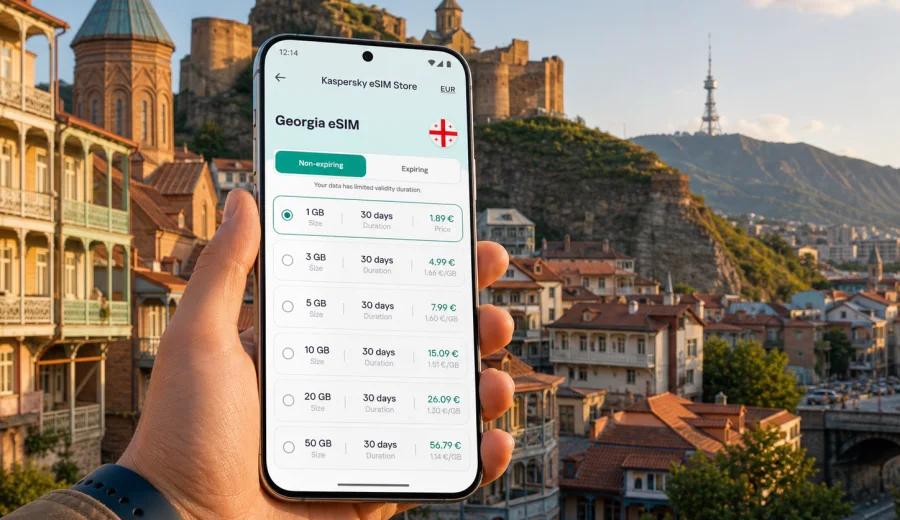
Georgia eSIM guide: mobile connection and internet for your trip
If you are planning a trip across the Caucasus, a mobile internet for a trip to Georgia can make mobile connection and internet preparation much simpler. Instead of looking for a physical SIM card after landing, you can choose a data plan before the trip, install an eSIM on a compatible device and use mobile data for maps, taxis, hotel messages, translation, banking notifications and day-to-day travel tasks.
Georgia is compact, but travel scenarios vary a lot. A weekend in Tbilisi is not the same as a road trip to Kazbegi, a remote stay in Svaneti, a wine route through Kakheti or a beach break in Batumi. Your internet needs also change by route: one traveller may only need maps and messengers, while another may upload video, join work calls and use navigation for several hours a day. This guide explains how to think about eSIM for Georgia, how to choose a suitable data plan and what to check before you rely on it during the trip.
Why eSIM is useful for mobile internet in Georgia
An eSIM is a digital SIM profile that can be installed on a compatible smartphone or tablet. For travel, its main advantage is practical: you can prepare mobile data without swapping a physical SIM card. Your regular SIM can stay in the device for calls, SMS or banking verification, while the eSIM profile handles mobile internet abroad.
For Georgia, eSIM can be useful in several common moments:
- arriving at Tbilisi, Kutaisi or Batumi airport and opening maps without waiting for hotel Wi-Fi;
- messaging a driver, host or tour operator while you are still in transit;
- checking train, bus or ride-hailing details between cities;
- using translation and navigation in markets, restaurants and stations;
- sharing location with family or colleagues during mountain routes;
- keeping access to booking confirmations, online tickets and payment apps.
The main point is control. You can review the data volume, validity period and destination before you travel. That does not mean every eSIM plan is right for every route, and it does not mean mobile coverage is identical in every valley or mountain road. It means you can make a clear decision before the trip instead of solving connectivity under time pressure after arrival.
Georgia travel scenarios and data needs
Your ideal data volume depends less on the country name and more on behaviour. A traveller who uses offline maps and hotel Wi-Fi will consume far less data than someone who streams video, works remotely or uploads photos every evening.
| Trip scenario in Georgia | Typical internet use | What to consider |
|---|---|---|
| Short city break in Tbilisi | Maps, taxis, messengers, restaurant search | A smaller data package may be enough if you use Wi-Fi at the hotel |
| Tbilisi plus Kazbegi or Kakheti | Navigation, route updates, photo sharing | Choose enough data for time on the road and check validity period |
| Batumi holiday | Messaging, maps, social media, bookings | Data use can rise if you stream at the beach or share videos |
| Remote work stay | Email, cloud files, video calls, hotspot use | Choose a larger allowance and check whether tethering is allowed by the selected plan |
| Multi-country Caucasus route | Several borders and longer validity | Compare a country plan with regional options if available for your itinerary |
As a rough planning habit, separate essential data from comfort data. Essential data includes maps, messaging, transport apps, accommodation access and security codes. Comfort data includes streaming, social feeds, cloud backup and large uploads. If you are unsure, size the plan around essential use first, then add margin for the way you actually travel.
How Kaspersky eSIM Store fits into the trip
Kaspersky eSIM Store is an app and website where you can quickly choose, arrange and activate an eSIM with a suitable data plan for mobile internet in an international trip. The service is designed around the traveller's task: select a destination, review plan conditions, install the eSIM on a compatible device and manage the profile through the site or app.
It is important to describe the product accurately. Kaspersky eSIM Store is not a mobile network operator and should not be treated as a replacement for a local telecom contract. It helps you prepare an eSIM data plan for travel. The actual conditions, such as data allowance, validity, destination and available options, depend on the plan you choose.
This matters because mobile internet is part of the travel infrastructure, not just a technical setting. When you know the plan's data volume and validity period before departure, you can make better decisions about navigation, remote work, family communication and backup options.
How to choose an eSIM data plan for Georgia
Start with the practical shape of the trip. You do not need to predict every megabyte, but you should know whether you are mainly using maps and messages or whether your phone will become a work and media device.
Check these points before choosing:
1. Length of stay. Match the validity period to your actual dates in Georgia, including arrival and departure days.
2. Data volume. Choose a package that covers maps, messengers, browsing and any planned work or media use.
3. Route. City trips and mountain routes have different needs. Offline maps are useful even when you plan to use mobile data.
4. Device role. If your phone will share internet with a laptop, data can disappear much faster.
5. Plan conditions. Review whether the plan is for Georgia only or has a wider regional scope, and check when validity begins.
6. Support needs. If you are less comfortable with device settings, leave time to install and test the eSIM before departure.
A simple rule works well: choose for the trip you are actually taking, not for the most optimistic version of the trip. If you plan to spend three days in Tbilisi and mostly use hotel Wi-Fi, a smaller package may be enough. If you are driving through Kakheti, moving to Kazbegi and uploading photos every evening, give yourself more data and time.
Practical action before you travel
Before you leave, open the mobile internet for a trip to Georgia page, compare the available data plans and choose the option that fits your dates, route and expected internet use. Review the data allowance, validity period and destination carefully. After you have selected a suitable plan, install the eSIM while you still have a stable internet connection, then keep the activation instructions available offline or in your email.
This mid-trip preparation step is worth doing calmly. Airport arrivals can be busy, public Wi-Fi can be unreliable, and language barriers can make small technical issues feel bigger than they are. If the eSIM is already installed, you only need to switch mobile data to the eSIM profile when the plan is ready to be used according to its conditions.
Installation and activation steps
The exact screens depend on your device, but the travel workflow is usually straightforward. You choose a plan, install the eSIM profile, then select it for mobile data when you are ready to use it. For device-specific guidance, use the Android installation guide or the iOS installation guide.
Once your route and approximate data needs are clear, you can choose a suitable eSIM data plan for the trip and compare data volume, validity period, and activation conditions before installation.
Typical setup flow:
1. Check that your smartphone or tablet supports eSIM.
2. Make sure the device is not locked to one mobile operator.
3. Choose the Georgia data plan that matches your trip.
4. Install the eSIM profile using the on-screen instructions or QR code.
5. Name the profile clearly, for example "Georgia travel".
6. Keep your regular SIM for calls or SMS if you still need it.
7. Select the eSIM profile for mobile data when you want to start using it.
8. If required by the selected plan or device settings, enable data roaming for the eSIM profile.
Do not delete the eSIM profile casually after installation. Depending on the conditions of the selected eSIM profile, it may not be possible to move it to another device or reinstall it after removal. If something looks unclear, check the instructions first or contact support before changing settings.
Device compatibility checklist
Before buying a travel eSIM plan, confirm that your phone supports eSIM and can use it abroad. This is the step many travellers skip, and it is also the step that prevents most avoidable problems. You can check your device before choosing a plan.
Use this checklist:
- your device model supports eSIM;
- the device is not locked to a single mobile operator;
- the operating system is up to date enough for eSIM setup;
- you have a stable internet connection during installation;
- you know which SIM profile will handle mobile data;
- you know whether your regular SIM should stay active for calls or SMS;
- you have saved the installation email or QR code details in a place you can access.
If you use a dual-SIM setup, label profiles clearly. It is easy to confuse "Primary", "Travel", "Business" and "Data" when you are tired after a flight. A clear name such as "Georgia eSIM" helps you select the correct line for mobile data and avoid accidental roaming on your regular SIM.
What eSIM does and does not include
For travel pages, eSIM is mainly about mobile data. Unless a specific plan states otherwise, do not assume it includes a local phone number, regular voice calls or SMS. You can usually use internet-based communication apps for calls and messages while your data connection is active.
What you can typically use mobile data for:
- maps and navigation;
- messaging apps and internet calls;
- booking platforms and airline apps;
- translation tools;
- online banking notifications and payment confirmations;
- email and browser access;
- work apps, if your data allowance is large enough.
What you should not assume automatically:
- a Georgian phone number;
- standard voice minutes;
- standard SMS;
- identical coverage in every remote area;
- unlimited hotspot use;
- the ability to transfer the eSIM to another device after activation.
This distinction is useful in Georgia because many travel tasks are data-based. You may not need a local number to navigate Tbilisi, message a hotel or open a booking confirmation. But if a service specifically requires SMS to a local number, check that requirement in advance.
Internet use in Tbilisi, Batumi and mountain routes
In Tbilisi, mobile data is most useful for ride-hailing, maps, restaurant search, delivery apps, translation and coordination with hosts. The city is walkable in parts, but elevation changes and winding streets can make navigation important, especially around Old Tbilisi, Mtatsminda, Avlabari and the riverfront.
In Batumi, data needs often shift toward leisure: beach navigation, restaurant discovery, messaging, short videos, hotel communication and onward transport. If you share many photos or videos, your usage can grow quickly. Use Wi-Fi for large uploads when possible and keep mobile data for tasks that need mobility.
Mountain routes need a more careful mindset. Whether you are going toward Kazbegi, Svaneti, Borjomi, Tusheti or other rural areas, prepare offline maps and key addresses before leaving the city. Mobile data is valuable on the road, but terrain and local network conditions can affect availability. eSIM is a travel tool, not a promise that every remote point on a route will have the same signal quality.
Ways to save data without making the trip harder
You do not need to turn your phone into a restricted device, but a few habits make a travel data plan last longer.
- Download offline maps for Tbilisi, Batumi and any mountain route before departure.
- Disable automatic cloud photo and video backup on mobile data.
- Update apps over Wi-Fi before you travel.
- Set messaging apps to download large media only on Wi-Fi.
- Use lower video quality if you need to stream on mobile data.
- Check which apps are allowed to use background data.
- Keep hotel, route and ticket information available offline.
The goal is not to avoid using the eSIM. The goal is to spend mobile data on travel-critical tasks: navigation, communication, bookings and safety-related access.
eSIM compared with roaming, public Wi-Fi and a physical SIM
Different connectivity options can make sense in different situations. eSIM is often attractive because it reduces friction, but it is still worth comparing the practical trade-offs.
| Option | Main advantage | Main limitation |
|---|---|---|
| Travel eSIM | Can be prepared before arrival and does not require a physical SIM swap | Requires a compatible, unlocked device |
| Standard roaming | Uses your existing mobile number and SIM | Cost and data conditions depend on your home operator |
| Public Wi-Fi | Useful for large downloads at hotels or cafes | Availability, speed and security vary by location |
| Local physical SIM | May suit long stays or users who need local voice services | Requires finding a seller, choosing a plan and handling a physical card |
For many visitors, the strongest setup is mixed. Use eSIM for mobile internet when moving around, keep trusted Wi-Fi for large updates and keep your regular SIM active only for the services you still need.
Quick preparation checklist for Georgia
Use this checklist a few days before departure:
- confirm your device supports eSIM and is not operator-locked;
- choose a data plan for Georgia that fits your stay and route;
- install the eSIM while you have stable Wi-Fi;
- save installation details and support information;
- download offline maps for the regions you plan to visit;
- check whether your banking and travel apps require SMS access;
- turn off heavy background uploads on mobile data;
- label your eSIM profile clearly;
- decide when you will switch mobile data to the eSIM profile.
If you are travelling with family or colleagues, repeat the check for each device. One compatible phone does not mean every phone in the group supports eSIM.
Common mistakes to avoid
The most common eSIM problems are usually planning issues rather than complicated technical failures.
Avoid these mistakes:
1. Buying before checking compatibility. Always confirm device support first.
2. Choosing too little data for a work trip. Video calls and hotspots can use data quickly.
3. Deleting the eSIM profile after installation. Reinstallation or transfer may not be available.
4. Leaving your regular SIM selected for mobile data. This can trigger standard roaming charges from your home operator.
5. Assuming voice and SMS are included. Treat the plan as mobile data unless the conditions say otherwise.
6. Waiting until a busy arrival moment to install. Install with calm, stable Wi-Fi before you need the connection.
Frequently asked questions
Can I install an eSIM before arriving in Georgia?
In many cases, yes. Installation usually needs an internet connection, so doing it before departure is often convenient. Check the selected plan conditions to understand when validity starts and when data should be activated.
Will an eSIM give me a Georgian phone number?
Do not assume that. Travel eSIM plans are usually focused on mobile data. Voice calls and SMS are included only if the selected plan explicitly says so.
Can I keep my regular SIM active?
Often yes, if your device supports using your regular SIM and eSIM together. Many travellers keep their regular SIM for calls, SMS or banking messages and use the eSIM profile for mobile data.
Do I need to enable data roaming for the eSIM?
Some devices or plans may require data roaming to be enabled for the eSIM profile. Follow the instructions for your device and selected plan, and make sure your regular SIM is not selected for mobile data unless you intend to use roaming from your home operator.
Can I use eSIM as a hotspot?
It depends on the selected plan and device settings. If you plan to connect a laptop or share data with another traveller, check the plan conditions first and choose a larger data allowance.
What if I visit Armenia, Azerbaijan or another country after Georgia?
Check whether a country plan or a regional option better matches your route. Do not assume a Georgia-only plan covers neighbouring countries unless the plan conditions say so.
Choose an eSIM plan for your Georgia trip
For a smoother arrival and a more predictable mobile internet setup, prepare your eSIM before the trip. In Kaspersky eSIM Store, you can choose Georgia as the destination, compare available data plans, review validity and data volume, and install the eSIM on a compatible device before you need it on the road.
Select a suitable eSIM plan for Georgia, check your device compatibility, install the profile with a stable internet connection and keep the instructions nearby. That preparation gives you a clearer way to stay online for maps, messages, bookings and everyday travel tasks while you explore Georgia.
Before departure, open Kaspersky eSIM Store and review mobile internet options for your destination. Choose the data volume and validity period deliberately, then install the eSIM on a compatible device over a stable Wi-Fi connection.