
Travel connectivity guide
Ghana eSIM: mobile internet for travel
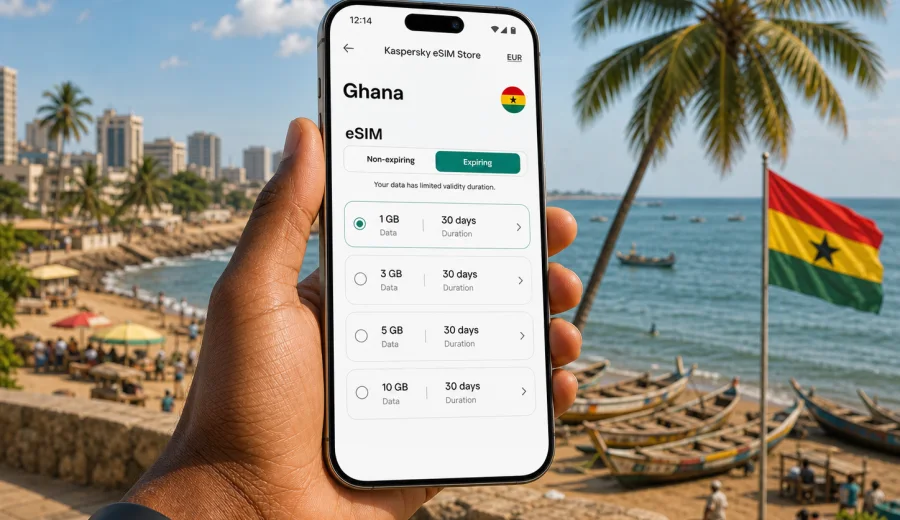
eSIM for Ghana: mobile connection and internet for your trip
Ghana is an easy country to enjoy when your phone is ready before you land. You may need maps in Accra, a ride-hailing app after arrival, messages from a hotel in Cape Coast, mobile payments, restaurant searches, translation, work email, or quick updates to family while you move between regions. A stable mobile connection is not just a convenience in this kind of trip. It is part of how you plan, navigate, confirm bookings, and react when the day changes.
An eSIM can help you prepare mobile internet for Ghana without looking for a physical SIM card immediately after arrival. Instead of swapping plastic cards, you install a digital SIM profile on a compatible phone, choose a data package for the trip, and use mobile data when the eSIM is active. This is especially useful if your itinerary includes different types of travel: airport arrival, city transport, beaches, heritage sites, business meetings, and longer road transfers.
This guide explains how to think about eSIM for Ghana in practical terms: what to check before buying, how much data you may need, when to install and activate your eSIM, and how to keep your main number available while using mobile internet abroad.
Why mobile internet matters in Ghana
Ghana is a country where travel days can involve several small decisions. You may move from Kotoka International Airport to central Accra, from Accra to Cape Coast, from Kumasi to Lake Bosomtwe, or from Tamale toward Mole National Park. In each case, mobile internet helps with routine tasks that are easy to underestimate before the trip.
You may need data for:
- map navigation and route checking;
- hotel and apartment confirmations;
- ride-hailing and transport coordination;
- banking alerts and mobile payments;
- messaging apps and internet calls;
- cloud documents, tickets, and QR codes;
- weather checks during coastal or inland travel;
- translation and local search;
- remote work, email, and video meetings.
Public Wi-Fi can be helpful in hotels, cafes, airports, and coworking spaces, but it is not a full replacement for mobile data. Wi-Fi may require registration, work only inside a building, slow down at busy times, or be unavailable exactly when you need to confirm an address or contact a driver. A travel eSIM gives you a separate mobile data option on your own device, subject to the terms and coverage of the selected tariff.
What an eSIM does and does not do
An eSIM is a digital SIM profile supported by many modern smartphones and some tablets. For a trip to Ghana, it is usually used for mobile internet. You install the eSIM profile, set it as the line for cellular data, and keep your physical SIM or main eSIM available for calls, SMS, or banking messages if your device supports dual SIM use.
For most travel data packages, the important point is simple: an eSIM is primarily for internet access. It usually does not include a local phone number, standard voice calls, or SMS unless the terms of the selected tariff say so. You can still use messaging apps, internet calls, email, maps, and online services through mobile data.
Before you choose any eSIM tariff, review these details:
| Detail to check | Why it matters in Ghana |
|---|---|
| Data amount | Maps, uploads, video, and work calls can use very different amounts of data. |
| Validity period | A short city break and a multi-region trip need different durations. |
| Activation rule | Some tariffs start after installation, while others start when the eSIM first connects. |
| Destination | Make sure the package is for Ghana or for a region that includes Ghana. |
| Hotspot support | Useful if you need to share data with a laptop or another device. |
| Device compatibility | Not every phone model supports eSIM, and some devices may be carrier-locked. |
This preparation prevents a common travel problem: buying a data package that looks convenient but does not match your device, dates, or actual internet habits.
Ghana travel scenarios where eSIM is useful
Your data needs in Ghana depend less on the country name and more on how you travel. A person staying near one hotel in Accra will use data differently from someone driving between coastal towns, heritage sites, and northern regions.
For a short Accra trip, mobile internet is mostly about quick coordination. You may need maps, restaurant searches, ride apps, email, and messaging. In this case, a modest data package can be enough if your hotel has reliable Wi-Fi and you avoid heavy video streaming on cellular data.
For a coastal route, data becomes more important during transfers. Cape Coast, Elmina, Busua, and other coastal stops can involve moving between hotels, beaches, restaurants, and historical sites. Offline maps help, but live navigation, weather checks, and messages still need mobile data.
For business travel, reliability and timing matter. You may need to read documents before a meeting, use a hotspot for a laptop, or join a call when Wi-Fi is unstable. In this case, choose a package with a comfortable data buffer rather than trying to calculate the minimum possible amount.
For longer trips around Ghana, think in days rather than gigabytes only. A plan that is valid for the full stay is easier to manage than one that ends before your final transfer. If you expect to use maps daily, upload photos, and make internet calls, choose more data than you would for a weekend trip.
How much data to choose for Ghana
There is no universal number, but you can estimate your needs by looking at your most data-heavy habits. Navigation and messaging are usually light. Video, cloud backup, social media uploads, and hotspot use can increase consumption quickly.
| Trip style | Typical data profile | Practical approach |
|---|---|---|
| 2-4 days in Accra | Maps, messaging, bookings, light browsing | Choose a small package if Wi-Fi is available at your hotel. |
| 5-7 days with coastal stops | Daily navigation, photos, restaurant search, calls | Choose a mid-size package with room for transfers. |
| Business trip | Email, documents, messaging, possible hotspot | Prioritize enough data and a validity period that covers every meeting day. |
| 10-14 days across regions | Navigation, messaging, uploads, regular research | Choose a larger package or a plan that can be topped up if available. |
| Heavy media use | Video, cloud backup, hotspot, frequent uploads | Use Wi-Fi for large files and reserve mobile data for travel-critical tasks. |
If you are unsure, check how much mobile data you normally use at home over a similar number of days. Then adjust downward if you will rely on hotel Wi-Fi, or upward if you plan to share a hotspot, work remotely, or spend many hours on the road.
Before you buy: device and trip checklist
The best time to prepare an eSIM is before you are tired from a flight or standing in a busy arrivals area. A few checks at home can save time later.
Use this checklist:
- Confirm that your phone supports eSIM.
- Check that the phone is not locked to one carrier.
- Make sure your operating system is up to date.
- Decide whether your main SIM should stay active for calls or SMS.
- Check the exact trip dates and choose a matching validity period.
- Review whether you need hotspot support.
- Save hotel addresses and key contacts offline.
- Keep Wi-Fi available during eSIM installation.
Also think about your arrival routine. If you land at Kotoka International Airport, you may want data for the ride to your accommodation, a message to your host, or a quick route check. If your first stop is outside Accra, it is even more useful to have mobile internet ready before the transfer begins.
Choosing an eSIM plan through Kaspersky eSIM Store
Kaspersky eSIM Store is an app and website where you can quickly choose, arrange, and activate an eSIM with a suitable mobile internet tariff for an international trip. For Ghana, the practical advantage is preparation: you can compare available package conditions, check the data amount and validity period, and install the eSIM on a compatible device before you need it on the road.
When you are ready to compare options, you can choose an eSIM tariff for your trip to Ghana and match the package to your itinerary. A short city stay, a coastal route, and a longer business trip may all call for different data amounts, so look at both gigabytes and validity days.
Kaspersky eSIM Store should be understood as a tool for choosing, arranging, installing, and activating an eSIM tariff for travel. It is not a mobile operator and should not be treated as a network owner. The actual service conditions depend on the selected tariff, destination, and device settings.
When to install and when to activate
Installation and activation are not always the same moment. Installation means adding the eSIM profile to your device. Activation means the data package starts according to the rules of the selected tariff. Some packages may begin when the eSIM connects to a supported network, while others may start earlier. Always read the specific conditions before you install or switch the line on.
A cautious setup flow looks like this:
1. Choose the Ghana tariff before departure.
2. Install the eSIM while you still have stable Wi-Fi.
3. Keep your main SIM available if you need bank SMS or regular calls.
4. On arrival, select the eSIM as the line for cellular data.
5. Enable data roaming for the eSIM if the instructions for the tariff or device require it.
6. Check that mobile data works before leaving the airport or accommodation.
If the article or help screen mentions device support, treat it seriously. Before purchase, check your device and confirm that eSIM is supported for your exact model and region. Some phone models have different eSIM support depending on where they were sold, and carrier locks can affect whether another SIM profile can be used.
For installation steps, follow the guide for your operating system: Android installation instructions or iOS installation instructions. Keep the phone connected to Wi-Fi during setup and do not delete the eSIM profile unless you are sure you no longer need it.
Practical settings for your phone
After installing an eSIM for Ghana, review the cellular settings before you rely on it for the day. The exact menu names vary by device, but the logic is similar.
Check these settings:
- Set the Ghana eSIM as the line for mobile data.
- Keep your primary SIM for calls or SMS if you need it.
- Turn off automatic data switching if it might use your home roaming plan unexpectedly.
- Enable data roaming on the eSIM when required by the selected tariff.
- Disable cloud photo backup on cellular data if you have a small package.
- Download offline maps for Accra, Cape Coast, Kumasi, Tamale, or your route.
- Allow hotspot only when you really need it, because laptops can use data quickly.
eSIM, roaming, local SIM, and Wi-Fi: what to compare
Travelers usually choose between several ways to stay online. Each has a place, and the best option depends on timing, budget, device support, and how much control you want before arrival.
| Option | Strengths | Trade-offs |
|---|---|---|
| Travel eSIM | Can be prepared before or soon after arrival; no plastic SIM swap; clear package conditions | Requires a compatible unlocked device and careful activation timing. |
| Home roaming | Keeps your usual mobile line simple to use | Costs and data limits depend on your home carrier's roaming terms. |
| Local physical SIM | May suit long stays or users who need a local number | Requires purchase on arrival, documents or registration may be needed, and setup takes time. |
| Public Wi-Fi | Useful for large downloads at hotels or cafes | Not available everywhere and not ideal as your only connection method. |
For many visitors, the practical answer is a combination. Use eSIM for navigation, transport, messages, and urgent tasks. Use trusted Wi-Fi for large app updates, long video calls, and backups. Keep your main SIM available for critical SMS if your bank or service requires it.
Ghana routes and data planning
Accra is usually the starting point for international arrivals. If you stay in the capital, your phone will help with transport, local search, meetings, food delivery, and directions between neighborhoods such as Osu, Airport Residential, Cantonments, Labadi, and East Legon. Even if your hotel Wi-Fi is good, you will still want data when moving around.
Cape Coast and Elmina are popular for heritage travel and coastal stays. In this scenario, mobile internet is useful for checking opening times, coordinating transport, sharing location, and keeping family updated during day trips. Downloading offline maps before the road transfer can reduce data use.
Kumasi and the Ashanti region may involve markets, cultural sites, meetings, and intercity travel. If you are moving with a guide or driver, messaging apps can be more practical than regular calls. An eSIM data package supports those internet-based communication tools.
Northern Ghana trips require more planning. Routes toward Tamale, Mole National Park, or other inland destinations can include longer transfer times and fewer moments when you can rely on hotel Wi-Fi. For this kind of itinerary, choose a data package with enough validity days and avoid spending mobile data on nonessential streaming.
Data-saving habits that still feel normal
You do not need to treat mobile data as fragile, but a few habits can help a package last longer.
Use these settings before busy travel days:
- Download Google Maps or another map area for offline use.
- Save booking confirmations to your wallet app or files.
- Turn off automatic video playback in social apps.
- Pause cloud photo and video backup on cellular data.
- Send compressed images in messengers when quality is not important.
- Use hotel Wi-Fi for operating system updates.
- Close hotspot when your laptop is finished syncing.
- Check data use every few days on longer trips.
The biggest savings usually come from avoiding background uploads and laptop hotspot surprises. A computer can update apps, sync cloud folders, and load media-heavy websites without asking you first. If you share your eSIM connection with a laptop, watch the data counter.
Common mistakes to avoid
The most common eSIM problems are usually preparation issues, not complicated technical failures.
Avoid these mistakes:
- Buying a tariff before checking whether your phone supports eSIM.
- Installing too early without reading when validity starts.
- Forgetting to set the eSIM as the mobile data line.
- Leaving your home SIM selected for data and using roaming by accident.
- Expecting a data-only eSIM to include a local phone number.
- Deleting the eSIM profile after installation and assuming it can always be restored.
- Using hotspot for a laptop without checking data consumption.
- Waiting until a busy arrival moment to read installation instructions.
If you prepare calmly, eSIM setup is usually a short task. The goal is not to make your phone complicated. It is to separate your travel data connection from your usual number and give yourself a more predictable way to get online in Ghana.
FAQ about eSIM and internet in Ghana
Can I install an eSIM before flying to Ghana?
In many cases, yes. You can often install the eSIM profile while you still have stable Wi-Fi before departure. Check the activation rule of the selected tariff so you understand when the validity period begins.
Will an eSIM give me a Ghanaian phone number?
Usually no. Travel eSIM tariffs are commonly focused on mobile data. If voice calls, SMS, or a local number are included, that should be stated in the tariff conditions. For most travel communication, you can use internet-based apps.
Should I keep my regular SIM active?
If your phone supports dual SIM use, keeping your regular SIM active can be useful for bank messages, account verification, or incoming calls. Set the Ghana eSIM as the data line if you want mobile internet to use the travel package.
Is hotel Wi-Fi enough for Ghana?
Hotel Wi-Fi is useful, especially for large downloads and video calls, but it does not help during airport transfers, city navigation, day trips, or route changes. Mobile data gives you more flexibility outside fixed Wi-Fi locations.
What should I do if data does not connect after arrival?
Check that the eSIM is enabled, selected for mobile data, and allowed to use roaming if required. Restart the phone, wait a few minutes, and review the installation instructions for your device. Also confirm that the selected tariff is still valid.
Final preparation before your trip
A good mobile setup for Ghana is simple: confirm device compatibility, choose a data package that matches your route, install the eSIM while you have Wi-Fi, and keep your primary number available if you need it for calls or SMS. Then use mobile data for the tasks that matter most on the road: maps, transport, messages, bookings, payments, and urgent updates.
Before you leave, review your itinerary one more time. A weekend in Accra, a week on the coast, and a longer route through several regions do not need the same data amount. Choose a validity period that covers the full stay and leave yourself a margin for unexpected route changes.
When you are ready to prepare mobile internet for the journey, select an eSIM tariff for Ghana through Kaspersky eSIM Store and install it on a compatible device before you need mobile data abroad.