
Travel connectivity guide
Ghanzi eSIM: mobile internet for Botswana trips
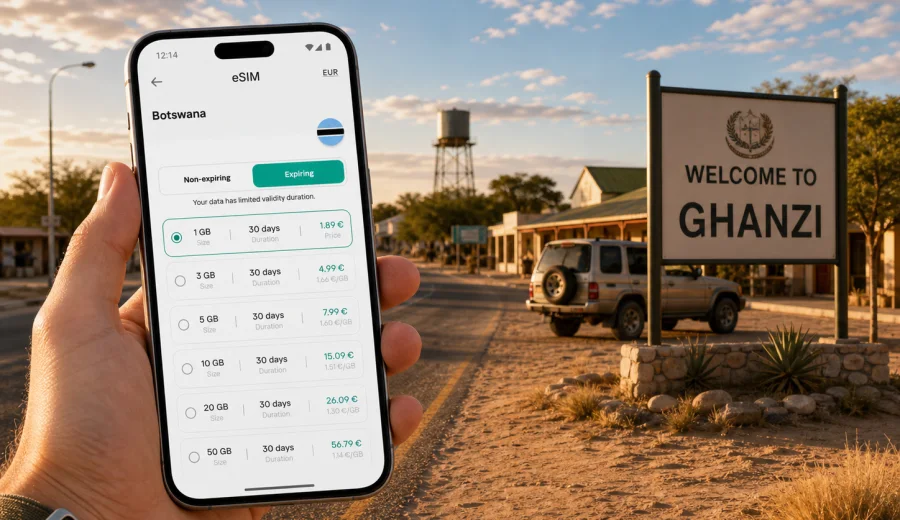
Ghanzi eSIM: mobile connection and internet for Botswana trips
Ghanzi is a practical base in western Botswana: a gateway town for the Kalahari, a road-trip stop between longer distances, and a useful point for travellers moving toward Maun, the Central Kalahari Game Reserve, Namibia, or ranch and lodge areas around the district. It is not a city where you want to solve mobile internet at the last minute. Distances are long, plans can change because of road conditions or lodge check-in times, and public Wi-Fi may not be where you need it most.
An eSIM helps you prepare mobile data before you arrive in Ghanzi. With a compatible phone, you can install a digital SIM profile, keep your regular physical SIM in place if needed, and use mobile internet for maps, messaging, bookings, banking confirmations, weather checks, and route coordination. The main point is control: you know the data allowance, validity period, destination, and activation steps before the trip becomes busy.
This guide focuses on Ghanzi itself and the travel situations around it: arrival by road or local airstrip, movement between hotels and lodges, transport planning, business visits, stopovers, and onward trips through western Botswana. It also explains how to choose an eSIM plan sensibly for a destination where coverage and Wi-Fi can vary more than in a large capital city.
Why Ghanzi needs a mobile data plan
Ghanzi is often part of a route, not a single-city holiday. Travellers stop there to refuel, sleep, resupply, meet local partners, reach a lodge, or continue toward the Kalahari. That makes mobile data especially useful because many decisions happen on the move: which road to take, where to check in, whether a booking has been confirmed, and how to contact a driver or host.
You may need internet in Ghanzi for:
- navigation from the highway into town, guesthouses, fuel stations, supermarkets, and lodge access roads;
- messaging with a tour operator, lodge reception, driver, colleague, or family member;
- checking route times before driving toward Maun, Charles Hill, Namibia, or the Central Kalahari area;
- opening booking confirmations, payment receipts, and travel documents;
- using ride, taxi, or local transfer coordination where available;
- checking weather before long road sections;
- sharing your location during a self-drive route;
- using translation, currency, banking, and email apps without waiting for hotel Wi-Fi.
In a compact town, it is easy to assume that connectivity will be simple. The challenge is not only the town centre. The challenge is the full travel pattern: the road into Ghanzi, the lodge outside town, the next morning departure, and the stretches where you may want offline maps and a working data plan at the same time.
Arrival in Ghanzi: road, lodge transfer, or local airstrip
Many visitors reach Ghanzi by road. Depending on the route, you may be coming from Maun, Gaborone, Francistown, the Namibian side, or another stop in western Botswana. Road arrivals make mobile internet valuable before you reach your accommodation, because the last kilometres can involve turns toward lodges, dirt access roads, or a meeting point that is easy to miss after sunset.
If you arrive by a local flight, charter, or transfer using the Ghanzi airstrip area, data is still useful immediately after landing. You may need to message your host, confirm pickup, check a map, or open a stored itinerary. A small arrival point will not necessarily offer the same connectivity experience as a major airport terminal, so installing the eSIM before travel is usually the calmer option.
For a self-drive trip, download offline maps before entering remote areas and use mobile data for live checks when coverage is available. Offline maps help with continuity; mobile internet helps with updates, messages, and confirmations. Treat them as complementary tools rather than substitutes.
Where mobile internet matters inside Ghanzi
Ghanzi is easier to manage when you divide your connectivity needs by place. The town centre is where you are likely to handle errands. The outskirts and lodge roads are where you may need directions and communication. The onward routes are where you should be more conservative with data and more prepared for coverage changes.
| Area or situation | What you may need online | Practical tip |
|---|---|---|
| Town centre and commercial streets | Maps, payments, messaging, opening bookings | Keep data available for quick errands and route changes. |
| Fuel stations and supply stops | Banking confirmations, route checks, contact with companions | Do important app updates before leaving town. |
| Guesthouses and hotels | Check-in messages, Wi-Fi backup, email | Do not rely only on accommodation Wi-Fi for time-sensitive tasks. |
| Lodges outside town | Navigation, pickup coordination, weather | Save directions offline and keep your eSIM active for messages. |
| Business visits | Email, calendar, documents, hotspot for a laptop if allowed | Choose a plan with enough data for calls and document sync. |
| Onward road trips | Navigation updates, location sharing, emergency contacts | Prepare offline tools and use mobile data when signal is available. |
This is why a Ghanzi eSIM plan should not be chosen only by the number of days in town. Think about the whole route: arrival day, local movement, a possible remote lodge stay, and the first hours of the next leg.
How much data to plan for Ghanzi
Your data needs depend on how you travel. A short stopover uses less data than a lodge-based trip with video calls, cloud photo backup, and work email. The safest approach is to separate essential tasks from optional tasks.
Essential data tasks usually include messaging, maps, booking apps, email, bank confirmations, and basic browsing. Optional high-use tasks include video calls, social media uploads, streaming, cloud backups, and using your phone as a hotspot. In Ghanzi, it is better to reserve data for travel-critical tasks, especially before leaving town.
| Traveller type | Typical Ghanzi use case | Data planning approach |
|---|---|---|
| Overnight road traveller | One night in town, fuel and supply stop, onward drive | A smaller short-validity plan can be enough if you avoid streaming. |
| Lodge traveller | Town arrival, lodge transfer, messaging, photos, weather | Choose more data if Wi-Fi at the lodge is uncertain. |
| Self-drive visitor | Navigation, route updates, location sharing, booking checks | Prioritise a plan with enough allowance for maps and messaging. |
| Business traveller | Email, documents, calendar, video calls, hotspot when allowed | Choose a larger plan and check hotspot conditions in the tariff. |
| Family or group organiser | Messaging several people, confirmations, shared maps | Keep extra data for coordination and last-minute changes. |
If you will stay mostly in town and use accommodation Wi-Fi for heavy tasks, a modest allowance may be enough. If you plan to work, manage logistics for a group, or travel beyond Ghanzi into lodge areas, choose more data than you would for a simple overnight stop.
Before you leave for Ghanzi
Good preparation reduces small problems on arrival. Do these tasks while you still have stable internet at home or at a previous major stop:
1. Save your accommodation address, check-in details, and emergency contacts offline.
2. Download offline maps for Ghanzi and your onward route.
3. Save booking confirmations as files or screenshots.
4. Check whether your phone supports eSIM and is not locked to one mobile operator.
5. Decide how much data you need for maps, messaging, work, and route changes.
6. Install your eSIM profile before the journey if the tariff conditions allow it.
7. Keep your regular SIM active for calls or SMS if you still need your home number.
The key is to separate installation from activation. Some travellers install the eSIM profile before departure and activate mobile data when they arrive, while others follow the exact timing required by the chosen tariff. Always read the plan conditions before you start using data.
Choosing an eSIM plan for Ghanzi through Kaspersky eSIM Store
Kaspersky eSIM Store is an app and website where you can choose, arrange, install, and activate an eSIM with a suitable data plan for mobile internet during an overseas trip. For a Ghanzi itinerary, the country context is Botswana, but the practical choice should match how you will actually move: town errands, lodge transfer, business calls, road sections, and possible onward travel.
When you compare options, look at four details first:
- destination coverage shown in the plan conditions;
- data allowance, such as 1 GB, 3 GB, 5 GB, 10 GB, or a larger package;
- validity period, especially if your route includes several days before or after Ghanzi;
- activation rules, including when validity starts and whether data roaming must be enabled for the eSIM.
If your itinerary centres on Ghanzi and nearby western Botswana, you can review available data plan options for Botswana travel in the Africa destination section before the trip. Check the details of the specific plan you select, because conditions, included destinations, validity, and available allowances can differ.
This is especially useful when Ghanzi is not your only stop. A visitor may land elsewhere, drive to Ghanzi, continue to Maun, or cross toward Namibia. In that case, the plan should fit the full route, not just the hotel night in town.
Device compatibility and installation
Before you arrange an eSIM, make sure the phone or tablet you want to use supports eSIM and is not restricted by an operator lock. If you are unsure, check your device before paying for a plan. This is a simple but important step: an eSIM profile can only be installed on a compatible device, and transfer rules can be limited after activation.
Installation is usually a short process, but do it when you are not in a rush. You may receive a QR code or in-app installation flow depending on the device and plan. Keep your regular SIM in the phone if you need your home number for calls, SMS, or bank verification. The eSIM is mainly for mobile data unless the selected plan explicitly states otherwise.
For setup steps, use the relevant guide for your device: Android installation instructions or iOS installation instructions. After installation, label the eSIM clearly, for example "Botswana data" or "Travel data", so you do not confuse it with your home line.
Common settings to check:
- set the eSIM as the mobile data line when you want to use travel data;
- keep your main SIM selected for calls if you need your regular phone number;
- enable data roaming for the eSIM if the plan instructions require it;
- turn off automatic cloud backups on mobile data if you have a limited allowance;
- check whether hotspot use is allowed by the selected plan before relying on it.
Ghanzi travel scenarios where eSIM helps
A one-night stopover
You arrive in Ghanzi in the afternoon, check into a guesthouse, buy supplies, and leave the next morning. Mobile internet helps with finding the property, messaging reception about arrival time, checking the fuel stop, and updating the next day's route. For this scenario, avoid spending data on video or large uploads. Keep it for maps, messaging, and booking apps.
A lodge stay outside town
You stay near Ghanzi or use the town as a base for Kalahari-focused activities. Mobile data is useful for coordinating transfers, checking weather, and confirming meal or pickup times. Lodge Wi-Fi may be limited, shared, or strongest only in certain areas. Even if Wi-Fi is available, having an eSIM gives you a backup for essential messages.
A business trip
Ghanzi can be a destination for agriculture, local administration, logistics, conservation, tourism, or district-level meetings. If you travel for work, choose a plan that can handle email, calendar updates, messaging apps, document downloads, and occasional video calls. If you plan to connect a laptop through hotspot, confirm that tethering is allowed under the selected tariff and budget extra data.
A self-drive route through western Botswana
For self-drive travellers, Ghanzi is often a practical staging point. Use mobile data in town to refresh maps, message your next accommodation, and check road or fuel plans. Once you leave town, coverage may become less predictable. Keep offline maps, paper or saved route notes, and emergency contacts ready. Use mobile internet when available, but do not make the whole route dependent on live data.
A short stop for fuel, food, and messages
Even if you do not sleep in Ghanzi, a working data plan can make the stop more efficient. You can check the next distance, confirm the next accommodation, send a location update, and handle payment notifications before continuing. This is a good example of why eSIM is not only for long stays; sometimes the most valuable data is used during a 30-minute stop.
Data habits that work well in Ghanzi
Data discipline matters more on a remote route than in a large city. Before reaching Ghanzi, pause automatic photo backup, download offline maps, update apps over Wi-Fi, and save accommodation details as files or screenshots. Use mobile data first for navigation, messages, bookings, payment confirmations, weather, and work updates.
If Ghanzi is part of a larger route, refresh maps and send important messages while you are in town. For routes toward Maun, the Central Kalahari area, or the Namibian side, keep offline tools ready and use live data when coverage is available.
Before activation, read the selected plan details carefully: destination coverage, data allowance, validity period, activation timing, hotspot conditions, top-up options, and whether voice calls or SMS are included. Most travel eSIM use cases are data-first, so keep your regular SIM active if you still need your home number for verification messages.
Quick answers for Ghanzi travellers
Is an eSIM useful for Ghanzi?
Yes, especially if you are arriving by road, staying outside the town centre, travelling onward, or relying on maps and messaging. It helps you prepare mobile data before the trip instead of searching for a local solution after arrival.
Should I install the eSIM before reaching Botswana?
In many cases, installing before travel is convenient, but activation timing depends on the selected plan. Read the instructions carefully so you do not start the validity period earlier than intended.
Can I use eSIM instead of hotel Wi-Fi?
You can use it for mobile internet, but it is better to keep Wi-Fi for heavy downloads or uploads when it is reliable. Use eSIM for movement, maps, messaging, bookings, and backup connectivity.
Will eSIM work on every road outside Ghanzi?
No mobile data option should be treated as guaranteed on every remote road. Coverage depends on local networks, terrain, distance from infrastructure, and the selected plan. Download offline maps and keep essential details saved.
Can I keep my regular phone number?
Usually, yes, if your phone supports dual SIM use with eSIM and your regular SIM remains active. You can use the eSIM for mobile data and keep your main SIM for calls or SMS, depending on your device settings and home operator conditions.
Final preparation for a smoother Ghanzi trip
Before your travel day, make sure your phone is compatible, your route is saved offline, your accommodation details are accessible, and your selected data plan fits the full itinerary. Ghanzi rewards preparation: a few minutes spent setting up mobile internet can make arrival, check-in, errands, and onward travel much easier.
If Ghanzi is on your Botswana route, use Kaspersky eSIM Store to choose a suitable eSIM data plan for your trip through the Africa destination page and install it on a compatible device before you need it. Then you can use mobile internet for the practical parts of travel: navigation, messages, bookings, work updates, and staying organised between town, lodge, and the next road ahead.