
Travel connectivity guide
Ghardaia eSIM for mobile internet
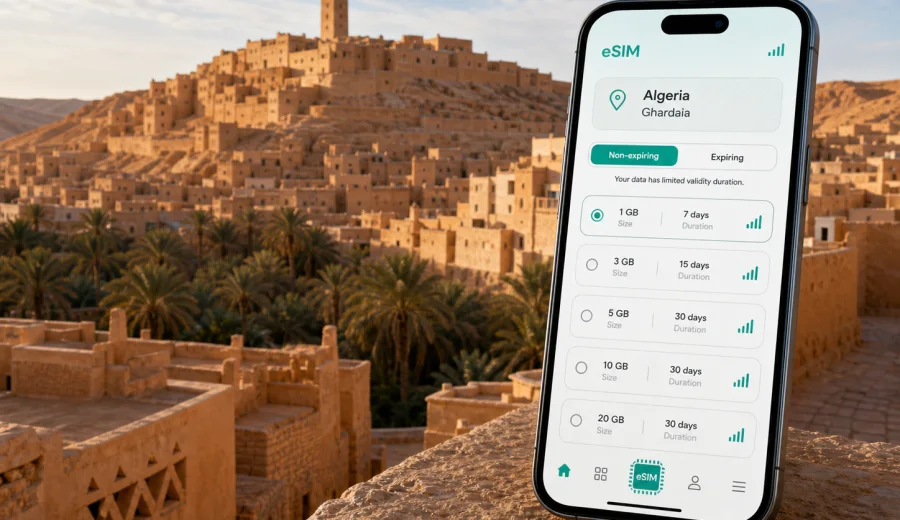
Ghardaia eSIM: mobile connection and internet for your trip
Ghardaia is not a city where mobile internet is only useful for posting travel photos. It is the tool that helps you move through the M'zab Valley with confidence: finding your hotel after arrival, checking pickup times, navigating between ksour, messaging your host, and keeping travel documents available when you are away from a reliable Wi-Fi network.
An eSIM can make this easier because you do not need to look for a physical SIM card as soon as you arrive. You can prepare a digital SIM profile before the trip, install it on a compatible phone, and use mobile data for maps, bookings, translation, messaging, and work tasks while you are in Ghardaia.
This guide focuses on the city itself: arriving through Ghardaia's airport, moving between the historic towns of the M'zab, planning visits around heat and opening hours, and choosing a data allowance that fits a desert-city itinerary.
Why mobile internet matters in Ghardaia
Ghardaia sits in central Algeria, on the edge of the Sahara, and many trips combine the city with nearby settlements such as Beni Isguen, Melika, Bou Noura, and El Atteuf. Distances are not extreme, but the practical details matter. Streets can be narrow, hotel entrances may be tucked into older districts, and many useful decisions happen on the move.
You may need mobile data in Ghardaia for:
- checking the route from Noumerat - Moufdi Zakaria Airport to your accommodation;
- confirming a transfer or taxi pickup with your hotel;
- using offline and online maps around the M'zab Valley;
- messaging guides, colleagues, family, or hosts;
- translating short phrases when you need directions or transport help;
- checking prayer times, opening hours, weather, or local travel updates;
- managing flight, bus, or onward-trip information from your phone;
- uploading documents or joining short work calls during a business stay.
Public Wi-Fi can be useful in a hotel or cafe, but it is not always available exactly when you need it. A working mobile data plan is especially helpful during the first hour after arrival, when you are finding transport, handling luggage, and trying to reach the correct address without losing time.
Arrival scenarios: airport, transfer, and first hours
Many visitors reach Ghardaia by domestic flight or by road from another Algerian city. If you arrive at the airport, your first connectivity needs are simple but important: confirm the driver's name, check the route into the city, tell your hotel your arrival time, and keep your booking details accessible.
If you come by road, eSIM data is useful before you reach the hotel. You may need to share your live location, check the final approach to the property, or message a local contact when the route enters denser streets. The same applies if Ghardaia is a stop on a wider Algeria itinerary and you are moving between cities with limited time to solve connectivity problems.
A practical first-hour setup looks like this:
1. Keep your primary SIM active for calls or banking messages if you need them.
2. Set the eSIM as the mobile data line.
3. Turn on data roaming for the eSIM if the plan instructions require it.
4. Open your map app before leaving the terminal, station, or pickup point.
5. Save your hotel address in English and, if available, Arabic or French.
This approach lets you separate mobile internet from your regular phone number. Most travel eSIM plans are focused on data. Voice calls and SMS are not included unless the selected plan clearly says otherwise, so use messaging apps for calls and texts when you rely on mobile data.
Where eSIM helps most around the city
Ghardaia rewards slow, careful movement. The old-town areas, viewpoints, markets, and neighboring towns are easier to enjoy when you are not trying to solve basic logistics from memory. Mobile data helps you stay flexible without turning the trip into a phone-first experience.
| City situation | Why mobile data helps | Typical data use |
|---|---|---|
| Airport arrival | Confirm pickup, route, and hotel address | Low |
| Old-town navigation | Check walking routes and meeting points | Low to medium |
| Visits to nearby ksour | Coordinate transport and return times | Medium |
| Hotel check-in | Retrieve booking, ID copies, and messages | Low |
| Business meetings | Email, documents, chat, calendar changes | Medium |
| Day trips from Ghardaia | Maps, messaging, photos, weather checks | Medium to high |
The biggest advantage is continuity. You can leave the hotel, cross into a different part of the city, meet a guide, stop for lunch, and still have the same data connection available for practical tasks. That matters more in Ghardaia than in a city where every street corner has predictable Wi-Fi.
How much data to plan for Ghardaia
The right eSIM data allowance depends on how you use your phone. A short cultural visit can be light on data if you download offline maps and avoid video streaming. A business trip or a multi-city route through Algeria needs more headroom.
Use this quick planning guide:
| Trip style | Likely needs | Practical allowance |
|---|---|---|
| 1-2 day stopover | Maps, messaging, hotel apps, flight checks | 1-3 GB |
| 3-5 day city stay | Navigation, photos, bookings, translation | 3-5 GB |
| 1 week in Ghardaia and nearby towns | Daily maps, messaging, work email, uploads | 5-10 GB |
| Remote work or frequent video calls | Documents, cloud apps, calls, hotspot use | 10 GB or more |
Video is the main data consumer. If you watch long videos, back up photos automatically, or use your phone as a hotspot for a laptop, a small package may run out faster than expected. For a calmer trip, download maps and entertainment on Wi-Fi before leaving your hotel, then reserve eSIM data for navigation, messaging, and live travel tasks.
Ghardaia travel patterns that affect your eSIM choice
A city eSIM article should not treat every trip the same. Ghardaia has several patterns that influence mobile data use.
First, many visitors move between several historic settlements in the M'zab Valley rather than staying in one compact center. Even a short ride can create repeated map checks, pickup messages, and route confirmations.
Second, the climate encourages planning. In hot periods, you may arrange walks early or late in the day, adjust transport times, and check weather before a longer outing. Having data makes those small changes easier.
Third, Ghardaia is often part of a wider Algeria route. You might connect through Algiers, continue south, or return north after a short stay. In that case, choose a plan for Algeria rather than thinking only about one city. The same eSIM profile can support the city part of the trip and your onward movement within the country, subject to the terms of the selected plan.
When you are ready to compare options, Kaspersky eSIM Store helps you choose an eSIM plan for your trip to Algeria by destination, data volume, validity period, and price before you travel or after you arrive.
How to choose an eSIM plan for Ghardaia
Start with your itinerary, not with the biggest data package. A good choice is the plan that fits your real movement, length of stay, and phone habits.
Check these points before you decide:
- Destination: the plan should cover Algeria, because Ghardaia is in Algeria.
- Validity: the active period should match your arrival date, city stay, and onward travel.
- Data volume: allow extra data for maps, photos, work, and hotspot use.
- Activation rules: check when the validity period starts and how activation works.
- Device compatibility: your phone or tablet must support eSIM and must not be locked to one mobile operator.
- Voice and SMS: assume the plan is for mobile data unless the terms say otherwise.
If you are visiting Ghardaia as a stopover, a smaller plan may be enough. If you will spend several days exploring the M'zab Valley, working from a hotel, or using mobile data between transport points, choose more data than your minimum estimate. The cost of running out of data is not only the top-up itself; it is the interruption at the moment when you need maps or messaging.
Check device compatibility before you buy
Before purchasing any eSIM plan, confirm that your device supports eSIM and can use it while you travel. Some phones are sold with regional differences, and some devices may be locked by a mobile operator.
Use this short checklist:
- Your phone supports eSIM.
- The device is not locked to a single operator.
- You know where to add a mobile plan in the phone settings.
- You can receive the installation email or open your account while connected to Wi-Fi.
- You understand which SIM line will handle mobile data during the trip.
If you are not sure, check your device before you choose a plan. This is especially important if you are using an older phone, a device bought in a different market, or a company-managed phone with restrictions.
Installing an eSIM before Ghardaia
The easiest setup is to install your eSIM while you still have a stable Wi-Fi connection, then activate mobile data according to the plan instructions when the trip begins.
A practical installation flow:
1. Choose the destination and plan.
2. Complete the order in Kaspersky eSIM Store.
3. Add the eSIM profile to your phone.
5. Keep your regular SIM for calls if needed.
6. Set the eSIM as the mobile data line when you are ready to use it.
7. Follow any plan-specific guidance about data roaming for the eSIM line.
For device-specific setup steps, use the instructions for Android or the instructions for iOS. The exact menu names may vary by phone model and operating system version, so follow the instructions shown for your device.
City movement: taxis, walking, and hotel transfers
In Ghardaia, travel planning often happens through hotels, local contacts, taxis, and arranged guides. Mobile data helps you keep these arrangements simple. You can share your pickup point, send a photo of a meeting place, confirm a return time, or check whether a driver has reached the correct entrance.
For walking routes, use mobile data carefully. Old districts can have narrow lanes, steps, and shaded passages where map positioning may be less precise than on wide streets. Use maps for orientation, but rely on local guidance where access rules or visitor routes require it.
For hotel transfers, save these details before you arrive:
- hotel name and full address;
- phone number or messaging contact;
- arrival terminal or pickup point;
- booking confirmation;
- a screenshot of the route.
An eSIM does not replace local knowledge, but it gives you a stable way to coordinate the practical parts of the day.
Business trips to Ghardaia
Business travel in Ghardaia may involve short schedules, site visits, meetings, and coordination with people in different parts of Algeria. In that situation, mobile data is less about leisure and more about reliability: calendar changes, route checks, document access, short calls, and messages during transfers.
If you expect file uploads, laptop tethering, or video calls, choose a larger data allowance and confirm whether hotspot use is allowed by the selected plan. If your employer manages your phone, check whether company settings allow eSIM installation before the trip.
Stopovers and short stays
A short stop in Ghardaia still benefits from prepared mobile internet. Prioritize fast setup before arrival, enough data for maps and messages, access to booking confirmations, and validity dates that cover the whole stop. A compact itinerary can use data quickly: airport arrival, hotel transfer, city walk, photo sharing, restaurant search, and onward travel checks may all happen in a few hours.
Day trips from Ghardaia and wider Algeria routes
If Ghardaia is part of a wider Algeria trip, think beyond the city center. You may move through Algiers, other desert-edge towns, or regional transport connections. Before a day trip, save offline map areas, your driver's or guide's contact details, the hotel address for the return, and screenshots of booking information.
Mobile data is not a guarantee that every remote spot will have the same signal quality. Local network conditions, terrain, buildings, and the selected plan all affect the experience. Keep critical details available offline as a backup.
Data-saving tips for Ghardaia
To make a smaller eSIM package last longer, download offline maps before leaving the hotel, turn off automatic photo backups on mobile data, update apps only on Wi-Fi, avoid long video streaming, and monitor data use in your phone settings. For many visitors, the practical setup is a combination: eSIM for mobile data outside the hotel, Wi-Fi for large downloads, and the regular SIM kept active if needed for calls or banking messages.
FAQ: eSIM for Ghardaia
Should I choose a Ghardaia plan or an Algeria plan?
Ghardaia is in Algeria, so review eSIM plans for Algeria and choose the data volume and validity period that match your city stay and onward route.
Final checklist before your trip
Before you leave for Ghardaia, make sure you have:
- confirmed that your phone supports eSIM;
- checked that the device is not operator-locked;
- selected a plan for Algeria with suitable data and validity;
- installed the eSIM while connected to Wi-Fi;
- saved hotel and transport details offline;
- downloaded map areas for Ghardaia and the M'zab Valley;
- set the eSIM as your mobile data line when needed.
For a city stay, business trip, or wider Algeria route, Kaspersky eSIM Store helps you prepare an eSIM plan for travel in Algeria before you need mobile internet on the ground.