
Travel connectivity guide
Ghent eSIM for mobile internet in Belgium
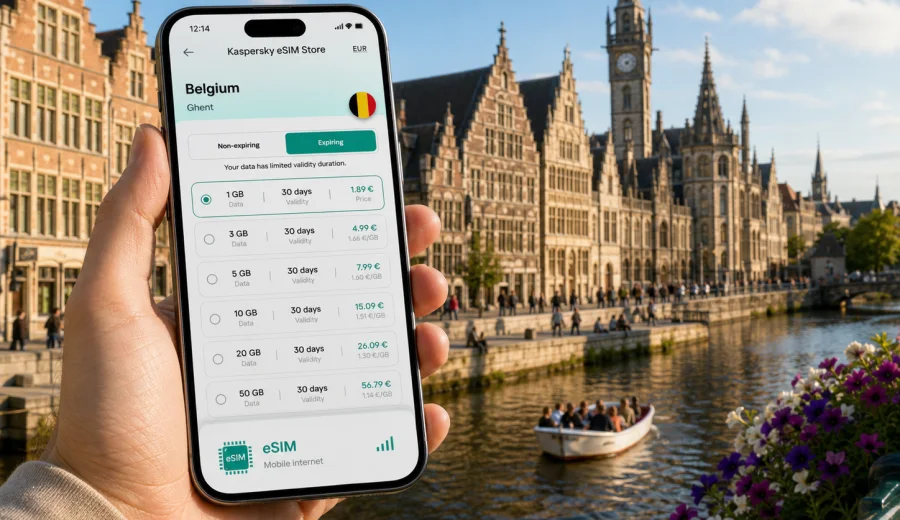
Ghent eSIM: mobile connection and internet for a city trip to Belgium
Ghent is one of Belgium's easiest cities to enjoy on foot, by tram, and by train, but it is also a city where mobile internet quickly becomes part of the trip. You may need a map as soon as you leave Gent-Sint-Pieters station, a translation app when reading menus in Patershol, a ride update when a tram route changes, or a video call after a business meeting near Flanders Expo. A prepared eSIM helps you keep those small travel tasks under control without looking for a physical SIM card after arrival.
This guide focuses on Ghent itself: arrival routes, local movement, hotel areas, museum days, canal walks, business travel, short stopovers, and day trips from the city. Belgium matters because your eSIM plan is chosen for the country, but the real question is practical: how much mobile data do you need while moving around Ghent, and when should you activate it?
Why mobile internet matters in Ghent
Ghent looks compact on a map, yet the useful places are spread across several travel zones. The historic center is around Korenmarkt, Graslei, Korenlei, Saint Bavo's Cathedral, the Belfry, and Gravensteen. Many hotels and offices sit closer to Gent-Sint-Pieters, the university area, Dok Noord, or the exhibition district. A visitor often moves between these areas several times a day.
Mobile data helps with:
- walking routes through car-light streets and canal-side lanes;
- tram and bus checks when stops are temporarily moved;
- train updates for Brussels, Bruges, Antwerp, Lille, or the airport;
- hotel check-in messages and apartment entry codes;
- restaurant bookings and mobile payments;
- translation between English, Dutch, French, and other languages;
- cloud documents for meetings, conferences, and university visits.
Public Wi-Fi can be useful in hotels, cafes, and conference venues, but it is not a complete travel plan. It may require registration, it may be slow at busy times, and it disappears exactly when you are between stations, stops, hotels, and meeting points. With an eSIM on a compatible device, you can use mobile internet during those gaps.
Arrival in Ghent: where data is useful first
Ghent does not have a major passenger airport next to the city center, so many visitors arrive through another Belgian or regional gateway. The most common routes are Brussels Airport by train, Brussels South Charleroi Airport with a longer transfer, international rail through Brussels, or train connections from Bruges, Antwerp, Lille, Amsterdam, or Paris.
The first mobile data tasks usually happen before you see the canals:
| Arrival route | Mobile internet tasks in Ghent |
|---|---|
| Brussels Airport to Gent-Sint-Pieters | Check train platform changes, share arrival time, open the route from the station to your hotel. |
| Brussels Midi or Brussels Central | Compare train options, keep your ticket app available, follow updates during transfers. |
| Charleroi Airport | Manage bus and rail changes, save connection details, message your hotel if arrival is late. |
| Bruges or Antwerp by train | Track local train times and find the right tram from Gent-Sint-Pieters or Gent-Dampoort. |
| Car rental or taxi | Navigate to low-traffic streets, parking areas, and hotel drop-off points. |
Gent-Sint-Pieters is the main station for most visitors. From there, trams and buses connect to the old town, university areas, and business districts. Gent-Dampoort is useful for the east side of the city, Dok Noord, and some routes toward Antwerp. If your hotel is in the historic center, do not assume it is a short straight walk from the main station with luggage. Online routing saves time because the best route may combine tram, walking, and a short final turn through pedestrian streets.
eSIM basics for a Ghent trip
An eSIM is a digital SIM profile installed on a compatible phone or tablet. For travel, it is usually used for mobile data rather than a local phone number. That distinction matters in Ghent because most visitor tasks are data tasks: maps, ticket apps, messengers, email, bookings, translation, and browser searches.
Before you choose a plan, check three points:
- your device supports eSIM;
- your device is not locked to one mobile operator;
- the plan conditions match Belgium or a wider region that includes Belgium.
For many trips, you can keep your regular SIM for calls and SMS while using the travel eSIM for mobile data. On dual-SIM phones, you can usually choose which line handles mobile data, which line receives calls, and whether data roaming is enabled for the eSIM. The exact menu names depend on iOS or Android and on the device manufacturer.
How much data you may need in Ghent
Data use depends more on behavior than on city size. A traveler who uses offline maps, hotel Wi-Fi, and short messaging may use little data. A business visitor who keeps email, navigation, cloud files, and video calls open may need a larger package.
Typical Ghent scenarios:
| Trip style | Likely data needs | Notes |
|---|---|---|
| One-day stopover | Low to moderate | Maps, transport checks, restaurant searches, messaging, a few photos uploaded later. |
| Weekend city break | Moderate | Navigation, museum searches, payments, translation, social sharing, train updates. |
| Business trip | Moderate to high | Email, documents, calendar changes, ride coordination, hotspot use if allowed by the plan. |
| Student or conference visit | High | Campus maps, group chats, cloud files, schedule apps, longer stays. |
| Belgium rail base | Moderate to high | Ghent plus Bruges, Brussels, Antwerp, or the coast means more route checks and mobile browsing. |
Video, cloud backup, large app updates, and laptop tethering can consume data quickly. If your plan allows hotspot use, treat it as a useful backup rather than your main internet connection for a full workday. Download heavy files on trusted Wi-Fi, keep offline maps saved, and turn off automatic photo backup if your data package is limited.
Ghent neighborhoods where connectivity helps
The old center is beautiful but not always simple to navigate on the first day. Streets curve around water, bridges, tram lines, squares, and pedestrian areas. Mobile internet is useful not because the city is difficult, but because Ghent rewards flexible movement.
Korenmarkt, Graslei, and Korenlei. This is the classic first walk. You may use maps to find canal viewpoints, restaurants, boat departures, and routes toward Gravensteen or Saint Bavo's Cathedral. At busy times, data helps you compare restaurant availability instead of walking from one full terrace to another.
Patershol and Prinsenhof. These areas are atmospheric and compact, with small streets and dinner spots. Navigation helps when it is dark or rainy, and messaging is useful if your group splits up around the castle and canals.
Arts Quarter and Citadelpark. Museum visits, the park, and streets around the station often combine walking and tram rides. Mobile data helps coordinate timed tickets, opening hours, and the return route.
Dok Noord and the east side. This area has offices, leisure spaces, and apartments. It is less obvious for first-time visitors than the medieval center, so transport checks and map routing are useful.
Flanders Expo and business areas. If you are in Ghent for an event, conference, or trade fair, mobile internet becomes part of the workday. You may need calendar updates, presentation files, taxi coordination, and group messages between the station, venue, hotel, and dinner.
Choosing an eSIM plan for Belgium before going to Ghent
For a city article, the correct destination is the country that contains the city. Ghent is in Belgium, so choose a Belgium plan unless your route across Europe makes a regional plan more practical. Think about trip length, expected data use, and whether you need coverage only in Belgium or in several countries during one journey.
If you want to prepare before arrival, you can use Kaspersky eSIM Store to choose an eSIM plan for a trip to Ghent and Belgium and review the available data amount, validity period, destination, and price before you install anything on your device. Kaspersky eSIM Store is an app and website that helps you choose, arrange, and activate an eSIM with a suitable data plan for mobile internet in an international trip.
Do not choose only by the largest number on the screen. A smaller plan may be enough for a careful weekend. A longer stay, daily train travel, video calls, or hotspot use may justify more data. The best plan is the one that matches how you will actually move through Ghent.
Practical setup checklist
Set up your mobile internet before the trip if you want less friction at arrival. You do not need to activate data too early if your plan validity begins only after activation, but you should know how the selected plan works.
Before departure:
- confirm that your phone or tablet supports eSIM;
- check that the device is not carrier-locked;
- review the plan's destination, data allowance, validity period, and activation rules;
- install the eSIM while you have stable home Wi-Fi if the plan instructions allow it;
- save your QR code or installation details where you can access them securely;
- keep your regular SIM active if you need your usual phone number for bank messages or calls.
Before buying, check your device to make sure eSIM is supported. This is especially important if you are using an older phone, a device bought through a carrier, or a phone model that differs by region.
When you install the eSIM, follow the steps for your device. Kaspersky eSIM Store provides an Android installation guide and an iOS installation guide for the main setup flow. Menu names can vary, but the usual idea is simple: add the eSIM, label it clearly, select it for mobile data, and enable data roaming for that eSIM if the plan instructions require it.
When to activate the eSIM in Ghent
Activation timing depends on the plan terms. Some plans begin when the eSIM connects to a supported network at the destination. Others may have different rules. Read the conditions before your trip so you know whether installation and activation are separate steps.
Useful timing choices:
- Before departure: Install the eSIM profile over stable Wi-Fi, but keep travel data off until needed if the instructions allow that.
- At the airport or station: Activate when you know you are close to Belgium or have arrived, especially if you need navigation immediately.
- At the hotel: Use Wi-Fi for setup only if you are confident you can reach the hotel without mobile data.
For Ghent, the safest practical approach is to arrive with the eSIM already installed and ready to use. You can then switch mobile data to the travel eSIM after landing in Belgium or before leaving the train station. This helps when platforms change, tram stops are unfamiliar, or you need to contact your host.
Local movement: trams, buses, walking, and bikes
Ghent is well suited to slow travel, but the city still benefits from real-time data. The historic center has many car-light streets, and walking is often the most pleasant option once you are near Korenmarkt. For longer hops, trams and buses connect the center with Gent-Sint-Pieters, Gent-Dampoort, the university area, Flanders Expo, and residential districts.
Use mobile internet for:
1. Checking the best stop for your exact hotel, not just the closest stop on a map.
2. Confirming whether a tram route is affected by works or events.
3. Finding a late-evening route back to the station or apartment.
4. Opening a bike-share or mobility app if you plan to ride.
5. Sharing your live location with travel companions.
The old city is compact enough that you should not need constant streaming navigation. Still, a few seconds of data at the right time can prevent a 20-minute wrong turn in rain or a missed train connection.
Hotels, business trips, and day trips
Where you stay changes your mobile data pattern. A hotel in the historic center is best for sightseeing and restaurants, but digital check-in, narrow streets, and evening route changes make mobile data useful. A room near Gent-Sint-Pieters is practical for trains, yet you may check tram times several times a day. The university area, Dok Noord, and Flanders Expo are more spread out, so transport apps and maps matter more.
Business travelers should treat mobile internet as continuity between Wi-Fi zones. Venue Wi-Fi may handle long video calls, while eSIM mobile data is useful for calendar changes, documents, taxi coordination, and messaging between meetings. If hotspot use is allowed by the selected plan, keep it as a backup for short urgent tasks rather than a full workday on a laptop.
Ghent is also a good base for Bruges, Brussels, Antwerp, Mechelen, Leuven, and the Belgian coast. If you use the city as a rail hub, you will check platforms, walking routes, and return options more often than a visitor who stays only in the center. For a Belgium-only itinerary, one Belgium plan may be enough. If your trip continues into neighboring countries, compare the destination coverage and validity period before choosing.
Short visits and data-saving habits
For a one-day stopover, prepare an offline map, save the station and luggage details, and keep enough data for live transport and messages. The goal is not to browse constantly. It is to have mobile internet ready when you need a route, a booking, or a delay update.
To make a data package last longer:
| Habit | Why it helps |
|---|---|
| Download offline maps | Walking routes use less mobile data. |
| Pause cloud photo backup | Canal photos and videos can be large. |
| Update apps on Wi-Fi | App updates are rarely urgent during a trip. |
| Save hotel details offline | You still have the address if signal is weak. |
| Monitor usage daily | You can adjust before the package runs low. |
Avoid the common mistakes: buying a plan without checking Belgium coverage, assuming eSIM data includes calls and SMS, forgetting to select the eSIM as the mobile data line, leaving data roaming disabled when the plan instructions require it, or deleting an eSIM profile before the trip is finished.
FAQ: eSIM and mobile internet in Ghent
Is eSIM useful for a weekend in Ghent?
Yes, if you rely on maps, transport updates, messaging, translation, or digital hotel check-in. A weekend trip can be simple, but the first and last hours often depend on mobile data.
Should I choose a Ghent plan or a Belgium plan?
Choose by country or region. Ghent is in Belgium, so a Belgium plan is the natural option unless a wider Europe route makes a regional plan more suitable.
Can I keep my usual phone number?
On many dual-SIM devices, you can keep your regular SIM active for calls or SMS while using the eSIM for mobile data. Check your device settings and your home operator's roaming conditions.
Does a travel eSIM include calls and SMS?
Do not assume that. Many travel eSIM plans are focused on mobile data. Use internet-based calling and messaging apps when the plan does not include a regular phone number.
Is hotel Wi-Fi enough in Ghent?
It may be enough for heavy downloads, but it does not help while you are moving between the station, hotel, restaurants, museums, and meeting places. Mobile data fills that gap.
Can I install the eSIM after I arrive?
You can if you have stable Wi-Fi and the plan instructions allow it, but installing before travel is usually less stressful. Activation timing depends on the plan terms.
Final preparation for your Ghent trip
For Ghent, the best mobile internet plan is the one that matches your actual route: station arrival, tram rides, old-town walks, hotel location, work commitments, and possible day trips. Prepare your device before departure, check eSIM compatibility, read the activation rules, and keep your regular SIM settings clear.
Kaspersky eSIM Store helps you choose, arrange, and activate an eSIM with a suitable data plan for mobile internet during an international trip. Before you leave, prepare an eSIM plan for Belgium through Kaspersky eSIM Store so you can arrive in Ghent ready for maps, transport updates, hotel messages, and everyday travel tasks.