
Travel connectivity guide
eSIM for Gibraltar: mobile internet guide
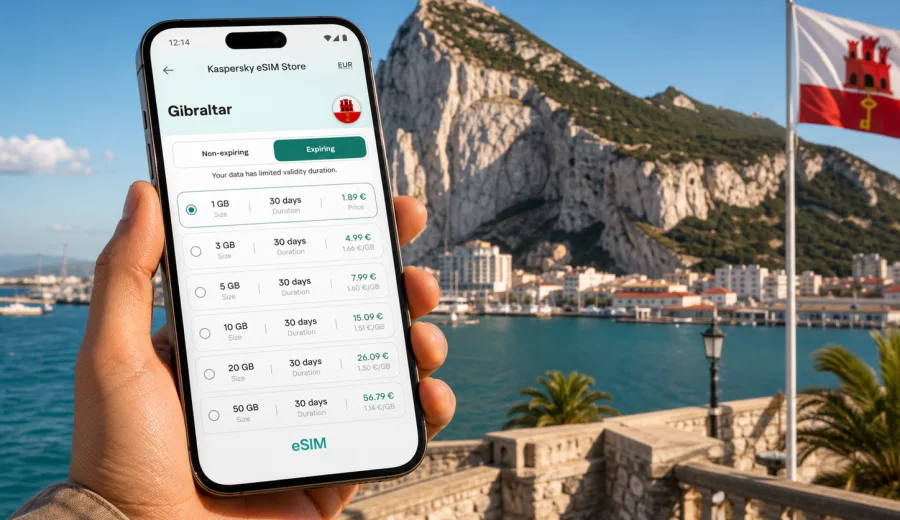
eSIM for Gibraltar: mobile connection and internet for your trip
Gibraltar is compact, busy and very easy to cross in a single day, but a trip there still depends on reliable mobile internet. You may need maps after landing, a taxi or bus schedule near the airport, messages with your hotel, a boarding pass, restaurant bookings, work email, or navigation between Main Street, the Rock of Gibraltar, Europa Point and the border with Spain. An eSIM helps you prepare mobile data before you travel, so you do not have to start your visit by looking for a physical SIM card.
An eSIM is a digital SIM profile installed on a compatible smartphone or tablet. For travel, it can be used for mobile internet without changing your regular SIM card. Kaspersky eSIM Store is an app and website where you can choose, arrange and activate an eSIM with a suitable data plan for an international trip. It is useful when you want a clear data allowance, a defined validity period and a simple setup path before or shortly after arrival.
This guide explains how to use eSIM for Gibraltar, how to choose a data plan, what to check before purchase and how to avoid common setup mistakes. The focus is practical: staying online for transport, maps, messaging, bookings and everyday travel tasks.
Why eSIM is useful in Gibraltar
Gibraltar can feel simple on a map, but the online tasks start immediately. The airport is close to the town centre, the frontier with Spain is often part of the route, and many visitors move between short walks, cable car plans, beaches, marinas and day trips. Mobile internet helps you make small decisions quickly.
For a short visit, eSIM is convenient because you can keep your primary SIM in the phone and use the eSIM profile for data. For a business trip, it helps you avoid relying on hotel Wi-Fi for every call or file. For a longer stay, it gives you a controlled data allowance that you can match to your expected usage.
Typical Gibraltar travel scenarios include:
| Travel situation | Why mobile internet matters | Practical eSIM use |
|---|---|---|
| Arrival at Gibraltar International Airport | You may need maps, hotel directions or transport details immediately | Activate mobile data on the eSIM after landing |
| Crossing the Spain-Gibraltar border | You may use maps, messages and travel documents while moving between networks | Check whether your selected plan covers the places you will use it |
| Visiting the Rock of Gibraltar | You may need tickets, walking routes and meeting points | Keep data available for navigation and messaging |
| Work trip or conference | You may need email, calendar updates and video calls | Choose a larger data allowance if tethering or calls are expected |
| Family travel | Several people may rely on one person for maps and bookings | Prepare each compatible device separately if needed |
The main benefit is not that eSIM changes the whole trip. It removes a common first-hour problem: how to get online without waiting for hotel Wi-Fi, searching for a shop or changing a physical SIM card.
What eSIM gives you in a Gibraltar trip
An eSIM for travel is usually about mobile data. It does not automatically include a local phone number, ordinary voice calls or SMS unless those options are clearly included in the selected plan conditions. For most travellers, this is still enough: messaging apps, map apps, booking platforms and email work through mobile internet.
Use eSIM when you want:
- mobile internet without buying a physical SIM card;
- a data plan prepared before the trip;
- clear visibility of data allowance and validity period;
- less dependence on public Wi-Fi in cafes, airports and hotels;
- a separate data profile while keeping your regular SIM active for calls or banking messages;
- an easier setup flow on a compatible phone.
Gibraltar is a good example of a destination where a small territory does not mean low data needs. A few navigation sessions, photo uploads, video calls, cloud backups and map downloads can use more data than expected. Choosing the right allowance matters more than choosing the largest possible plan.
How much data do you need for Gibraltar?
Your best eSIM plan depends on trip length and behaviour. A weekend in Gibraltar with maps, messaging and light browsing needs less data than a work trip with video calls or frequent hotspot use. Before choosing, think about how you use your phone when you are away from home, not only how many days you will be abroad.
Use this rough planning table:
| Usage pattern | Examples | Plan approach |
|---|---|---|
| Light use | Maps, messaging, boarding passes, restaurant searches | Smaller data allowance may be enough |
| Regular travel use | Maps, social media, photo sharing, bookings, email | Mid-size allowance gives more comfort |
| Work-heavy use | Video calls, cloud files, hotspot for a laptop | Choose a larger allowance and check tethering rules |
| Multi-country route | Gibraltar plus Spain or other European stops | Check whether a country, regional or broader plan fits the full route |
Do not estimate only by destination size. Gibraltar is small, but roaming, navigation, queues, transfers and day trips can still create many short online moments. If you plan to upload many videos, stream often or use your phone as a hotspot, choose a plan that leaves enough margin.
What to check before you choose a plan
Before arranging an eSIM for Gibraltar, check three things: the country or region covered by the plan, the validity period and the data allowance. If you are also spending time in Spain before or after Gibraltar, make sure your chosen option matches the full route rather than only the first stop.
Also check when the plan starts counting validity. Some plans begin after installation, some after first connection to a supported network, and some may have other conditions. Read the plan details before purchase, especially if you want to install the eSIM in advance and activate it later.
Here is a practical pre-purchase checklist:
- Confirm that your destination is Gibraltar.
- Check whether your wider route includes Spain or another country.
- Compare data allowance with your expected usage.
- Check plan validity against the full trip length.
- Review whether hotspot use is allowed if you need it.
- Make sure your phone supports eSIM and is not carrier-locked.
- Keep an internet connection available for installation.
- Save installation details before you leave home.
If you are not sure whether your phone can use eSIM, check your device before choosing a plan. Some models vary by region of sale, and a phone locked to a mobile operator may not accept a travel eSIM profile.
How Kaspersky eSIM Store fits into the setup
Kaspersky eSIM Store helps you choose, arrange and activate an eSIM with a suitable data plan for mobile internet in an international trip. You can review available options for the destination, compare the data amount and validity period, and install the eSIM on a compatible device.
This is useful when you want the mobile internet part of the trip prepared before arrival. Instead of searching for an offline point of sale, you can choose the destination and plan conditions in advance, then follow the setup instructions. If you are planning your route now, you can choose an eSIM plan for Gibraltar and compare the available data options before you travel.
The product should be understood as a convenient app and website for selecting and activating travel eSIM plans. The actual connection depends on the selected plan, device settings and local network conditions. That is why the safest approach is to check compatibility, read plan terms and keep your setup details available.
When to install and activate your eSIM
Many travellers prefer to install the eSIM before departure while they still have stable home Wi-Fi. That reduces stress at the airport and gives time to fix basic setup issues. Activation timing depends on the plan conditions, so read the details carefully before installing too early.
A practical sequence looks like this:
1. Choose Gibraltar or the region that matches your route.
2. Select a plan by data allowance and validity period.
3. Confirm that your device supports eSIM and is unlocked.
4. Install the eSIM profile while you have a reliable internet connection.
5. Keep your primary SIM active if you still need calls or SMS.
6. On arrival, select the eSIM profile for mobile data.
7. Enable data roaming for the eSIM if the instructions or device require it.
8. Test maps or a web page before leaving the airport or hotel.
If you use an iPhone or Android device, follow the relevant setup guide: installation instructions for Android and installation instructions for iOS. The exact screens may differ by device model and operating system version, but the general logic is the same: add the eSIM profile, select it for mobile data and confirm the required settings.
Gibraltar travel scenarios where eSIM helps
Arrival and first connection
Gibraltar International Airport is close to the centre, but the first hour still often involves messages, maps and transport decisions. With eSIM prepared, you can open directions, contact your accommodation and check your next step without waiting for a Wi-Fi login page.
Walking around the town centre
Main Street, Casemates Square, Ocean Village and nearby streets are easy to explore on foot. Mobile internet helps with restaurant searches, opening hours, tickets, digital payments, translation and sharing live location with travel companions.
Visiting the Rock of Gibraltar
The Rock is the landmark most visitors plan around. You may need route updates, ticket information, weather checks and meeting points. If your group separates for a while, mobile data makes coordination easier.
Border and onward travel
Many itineraries include Spain before or after Gibraltar. If you cross the frontier, check whether your plan covers the full route. A plan that fits only one part of the journey may leave you switching settings or relying on Wi-Fi at the wrong time.
Remote work
For email and chat, moderate data may be enough. For video calls, hotspot use and large files, choose more data and review plan conditions. If stable work access is important, prepare a backup such as hotel Wi-Fi, but avoid depending on it as your only option.
eSIM, roaming and local SIM cards: what is different?
The best option depends on your priorities. Roaming may be simple if your home operator includes Gibraltar on favourable terms, but it can also be expensive or unclear. A physical local SIM may suit longer stays, but it usually requires finding a place to buy it and replacing or adding a SIM card. eSIM sits between these options: it is digital, can be prepared in advance and is focused on mobile data for travel.
| Option | Good for | What to watch |
|---|---|---|
| Home roaming | Travellers with a strong roaming package from their operator | Price, fair-use limits and whether Gibraltar is included |
| Physical SIM | Longer stays or users who specifically need a local SIM arrangement | Store availability, setup time and SIM slot use |
| Travel eSIM | Short trips, business travel and prepared mobile data | Device compatibility, plan coverage and data allowance |
There is no universal answer for every traveller. The practical choice is the one that matches your route, phone, budget and data habits.
How to reduce data use during the trip
Even with a comfortable eSIM plan, it is worth controlling background usage. A few settings can make the data allowance last longer:
- Download offline maps for Gibraltar and nearby parts of Spain before departure.
- Turn off automatic cloud photo backup on mobile data.
- Disable app auto-updates outside Wi-Fi.
- Use lower video quality for streaming or calls when possible.
- Check which SIM profile is selected for mobile data.
- Avoid using hotspot for large laptop updates.
- Monitor remaining data in the app or phone settings.
These steps are especially useful for short plans. They help reserve mobile data for travel tasks that are hard to postpone: navigation, messages, bookings and urgent work.
Device compatibility and common setup mistakes
The most common eSIM problem is not the destination. It is the device. Before purchase, confirm that the phone or tablet supports eSIM, that the model variant allows eSIM in your region and that it is not locked to one mobile operator. Also make sure the operating system is up to date enough to add and manage eSIM profiles.
Avoid these mistakes:
- buying a plan before checking eSIM support;
- deleting an eSIM profile too early;
- installing the eSIM on the wrong device;
- selecting the primary SIM for data after arrival by mistake;
- leaving data roaming disabled when the eSIM needs it;
- expecting ordinary calls or SMS if the plan is data-only;
- assuming a plan covers Spain just because Gibraltar is nearby.
If something does not work immediately, check the simple settings first: mobile data line, data roaming for the eSIM, airplane mode, network selection and whether the plan has been activated according to its terms. Connection may take a few minutes depending on the device and local network conditions.
Quick preparation checklist
Use this checklist a day or two before travelling:
- Your phone supports eSIM.
- The device is not carrier-locked.
- The selected plan covers Gibraltar and your wider route.
- The data allowance fits your expected use.
- The validity period covers the full stay.
- You know whether activation starts on installation or first network use.
- Installation instructions are saved or easy to open.
- Your regular SIM remains available if you need bank SMS or voice calls.
- Offline maps and key booking details are downloaded.
- Family or colleagues know how to reach you through internet-based apps.
This preparation takes little time, but it can prevent the most frustrating connectivity issues after arrival.
Frequently asked questions
Can I use eSIM in Gibraltar for mobile internet?
Yes, if you choose a plan that covers Gibraltar and use a compatible, unlocked device. Availability, speed and connection quality depend on the selected plan, device settings and local network conditions.
Does travel eSIM include a phone number?
Usually no. Travel eSIM plans are typically for mobile data. Ordinary voice calls and SMS are not included unless the specific plan terms say otherwise. You can use messaging and calling apps through mobile internet.
Should I install the eSIM before I travel?
Often, yes. Installing before departure can be easier because you have stable Wi-Fi and time to follow the instructions. Check the plan details first, because validity and data usage may begin according to specific activation rules.
Do I need data roaming switched on?
On some devices and plans, yes. If the setup instructions say to enable data roaming for the eSIM profile, turn it on for that profile only. Keep your primary SIM settings under control so you do not accidentally use home roaming.
Can I use one eSIM on several phones?
No, not in the way Wi-Fi works. An eSIM profile is installed on a specific compatible device. If several travellers need mobile data, each person should prepare their own compatible device and plan.
What if I am visiting Gibraltar and Spain?
Check the coverage of your selected plan before purchase. If your route includes both Gibraltar and Spain, you may need a plan that covers the whole route rather than only one destination.
Is public Wi-Fi enough for Gibraltar?
It can help, but it is not always available when you need it. Mobile internet is useful for airport arrival, border crossings, maps, tickets, ride arrangements and urgent messages when you are away from a trusted Wi-Fi network.
Choose mobile internet for Gibraltar before you go
Gibraltar is easy to navigate when your phone is ready: maps load, messages arrive, bookings open and route changes are easier to handle. Before you travel, check your device compatibility, review the plan conditions and decide how much data you need for the way you actually use your phone.
Kaspersky eSIM Store helps you prepare this part of the trip through a clear app and website flow: choose the destination, review data and validity, install the eSIM on a compatible device and activate it according to the instructions. When you are ready to plan the mobile internet part of your route, choose an eSIM plan for your trip to Gibraltar.