
Travel connectivity guide
Gjirokaster eSIM: Mobile Internet Guide
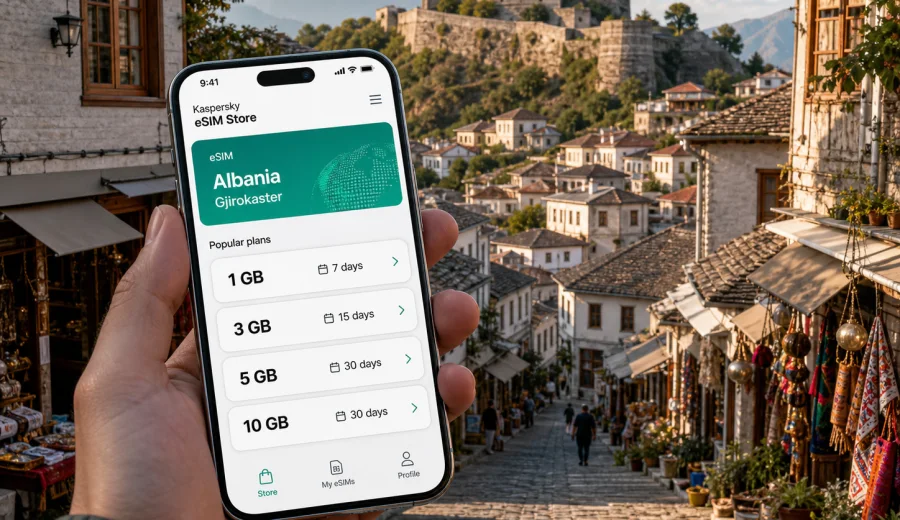
Gjirokaster eSIM: mobile connection and internet for your trip
Gjirokaster is one of those cities where mobile internet quickly becomes part of the travel plan, not just a convenience. The old town rises sharply above the valley, stone lanes bend between Ottoman-era houses, and many hotels, guesthouses, restaurants, and museums are tucked into streets where you will want navigation before you want a postcard view. If you arrive with an eSIM already prepared, you can check your route, message your host, open a map, and handle transport without searching for a SIM shop or depending on Wi-Fi.
This guide is for travelers visiting Gjirokaster, Albania, who need practical mobile connection advice for arrival, local movement, hotels, business trips, stopovers, and day trips. It focuses on eSIM as a digital SIM option for mobile internet abroad. It does not replace checking the details of your chosen tariff: data volume, validity period, destination, activation rules, and device compatibility still matter.
Why mobile internet matters in Gjirokaster
Gjirokaster is compact on the map, but the city is not always simple on foot. The historic center is steep, the castle sits above the bazaar, and short distances can feel longer with luggage or in hot weather. Reliable mobile internet helps with ordinary travel tasks that become more important in a hilly heritage city:
- finding the correct guesthouse entrance on a narrow lane;
- checking walking routes between the bazaar, castle, museums, and viewpoints;
- messaging a hotel or apartment host before arrival;
- ordering a taxi or confirming a pickup point;
- translating menus, museum notes, or transport messages;
- checking bus or shared transfer options for Saranda, Tirana, Berat, Permet, or other Albanian stops;
- sharing your location with travel companions when the group splits up.
Public Wi-Fi can be useful in hotels and cafes, but it is not a complete travel plan. You may need internet before check-in, outside restaurant hours, at a roadside stop, or while moving between the lower city and the old town. An eSIM gives you another way to get online through a compatible phone without handling a physical SIM card.
Arrival scenarios: when eSIM is useful first
Most international visitors reach Gjirokaster overland after arriving elsewhere in Albania or nearby regions. The city does not have a major international airport, so travelers often come by road from Tirana, Saranda, Vlore, Berat, or the Greek border area. That makes mobile data useful before you even see the castle.
| Arrival route | Where mobile data helps | Practical tip |
|---|---|---|
| From Tirana or Tirana airport | Transfer coordination, map checks, hotel messages | Save your hotel address offline, then use mobile data for live updates. |
| From Saranda | Route planning, taxi or bus timing, onward trip changes | Keep enough data for the road section and arrival in the old town. |
| From Berat or Permet | Navigation through mountain and valley roads | Do not rely only on cafe Wi-Fi between towns. |
| From a regional road trip | Fuel stops, parking, accommodation contact | Check whether your tariff covers Albania before activation. |
If your route includes several Albanian cities, choose a plan based on the whole trip, not only one afternoon in Gjirokaster. A two-day stop with light map use needs less data than a week with navigation, cloud photo backup, video calls, and laptop tethering.
eSIM basics for a Gjirokaster trip
An eSIM is a digital SIM profile installed on a compatible device. For travel, it is commonly used for mobile data without changing your physical SIM card. In Gjirokaster, that means you can keep your usual number active for banking messages or calls if your phone supports dual SIM behavior, while using the eSIM for data in Albania.
Before buying any eSIM tariff, check three things:
1. Your phone supports eSIM.
2. Your device is not locked to a single carrier.
3. The selected tariff includes Albania and has enough data and validity for your route.
If you are unsure about the first point, use the compatibility check before purchase: Check your device. This is especially important if you use an older phone, a regional device model, or a phone bought through a mobile operator contract.
Gjirokaster travel patterns and data use
Data needs vary by traveler. A one-night heritage stop may only require maps, messaging, translation, and a few uploads. A slower stay in the old town uses more navigation because walking routes can differ from driving routes. A regional road trip through southern Albania needs a larger buffer for hotel messages, route changes, and day trips. If you plan work calls or laptop tethering, check whether your chosen tariff allows hotspot use and whether the data volume fits your meeting schedule.
Moving around the city
Gjirokaster rewards walking, but it is not flat. The old bazaar, castle approach, museum houses, and viewpoints sit across stone streets and slopes. Mobile internet helps you choose realistic routes rather than simply following the shortest line on the map.
For local movement, use this approach:
- keep offline maps downloaded before arrival;
- use mobile data for live location, detours, and updated business hours;
- confirm your hotel entrance with the host, especially in the old town;
- ask taxi drivers or accommodation staff for the best drop-off point if your lane is too narrow or steep;
- save key places: bus station area, hotel, castle, bazaar, and your next pickup point.
Walking is usually best for the historic core, but a taxi can be useful with luggage, in heavy rain, or late in the evening. If your accommodation is high in the old town, do not assume every driver can stop directly at the door. A connected phone makes it easier to coordinate the final few minutes.
Districts, hotels, and where data is most useful
Gjirokaster has a clear difference between the historic upper area and the more practical lower parts of town. Both have travel advantages, and your mobile internet needs can change depending on where you stay.
| Area | Typical traveler need | Why eSIM helps |
|---|---|---|
| Old Bazaar and historic center | Walking routes, restaurant searches, photo sharing | Narrow lanes and slopes make live navigation useful. |
| Castle area | Tickets, museum information, viewpoints | You may move between attractions without returning to hotel Wi-Fi. |
| Lower city | Transport, shops, road connections | Helpful for bus, taxi, and onward travel planning. |
| Guesthouse zones on steep lanes | Host messaging, arrival instructions | Important when finding exact doors or parking spots. |
| Business or event stays | Backup data, email, hotspot if allowed | Useful when hotel Wi-Fi is unstable or crowded. |
If you book a traditional guesthouse, save the address, phone number, and check-in instructions before you travel. Some entrances are easier to find from a specific lane, and a host may send a pin or short walking instruction. Mobile data lets you receive that message when it matters.
Choosing an eSIM tariff for Albania before Gjirokaster
The simplest way to prepare is to choose the destination first, then match the tariff to your route and data habits. For a city article, the relevant destination is the country where the city is located, so Gjirokaster travelers should use an Albania option rather than looking for a separate city-only page.
When you are ready to compare options, you can choose an eSIM tariff for your trip to Gjirokaster in Albania through Kaspersky eSIM Store. The site and app help you select, arrange, and activate an eSIM with a suitable mobile internet tariff for travel abroad. Review the tariff conditions before payment, including data amount, validity period, supported destination, and activation instructions.
Use this quick decision table:
| Trip style | Suggested data mindset | What to check |
|---|---|---|
| One night in Gjirokaster | Light to moderate | Maps, messaging, translation, limited uploads. |
| Weekend city stay | Moderate | Daily navigation, restaurant research, photo sharing. |
| Southern Albania route | Moderate to high | Intercity navigation, multiple hotel contacts, road changes. |
| Work trip | High or backup-focused | Hotspot rules, video calls, document uploads. |
| Family or group trip | Higher buffer | Shared maps, multiple devices, ride coordination. |
Avoid choosing only by price. A low-data package can be enough for light use, but a larger package gives more room for video calls, uploads, route changes, or hotspot features if the tariff allows them.
How to install and activate eSIM for the trip
Install your eSIM while you still have a stable internet connection, such as at home, in your hotel, or before leaving for the next transfer. Activation rules can vary, so follow the instructions shown for your chosen tariff. In many cases, you install the eSIM profile first and then enable it for mobile data when you are ready to use it in the destination.
General preparation steps:
1. Check that your device supports eSIM and is not carrier-locked.
2. Choose Albania as the destination for the Gjirokaster trip.
3. Select a tariff by data volume and validity period.
4. Complete purchase and open the eSIM details in your profile or app.
5. Install the eSIM using the on-screen instructions or QR code.
6. Set the eSIM as the mobile data line when you are ready to use it.
7. If required by the tariff or device, enable data roaming for the eSIM line.
For device-specific setup, use the official installation guides: Android installation guide and iOS installation guide. Keep your primary SIM settings separate from the travel eSIM so you know which line handles calls, messages, and mobile data.
Practical data-saving checklist
Gjirokaster is photogenic, and it is easy to spend data on photo uploads without noticing. A few habits keep your package available for navigation and travel tasks:
- download Albania or southern Albania maps before arrival;
- save hotel and transport details offline;
- turn off automatic cloud photo backup on mobile data;
- update apps before the trip, not during it;
- use hotel Wi-Fi for large uploads when it is trustworthy and stable;
- check video-call quality settings before work calls;
- keep messaging apps active for hosts and drivers;
- monitor data use in your phone settings and in the app where available.
Business, stopovers, and trips from Gjirokaster
Gjirokaster is better known for heritage travel than corporate districts, but business visitors still come for regional meetings, tourism work, academic visits, and field travel. Treat eSIM as part of your backup plan: hotel Wi-Fi may handle large uploads, while mobile data helps with email, maps, urgent messages, and a video call if the fixed connection is weak. If you need laptop tethering, confirm that your selected tariff allows hotspot use.
For a short stopover, mobile internet helps most during arrival and departure: finding the guesthouse, checking a pickup point, comparing a taxi with a walking route, and confirming the next bus or transfer. For day trips, keep offline maps saved and mobile data available for live changes. Common route patterns include Saranda, the Blue Eye area, Permet, Tepelene, and onward heritage routes toward Berat. If you drive, let a passenger handle maps and messages.
Quick planning guide
Use this short checklist before you leave for Gjirokaster:
- Confirm your phone supports eSIM and is unlocked.
- Choose a tariff that includes Albania.
- Match the data volume to your route, not just one city walk.
- Install the eSIM while you have stable internet.
- Download offline maps for backup.
- Save hotel, transport, and emergency contact details.
- Decide which SIM line handles mobile data.
- Turn off mobile-data cloud backups if your package is limited.
- Keep installation instructions available until the eSIM is working.
FAQ: eSIM and mobile internet in Gjirokaster
Is there a separate Gjirokaster eSIM?
For a city trip, you normally choose a tariff for the destination country. Since Gjirokaster is in Albania, select an Albania eSIM tariff and check that it fits your travel dates and data needs.
Should I activate eSIM before arriving in Gjirokaster?
You can usually install the eSIM before the trip while you have reliable internet. Activation timing depends on the tariff conditions. Read the instructions carefully so the validity period starts when you expect.
How much data do I need for Gjirokaster?
For maps, messaging, translation, and restaurant searches, light to moderate data may be enough. Add more if you plan to upload many photos, use video calls, tether a laptop, or travel around southern Albania.
What if mobile data does not connect immediately?
Check that the eSIM is installed, selected for mobile data, and allowed to use data roaming if required. Restart mobile data or the phone if needed, and review the setup guide for your device. If the issue continues, contact support with your device model and tariff details.
Prepare your Gjirokaster connection before you travel
Gjirokaster is easiest to enjoy when your phone is ready for the practical parts of the trip: the road into the valley, the climb to the old town, the message from your host, the map to the castle, and the onward route through Albania.
Before you go, choose an eSIM tariff for Albania that matches your Gjirokaster itinerary. Kaspersky eSIM Store helps you select, arrange, and activate an eSIM with a suitable data tariff for travel abroad, while you stay in control of the destination, data volume, validity period, and device setup.