
Travel connectivity guide
Gjogv eSIM: mobile internet guide
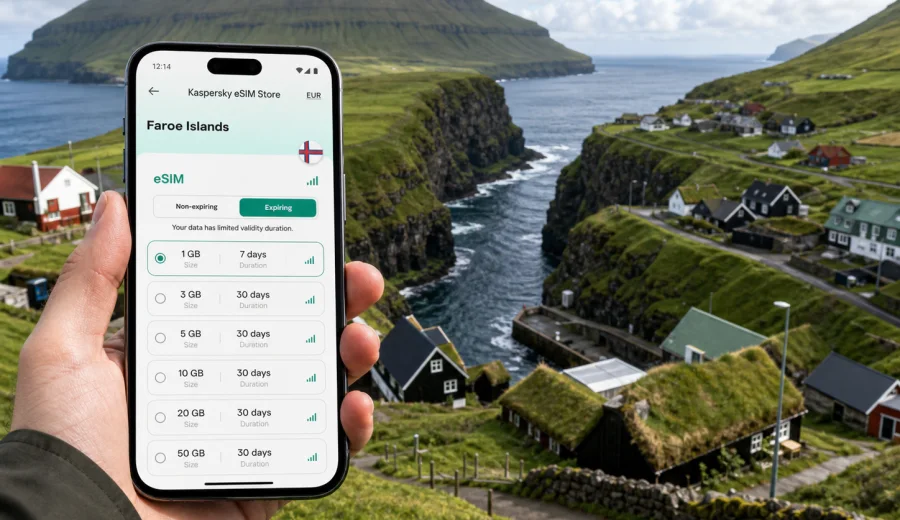
Gjogv eSIM guide: mobile connection and internet for a Faroe Islands trip
Gjogv is a small village with a very practical travel problem: you arrive for cliffs, sea air, grass-roof houses, hiking viewpoints, and quiet roads, but you still need mobile internet for maps, messages, ferry and bus checks, weather updates, hotel details, and photos. The village sits on the northeast coast of Eysturoy, away from the busiest travel base in Torshavn, so a prepared eSIM can make the day feel much simpler.
This guide focuses on using eSIM for Gjogv specifically. It is not a general Faroe Islands overview. The useful questions are local: how to stay online on the road to Gjogv, what to prepare before you leave your hotel, how much data you may need for navigation and photo sharing, and how to keep your main SIM available while using a travel data plan.
An eSIM is a digital SIM profile installed on a compatible phone. For a trip to Gjogv, it can be useful because you can arrange mobile data before the scenic part of the journey begins. You do not have to rely only on hotel Wi-Fi, public Wi-Fi, or buying a physical SIM after arrival.
Why mobile internet matters in Gjogv
Gjogv looks simple on a map, but the travel experience depends on timing, weather, and route choices. Roads in the Faroe Islands are scenic, narrow in places, and often shaped by tunnels, bridges, slopes, and changing visibility. A phone with mobile data helps with small decisions that matter during the day.
You may need internet in Gjogv for:
- checking the driving route from Torshavn, Vagar Airport, Klaksvik, Runavik, or another base;
- confirming bus options and transfer timing if you are not driving;
- opening hotel, guesthouse, or cafe details before you lose patience with weak Wi-Fi;
- using maps around the gorge, village paths, parking areas, and viewpoints;
- checking weather and wind before a walk along exposed ground;
- sending location pins to other travelers in your group;
- using messaging apps when ordinary calls or SMS are not included in your travel data plan;
- uploading photos later instead of draining your data while standing at the viewpoint.
The practical point is not constant screen time. Gjogv is a place where you want to look up from the phone. Mobile internet simply keeps the logistics under control, especially when you are moving between villages and do not want to stop every time you need directions.
Gjogv travel scenarios where eSIM helps
Different travelers use data differently in Gjogv. A one-day visitor may only need maps and messages, while someone staying overnight may use the phone for restaurant checks, accommodation communication, and weather planning for the next morning.
| Scenario in Gjogv | What you usually need online | eSIM planning tip |
|---|---|---|
| Day trip by rental car | navigation, parking, weather, route changes | install eSIM before leaving your base |
| Public transport visit | timetable checks, walking route, delay updates | save key details offline, then use data for changes |
| Overnight stay | hotel messages, maps, photos, next-day planning | choose enough data for evening use and the return trip |
| Hiking-focused visit | weather, maps, emergency contact details | download offline maps and keep mobile data for updates |
| Business stop in the Faroes | email, files, messaging, hotspot for laptop | check whether tethering is allowed in the selected plan |
For Gjogv, mobile data is most valuable before and after the most photogenic moments: when you are approaching the village, checking conditions, finding your accommodation, and deciding where to go next.
Before you travel: check your phone and settings
Before choosing any eSIM plan, confirm that your device supports eSIM and is not locked to a mobile operator. This is important because a travel eSIM cannot help if your phone cannot install or use an eSIM profile. You can check your device before you arrange the plan.
A short pre-trip checklist:
- Make sure your phone supports eSIM.
- Check that the phone is not carrier locked.
- Update your operating system if you have postponed updates for a long time.
- Keep your usual SIM active if you need your regular number for banking, two-factor codes, or incoming calls.
- Decide whether mobile data should run through the travel eSIM while your main SIM stays available for calls or messages.
- Save your hotel address, car rental details, and ferry or bus information offline.
- Install the eSIM while you have stable Wi-Fi, unless the plan instructions say otherwise.
Most recent eSIM-capable phones let you store more than one eSIM profile, but the number of active lines and available settings depends on the model. Check your device menu carefully rather than assuming every phone handles dual SIM in the same way.
How much data do you need for Gjogv?
Data needs in Gjogv are usually modest if you are using the phone for travel tasks. The larger risk is accidental usage: cloud photo backup, automatic video upload, app updates, and streaming can consume more data than maps and messages.
A realistic planning guide:
- Light use: maps, messages, weather, and occasional browsing can fit a small data package.
- Standard travel use: navigation, photo sharing, social apps, and restaurant or route checks need more headroom.
- Heavy use: video calls, hotspot for a laptop, frequent uploads, or cloud backup require a larger package.
Turn off automatic photo backup on mobile data if you plan to take many pictures in Gjogv. The village, gorge, cliffs, and roads are exactly the kind of place where you may shoot dozens of high-resolution photos without noticing how quickly uploads start in the background.
Arrival routes and local movement
Many visitors reach Gjogv by car from Torshavn, Vagar Airport, Runavik, Klaksvik, or another base in the islands. The drive is part of the attraction, but it is also where internet access is useful. You may want to compare routes, check tunnel directions, adjust timing for weather, or message your accommodation if arrival changes.
If you are traveling by public transport, prepare more carefully. Services in smaller villages may be less frequent than in larger towns, and connection timing matters. Save the planned route before departure, then use mobile data to check updates while you are on the move.
In the village itself, you may not need constant navigation. Gjogv is compact, and the main natural feature is the sea gorge that gives the village its name. Still, data helps when you want to mark where you parked, find a guesthouse, check a walking route, or decide whether to continue toward Eidi, Funningur, or another stop on Eysturoy.
Choosing an eSIM plan for Gjogv
When you compare plans, think about the whole route, not only the minutes you spend in the village. Your data plan should cover the arrival airport, your base, the drive to Eysturoy, the time in Gjogv, and the next destination.
For a trip focused on Gjogv, consider:
- Destination: select Faroe Islands rather than a nearby country unless a regional plan clearly matches your route.
- Duration: match validity to your full stay, including arrival and departure days.
- Data volume: choose enough for maps, messaging, weather, browsing, and reasonable photo sharing.
- Activation rules: check when the validity period starts and whether you need to activate before or after arrival.
- Hotspot: verify tethering conditions if you plan to connect a laptop or another device.
- Calls and SMS: remember that travel eSIM plans usually focus on mobile data, unless the plan terms state otherwise.
After you have checked your phone and estimated your data use, you can choose a mobile internet plan for the Faroe Islands trip through Kaspersky eSIM Store. The app and site help you select a destination, review available plan conditions, arrange the eSIM, and prepare it for use on a compatible device.
Where to install and activate the eSIM
The easiest place to install an eSIM is somewhere with stable Wi-Fi: at home before departure, at your hotel, or at another reliable connection point. Gjogv is not the place to discover that you need to read a QR code, confirm device settings, or wait for an email while standing outdoors in wind or rain.
A practical setup sequence:
1. Choose the destination and plan for the Faroe Islands.
2. Confirm that the phone supports eSIM and is unlocked.
3. Install the eSIM profile using stable Wi-Fi.
4. Name the line clearly, for example Faroe data or Travel eSIM.
5. Keep your regular SIM as the default line for calls if you need your home number.
6. Set mobile data to the eSIM when you are ready to use the travel plan.
7. Check whether data roaming must be enabled for that eSIM profile.
8. Test a small data task after arrival, such as opening a map or sending a message.
If you need installation guidance, follow the relevant step-by-step page for your device: Android installation instructions or iOS installation instructions. Device menus vary by model and operating system version, so use the instructions together with the plan details shown during setup.
Using mobile data around the village
Gjogv rewards slow travel. You may walk to the gorge, look at the harbor area, photograph the houses, or continue to nearby viewpoints. Mobile internet should support that rhythm rather than interrupt it.
Useful habits in the village:
- Open maps before you start walking, then keep the phone away unless you need it.
- Save the parking point if you are driving.
- Check the weather before walking on exposed paths.
- Send a message to your group before splitting up for photos.
- Avoid streaming video on mobile data unless you selected a larger plan.
- Upload full photo sets later on Wi-Fi if your package is small.
Because Gjogv is compact, battery life can become more important than data volume. Cold wind, camera use, maps, and weak-signal searching can all drain a phone faster. Carry a power bank if you plan a full day on Eysturoy.
Hotels, guesthouses, and remote work
If you stay overnight in Gjogv or nearby villages, do not assume every indoor connection will match the needs of a video call or large file upload. Accommodation Wi-Fi may be enough for ordinary browsing, but a travel eSIM gives you a separate mobile data option for messages, maps, and backup connectivity.
For remote work or a business stop, plan more conservatively:
- choose a package with enough data for email, cloud documents, and messaging;
- check hotspot rules before relying on the phone for a laptop;
- download large files before leaving a stronger connection;
- schedule video calls from a place where you have already tested the connection;
- keep key documents available offline.
Gjogv is not a typical business district, and that is part of its appeal. If you need to work during a Faroe Islands itinerary, treat the village as a scenic stop where connectivity should be prepared in advance rather than improvised at the last minute.
Gjogv, Torshavn, and trips across Eysturoy
A common mistake is to think of the eSIM plan only for the main city or hotel base. In practice, your phone has to support the full route. A Gjogv itinerary may include Torshavn, the airport on Vagar, the subsea tunnel network, Runavik, Eidi, Funningur, Klaksvik, or other villages and viewpoints.
For route planning, divide your data use into three layers:
| Layer | Examples | Why it matters |
|---|---|---|
| Essential | maps, weather, accommodation messages | keeps the trip manageable |
| Convenient | restaurant checks, photo sharing, translation | improves comfort without heavy use |
| Data-heavy | video calls, cloud backup, streaming | can consume a package quickly |
If your plan is small, reserve mobile data for the essential layer and move heavy tasks to Wi-Fi. If your trip includes several islands or you are driving every day, choose more headroom so you do not have to monitor every map refresh.
Roaming, Wi-Fi, physical SIM, or eSIM?
There is no single best option for every traveler. The right choice depends on your phone, your home operator, the length of stay, and how much control you want before arrival.
| Option | Good for | Limitations |
|---|---|---|
| Home roaming | travelers who prefer keeping one SIM active | costs and data limits depend on your home plan |
| Public or hotel Wi-Fi | light use inside accommodation or cafes | not available on roads, viewpoints, or village walks |
| Physical local SIM | longer stays with time to arrange it | requires a SIM slot and an in-person purchase process |
| Travel eSIM | planning mobile data before or during the trip | needs a compatible unlocked device |
For Gjogv, the main advantage of eSIM is preparation. You can sort out the travel data plan before the day trip, then use mobile internet for the parts of the journey where Wi-Fi is not realistic: roads, viewpoints, outdoor walks, and quick route changes.
Data-saving settings before the Gjogv day trip
Small settings make a visible difference. Before leaving Torshavn, the airport area, or your overnight base, spend five minutes preparing the phone.
Check these settings:
- Download offline map areas for Eysturoy and your route.
- Turn off mobile-data cloud backup for photos and videos.
- Disable automatic app updates on mobile data.
- Set messaging apps to download media only when you choose.
- Keep weather, maps, ride or transport apps, and accommodation apps allowed to use mobile data.
- Set the travel eSIM as the data line and keep your primary number available if needed.
- Confirm whether data roaming should be enabled for the travel eSIM.
This setup gives you a practical balance: the phone stays useful for Gjogv logistics, but background services do not quietly consume the data package.
Quick guide for a one-day Gjogv itinerary
Here is a simple mobile-internet plan for a day visit:
1. Install the eSIM the evening before, using Wi-Fi.
2. Save the route from your base to Gjogv.
3. Download offline maps for the island and nearby villages.
4. Check the weather and wind before departure.
5. Use mobile data for live navigation and messages on the road.
6. In Gjogv, keep maps, camera, and weather ready, but avoid unnecessary streaming.
7. Before leaving, check the next route to Eidi, Funningur, Torshavn, or your accommodation.
8. Upload large photo batches later on Wi-Fi if your plan is limited.
This approach works well because Gjogv is a place where the travel day can change with weather and light. You keep enough connectivity for decisions without turning the visit into a screen-heavy experience.
Common eSIM mistakes to avoid in Gjogv
Avoid these issues before the trip:
- Buying a plan before checking whether your phone supports eSIM.
- Installing the eSIM on the wrong device if you plan to use another phone for travel.
- Assuming the plan includes a voice number or SMS.
- Forgetting to set the eSIM as the mobile data line.
- Leaving photo backup, app updates, or streaming active on mobile data.
- Waiting until you are already on the road to install the profile.
- Choosing a plan duration that ends before the return day.
- Ignoring hotspot rules when you need a laptop connection.
The most important rule is simple: install and check everything while you still have stable Wi-Fi. Then the Gjogv part of the trip can stay focused on scenery, not settings.
FAQ: eSIM and mobile internet in Gjogv
Is eSIM useful for a small village like Gjogv?
Yes, because the value is not only inside the village. eSIM helps with the route to Gjogv, weather checks, maps, accommodation messages, and onward travel across Eysturoy or the wider Faroe Islands.
Should I install the eSIM before arriving in Gjogv?
It is usually better to install it earlier, while you have reliable Wi-Fi. You can then activate or start using mobile data according to the plan instructions and your arrival timing.
Can I keep my usual phone number?
On many dual-SIM phones, you can keep your regular SIM active for calls or messages while using the eSIM for mobile data. The exact settings depend on your device and home operator.
Does a travel eSIM include calls and SMS?
Many travel eSIM plans are designed for mobile internet. Ordinary calls and SMS are not included unless the selected plan states otherwise. For voice and messages, travelers often use internet-based apps.
Is public Wi-Fi enough for Gjogv?
Wi-Fi can help at accommodation, but it does not cover the drive, viewpoints, walking routes, parking decisions, or changes in the day plan. Mobile data gives you more flexibility outside buildings.
What should I do if mobile data does not start immediately?
Check that the eSIM is selected for mobile data, data roaming is set according to the plan instructions, airplane mode is off, and the phone has been restarted if needed. Also confirm that the plan is active and that the device supports eSIM.
Final preparation before you go
For Gjogv, the best mobile setup is quiet and practical: a compatible phone, an installed eSIM, offline maps, controlled background data, and a plan that covers the whole Faroe Islands route. That gives you internet for navigation, weather, messages, hotel details, and onward travel without depending only on Wi-Fi.
Before your trip, use Kaspersky eSIM Store to prepare an eSIM plan for mobile internet in the Faroe Islands. Choose the destination, review the data amount and validity period, install the eSIM on a compatible device, and keep your Gjogv day focused on the gorge, the village, and the road ahead.