
Travel connectivity guide
Glasgow eSIM: mobile internet for your city trip
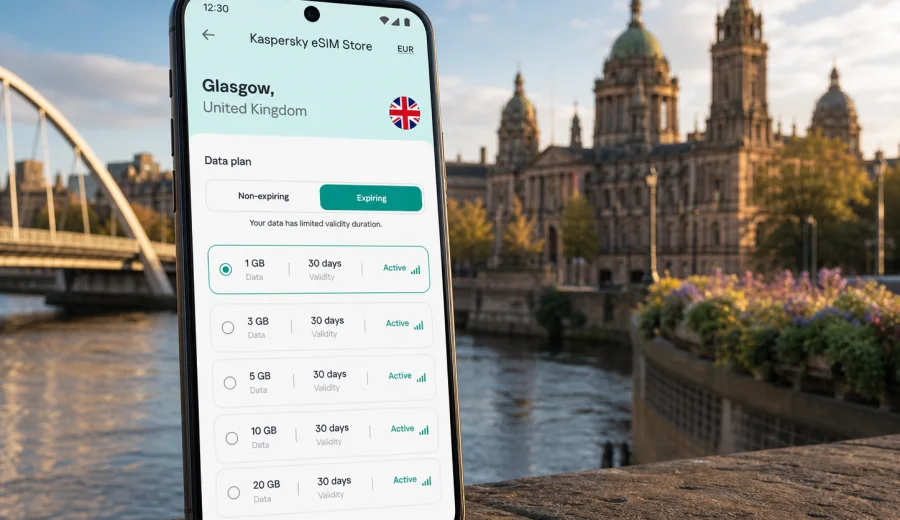
Glasgow eSIM: mobile connection and internet for your city trip
Glasgow is a city where mobile internet becomes useful almost as soon as you land. You may need maps for the route from Glasgow Airport, a ride-hailing app for a late arrival, a train update at Queen Street, a hotel booking confirmation in the city centre, or messaging during a busy day between the West End, Merchant City and the SEC. An eSIM can make that first hour easier because you can prepare mobile data before the trip instead of looking for a physical SIM card after arrival.
For travellers, an eSIM is a digital SIM profile that works on a compatible phone or tablet. It is mainly useful for mobile data: navigation, transport apps, messaging, email, hotel check-in, restaurant reservations, cloud documents and maps. It usually does not replace a local phone number for standard calls or SMS unless the chosen plan says so. For voice calls, many visitors use internet-based calling and messaging apps over mobile data.
This guide focuses on Glasgow, not just the United Kingdom in general. It explains when mobile data matters in the city, how to estimate the right amount of traffic, what to check before you travel, and how Kaspersky eSIM Store can help you choose, arrange and activate an eSIM with a suitable plan for a UK trip.
Why eSIM is useful in Glasgow
Glasgow is straightforward to explore, but it is still a large city with several travel patterns. A visitor might arrive by air, cross the city by train, join a conference near the Clyde, stay in the West End, meet clients in the financial district, or use Glasgow as a base for day trips. In all these cases, mobile data is less about browsing for fun and more about keeping the trip predictable.
Common Glasgow situations where an eSIM can help:
- checking the route from Glasgow Airport to your hotel before you leave the terminal;
- following live transport updates for trains, buses and the Glasgow Subway;
- opening QR tickets, boarding passes, booking confirmations and event passes;
- using maps around Buchanan Street, George Square, Finnieston, the West End and Merchant City;
- messaging your hotel, colleagues, friends or family when plans change;
- using translation, banking, authentication and ride-hailing apps without waiting for Wi-Fi;
- working from a laptop through tethering if your selected plan and device allow it.
The city centre is walkable, but Glasgow’s neighbourhoods are spread out enough that live maps are genuinely useful. The distance from Kelvingrove to the Necropolis, from the University of Glasgow to the SEC, or from Merchant City to the Southside can look small on a tourist map and still involve a bus, subway, taxi or train decision. With mobile data, you can adapt your route instead of relying only on screenshots.
Arrival in Glasgow: the first online moments
Many international visitors arrive at Glasgow Airport, while others reach the city through Edinburgh Airport and then continue by train, coach or car. If Glasgow is your first stop, the airport-to-city transition is one of the clearest reasons to prepare mobile internet in advance. You may need to check which bus stop to use, confirm a taxi pickup point, message your hotel about late check-in or load the address of an apartment.
If your eSIM is already installed before departure, you can usually switch to the eSIM profile for mobile data after landing and wait for the device to register on a local network. Connection time can vary by device and local conditions, so it is sensible to keep your booking details saved offline too. eSIM does not remove every travel variable, but it reduces the need to solve connectivity at the same time as baggage, transfers and directions.
For rail arrivals, mobile internet is useful in a different way. Glasgow Central serves many intercity and regional routes, while Queen Street is important for Edinburgh and northern connections. Stations can be busy, platforms may change, and the quickest onward route may depend on where your hotel is. With mobile data ready, you can check a walking route, subway direction or onward bus without first searching for a Wi-Fi network.
Where mobile data helps most in the city
Glasgow rewards flexible movement. You may start with coffee near George Square, continue to the Gallery of Modern Art, cross to the riverside, meet friends in Finnieston, then go to a concert, football match or business dinner. Mobile internet supports that rhythm because your plan can change throughout the day.
| Glasgow scenario | Why mobile data matters | Practical tip |
|---|---|---|
| City centre stay | Maps, restaurant bookings, train updates | Save your hotel address offline, then use live routing for changes |
| West End visit | Navigation around Kelvingrove, Byres Road and the university | Check subway stops before walking in wet weather |
| SEC or OVO Hydro event | Tickets, rides, meeting points | Keep event QR codes saved, but use data for transport after the show |
| Business trip | Email, documents, messaging and calendar updates | Choose a plan with enough data for work apps and tethering needs |
| Short stopover | Fast route planning from airport or station | Install the eSIM before travel so setup is not part of the stopover |
| Day trip from Glasgow | Maps and rail updates outside the city | Check whether the selected plan covers the full UK route |
Choosing a data amount for Glasgow
The right plan depends on your behaviour, not only the number of days. A traveller who uses maps, messaging and occasional browsing needs far less data than someone who streams video, uploads large files or uses a laptop hotspot. Glasgow itself does not require a special city-only data logic; the key is to choose a UK plan that matches your stay and route.
Use this quick estimate:
- Light use: maps, messaging, email checks, booking apps and occasional browsing.
- Standard use: all light use plus social media, photo sharing, transport apps and regular search.
- Work-heavy use: video meetings, document sync, laptop tethering and frequent cloud access.
- High media use: streaming, large uploads, long video calls or using mobile data as the main connection.
Before choosing, check the plan conditions: included data, validity period, destination, when the validity starts, whether top-up is available, and whether tethering is allowed. If your trip includes Edinburgh, Loch Lomond, the Highlands or several UK cities, choose a plan for the United Kingdom rather than thinking only about Glasgow.
A practical eSIM setup plan before you travel
A calm setup before departure is usually better than doing everything after landing. You can check device compatibility, choose the destination, review plan conditions and install the eSIM while you still have a stable connection at home. Then, when you arrive in Glasgow, you mainly need to select the eSIM for mobile data and follow the device prompts.
Preparation checklist:
1. Confirm that your phone or tablet supports eSIM.
2. Check that the device is not locked to one mobile operator.
3. Decide whether Glasgow is the only destination or part of a wider UK route.
4. Estimate data needs for maps, messaging, work and media.
5. Review validity dates and traffic volume before arranging the plan.
6. Install the eSIM while connected to reliable Wi-Fi.
7. Keep the QR code, account access and travel details available if you need them later.
Before you arrange a plan, check your device and make sure the model supports eSIM in your region. Some phone models differ by market, and operator locks can prevent a new eSIM profile from working as expected.
How Kaspersky eSIM Store fits into a Glasgow trip
Kaspersky eSIM Store is an app and website where you can quickly choose, arrange and activate an eSIM with a suitable plan for mobile internet in an overseas trip. For Glasgow, the relevant destination is the United Kingdom. You can review the plan conditions, choose the option that fits your stay, install the eSIM on a compatible device and use it for mobile data while travelling.
If you want to prepare before departure, you can choose an eSIM plan for your trip to Glasgow and check the available UK options. This is the most natural point in planning: you already know the city, the country, the approximate stay length and whether the route continues outside Glasgow.
The product role is practical. It helps you complete the eSIM preparation flow without presenting Kaspersky as a mobile operator or a network owner. The actual experience still depends on your device, the selected plan, local network conditions and correct activation settings.
Installing and activating eSIM for Glasgow
The exact steps depend on your device, but the overall logic is similar. You arrange the eSIM plan, add the eSIM profile to the device, then choose it for mobile data when you are ready to use it. Installation usually requires an internet connection, so it is better to install before travel or while connected to reliable Wi-Fi.
Typical steps:
1. Choose the destination and plan for the United Kingdom.
2. Open the eSIM details in your account, app or email.
3. Add the eSIM profile on your device using the provided instructions.
4. Name the line clearly, for example “UK travel”.
5. Keep your main SIM for calls if needed, and select the eSIM for mobile data.
6. After arrival, allow the device a few minutes to register on a local network.
7. If the instructions require it, enable data roaming for the eSIM profile.
For device-specific setup, use the Android installation guide or the iOS installation guide. Follow the steps carefully and avoid deleting the eSIM profile unless you are sure the selected plan allows reinstallation.
Glasgow transport and navigation scenarios
Transport in Glasgow is easier when your phone can update routes in real time. The Subway is a simple loop and useful for the West End, city centre and Southside, but it will not cover every hotel, venue or business address. Buses, walking routes, taxis and trains fill the gaps. Live mobile data helps you compare the practical options instead of choosing the route you saved yesterday.
For a visitor, the most common online transport tasks are:
- checking whether to use Central or Queen Street for a train connection;
- finding the nearest Subway station around Buchanan Street, St Enoch, Kelvinhall or Hillhead;
- checking walking time between the city centre and the riverside;
- finding a taxi or ride-hailing pickup after an evening event;
- loading directions to hotels outside the centre;
- messaging a meeting contact if a train or bus is delayed.
Business trips, conferences and remote work
Glasgow is a common destination for conferences, university visits, financial services meetings, creative industries and public-sector events. Business travellers often need more than tourist navigation. You may need calendar updates, cloud documents, authentication codes, messaging, train changes and a quick video call between meetings.
If this sounds like your trip, choose a plan with a margin rather than the smallest possible traffic allowance. Email and maps are light, but document sync, video calls and tethering can use data quickly. Also check whether your selected plan allows hotspot use if you expect to connect a laptop. eSIM can be a useful backup when venue Wi-Fi is overloaded or when you need to work from a taxi, station or hotel lobby.
For hotel and apartment stays, remember that Wi-Fi usually helps once you are indoors, while mobile data helps between places: station to reception, venue to taxi, restaurant to apartment door code, or late train to hotel message. For a one-night stopover, choose by validity period first and data volume second. For trips beyond Glasgow to Edinburgh, Stirling, Loch Lomond or the Highlands, check that the selected plan covers the United Kingdom route you actually plan to take.
What to check before arranging an eSIM
The best eSIM experience starts with a few checks. They take only a few minutes, but they prevent the most common travel problems.
| Check | Why it matters |
|---|---|
| eSIM support | Not every phone or tablet supports eSIM, and some regional versions differ |
| Operator lock | A locked device may not accept another eSIM profile |
| Plan destination | Glasgow requires a plan that works for the United Kingdom |
| Validity period | A short plan may expire before the end of your stay |
| Data volume | Maps and messaging are light; video, uploads and tethering are heavier |
| Activation rules | Some plans start counting validity after installation, others after first network use |
| Calls and SMS | Travel eSIM plans are usually for mobile data unless stated otherwise |
Also think about timing. Install the eSIM when you have stable internet, but activate mobile data for the eSIM when you are ready to use it according to the plan conditions. If you are unsure, read the plan details before scanning or activating.
Quick answers about eSIM in Glasgow
Is eSIM useful for Glasgow Airport arrivals?
Yes. It can help with maps, hotel messages, transport apps and booking confirmations after landing. Install the eSIM before travel where possible, then select it for mobile data after arrival.
Can I use eSIM for normal phone calls in Glasgow?
Usually no, unless the selected plan specifically includes calls or SMS. Travel eSIM plans are mainly for mobile internet. You can use internet-based calling and messaging apps over data.
Can I install eSIM after I arrive?
Yes, if you have internet access for installation and your device supports eSIM. However, installing before departure is often easier because you can use a stable home or office connection.
Final checklist for your Glasgow eSIM
Before leaving for Glasgow, make sure you can answer these questions:
- Does your device support eSIM and is it unlocked?
- Is your plan valid for the United Kingdom?
- Does the data volume match your maps, messaging, work and media needs?
- Do you know when the plan validity starts?
- Have you saved important bookings offline?
- Do you know how to switch mobile data to the eSIM profile?
- Have you kept installation instructions available in case you need them?
If the answers are clear, your mobile internet setup is much less likely to interrupt the trip. You can focus on the city: finding your way from the airport, moving between neighbourhoods, managing work or event plans, and staying in touch without searching for a SIM counter after arrival.
Choose an eSIM plan for your Glasgow trip
Glasgow is easiest when your phone is ready for the practical parts of travel: maps, transport updates, hotel access, bookings, messages and online work. Kaspersky eSIM Store helps you choose, arrange and activate an eSIM with a suitable plan for mobile internet in an overseas trip, while you stay in control of the destination, data volume and validity period.
Before you travel, choose an eSIM plan for the United Kingdom, install it on a compatible device, and keep the setup instructions close. Then, when you arrive in Glasgow, you can spend your first minutes on the city instead of on finding a physical SIM card.