
Travel connectivity guide
Goma eSIM: mobile internet for your trip
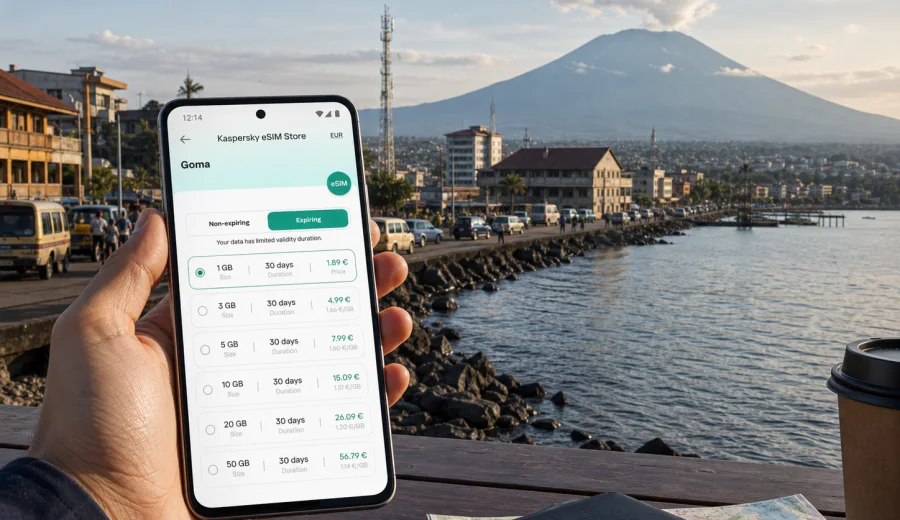
Goma eSIM: mobile connection and internet for your trip
Goma is a city where mobile internet can matter from the first hour. You may need maps for the road from the airport, a message to your hotel, a ride confirmation, a payment notification, a meeting update or a quick check of your next route along Lake Kivu. An eSIM helps you prepare mobile data before you start moving around the city, without looking for a physical SIM card as soon as you arrive.
This guide focuses on practical travel scenarios in Goma, Democratic Republic of the Congo: arrival, local transport, hotels, business days, short stopovers, routes around the lake and onward travel from the city. It also explains how to choose a data plan, what to check before purchase and how Kaspersky eSIM Store can help you choose, arrange and activate an eSIM with a suitable mobile internet tariff for an international trip.
Why mobile internet is useful in Goma
Goma is spread along the northern shore of Lake Kivu, close to the Rwanda border and surrounded by volcanic landscape. For visitors, this means that navigation is not only about finding a tourist attraction. It is also about confirming meeting points, checking transport, sharing your live location with colleagues or relatives and keeping access to bookings while moving between the airport, hotels, offices, restaurants and lakefront areas.
Mobile internet is especially useful in these moments:
- after landing, when you need to contact your driver, host or hotel;
- on the way from Goma International Airport into the city;
- when moving between lakefront hotels, restaurants, offices and residential districts;
- when checking maps before a road trip outside the city;
- during business visits, NGO work, field meetings or conference days;
- when using messengers for calls because many travel eSIM tariffs are data-only;
- when you want to reduce dependence on public Wi-Fi in airports, cafes and hotels.
An eSIM is not a guarantee of coverage in every location. Local network conditions can vary by area, building, device and chosen tariff. The practical advantage is preparation: you can select a tariff before the trip, install the eSIM on a compatible phone and keep it ready for mobile data when the plan conditions allow activation.
Arrival in Goma: what to prepare before the first ride
The first hour in Goma is often when a traveler needs the most coordination. You may be confirming where to meet a driver, checking whether the hotel has received your arrival time, sending a message to a local contact or looking up the route from the airport. If you rely only on airport Wi-Fi or a physical SIM card purchase after landing, those first steps can become slower.
A simple arrival checklist can reduce friction:
| Moment | Why mobile data helps | What to prepare |
|---|---|---|
| Before boarding | You may not want to configure a new connection while tired | Install the eSIM profile and save key booking details |
| At arrival | You may need a message, map or ride confirmation | Keep the eSIM ready and know which SIM is used for data |
| On the transfer | Routes and timing can change | Use maps and messengers without waiting for hotel Wi-Fi |
| At check-in | Hotels may ask for booking details or contact information | Keep email, booking apps and documents accessible |
For a short stopover, even a small data allowance may be enough for maps, messages and essential updates. For several days in Goma, allow more data if you expect video calls, cloud documents, hotspot use or heavy navigation. The right choice depends on trip length, app habits and whether your hotel or office has reliable Wi-Fi.
Moving around the city with an eSIM
Goma can involve several very different movement patterns in one day: a morning airport transfer, meetings in town, lunch near the lake, a visit to an office or project site and an evening return to the hotel. In each case, mobile internet supports small but important tasks: route checks, messaging, translation, weather checks, contact sharing and document access.
Useful city scenarios include:
- saving offline maps, then using mobile data for live search and route updates;
- sending your live location to a trusted contact when moving to a new meeting point;
- keeping hotel and driver phone numbers in a messenger;
- confirming restaurant, office or conference addresses before leaving;
- checking email when moving between appointments;
- using a hotspot for a laptop only when the tariff conditions and device settings allow it.
Goma's lakefront and central areas may feel compact on a map, but travel time can still vary. Weather, road conditions, events and local movement patterns can affect routes. Mobile data gives you more flexibility, especially if you need to adjust plans during the day instead of waiting until you are back on Wi-Fi.
Districts, hotels and working days
Many visitors to Goma are not on a classic leisure trip. The city is often part of a business route, field visit, humanitarian schedule, media assignment, regional meeting or cross-border itinerary. In those cases, mobile internet is part of daily work rather than a travel extra.
If you are staying near the lake, in a central hotel or close to offices, an eSIM can support:
- calendar updates and meeting reminders;
- taxi or driver coordination;
- secure access to work email through your usual tools;
- quick document downloads before a meeting;
- messaging with local partners;
- checking flight or road transfer updates;
- using translation apps in short conversations.
For longer working days, think about your data use in blocks. Messaging and maps are light. Video calls, file sync, cloud backups and hotspot use can consume much more. If your phone automatically uploads photos or syncs large files, disable those tasks on mobile data before the trip or set them to Wi-Fi only.
How much data might you need in Goma?
There is no universal data amount for every traveler, but you can estimate your usage by scenario.
| Trip style | Typical mobile data needs | Practical tariff approach |
|---|---|---|
| Airport transfer or short stopover | Messages, maps, booking checks | Small data package with enough validity for the day |
| Two or three city days | Navigation, messengers, email, light browsing | Medium package with a validity period matching the trip |
| Business week | Email, documents, maps, calls through apps | Larger package, especially if Wi-Fi is uncertain |
| Field route from Goma | Navigation, coordination, photo sharing | More data and careful offline preparation |
| Laptop hotspot use | Cloud documents, browser, work apps | Choose more data and confirm hotspot support in the tariff terms |
Before you travel, download offline maps, keep PDF copies of documents, save hotel addresses and turn off unnecessary background data. These steps help your eSIM data last longer and make the connection more useful when you really need it.
Choosing an eSIM tariff for Goma
For a city trip to Goma, choose the destination by country first: Democratic Republic of the Congo. A city article uses the country tariff page because the eSIM plan is selected for the country or relevant region, not for one street or hotel district. In Kaspersky eSIM Store, you can prepare an eSIM for Goma and the Democratic Republic of the Congo by checking available options for the destination, comparing data volume and validity, and choosing the plan that fits your route.
When comparing tariffs, focus on five details:
1. Destination: make sure the tariff covers Democratic Republic of the Congo or a region that includes your route.
2. Data volume: choose enough for maps, messengers, email and any work tasks.
3. Validity period: match the plan duration to your stay, including arrival and departure days.
4. Activation rules: check when the validity period starts and what steps are required.
5. Usage conditions: review whether hotspot use is allowed and whether voice calls or SMS are included. Many travel eSIM tariffs are data-only unless stated otherwise.
If your route includes other countries, compare destination coverage carefully. A regional plan may help some routes, but only if the selected tariff terms fit your actual itinerary.
Before you buy: device and account checks
An eSIM requires a compatible, unlocked device. Before buying a tariff, check your device and make sure it supports eSIM installation. A phone locked to one mobile operator may not accept another mobile profile.
- Your phone or tablet supports eSIM.
- The device is not locked to one mobile operator.
- You have stable internet access during installation.
- You know which SIM profile should handle mobile data.
- You understand whether the tariff includes only data or also other services.
- You have read the validity and activation conditions.
- You have enough battery before installing or activating the eSIM.
Installing and activating eSIM for the trip
Installation is usually easier before departure, when you still have stable Wi-Fi and time to check settings. If you need platform-specific steps, use the Android installation guide or the iOS installation guide.
A practical setup sequence:
1. Check device support and operator lock status.
2. Choose Democratic Republic of the Congo or a suitable regional destination.
3. Select a tariff by data volume and validity period.
4. Install the eSIM profile and label it clearly.
5. When ready, set the eSIM as the mobile data line.
6. If required, enable data roaming for the eSIM profile.
Connection can take several minutes. If the eSIM does not connect immediately, check that mobile data is assigned to the eSIM profile, airplane mode is off and roaming data follows the instructions.
Goma travel scenarios where eSIM helps
- Airport arrival and hotel transfer: confirm the pickup point, share your location and open the route before you reach hotel Wi-Fi.
- Meetings and project visits: receive schedule changes, open documents and use maps between offices or field meeting points.
- Lake Kivu plans: check reservations, waterfront addresses and group messages while moving between hotels, restaurants and meeting spots.
- Trips from Goma: download offline maps, save contact numbers and check that the selected tariff matches the country or region of the route.
- Short stopovers: use a smaller data package for messages, maps and booking checks if the validity period fits the same-day visit.
How to keep data use under control
- turn off automatic cloud photo uploads on mobile data;
- download offline areas in your maps app;
- set app updates to Wi-Fi only;
- disable background refresh for apps you do not need;
- download tickets, hotel confirmations and work files in advance;
- avoid laptop hotspot use unless your tariff and data allowance make sense for it.
eSIM compared with other internet options in Goma
| Option | Useful when | Trade-offs |
|---|---|---|
| Travel eSIM | You want mobile data prepared before arrival | Requires a compatible, unlocked device and the right tariff |
| Home roaming | You need your usual SIM active | Costs and conditions depend on your home operator |
| Public Wi-Fi | You are at a hotel, office or cafe | Availability, speed and security can vary |
| Physical local SIM | You stay longer and can visit a shop | Requires time, local process and device compatibility |
For many travelers, the best setup combines the home SIM for important messages, hotel Wi-Fi for large downloads and an eSIM for mobile data while moving around Goma.
Common mistakes to avoid
Do not wait until you are in a hurry to install the eSIM. Do not choose only by data volume while ignoring validity, coverage and activation rules. Do not assume voice calls and SMS are included unless the tariff details say so.
FAQ: eSIM and mobile internet in Goma
Is there a special eSIM only for Goma?
Usually you choose an eSIM tariff for Democratic Republic of the Congo or for a suitable region that includes your route.
Can I install the eSIM before I travel?
In most cases, yes. Install before departure when you have stable Wi-Fi and read the activation rules.
Will an eSIM give me a local phone number?
Many travel eSIM tariffs are data-only unless the tariff details say otherwise.
What if my hotel has Wi-Fi?
Hotel Wi-Fi is useful for large downloads, but it does not help in a vehicle, at the airport or between meetings.
Can I use the eSIM as a hotspot?
Hotspot support depends on the selected tariff and your device settings. Check the conditions before relying on tethering.
What should I do if the eSIM does not connect?
Check that the eSIM is installed, selected for mobile data and allowed to use data roaming if the instructions require it.
Final preparation for Goma
Before your trip, save your hotel address, driver contact, offline maps, key documents and meeting details. Then check your device compatibility, select a tariff with suitable data volume and validity, and install the eSIM while you still have reliable Wi-Fi.
Kaspersky eSIM Store helps you choose, arrange and activate an eSIM with a suitable mobile internet tariff for an international trip. If Goma is your destination, you can choose an eSIM tariff for the Democratic Republic of the Congo and prepare mobile data before you arrive, so the first message, route check or booking update is easier to handle when the trip begins.