
Travel connectivity guide
Goris eSIM for mobile internet in Armenia
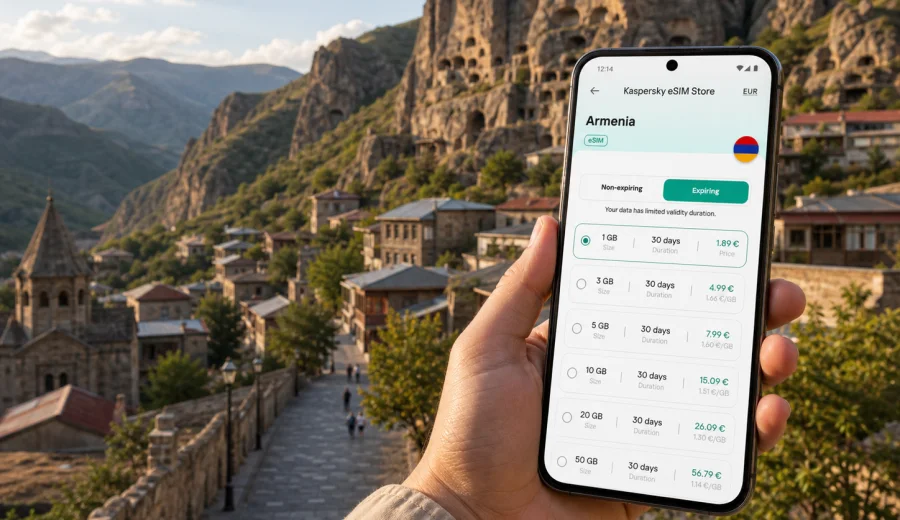
Goris eSIM: mobile connection and internet for a trip to southern Armenia
Goris is a practical base for exploring southern Armenia: stone houses on the hillside, cave dwellings above the old town, mountain roads toward Tatev, and long drives through Syunik Province. For this kind of trip, mobile internet is not just a convenience. It helps with maps, hotel messages, taxi coordination, translation, weather checks, and staying in touch when you move between the city, viewpoints, guesthouses, and day-trip routes.
An eSIM can make that connection simpler. Instead of looking for a physical SIM card after arrival, you can prepare a digital SIM profile before the trip, choose a data package for Armenia, and activate it on a compatible phone when you need mobile data. Kaspersky eSIM Store is an app and website where you can choose, set up, and activate an eSIM with a suitable data tariff for international travel.
This guide focuses on Goris, not Armenia in general. It covers arrival, local movement, navigation, business travel, short stays, hotel use, and routes from Goris to nearby places in southern Armenia.
Why mobile internet matters in Goris
Goris is compact, but the travel pattern around it is wider than the city itself. Many visitors use it as a stop on the road between Yerevan and Syunik, as a base for Tatev, or as a quiet overnight point before continuing toward other parts of southern Armenia. That means you may need mobile data in several situations:
| Travel moment in Goris | Why mobile internet helps |
|---|---|
| Arrival by car or minibus | Check your route, contact the hotel, and share arrival updates. |
| Walking around the old town | Use maps to find viewpoints, guesthouses, cafes, and historical areas. |
| Trips toward Tatev or Khndzoresk | Follow navigation, confirm pickup points, and check travel time. |
| Hotel check-in | Open booking details, message the host, or translate instructions. |
| Remote work | Join calls, use cloud files, and keep a backup connection if Wi-Fi is weak. |
| Evening planning | Compare next-day routes, save places, and check weather before a mountain drive. |
Public Wi-Fi may be available in hotels, cafes, or restaurants, but it is not something to rely on for every step of the trip. A mobile data plan gives you more independence when you are outside the hotel, between stops, or trying to coordinate transport. It can also reduce the need to connect to unfamiliar public Wi-Fi networks during the day.
Arrival scenarios: when you first need data
Goris does not usually work like a major fly-in city. Many travelers arrive by road after landing in Yerevan or after moving through Armenia by car, private transfer, tour vehicle, or intercity transport. That makes the first mobile internet use case different from a classic airport guide.
You may need data before you reach the city:
- to follow the route from Yerevan or another Armenian city;
- to message a guesthouse about a late arrival;
- to check whether a road stop is on the correct route;
- to confirm pickup times for a day trip;
- to keep family or colleagues updated during a long drive;
- to use translation when speaking with drivers or local hosts.
If you install the eSIM before you leave home, you can avoid doing technical setup in the car, at a roadside stop, or in a hotel lobby after a long trip. The exact activation moment depends on the tariff conditions, so check when the validity period starts and whether you need to be in Armenia before activating mobile data.
Local movement in Goris: maps, taxis, walking routes
Goris is not a city where you need constant metro-style planning, but mobile internet still helps because distances and elevation can feel different from what they look like on a map. Streets may climb, guesthouses can sit on hillsides, and viewpoints above the old cave area are easier to find with live navigation.
Typical local uses include:
- finding your guesthouse after dark;
- checking walking time between the center, old cave area, cafes, and viewpoints;
- messaging a driver for a pickup;
- saving offline map areas before leaving the hotel;
- checking if a restaurant, shop, or pharmacy is still open;
- translating signs, menus, or short messages.
For Goris, a sensible approach is to combine offline maps with mobile data. Download the map area before the trip, then use the eSIM for live route corrections, messaging, and searches when plans change.
How much data you may need for Goris
Your data needs depend less on the size of Goris and more on the style of your trip. A quiet overnight stay with maps and messaging can use little data. A remote-work stay, video calls, frequent photo uploads, and cloud backups can use much more.
| Trip style | Typical data behavior | What to watch |
|---|---|---|
| One-night stopover | Maps, hotel messages, restaurant search, route checks | A smaller package may be enough if you avoid video. |
| Weekend in Syunik | Navigation, day-trip planning, photos, messaging | Choose enough data for routes outside the city. |
| Business visit | Email, documents, calls, hotspot for a laptop | Check whether tethering is allowed in the selected tariff. |
| Remote-work stay | Calls, cloud files, collaboration tools, backup connection | Consider a larger data allowance and monitor usage. |
| Road trip through Armenia | Maps, music, messaging, accommodation changes | Match the tariff duration to the full Armenia itinerary, not only Goris. |
Video is the main data driver. A few minutes of map use and messaging are usually modest, while streaming, video calls, automatic photo sync, and app updates can consume data quickly. Before the trip, disable large automatic downloads over mobile data and keep cloud backup settings under control.
Choosing an eSIM tariff for a trip to Goris
For a city article, the right eSIM landing page is the country page. Goris is in Armenia, so choose a tariff for Armenia unless your route clearly needs a regional or multi-country option. In Kaspersky eSIM Store, you can review the data allowance, validity period, destination, and price before choosing a package.
When comparing options, focus on four questions:
1. How long will you be in Armenia, including the days before and after Goris?
2. Will you only use maps and messaging, or will you also work, upload media, and join calls?
3. Do you need data only on your phone, or will you use hotspot for a laptop?
4. Does the tariff validity match your full route through Armenia?
If your Goris visit is part of a longer Armenia route, do not choose only for the nights spent in the city. Count the drive, nearby day trips, and the next destination. A package that covers the complete Armenia stay is usually easier to manage than trying to stretch a very small allowance across several travel days.
Practical setup before you leave
Set up the eSIM while you still have a stable home connection or reliable hotel Wi-Fi. That gives you time to read the instructions, scan a QR code if needed, and check phone settings calmly.
Before buying or installing an eSIM, make sure your phone supports eSIM and is not locked in a way that prevents another mobile profile from working. You can use the internal compatibility check here: check your device.
Basic preparation checklist:
- check that your phone supports eSIM;
- confirm that your device is not locked to a single carrier;
- update your phone system if an update is already pending;
- keep your primary SIM active if you need calls or SMS from your regular number;
- save the installation instructions somewhere you can open offline;
- decide which SIM profile should use mobile data after arrival;
- check whether data roaming must be enabled for the eSIM profile.
If you are preparing the trip through Kaspersky eSIM Store, you can choose an eSIM tariff for Armenia and match the data package to your Goris itinerary. Put the purchase and setup step after your route planning, so the duration and data allowance reflect the real trip, not a rough guess.
Installing the eSIM on iPhone or Android
The installation flow depends on your device, operating system version, and the tariff details. In general, you choose a tariff, complete the setup steps, install the eSIM profile, and then select it for mobile data when you want to use it.
For device-specific setup, use the internal guides: Android installation instructions and iOS installation instructions.
A simple installation sequence looks like this:
1. Choose the Armenia tariff that fits your trip.
2. Open the eSIM details after purchase.
3. Install the eSIM profile using the available instructions or QR code.
4. Name the profile clearly, for example Armenia Travel.
5. Keep your regular SIM for calls if you need your usual number.
6. Set the eSIM as the mobile data line when you are ready to use it.
7. Turn on data roaming for the eSIM profile if the instructions require it.
8. Test mobile data in a low-pressure moment before relying on it for navigation.
Do not delete the eSIM profile unless you are sure you no longer need it. In many cases, an activated eSIM profile cannot simply be moved to another device. If you change phones before the trip, check the tariff and installation conditions first.
Goris travel situations where eSIM is especially useful
The value of mobile internet in Goris becomes clear in small, practical moments rather than one dramatic use case.
Late arrival. If your road journey takes longer than expected, you can message the hotel or guesthouse, confirm the address, and share your arrival time.
Finding the right viewpoint. The landscape around Goris includes hills, cliffs, and old cave areas. Mobile maps help you avoid unnecessary detours and choose a walking route that matches your time and energy.
Driver coordination. If you arrange a day trip, you may need to confirm pickup points, send your location, or adjust the meeting time.
Translation. Short translation tasks can help with menus, directions, and messages from accommodation hosts.
Weather checks. In mountainous areas, weather can affect comfort and timing. Mobile data lets you check the forecast before leaving for viewpoints or road trips.
Backup connection. Hotel Wi-Fi can be good enough for casual browsing but still unstable for calls. An eSIM data connection can act as a backup for urgent messages, email, or navigation.
Business trips and remote work in Goris
Goris is quieter than Armenia's main business centers, but people still visit for regional work, field projects, road logistics, research, and remote work stays. In these cases, the mobile internet requirement is more serious.
For business use, prepare a connection plan:
- choose a data allowance that covers email, document access, and calls;
- check whether your chosen tariff allows hotspot use if you need a laptop;
- keep large file transfers for trusted Wi-Fi when possible;
- download key documents before long drives;
- keep chargers and a power bank available during road travel;
- test messaging and map apps before leaving the hotel.
If you are joining video calls, do not assume mobile data will behave the same in every building or road segment. Use the eSIM as a practical travel connection and backup, but still plan important calls around stable locations where possible.
Hotels, guesthouses, and Wi-Fi expectations
Accommodation in Goris often includes family-run guesthouses, small hotels, and places with mountain views. Wi-Fi may be enough for ordinary use, but it can vary by room location, building structure, number of guests, or router placement.
An eSIM can help in three hotel situations:
1. Before check-in, when you need maps, booking details, and host messages.
2. During the stay, when Wi-Fi is weak in your room or you need a backup for urgent tasks.
3. After check-out, when you still have hours in the city before leaving.
The point is not to replace every Wi-Fi session with mobile data. It is to avoid being stuck when Wi-Fi is unavailable, unstable, or inconvenient.
Trips from Goris: choosing data for the wider route
Many travelers do not visit Goris as a single isolated stop. The city often sits inside a broader southern Armenia itinerary. You might continue to Tatev, Khndzoresk, Kapan, Meghri, or back toward Yerevan. Route details can change during the trip, especially when travel time, weather, or daylight matters.
For day trips and onward travel, mobile data helps with:
- route changes and estimated travel time;
- contacting drivers or hosts;
- checking whether a planned stop is still realistic;
- sharing live location with travel companions;
- saving backup routes;
- confirming accommodation in the next city.
If you plan several days in Armenia, choose the tariff based on the whole country route. Goris may be the article focus, but the data plan should support the real movement pattern.
What to check in your phone settings
Small settings can decide whether your eSIM works smoothly after arrival. Check them before you are standing outside with luggage or trying to navigate a mountain road.
| Setting | What to do |
|---|---|
| Mobile data line | Select the eSIM profile for data when you want to use the travel package. |
| Default voice line | Keep your regular SIM if you need calls or SMS on your usual number. |
| Data roaming | Enable it for the eSIM profile if the instructions or tariff require it. |
| Low data mode | Use it if you want to reduce background consumption. |
| App updates | Turn off automatic updates over mobile data. |
| Cloud backup | Pause photo and video backups if you have a limited package. |
| Hotspot | Check whether tethering is allowed by the selected tariff before relying on it. |
Remember that most travel eSIM data packages are designed for mobile internet. They may not include a local phone number, regular voice calls, or SMS unless the tariff conditions state otherwise. For calls and messages, you can use internet-based apps while mobile data is active.
A simple Goris connection plan
For a short stay, install the eSIM before the trip, download offline maps for southern Armenia, and use mobile data for arrival navigation, hotel contact, walking routes, taxi coordination, and onward travel. Keep large downloads, app updates, and photo backups on Wi-Fi when possible. For a longer stay, review data usage every day or two and keep the eSIM profile name clear so you do not confuse it with your regular SIM.
Common mistakes to avoid
- Buying a tariff that is too short for the full Armenia route.
- Waiting until arrival to check whether the phone supports eSIM.
- Forgetting to switch mobile data to the eSIM profile.
- Leaving cloud photo backup active on mobile data.
- Assuming that an eSIM includes voice calls and SMS.
- Deleting the eSIM profile while it is still needed.
- Choosing a package only for Goris when the trip includes several Armenian cities.
- Relying only on public Wi-Fi for transport and hotel coordination.
The safest habit is to set up the eSIM in advance, check the key phone settings, and keep a small amount of data reserved for navigation and messages on travel days.
FAQ about using eSIM in Goris
Is Goris the right city focus for an Armenia eSIM?
Yes, if your trip includes southern Armenia. You still choose an Armenia data tariff, but your usage pattern may be shaped by Goris: road arrival, guesthouse check-in, walking routes, viewpoints, and day trips.
Should I install the eSIM before arriving in Goris?
In most cases, yes. Installing before travel is easier because you can use a stable internet connection and resolve setup questions calmly. Check the tariff details to understand when validity and data usage begin.
Can I keep my regular SIM active?
Usually, you can keep your regular SIM for calls and SMS while using the eSIM profile for mobile data, if your device supports that setup. Check your phone settings after installation.
Does an eSIM replace hotel Wi-Fi?
Not necessarily. Use hotel Wi-Fi for large downloads, backups, or long video calls when it is reliable. Use the eSIM for mobility, navigation, messages, and backup access.
Can I use eSIM data for trips from Goris?
Yes, if the selected tariff covers Armenia and has active data allowance. Plan the data package for the whole Armenia route, including the days before and after Goris.
What if the eSIM does not connect immediately?
Check that the eSIM is selected for mobile data, data roaming is enabled if required, airplane mode is off, and the phone has signal. If needed, restart the device and review the installation instructions.
Final preparation for mobile internet in Goris
Goris rewards travelers who prepare a little before arrival. The city is easy to enjoy when maps, messages, bookings, and translation are available at the right moment. An eSIM is especially useful because the trip often involves road travel, guesthouse coordination, mountain routes, and day trips beyond the city center.
Before you leave, check device compatibility, choose a data allowance that fits the full Armenia itinerary, install the eSIM while you have a stable connection, and keep the profile ready for mobile data. For a practical start, you can prepare an eSIM tariff for your trip to Goris and Armenia through Kaspersky eSIM Store, then use it when your phone, route, and tariff conditions are ready.