
Travel connectivity guide
Governor's Harbour eSIM for Travel Internet
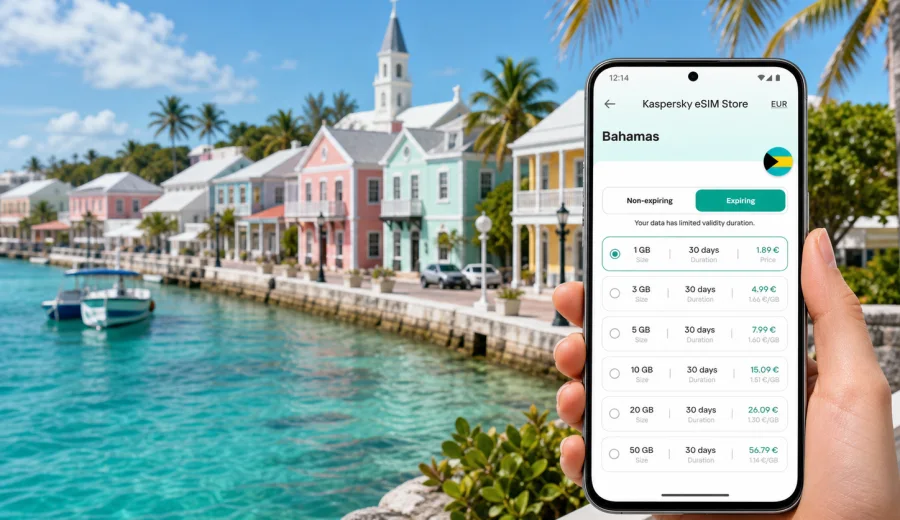
Governor's Harbour eSIM: mobile connection and internet for your Bahamas trip
Governor's Harbour is a small place with a very practical travel challenge: you often need mobile internet before the trip has really started. You may land at Governor's Harbour Airport, pick up a rental car, look for your guesthouse near the harbour, message a host about check-in, or use maps on Queen's Highway while driving along Eleuthera. In a city where plans can move between beaches, boat docks, restaurants, villas and day trips, an eSIM can make the first hours of the journey easier.
This guide explains how to prepare mobile connection and internet for Governor's Harbour with an eSIM, what to check before departure, and how to choose a data plan for a stay in the Bahamas. The focus is practical: arrival, local movement, hotels, navigation, remote work, short trips from town and the small details that decide whether your phone is useful when you need it.
Why eSIM matters in Governor's Harbour
Governor's Harbour is not a huge city where you can assume that every step of the trip will happen indoors or near reliable Wi-Fi. A typical day can include a drive to French Leave Beach, a stop around Cupid's Cay, lunch near the waterfront, a detour to a grocery store, and a return to accommodation after dark. Mobile internet helps you handle those movements without depending only on hotel reception or cafe networks.
An eSIM is useful because it lets you prepare a mobile data plan without changing a physical SIM card. With a compatible phone, you can install an eSIM profile and use it for data while keeping your main SIM available for your usual number, if your device settings support that setup.
For Governor's Harbour, mobile data is especially useful for:
- navigation from the airport to accommodation;
- checking ferry, taxi, rental car and boat arrangements;
- messaging hosts, hotels, family members and travel companions;
- finding restaurants, beaches, shops and fuel stops;
- confirming bookings for villas, boutique hotels or excursions;
- using translation, banking and airline apps;
- managing work messages during a business trip or remote-work stay.
The town is compact, but the island is long. Once you start moving around Eleuthera, your phone becomes part of the travel plan.
Arrival: when you may need data first
Many travelers arrive through Governor's Harbour Airport or drive in from another part of Eleuthera after landing elsewhere. In both cases, the most important mobile internet moment is often before you reach your room. You may need to open a map, find a rental counter, check a message from your host or confirm the exact turnoff for your accommodation.
Airport and hotel Wi-Fi can help, but it is not a complete plan. You may not want to search for a password while standing with luggage, and the signal may not follow you to the car park, road or dock. With an eSIM prepared before the trip, you can switch to the eSIM data line when you arrive and start using mobile internet as soon as the device and local network are ready.
This is not only about comfort. It can reduce small delays. For example, if your villa manager sends a gate code, if your taxi driver asks for a location pin, or if your arrival time changes, mobile data gives you a way to respond without waiting for the next Wi-Fi network.
Local movement around town and Eleuthera
Governor's Harbour is a good base for exploring central Eleuthera. You might stay near the harbour, on the Atlantic side near French Leave Beach, or farther along Queen's Highway. A short drive can feel simple during the day and less obvious at night, especially if you are using turn-by-turn navigation for the first time.
Mobile internet helps with the everyday city-and-island tasks:
| Travel situation | Why mobile data helps |
|---|---|
| Driving from the airport | Open maps, check the route and message your host if the flight is delayed. |
| Beach hopping | Compare locations, check saved pins and navigate back to the main road. |
| Restaurant plans | Confirm opening hours, call or message ahead, and share a location with your group. |
| Hotel check-in | Receive door codes, digital forms or last-minute instructions. |
| Day trips | Coordinate pickup points, ferry plans or excursion times. |
| Remote work | Use messaging, email and authentication apps when hotel Wi-Fi is weak or unavailable. |
For trips outside the town, save key places offline as well. Mobile data is helpful, but a sensible setup includes offline maps, downloaded booking confirmations and a few saved contact numbers.
How much data to plan for Governor's Harbour
The right eSIM data allowance depends on how you travel. Governor's Harbour is not a destination where most people stream video all day while walking around town, but maps, photos, messages and cloud backups can still use data quickly.
A simple way to estimate your need:
- Light use: maps, messaging, email checks, ride or transfer coordination, restaurant searches.
- Moderate use: daily navigation, social media, photo uploads, travel apps, browser searches.
- Heavy use: video calls, laptop hotspot, large file uploads, streaming, frequent cloud sync.
For a weekend stay, a small data plan may be enough if you mostly use hotel Wi-Fi and keep mobile data for navigation and messages. For a week in Governor's Harbour with day trips across Eleuthera, a larger plan gives more room for maps, photos and coordination. For remote work, choose based on actual tasks rather than the length of the holiday: video calls and hotspot use can change the calculation fast.
Practical data-saving settings before you fly
Small settings can make an eSIM plan last longer. Do these before departure, when you still have reliable home internet:
1. Download offline maps for Governor's Harbour and central Eleuthera.
2. Save accommodation addresses, booking numbers and host contacts.
3. Turn off automatic app updates over mobile data.
4. Disable automatic cloud photo backup on mobile data.
5. Download airline, banking and travel apps before the trip.
6. Save important documents for offline access.
7. Check whether your phone supports dual SIM use with one physical SIM and one eSIM, if you plan to keep your usual number active.
These steps do not replace mobile internet. They make it more predictable.
Choosing an eSIM plan for Governor's Harbour
For a city article, the plan choice is based on the country where the city is located. Governor's Harbour is in the Bahamas, so you should choose an eSIM plan that covers the Bahamas and matches your travel dates, expected data use and route.
Before choosing, check four things:
- Coverage destination: the plan should include the Bahamas.
- Validity period: the plan should cover the full stay, including arrival and departure days.
- Data volume: choose enough data for maps, messaging, bookings and your personal app habits.
- Activation rules: check when the plan starts and whether activation needs an internet connection.
Kaspersky eSIM Store is an app and website where you can quickly choose, order and activate an eSIM with a suitable data plan for mobile internet during an international trip. It helps you review plan conditions, select the destination and prepare mobile data without looking for a physical SIM card after arrival.
If Governor's Harbour is part of a wider Bahamas route, think beyond the first night. A plan that is comfortable for one day in town may feel too small if you continue to Harbour Island, Spanish Wells, Gregory Town, Rock Sound or other parts of Eleuthera.
To prepare before you travel, you can choose a mobile internet plan for the Bahamas in Kaspersky eSIM Store and review the data volume, validity period and destination before activation.
When to install and activate the eSIM
For most travelers, the easiest approach is to prepare the eSIM before leaving home and activate it when the trip begins or after arriving, according to the instructions for the selected plan. Installation and activation are related, but they are not always the same step. Read the plan conditions carefully so you understand when validity starts.
The usual preparation flow is:
1. Check that your device supports eSIM and is not locked to one mobile carrier.
2. Choose a Bahamas plan with the right data volume and validity period.
3. Install the eSIM profile while you have stable internet.
4. On arrival, set mobile data to the eSIM line.
5. Enable data roaming for the eSIM line if the plan instructions require it.
6. Test maps and messaging before leaving the airport or accommodation.
For installation help, use the instructions for Android or the instructions for iOS. The exact menu names may differ by device model and operating system version, so follow the on-screen prompts and the instructions for your phone.
Device compatibility: check this before buying
Not every phone supports eSIM, and some devices may be restricted by carrier lock. Before buying a plan for Governor's Harbour, check your device and confirm that it can install and use an eSIM profile.
This check matters because eSIM is a device feature. A travel plan can be suitable for the Bahamas, but it still needs a compatible, unlocked device to work correctly. If you travel with a work phone, a phone bought through a carrier, or an older model, check this early instead of waiting until you are at the airport.
Also check your dual SIM settings. Some travelers keep their main SIM active for calls or bank verification messages and use the eSIM for mobile data. Others turn off the home SIM to avoid roaming charges. The best setup depends on your device, home operator and travel needs.
Best moments to have mobile internet in Governor's Harbour
Governor's Harbour is the kind of destination where mobile internet quietly solves small problems all day. It may not feel essential while you are sitting at a hotel, but it becomes useful when you are moving.
Good examples:
- You arrive before your room is ready and need to coordinate luggage or a meeting point.
- You drive to French Leave Beach and want to share your location with friends.
- You need to confirm whether a restaurant is open before heading out.
- You take photos around the harbour and want to back up only selected images later.
- You use a banking app or two-factor authentication while paying for a booking.
- You need directions back to accommodation after dinner.
- You work for an hour from a cafe and need a fallback if Wi-Fi is unstable.
For these situations, an eSIM is less about constant phone use and more about control. You decide when to use data, and you can keep Wi-Fi for larger downloads.
Governor's Harbour travel scenarios and eSIM use
Different trips need different data habits. Use the scenarios below as a practical guide.
| Scenario | What to prioritize |
|---|---|
| Short stopover | Small data allowance, airport-to-hotel navigation, messaging and boarding updates. |
| Beach holiday | Maps, restaurant searches, group messaging, photo sharing and weather checks. |
| Villa stay | Host communication, door codes, grocery searches and route planning. |
| Business visit | Email, calendar, authentication apps, video calls and a backup for weak Wi-Fi. |
| Island route | Larger allowance, offline maps, repeated navigation and coordination across towns. |
If you use your phone mostly for maps and messages, keep background data limited. If you plan to tether a laptop, treat that as heavy use and choose a plan accordingly.
Hotels, villas and Wi-Fi: why mobile data still helps
Many accommodations in Governor's Harbour provide Wi-Fi, but travel does not happen only inside the room. You may need internet before check-in, while walking to dinner, while waiting for a transfer or while driving between beaches. Wi-Fi quality can also vary by building, room location and weather conditions.
Use hotel Wi-Fi for heavier tasks when it is reliable:
- system updates;
- large photo backups;
- long video calls;
- streaming;
- downloading documents.
Use eSIM mobile data for time-sensitive tasks:
- maps and route changes;
- messages to hosts or drivers;
- banking and authentication;
- restaurant or shop searches;
- urgent email;
- travel app notifications.
This split keeps data use more predictable and makes the eSIM plan more useful during the moments when Wi-Fi is not available.
Calls, SMS and messaging apps
Many travel eSIM plans are designed for mobile data. They may not include a local phone number, ordinary voice calls or SMS unless those features are clearly stated in the plan conditions. For Governor's Harbour, this means you should plan to use internet-based communication for many everyday needs: messaging apps, email, hotel apps, airline apps and map links.
If you need to receive SMS from your bank or airline on your usual number, check your home mobile operator's roaming terms before departure. You may keep your main SIM active for SMS while using the eSIM line for data, but the exact setup depends on your phone and operator.
For local businesses that prefer calls, consider whether messaging, email or hotel reception can help. Many practical arrangements in a small destination can be handled through internet-based communication, but it is better to know your options before you need them.
A simple arrival checklist
Use this checklist before leaving the airport, ferry dock or first Wi-Fi connection:
- eSIM profile is installed on the phone.
- Mobile data is assigned to the eSIM line.
- Data roaming is enabled for the eSIM line if required by the plan.
- Your primary SIM settings are clear, especially if you want to avoid roaming data charges.
- Maps for Governor's Harbour and Eleuthera are available.
- Accommodation address is saved.
- Host, hotel or transfer contact is easy to find.
- Battery saver is not blocking essential apps.
- Background updates are limited on mobile data.
Do this once, calmly, and the rest of the trip becomes easier to manage.
Common mistakes to avoid
The most common eSIM problems are avoidable. They usually happen because the traveler waits too long to prepare or skips device checks.
Avoid these mistakes:
- buying a plan before checking eSIM compatibility;
- assuming that every phone model has the same settings menu;
- deleting an eSIM profile too early;
- installing the eSIM only after leaving reliable Wi-Fi;
- forgetting to choose the eSIM line for mobile data;
- leaving automatic app updates and cloud backups active on mobile data;
- relying only on public Wi-Fi for arrival logistics;
- choosing a data allowance without considering day trips.
An eSIM works best when it is part of your travel preparation, not a last-minute fix at baggage claim.
FAQ: eSIM for Governor's Harbour
Is an eSIM useful for a small town like Governor's Harbour?
Yes, especially if you will drive, coordinate check-in, use maps, visit beaches or travel around Eleuthera. The town is compact, but the travel area is wider than the waterfront.
Should I install the eSIM before flying to the Bahamas?
It is usually more convenient to install the eSIM profile while you have stable internet before departure. Check the plan instructions so you understand when activation and validity begin.
Can I use eSIM data for maps and messaging?
Yes, if the selected plan is active and your device is configured correctly. Maps, messaging, email and travel apps are common reasons to use a travel eSIM.
Will an eSIM give me a local phone number?
Many travel eSIM plans focus on mobile data and do not include a regular phone number, voice calls or SMS unless the plan says so. Use messaging apps for calls and messages when appropriate.
Do I still need hotel Wi-Fi?
Hotel Wi-Fi is useful for large downloads, long calls and backups. eSIM mobile data is more useful when you are outside the hotel, arriving, driving, checking plans or coordinating with others.
How do I choose between smaller and larger data plans?
Think about your trip style. A short stay with maps and messages may need less data. A week with day trips, photo uploads, video calls or hotspot use needs more room.
Final preparation before your Governor's Harbour trip
Governor's Harbour rewards simple preparation. Save your maps, check your accommodation details, confirm your arrival plan and make sure your phone is ready for eSIM before you leave home. That gives you a better chance of handling the first airport message, the first route change and the first hotel check-in without searching for Wi-Fi.
Before you travel, choose an eSIM plan for the Bahamas in Kaspersky eSIM Store, review the data volume and validity period, check device compatibility and install the eSIM using the instructions for your phone. Then use mobile data where it matters most: arrival, navigation, bookings, messages and the everyday movement that makes a Governor's Harbour trip run smoothly.