
Travel connectivity guide
Granada eSIM for Mobile Internet in Spain
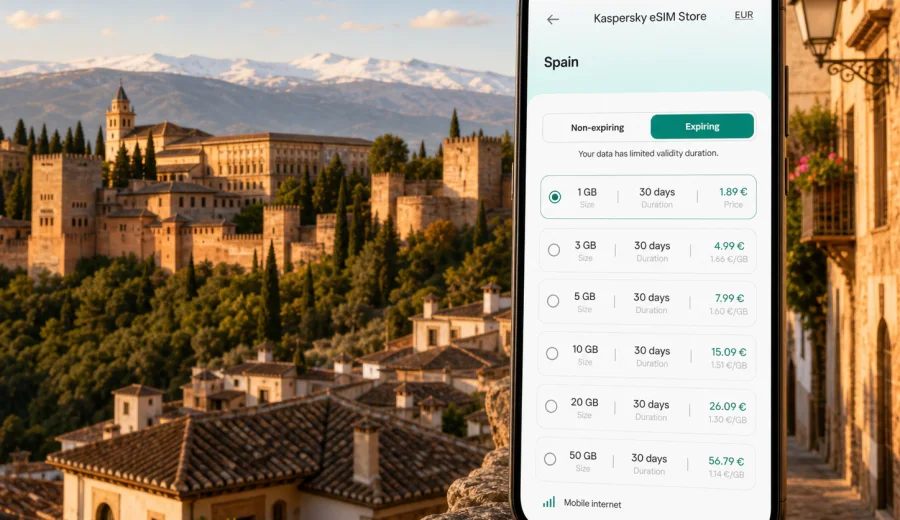
Granada eSIM: mobile connection and internet for your city trip
Granada is a city where mobile internet becomes part of the trip almost immediately. You may need it at the airport while checking your transfer, in the Albaicin while following steep lanes that split into small alleys, near the Alhambra while opening timed-entry details, or on a bus to the station when plans change. A Granada eSIM can help you prepare mobile data before arrival, so you spend less time looking for Wi-Fi and more time moving through the city with confidence.
This guide focuses on Granada, not Spain in general. The city has its own rhythm: historic districts with narrow streets, hillside viewpoints, university areas, compact central hotels, mountain day trips, and a strong mix of short breaks, cultural travel, and business stays. eSIM is useful because many of those moments are easier when maps, messaging, tickets, translation, ride details, and hotel information are available on your phone.
Why mobile internet matters in Granada
Granada looks compact on a map, but the practical travel experience is not always linear. The old center, Realejo, Albaicin, Sacromonte, and the Alhambra area sit across slopes, riverside paths, stairways, and restricted-access streets. Walking directions are useful, but you often need to re-check them because the fastest route may include steep climbs, steps, or pedestrian-only streets.
Mobile data is also helpful because many Granada visits revolve around timed plans. Alhambra tickets, hotel check-in messages, train and bus schedules, restaurant bookings, and group chats all depend on being reachable. If your trip includes a stopover from Madrid, Malaga, Seville, or Cordoba, you may also need live transport updates before you even reach the city.
Typical Granada scenarios where mobile internet helps:
- finding the correct route from Federico Garcia Lorca Granada Airport or a train connection into the city;
- checking bus stops and walking routes between the center, Albaicin, Sacromonte, and the Alhambra;
- opening digital tickets, hotel confirmations, QR codes, and booking emails;
- using translation in small shops, taxis, museums, and restaurants;
- calling or messaging a hotel when streets near the accommodation are hard to access by car;
- sharing your location with travel companions in crowded areas such as Plaza Nueva or Mirador de San Nicolas;
- planning day trips to Sierra Nevada, the Alpujarras, or nearby Andalusian cities.
Arrival in Granada: when eSIM helps first
Many travelers do not arrive in Granada by direct international flight. Some land in Malaga or Madrid, continue by train or bus, and reach Granada later in the day. Others fly into Granada Airport and take a bus, taxi, private transfer, or rental car. In every case, the first useful task is usually the same: confirm where you are going and how long it will take.
With mobile internet ready on a compatible phone, you can check the route from the airport, compare a taxi with a bus, message the hotel, or open a map before leaving the arrivals area. If your accommodation is in the historic center, it is worth checking the exact drop-off point. Some streets around central Granada, Albaicin, and Realejo can be narrow, steep, or restricted, so the closest car route is not always the same as the final walking route.
If you arrive by train, mobile data is useful around Granada railway station and on the onward journey to your hotel. The station is not far from the center, but if you have luggage, a late arrival, or a meeting soon after check-in, real-time navigation makes the transfer easier. If you arrive by long-distance bus, you may want to check city bus connections, taxi availability, or the fastest route to your district before leaving the bus station.
Granada districts and connection needs
Different parts of Granada create different mobile internet habits. The city center is convenient for walking, but it can be busy, and you may switch between maps, restaurant searches, and ticket confirmations many times a day. Albaicin and Sacromonte are more scenic but less predictable for navigation because streets curve, climb, and sometimes turn into steps. The Alhambra area demands careful timing, because tickets and entry slots matter.
| Area of Granada | What you may need mobile data for |
|---|---|
| Historic center and Cathedral area | walking routes, restaurants, hotel messages, taxi or bus checks |
| Albaicin | navigation on steep streets, viewpoint routes, location sharing |
| Sacromonte | evening plans, return routes, ride details, translation |
| Alhambra and Generalife | ticket access, entry timing, maps, meeting points |
| Realejo | hotel access, dining searches, walking routes to the Alhambra |
| Railway and bus station areas | onward transport, check-in updates, transfer planning |
| University and conference areas | messaging, documents, video calls on the move |
An eSIM does not replace good trip planning, but it makes small adjustments less stressful. If a route is closed, a restaurant is full, or your group splits for a few hours, you can update plans quickly without waiting for hotel Wi-Fi.
How much data may be enough for Granada?
The right data amount depends on how you travel. A short cultural weekend with offline maps and light messaging uses less data than a work trip with video calls, cloud files, and frequent hotspot use. Granada is also a city where photos and navigation can quietly increase usage, especially if you upload images during the day or stream video at the hotel instead of using Wi-Fi.
Use this practical estimate:
| Trip style | Typical mobile data use |
|---|---|
| 2-3 day city break | maps, messaging, tickets, restaurant searches, light photo sharing |
| 4-5 day Granada stay | daily navigation, translation, travel planning, moderate social apps |
| Business trip | email, documents, calendar changes, maps, occasional calls through apps |
| Granada plus Andalusia route | train and bus checks, hotel updates, maps between cities |
| Remote-work add-on | higher data need if you use hotspot, calls, or cloud tools outside Wi-Fi |
If you plan to rely on mobile data for video calls, streaming, or laptop tethering, choose a larger package than you would for a simple sightseeing trip. If you mostly need maps, messaging, ticket access, and occasional browsing, a smaller package may be enough. Always check the data volume, validity period, destination coverage, and activation rules before you confirm a plan.
Choosing an eSIM for Granada in Spain
For a city article, the relevant destination is the country the city belongs to. Granada is in Spain, so you should choose a plan that covers Spain rather than looking for a separate Granada-only option. This matters if your itinerary includes Malaga Airport, Seville, Cordoba, Madrid, or a coastal stop before or after Granada.
Kaspersky eSIM Store is an app and website where you can quickly choose, arrange, and activate an eSIM with a suitable mobile data plan for an international trip. It helps you compare practical plan conditions such as data volume, validity period, destination, and price before you travel or after you arrive. For Granada, you can prepare an eSIM plan for Spain before your trip and keep the setup focused on the country where you will use mobile internet.
When comparing options, look at four details first:
- Destination: choose Spain if Granada is the main destination; consider a regional option only if your route crosses several countries.
- Validity period: match it to the full travel period, including arrival and departure days.
- Data volume: allow extra data for maps, transport changes, hotspot use, and media uploads.
- Activation timing: understand when the plan starts and whether you should install it before departure or activate it after arrival.
The safest approach is to prepare the eSIM profile before you leave home while you have stable Wi-Fi, then activate data when you are ready to use it according to the plan conditions. This avoids rushing through setup at a station, airport, or hotel lobby.
Before you buy: check your device
Not every phone or tablet supports eSIM, and some devices can be locked to a mobile operator. Before choosing a plan, check that your device supports eSIM and can use a mobile data plan for travel. You can use the internal compatibility check here: Check your device.
Also check these practical points:
- your device software is up to date enough to install an eSIM profile;
- you know where mobile data and SIM settings are located on your phone;
- your primary SIM can stay active for calls or SMS if you still need it;
- data roaming for the eSIM may need to be enabled, depending on the plan instructions;
- you understand whether the eSIM can be reinstalled or transferred if you change devices.
eSIM plans for travel usually focus on mobile internet. They may not include a standard local phone number, voice calls, or SMS unless those features are clearly listed in the plan details. For most Granada travel tasks, internet-based calls and messages through apps are enough, but it is better to know this before you rely on a phone number for bookings.
How to install and activate your eSIM
Install your eSIM when you have a calm moment and a stable internet connection. Many travelers do this at home before departure, then activate mobile data when the trip begins. If you prefer to wait until arrival, use reliable Wi-Fi at the airport, hotel, or apartment before starting the setup.
For detailed setup steps, use the official instructions for your device: Android installation guide or iOS installation guide. The practical workflow is usually straightforward:
1. Choose the Spain plan that matches your Granada itinerary.
2. Complete the purchase and open the eSIM installation details.
3. Install the eSIM profile on your compatible device.
4. Label it clearly, for example "Spain travel data".
5. Turn on mobile data for the travel eSIM when you are ready to use it.
6. Check the plan balance and validity during the trip.
Do not delete the eSIM profile casually after installation. Depending on the plan conditions, deleting or moving an eSIM can make it difficult or impossible to reuse.
Practical Granada routes where data helps
Granada rewards wandering, but mobile internet keeps wandering from becoming inefficient. A few routes are especially data-dependent:
- Center to Alhambra: compare walking time, slope, bus options, and the correct entry point.
- Albaicin and Sacromonte evenings: use maps, ride details, and location sharing when streets are harder to read after dark.
- Hotel to station transfer: check live routes if you have luggage, early trains, or a tight connection.
- Sierra Nevada, Malaga, or Seville: use data for weather, platforms, delays, and regional transport changes.
If you travel as a couple, family, or business group, agree on a basic communication plan. Decide which messaging app you will use, share hotel addresses, and keep key reservations available offline as a backup.
Hotels, apartments, business trips, and stopovers
Hotel Wi-Fi is helpful, but it does not solve every Granada travel situation. You still need mobile internet between the station and the hotel, while checking into an apartment, walking to a meeting, or finding the correct entrance on a street where cars cannot stop directly outside the door.
For business trips, eSIM is useful because plans can change quickly. A meeting may move to a university building, a dinner may be arranged in Albaicin, or a taxi pickup point may change because of pedestrian streets. Keep mobile data for maps, urgent messages, calendar updates, and short document checks; use accommodation Wi-Fi for large downloads or long calls when it is reliable.
Granada also works well as a one-day stop on a wider Andalusia route. If you arrive in the morning, visit the Alhambra, walk through the center, and leave in the evening, mobile internet becomes a timing tool. Save ticket details, station addresses, return transport, and an offline map before arrival, then use mobile data for live changes.
Quick answers about eSIM in Granada
Do I need a Granada-specific eSIM?
No. Granada is in Spain, so a plan that covers Spain is the relevant choice for a typical city trip.
Can I install the eSIM before traveling?
In many cases, yes. It is often more convenient to install the eSIM profile before departure over stable Wi-Fi, then activate data according to the plan conditions.
Can I use my regular SIM at the same time?
Many compatible phones allow a physical SIM and an eSIM to be active together, but settings differ by device. Check which SIM is used for calls, messages, and mobile data.
Prepare mobile internet before Granada
Granada is easier when your phone is ready for the city before the first steep street, timed entry, station transfer, or hotel message. eSIM gives you a practical way to prepare mobile internet for Spain without relying only on roaming, public Wi-Fi, or an offline search for a local option after arrival.
Before you travel, check device compatibility, choose a data amount that fits your itinerary, read the activation details, and install the eSIM while you have reliable Wi-Fi. If Granada is part of a wider route through Spain, make sure the plan duration covers every travel day, not just the nights in the city.
To get ready for maps, messaging, tickets, and transport in Granada, choose an eSIM plan for your Spain trip through Kaspersky eSIM Store and activate it according to the plan instructions when you are ready to use mobile data.