Travel connectivity guide
Grand Case eSIM: Mobile Internet in Saint Martin
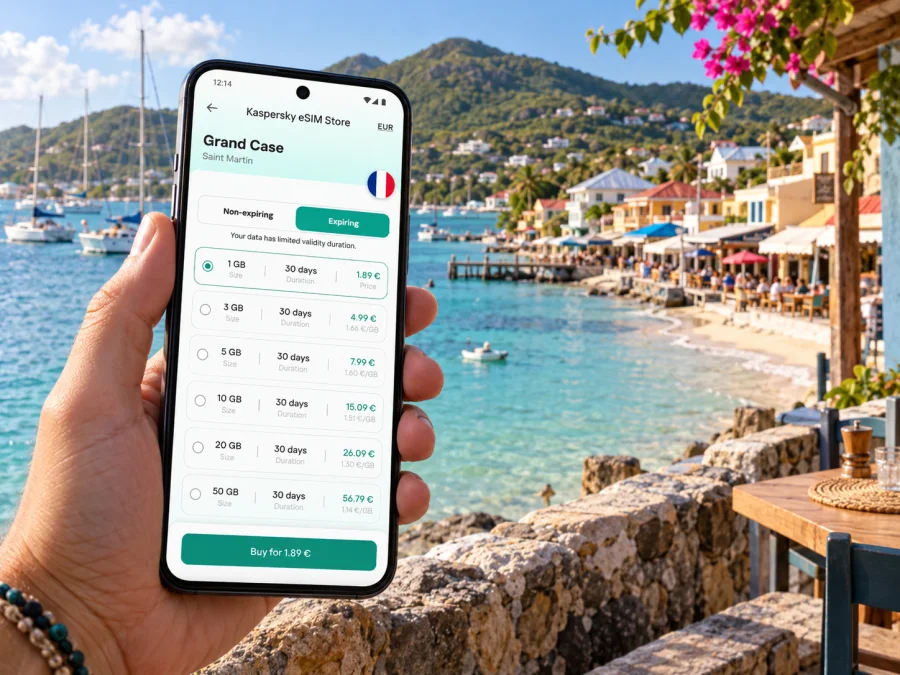
Grand Case eSIM for mobile connection and internet
Grand Case is a compact seaside village on the French side of Saint Martin, known for its bay, waterfront dining and easy access to the island’s northern coast. A phone with mobile data is useful here for checking your transfer, finding a guesthouse, messaging a host, looking up a minibus route or keeping plans flexible when you move between the beach, the village and Marigot.
An eSIM can make that preparation simpler: you choose a data plan for the destination, install its digital profile on a compatible phone and use it for mobile internet while travelling. The practical details matter on this island, though. Grand Case is in the French Collectivity of Saint-Martin; the southern part of the same island is the separate country of Sint Maarten. The airport you use, the territory covered by your plan and the regional version of your device all deserve a quick check before departure.
Where Grand Case is, and what “Saint Martin” means
Grand Case sits on the north-western coast of the island of Saint Martin, within the French overseas collectivity of Saint-Martin. The island is shared between that French territory in the north and Sint Maarten, a constituent country of the Kingdom of the Netherlands, in the south. The border is easy to cross by road, but the two names do not describe one mobile market or one administrative destination.
For a trip centred on Grand Case, Marigot, Orient Bay or the French Quarter, the relevant destination is Saint Martin. If you will also spend time in Philipsburg, Maho, Simpson Bay or elsewhere in Sint Maarten, check the selected plan’s coverage wording for both territories. An island-wide itinerary does not by itself prove that one destination plan includes both sides. The same check applies if your route extends to Anguilla, Saint-Barthélemy or another nearby island: proximity is not the same as included coverage.
Grand Case feels different from a large resort town. The village is arranged along a narrow coastal strip, with the main road and settlement close to the water. You can walk between many of the village’s restaurants, small hotels and beach access points, but a rental car, taxi or minibus is useful for visiting other parts of the island. Mobile data helps with the gaps between those plans: confirming a pickup point, sharing your location with a driver or checking whether a place is open before you set off.
Arriving: two airports with different roles
Two airports serve this part of the island, but they sit in different territories.
| Airport | Location and role | What to plan for |
|---|---|---|
| Grand Case–L’Espérance (SFG) | French side, beside Grand Case; regional and other connections depend on the current schedule. | Check your ticket and flight details. The airport lists taxis at arrivals; arrange transport ahead if you are staying elsewhere. |
| Princess Juliana International (SXM) | Sint Maarten side, near Simpson Bay; a larger gateway for many island itineraries. | Your road transfer crosses north into Saint-Martin. Confirm a pickup point and allow time for traffic. |
L’Espérance is very close to the village. Check current routes and passenger arrangements with the airport or airline, since schedules can change. From SXM, ask your accommodation whether it recommends a taxi, a pre-arranged pickup or a rental car; save the exact address offline rather than relying on a map pin alone.
A charged phone helps with reservations, driver messages and check-in instructions. If you plan to use a travel eSIM, install it while you have dependable Wi-Fi and follow its activation guidance. Keep your home line available if needed for calls or banking codes, and check which SIM is selected for mobile data after arrival.
Getting around the village and island
Grand Case is compact: many restaurants, small hotels and beach access points sit along the coastal village. Walking works for nearby stops, while other beaches, ferry points and settlements are spread across the island. Use a map to understand the route, then confirm the actual pickup point.
French-side minibuses depart from Marigot and run along the main road through places including Grand Case, Cul-de-Sac, Orient Bay and the French Quarter. Routes and stops can vary, so ask the driver whether the vehicle serves your destination and where to get off. If travelling from Sint Maarten, you may need to change in Marigot. Confirm service locally and keep a taxi option for a time-critical airport or ferry connection.
Taxis suit luggage, late arrivals or direct trips. Confirm the destination and fare arrangement before setting off. For an airport pickup, use the arrivals area or agree on a clear meeting point and keep the driver’s number accessible.
If renting a car, save your destination before leaving Wi-Fi. Check parking options near your stop, follow local signs and avoid blocking the road. A phone mount and power bank are useful for navigation.
A simple journey-planning routine
- Pin the exact accommodation entrance, not only “Grand Case.”
- Confirm whether you arrive at SFG or SXM and how to reach the address.
- Ask the minibus driver about your stop; do not assume every vehicle serves it.
- Save a map and reservation details offline.
- Keep enough battery for navigation and contacting your host.
- Check plan coverage if crossing into Sint Maarten.
Mobile data for everyday plans in Grand Case
Choose an allowance according to your habits and the length of the trip. Messaging and maps usually use less than video uploads, streaming, hotspot use or long work calls. Check both the allowance and validity period, including travel days and excursions.
| Travel pattern | Where data helps | Preparation |
|---|---|---|
| Beach stay | Meeting points, taxi messages and location sharing | Save the beach and lodging pins. |
| Village walk | Addresses, reservations and translation | Save useful map or language resources in advance. |
| Island day trip | Route checks, ferry updates and pickup coordination | Verify coverage if leaving Saint-Martin. |
| Remote work | Email, documents and calls | Check allowance, lodging Wi-Fi and power access. |
| Family travel | Sharing locations and coordinating arrivals | Agree on a meeting point and save bookings offline. |
A plan cannot guarantee a particular speed or signal in every building, vehicle or cove; terrain, construction, congestion and network conditions affect performance. Save directions for important journeys and keep lodging Wi-Fi as a backup.
Kaspersky eSIM Store is an app and website where you can choose, arrange and activate an eSIM with a suitable data plan for an international trip. Compare the destination, allowance, validity and conditions. For Grand Case, browse eSIM data options for Saint Martin and check the plan against your route. If you also visit the Dutch side, verify Sint Maarten coverage in the plan details rather than assuming the whole island is included. The French-side market includes local and regional operators such as Dauphin Telecom and Orange Caraïbe, but that does not identify the network used by a particular travel plan; check the plan’s own network and territory details.
Choose an eSIM for the route, not just the arrival pin
Start with every destination on your itinerary. A Saint Martin plan is relevant to Grand Case on the French side, but your trip may also include Sint Maarten, a ferry departure or another island. Check exact destination names and coverage notes; nearby does not mean included.
Estimate how you use data. Maps and messages are lighter than video, hotspot use or long meetings. If working remotely, check plan terms and arrange accommodation Wi-Fi as a backup. Compare allowance with trip length, and read when validity starts: activation rules differ, so follow the selected plan’s instructions.
Before purchase, check that your phone supports eSIM and is not carrier-locked. Regional variants of the same phone family may have different SIM hardware or eSIM support. Verify the exact model or part number with its manufacturer and confirm that your device is compatible.
A travel data eSIM generally does not replace your usual phone number. Unless the plan says otherwise, do not expect ordinary voice calls or SMS. Keep your home SIM configured if you need calls or verification messages, and review your home carrier’s roaming settings and charges. Internet-based calls and messages may work through apps over data.
Install and activate before you need directions
A calm moment at home or at the hotel is a better time to set up an eSIM than the curb outside an airport. The exact steps depend on your device and the plan. Follow the instructions provided with your purchase, and do not delete an installed eSIM profile unless you understand whether it can be installed again.
Before you begin
- Confirm the phone is eSIM-compatible, carrier-unlocked and running a supported operating system.
- Use a stable Wi-Fi connection for installation if the setup instructions require it.
- Keep the QR code or activation details available on another screen or in a safe place.
- Label the profile clearly, such as “Travel data,” so you can identify it later.
- Check which line is selected for mobile data and whether data roaming needs to be enabled for that specific profile.
For device-specific steps, use the Android eSIM installation guide or the iPhone and iPad eSIM installation guide. Menu names differ by manufacturer and software version, so follow the instructions that match your model. If you install before departure, activation may still need to wait until you reach the destination, depending on the plan terms.
After arrival, select the travel eSIM for mobile data if that is the plan you intend to use. Keep your home line configured for calls or messages only if needed, and check its roaming settings to avoid unintended charges. If data does not connect, verify that the correct profile is enabled, the plan’s start conditions have been met, the data line is selected and any required roaming setting is on. Restarting the phone can help it register again, but follow your provider’s instructions if the issue persists.
Everyday situations where data helps
In Grand Case, mobile data is most useful for small practical tasks: finding the right guesthouse entrance, sharing a pickup pin after dinner, checking a reservation or navigating back from a beach. Save the place name and address before you leave, and give a driver a recognisable meeting point rather than a vague venue name.
For remote work, test email, authentication and meeting apps before the first call. Check the plan allowance and your accommodation’s Wi-Fi as a backup; a travel data eSIM can support mobile access while moving around, but it cannot promise a fixed speed or uninterrupted signal. For a short stopover, prioritize the transfer and return journey, and keep boarding details accessible offline.
What to save offline
Before leaving dependable Wi-Fi, save your accommodation address and check-in contact, airport and transfer details, an area map, ferry or excursion bookings, and the eSIM instructions. Offline references help if data drops or your battery runs low; they do not replace checking current travel arrangements. Carry a power bank if you expect to navigate for a long stretch.
Common mistakes to avoid
- Confusing airports: SFG is beside Grand Case on the French side; SXM is on Sint Maarten and requires a road transfer north.
- Assuming island-wide coverage: Saint-Martin and Sint Maarten are separate destinations for plan purposes. Confirm each territory on your route.
- Relying on an assumed bus schedule: Ask whether the minibus serves your stop and allow extra time for airport or ferry connections.
- Checking only the device family name: Regional variants can differ; verify the exact model and carrier-lock status before purchase.
- Waiting until arrival to set up: Install the profile in advance and keep key addresses available offline.
Frequently asked questions
Is Grand Case in Saint Martin or Sint Maarten?
Grand Case is in the French Collectivity of Saint-Martin, on the northern part of the island. Sint Maarten is a separate country on the southern part, so check plan coverage if you visit both.
Which airport is closest to Grand Case?
Grand Case–L’Espérance (SFG) is beside the village. Princess Juliana International (SXM) is on Sint Maarten and requires a road transfer. Check the code on your booking.
Can I use an eSIM in Grand Case?
Yes, if the plan covers Saint Martin and your exact phone model supports eSIM and is unlocked. Confirm coverage, validity and activation terms before purchase; coverage in Sint Maarten is a separate check.
A practical checklist for your Grand Case trip
Confirm your airport, accommodation pin and transfer. Check whether your route includes Sint Maarten, then compare coverage, allowance and validity. Verify eSIM support for your exact phone variant and confirm it is unlocked. Install the profile, save essential details offline and keep a map backup.
Prepare your eSIM for Grand Case
Kaspersky eSIM Store helps you choose, arrange and activate an eSIM with a suitable data plan for mobile internet on an international trip. Review the destination and conditions for your whole route, then choose a data plan for Saint Martin that matches your travel dates and expected use. Install it on a compatible, unlocked device and follow the plan’s activation instructions before you depend on it for directions in Grand Case.


