
Travel connectivity guide
eSIM Greece: mobile internet for travel
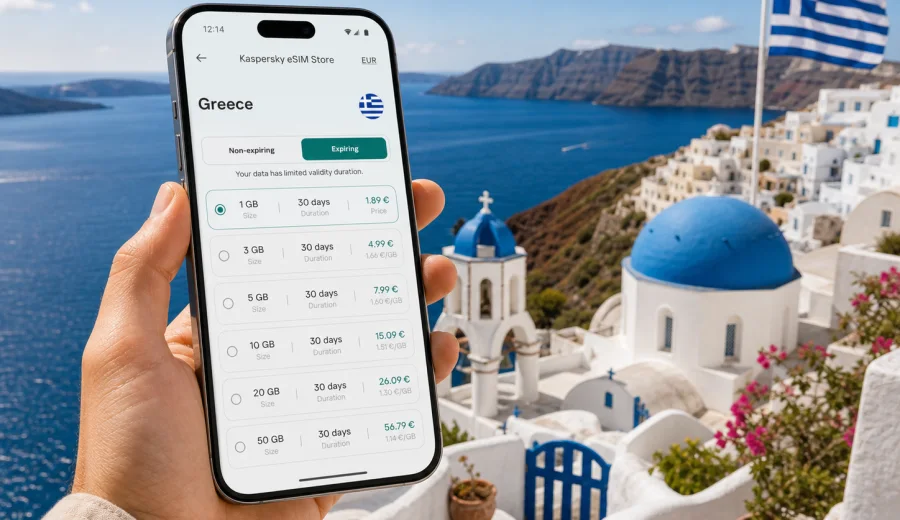
eSIM for Greece: mobile connection and internet for your trip
Greece is easy to underestimate from a connectivity point of view. A short trip can include Athens, ferries, islands, mountain roads, archaeological sites, beach towns, and hotels where Wi-Fi quality varies. If you need maps, ride-hailing, messaging, ferry updates, hotel check-in, remote work, or translation tools, mobile internet should be part of the travel plan before you land.
An eSIM can help you prepare mobile connection in Greece without looking for a physical SIM card after arrival. Instead of changing the plastic SIM in your phone, you install a digital SIM profile on a compatible device and use it for mobile data. Kaspersky eSIM Store is an app and website where you can choose, arrange, and activate an eSIM with a suitable data plan for mobile internet in an international trip.
This guide explains how to use eSIM for Greece, how to choose a data plan, what to check before buying, and how to avoid common mistakes. The focus is practical: getting online in Greece with fewer surprises and a clear understanding of what eSIM can and cannot do.
Why eSIM is useful for Greece
Greece is a mobile-first destination for many travelers. You may need internet before you reach your hotel, especially if you arrive late, rent a car, join a ferry connection, or travel with children. Public Wi-Fi can help in some places, but relying on it for the whole trip can be inconvenient.
An eSIM is useful in Greece when you want to:
- open maps and navigation as soon as you leave the airport or ferry port;
- message your hotel, host, driver, guide, or travel group;
- check ferry schedules, gate changes, and route updates;
- use translation tools in restaurants, pharmacies, stations, and local shops;
- upload documents, tickets, boarding passes, and booking confirmations;
- work from a laptop by sharing a mobile hotspot if the selected plan and device allow it;
- reduce dependence on public Wi-Fi in cafes, ports, airports, and hotels.
The main advantage is preparation. You can choose a data plan before departure, install the eSIM profile while you still have reliable internet, and switch mobile data to the eSIM when you are ready to use it in Greece. Activation and performance still depend on your device, the selected plan, and local network conditions, but the first steps of the trip become more predictable.
Where mobile internet matters most in Greece
Travel in Greece often combines short city stops with island or regional movement. That makes mobile data more valuable than it may seem during planning.
| Travel situation | Why mobile data helps | Practical note |
|---|---|---|
| Arrival in Athens or Thessaloniki | Navigation, taxi apps, hotel messages, ticket storage | Install the eSIM before leaving home, then switch data after arrival if the plan terms allow it. |
| Ferry routes to islands | Schedule checks, port updates, booking confirmations | Save tickets offline too, because signal quality can vary during sea crossings. |
| Island stays | Maps, restaurant bookings, messaging, weather checks | Choose a plan based on total trip length, not only the number of hotel nights. |
| Road trips on the mainland | Navigation, fuel stops, route changes, emergency contact | Download offline maps as a backup before driving outside major towns. |
| Remote work days | Email, chat, two-factor authentication, hotspot use | Check whether tethering is allowed and estimate data use carefully. |
The most common mistake is choosing a plan only for social media or messaging and forgetting navigation, ticket changes, and background app updates. Video streaming, cloud photo backup, and laptop use require a larger allowance.
How to choose an eSIM data plan for Greece
Start with your itinerary. A weekend in Athens is different from a 12-day route through Athens, Naxos, Santorini, Crete, and the Peloponnese. You do not need a complex calculation, but you should match the plan to your real use.
Consider five points:
1. Trip duration. Choose a validity period that covers arrival day, departure day, and any overnight travel.
2. Data volume. Messaging and maps use less data than video calls, streaming, cloud backup, and laptop work.
3. Destination scope. If you are visiting only Greece, a Greece plan can be simple. If you combine Greece with nearby countries, a regional plan may be more convenient if available and suitable.
4. Activation timing. Some plans start counting validity from installation, some from first connection to a supported network, and some follow other terms. Read the plan details before purchase.
5. Device and tethering needs. If you plan to share data with a laptop or another device, check whether hotspot use is supported by the device and tariff.
If you are unsure, avoid planning around perfect usage. Light messaging and maps need less data than video calls, cloud backup, laptop work, and streaming. It is safer to reduce automatic photo backup, download offline maps, and keep video for Wi-Fi than to depend on a tiny data allowance for a multi-stop trip.
What to check before buying
Before you arrange an eSIM for Greece, confirm the technical basics. This step is short, but it prevents most avoidable installation problems.
- Your phone or tablet must support eSIM.
- The device should not be locked to one mobile operator.
- The operating system should be up to date enough to manage eSIM profiles.
- You need stable internet during installation, usually via Wi-Fi or another mobile connection.
- You should know which SIM profile will be used for mobile data and which one will remain for calls or messages.
- You should review the selected tariff: data amount, validity period, country or region, price, and activation rules.
If you are not sure whether your device supports eSIM, check your device before you pay. Compatibility depends on the exact model, region, and sometimes carrier restrictions. A phone name alone is not always enough, because the same model family can have different eSIM support in different markets.
How to install and activate eSIM for Greece
The installation flow is usually simple, but do it when you are not rushing. The best time is often before departure, while you have stable Wi-Fi and enough time to read the screens carefully. If your tariff starts only after connecting to a supported network, you can install it in advance and activate mobile data when you arrive. Always follow the terms shown for the selected plan.
Basic steps:
1. Check device compatibility and carrier lock status.
2. Choose Greece as your destination and select a tariff by data volume and validity.
3. Complete the order and open the eSIM details in your profile, app, or confirmation email.
4. Install the eSIM profile using the on-screen flow or QR code.
5. Give the eSIM a clear label, such as "Greece data", so you can recognize it later.
6. When ready, set mobile data to the eSIM profile and enable data roaming for that profile if the instructions require it.
7. Keep your primary SIM available for your usual phone number if you need calls, bank messages, or two-factor authentication.
For device-specific setup, use the Android installation guide or the iOS installation guide. The exact menu names can vary by device model and operating system version, so follow the instructions shown on your phone as well.
After installation, do not delete the eSIM profile unless you are sure you no longer need it. In many cases, an eSIM profile cannot simply be moved to another device after activation. If something does not work, check the data line, roaming setting, APN instructions if provided, and destination coverage before removing anything.
When to choose your plan
You can prepare your Greece connectivity before the trip, after arrival, or during travel if your plans change. Preparing in advance is usually easier because you have a reliable connection and time to compare options. It is also helpful if you arrive at night, travel straight from the airport to a ferry, or need maps immediately.
Around the middle of your planning, once you know your dates and expected data use, you can choose an eSIM plan for Greece and review the available validity periods and data packages. Kaspersky eSIM Store helps you select, arrange, and activate a suitable eSIM tariff for mobile internet in a foreign trip; it is not a mobile operator and does not own or operate the local networks.
If you are already in Greece and still have Wi-Fi, you can also arrange an eSIM from your hotel, apartment, airport lounge, or cafe. Just make sure your device is compatible and unlocked before you start. If you are arranging it on mobile data from another SIM, avoid losing that connection until installation is complete.
Data planning for Greece
Data use is personal, but some patterns are predictable. Maps, messaging, email, and ticket apps are usually manageable. Video streaming, video calls, cloud backup, app updates, and social media uploads use far more data. Your phone may also use data in the background unless you limit it.
Use this checklist before departure:
- Download offline maps for Athens, your islands, and any road route.
- Save hotel addresses, ferry tickets, boarding passes, and insurance details offline.
- Turn off automatic photo and video backup on mobile data.
- Disable automatic app updates over mobile data.
- Set messaging apps to download media only on Wi-Fi if you want to save data.
- Check whether hotspot use is needed for a laptop or travel companion.
- Keep a small amount of data available for the final day: airport transfer, boarding pass, and messages.
For many travelers, the first day uses more data than expected. You search for transport, check into accommodation, message people, translate signs, and confirm bookings. The last day can also be data-heavy because of airport navigation, ride apps, boarding passes, and last-minute changes.
Practical scenarios
| Scenario | What to plan |
|---|---|
| Weekend in Athens | Maps, restaurant searches, ride apps, museum tickets, and messaging may be enough. Use Wi-Fi for video and backups. |
| Island hopping | Choose validity that covers ferry days, save tickets offline, and keep data for weather, port transfers, and booking changes. |
| Mainland road trip | Download offline maps before leaving major towns and keep mobile data for route changes, parking, and accommodation messages. |
| Work trip | Confirm hotspot support if you need it, keep venue or hotel Wi-Fi as a backup, and avoid large updates on mobile data. |
Common mistakes to avoid
- Buying before checking eSIM compatibility.
- Choosing a validity period that ends before departure day.
- Installing the eSIM while using weak public Wi-Fi.
- Deleting the eSIM profile during troubleshooting.
- Forgetting to set mobile data to the eSIM line after arrival.
- Leaving cloud backup, video auto-play, or app updates active on mobile data.
- Assuming an eSIM includes a phone number, calls, or SMS without checking the tariff.
- Assuming one small package will cover several people using hotspot every day.
Treat mobile internet as part of the itinerary. If your route is complex, your data plan should be planned with the same care as ferry times and hotel check-in.
Quick summary
An eSIM for Greece is a digital SIM profile for mobile data on a compatible device. It can be installed without a physical SIM card and used for maps, messaging, bookings, translation, and online check-in. Before buying, check compatibility, carrier lock status, data volume, validity period, destination coverage, and activation rules. Kaspersky eSIM Store helps you choose, arrange, and activate an eSIM tariff for mobile internet in an international trip.
FAQ
Does eSIM for Greece replace my normal SIM card?
Not necessarily. Many phones allow you to keep your primary SIM active for your usual number and use the eSIM for mobile data. Check which line handles mobile data, calls, and messages before you travel.
Will I get a Greek phone number?
Usually, travel eSIM tariffs are focused on mobile data. A phone number, voice calls, or SMS are included only if the selected tariff clearly says so. For calls and messages, many travelers use internet-based apps.
Can I install eSIM before flying to Greece?
In many cases, yes. Installing before departure can be convenient because you have stable Wi-Fi and time to check settings. Read the tariff terms to understand when validity starts.
Should data roaming be enabled?
Some eSIM profiles require data roaming to be enabled for the eSIM line. Follow the setup instructions and make sure mobile data is assigned to the correct profile.
What happens when the data package runs out?
The result depends on the selected tariff. You may need to top up, buy another plan, or switch to another connection. Track data use so you are not surprised on a travel day.
Is eSIM better than public Wi-Fi in Greece?
It solves a different problem. Public Wi-Fi can be useful in hotels, cafes, and airports, but it is not always available when you need navigation, transport, translation, or urgent messages.
Final preparation before you go
Before departure, check your device, choose a tariff that matches your route, install the eSIM while you have a stable connection, and save key travel documents offline. Keep your primary SIM available if you need your regular phone number.
If Greece is your next destination, you can prepare an eSIM plan for Greece through Kaspersky eSIM Store, then follow the setup instructions on your compatible device and use mobile internet for the parts of the trip where being online matters most.