
Travel connectivity guide
Greenland eSIM: Mobile Internet Guide
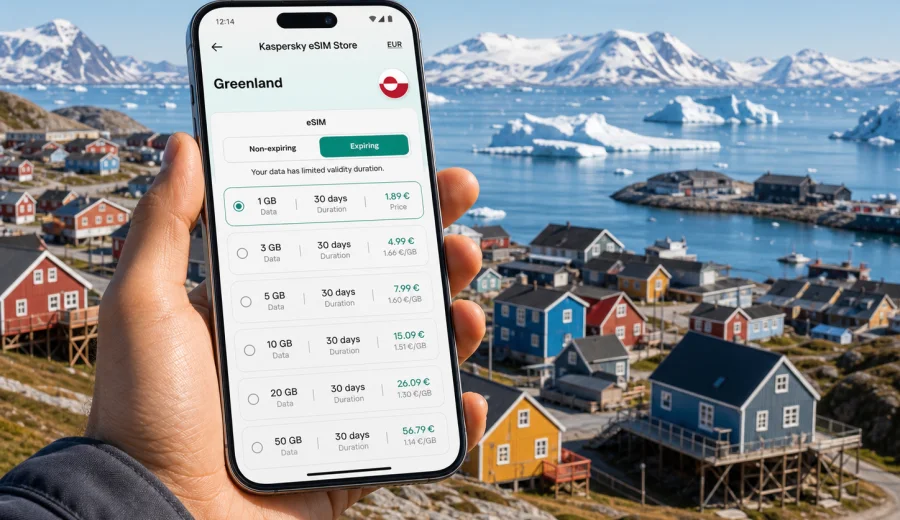
eSIM in Greenland: mobile connection and internet for your trip
Greenland is a destination where mobile internet matters before the trip begins. Distances are large, towns are separated by sea, air and mountain terrain, and many everyday travel tasks depend on being online: checking flight changes, saving ferry details, opening maps, messaging your hotel, translating local information and confirming tours. An eSIM can help you prepare mobile internet for Greenland without looking for a physical SIM card after arrival.
This guide explains how to choose an eSIM tariff for Greenland, what to check before purchase, how to install and activate eSIM, and how to plan data use for a trip that may include Nuuk, Ilulissat, Kangerlussuaq, Sisimiut, Qaqortoq or smaller settlements. The focus is practical: a compatible phone, a suitable data allowance, clear validity period and a calm setup process before you need internet in the field.
Why eSIM is useful for Greenland
Greenland travel often has a different rhythm from a city break in mainland Europe. You may land, transfer to a domestic flight, wait for weather updates, meet a boat operator or move between places where transport options are limited. In that context, mobile internet is not only about social media. It supports navigation, bookings, weather monitoring and basic coordination.
An eSIM is a digital SIM profile installed on a compatible smartphone or tablet. Instead of inserting a plastic SIM card, you add the eSIM profile to your device and choose it for mobile data. For a trip abroad, this can be convenient because you can prepare the connection before departure, keep your main SIM for calls or banking messages if needed, and use the eSIM for data in the destination.
For Greenland, eSIM can be especially practical when:
- you want mobile data soon after landing;
- you do not want to spend arrival time looking for a local SIM option;
- you need maps, messengers and booking apps during transfers;
- you plan several stops and want one data setup for the trip;
- you prefer to see the data volume, validity period and price before travel;
- you want to reduce dependence on public Wi-Fi in airports, hotels or cafes.
eSIM does not make a phone work in every place. Coverage, speed and availability depend on local networks, terrain, weather, building conditions and the specific tariff. In remote areas, during boat trips or on wilderness excursions, you should not rely on mobile internet as your only communication method. Treat eSIM as a useful data tool for travel, not as a replacement for local safety instructions, guides, offline maps or emergency planning.
Mobile internet scenarios in Greenland
Before choosing a tariff, think about how you will use data. Greenland trips can be short business visits, cruise stops, photography tours, hiking routes, research travel or family holidays. Each scenario creates a different data profile.
| Travel scenario | Typical online tasks | Data planning tip |
|---|---|---|
| Arrival in Nuuk | maps, taxi or transfer messages, hotel check-in, email | choose enough data for the first days, not only airport use |
| Ilulissat and Disko Bay | tour confirmations, weather checks, photo backup, messaging | upload large files on Wi-Fi when possible |
| Domestic flights | schedule changes, boarding updates, rebooking messages | install eSIM before travel so setup is not rushed |
| Cruise or coastal route | port information, messenger updates, maps near towns | remember that mobile data may not be available at sea |
| Remote nature trip | offline maps, guide coordination, emergency planning | download key files before departure and carry backup options |
| Work trip | email, video calls, documents, hotspot use | choose a larger allowance and check tethering conditions |
If your plan includes many videos, cloud photo uploads or hotspot sharing with a laptop, a small data package may run out quickly. If you mainly use messaging, maps, tickets and occasional browsing, a moderate package may be enough. The safest approach is to match the tariff to the real number of travel days and the apps you use most often.
What to check before buying an eSIM for Greenland
The most important step is compatibility. Not every phone supports eSIM, and some phones that technically support eSIM may be locked to a carrier. Before purchase, confirm that your device can install an eSIM profile and use mobile data with it abroad. You can check your device before selecting a tariff.
Also check these points:
1. Destination: the tariff should include Greenland or the region that covers your route.
2. Validity period: match the number of days to your stay, including arrival and departure days.
3. Data volume: choose enough traffic for maps, messengers, booking apps and work needs.
4. Activation rules: review when the validity period starts and whether activation requires arrival in the destination.
5. Data roaming setting: some eSIM profiles require data roaming to be enabled for that profile.
6. Calls and SMS: many travel eSIM tariffs are data-only unless the tariff conditions say otherwise.
7. Hotspot use: if you plan to share internet with a laptop, check whether tethering is allowed by the selected tariff.
8. Support access: keep purchase details and installation instructions available in case you need help.
A useful rule: install the eSIM while you still have stable Wi-Fi, but activate and use the mobile data profile according to the tariff instructions. That way you avoid downloading the profile at the airport when you may be tired, in a queue or dealing with transport changes.
How to choose the right data allowance
Greenland rewards preparation. Many travelers underestimate how often they will check weather, maps, photos, ferry details or flight updates. At the same time, you do not need to overbuy data if the trip is short and you will use hotel Wi-Fi for heavy downloads.
Use this checklist:
- For 2-3 days, estimate data for maps, messengers, email and light browsing.
- For 4-7 days, add a buffer for weather apps, route changes and photo sharing.
- For 1-2 weeks, consider a larger package if you will move between towns.
- For work trips, calculate video calls and document sync separately.
- For photography trips, avoid automatic cloud backup on mobile data unless your package is large.
- For family travel, decide whether one phone will share a hotspot or each person needs their own eSIM.
Typical data-saving settings before departure:
- download offline maps for Nuuk, Ilulissat and planned routes;
- save hotel addresses, tour vouchers and flight details offline;
- turn off automatic app updates on mobile data;
- restrict cloud photo and video backup to Wi-Fi;
- lower streaming quality or avoid streaming on mobile data;
- set messenger apps to download media manually;
- monitor data usage after the first day.
When you compare tariffs, do not look only at the data number. Validity matters just as much. A larger data package with a short validity period may not suit a longer route, while a smaller package with the right validity may be enough for a short trip with limited browsing.
Preparing eSIM before your Greenland trip
Kaspersky eSIM Store is an app and website where you can quickly choose, arrange and activate an eSIM with a suitable tariff for mobile internet in an international trip. It helps keep the process in one place: choose the destination, review available tariff conditions, install the eSIM on a compatible device and manage it through the site or app.
For Greenland, preparation is especially useful because the first hours after arrival can involve airport transfers, domestic connections or weather-related schedule checks. If you wait until you urgently need data, installation may feel more stressful than it needs to be.
Use this simple sequence:
1. Check that your smartphone supports eSIM and is not locked to one carrier.
2. Open Kaspersky eSIM Store on the website or in the app.
3. Choose Greenland as the destination.
4. Compare data volume, validity period and tariff conditions.
5. Arrange the selected tariff and save the confirmation details.
6. Install the eSIM profile using stable Wi-Fi.
7. Follow the activation instructions before travel or after arrival, depending on the tariff.
8. Set the eSIM as the line for mobile data when you are ready to use it.
If you want to prepare in advance, you can choose an eSIM tariff for your Greenland trip after checking device compatibility and deciding how much data your route needs.
Installation and activation: the practical steps
The exact menu names differ by device, but the logic is similar: you add a mobile plan, install the eSIM profile, choose it for cellular data and enable the required settings. Use a reliable Wi-Fi connection during installation because the phone needs internet access to download the eSIM profile.
For detailed setup, use the official installation guides:
Before you tap through the final steps, read the activation notes for the selected tariff. Some tariffs start counting validity after installation, while others start after connecting to a supported network in the destination. The details can vary, so follow the instructions shown for your eSIM.
After installation, check these settings:
- the eSIM profile is present in your cellular settings;
- your main SIM remains selected for calls if you want to keep it active;
- the eSIM is selected for mobile data when you need internet in Greenland;
- data roaming is enabled for the eSIM if the instructions require it;
- low data mode is enabled if you want to reduce background traffic;
- your messenger and banking apps still receive messages as expected.
Do not delete the eSIM profile unless the instructions or support team advise it. In many cases, deleting an eSIM can make it difficult or impossible to reinstall the same profile.
Where eSIM can help during the trip
Greenland trips often involve small operational details. Mobile internet helps you handle them without waiting for hotel Wi-Fi or a public hotspot.
At the airport: check luggage updates, transfer messages and domestic flight information. Greenland travel can involve changing weather, so being able to receive updates is useful.
In town: use maps, restaurant information, hotel messages, translation and taxi or transfer coordination. Even if towns are compact, online access saves time.
On tours: confirm meeting points, contact the operator and share arrival times. For glacier, fjord or boat tours, download key information before leaving town.
For work: send documents, join short calls and handle email. If you need stable connectivity for important meetings, confirm backup options in advance.
For safety planning: save emergency contacts, hotel details, guide contacts and route notes offline. Mobile internet is useful, but remote-area travel needs more than a phone data plan.
eSIM, roaming, local SIM and Wi-Fi: what is different?
There is no single best option for every traveler. The right choice depends on your phone, route, budget, timing and tolerance for setup tasks.
| Option | Strengths | Limits to consider |
|---|---|---|
| Travel eSIM | can be prepared before travel, no plastic SIM, clear data package | requires compatible unlocked device; usually data-only |
| Standard roaming | keeps your usual SIM active and familiar | costs and limits depend on your home operator |
| Local physical SIM | may suit longer stays or specific local needs | requires purchase after arrival and a SIM slot |
| Public Wi-Fi | useful for large downloads in hotels or cafes | not always available when moving around; quality varies |
For many visitors, eSIM works well as the main mobile data option, while hotel Wi-Fi handles large uploads and downloads. If your trip includes remote fieldwork, expedition travel or long time outside towns, add offline planning and local guidance rather than assuming any mobile option will be available everywhere.
Data planning examples
Here are practical examples to help estimate your needs. They are not tariff promises; they are planning patterns.
Short city-focused visit: You spend three days in Nuuk, use maps, messengers, email and occasional browsing. A moderate data package may be enough if you use Wi-Fi for video and backups.
Photography trip: You visit Ilulissat and share photos with family. Keep cloud backup on Wi-Fi only, because image and video uploads can consume data quickly.
Business travel: You need email, file access and possible hotspot use. Choose a larger allowance, check tethering conditions and keep a backup plan for important calls.
Multi-stop route: You connect through several towns and need transport updates. Choose a validity period that covers the whole route, not only the first stay.
Cruise stop: You need data near port and in town. Mobile data may not be available at sea, so download documents and maps before departure.
Common mistakes to avoid
The most common eSIM problems are usually preventable. Review this list before you travel:
- buying before checking eSIM compatibility;
- installing the eSIM on the wrong device;
- deleting the eSIM after installation;
- assuming the tariff includes voice calls or SMS;
- leaving the main SIM selected for mobile data by mistake;
- forgetting to enable data roaming for the eSIM when required;
- using mobile data for automatic video backup;
- choosing a validity period shorter than the full route;
- relying on mobile data in remote areas without offline backups;
- waiting until arrival to read the setup instructions.
If something does not work after arrival, check the basics first: airplane mode is off, the eSIM is selected for mobile data, data roaming is set according to instructions, the phone has been restarted, and you are in an area where a local network is available. If the issue remains, contact support with your order details and screenshots of the cellular settings if requested.
Quick checklist before departure
Use this checklist the day before your flight:
- Confirm your device supports eSIM and is unlocked.
- Choose a Greenland tariff with suitable data and validity.
- Install the eSIM profile using stable Wi-Fi.
- Save installation instructions and order details offline.
- Download offline maps for towns and planned routes.
- Save hotel, tour and transport contacts.
- Turn off automatic updates and cloud backups on mobile data.
- Keep your primary SIM active only if you need calls or SMS from your usual number.
- Pack a charger or power bank for long travel days.
- Check how to switch mobile data between SIM profiles.
This preparation takes a little time, but it reduces uncertainty during the first hours in Greenland, when you may be dealing with transport, weather, luggage or a tight domestic connection.
Frequently asked questions
Does an eSIM for Greenland include calls and SMS?
Many travel eSIM tariffs are intended for mobile data. Calls and SMS are not included unless the selected tariff explicitly says so. You can usually use internet-based messengers and calling apps over mobile data.
Can I install the eSIM before arriving in Greenland?
In many cases, yes. Installing the eSIM profile before travel can be convenient because you can use stable Wi-Fi and avoid setup pressure after landing. Always read the activation rules for the selected tariff so you understand when the validity period starts.
Do I need to remove my physical SIM?
Usually no. Most compatible phones let you keep your physical SIM or main eSIM active and add a travel eSIM for mobile data. You can choose which line handles mobile data in your phone settings.
Will eSIM work in remote parts of Greenland?
No mobile data option should be treated as guaranteed in remote terrain, at sea or far from settlements. Availability depends on local networks and conditions. Download essential information offline and follow local safety guidance.
Can I share eSIM data with a laptop?
It depends on the device and the tariff conditions. If you need hotspot use for work, check the selected tariff before purchase and monitor data consumption carefully.
What happens if I run out of data?
Depending on the available options for your profile and destination, you may be able to add more data or choose another tariff. Keep an eye on usage in your device settings and in the app or site where your eSIM is managed.
Is eSIM safer than public Wi-Fi?
Mobile data can help you depend less on public Wi-Fi, especially during travel days. Still, use normal security habits: keep your phone updated, avoid entering sensitive information on suspicious networks and use trusted apps.
Final advice for mobile internet in Greenland
For Greenland, the best eSIM setup is the one you prepare before you need it. Check compatibility, choose a realistic data allowance, install the profile on Wi-Fi and save key travel details offline. Use mobile data for navigation, messages, bookings and updates, and save heavy uploads for Wi-Fi when possible.
Kaspersky eSIM Store helps you choose, arrange and activate an eSIM with a suitable tariff for mobile internet in an international trip. Before you travel, review the options and prepare an eSIM tariff for Greenland so your phone is ready for the route, the weather changes and the practical details of arrival.