
Travel connectivity guide
Grodno eSIM for Mobile Internet
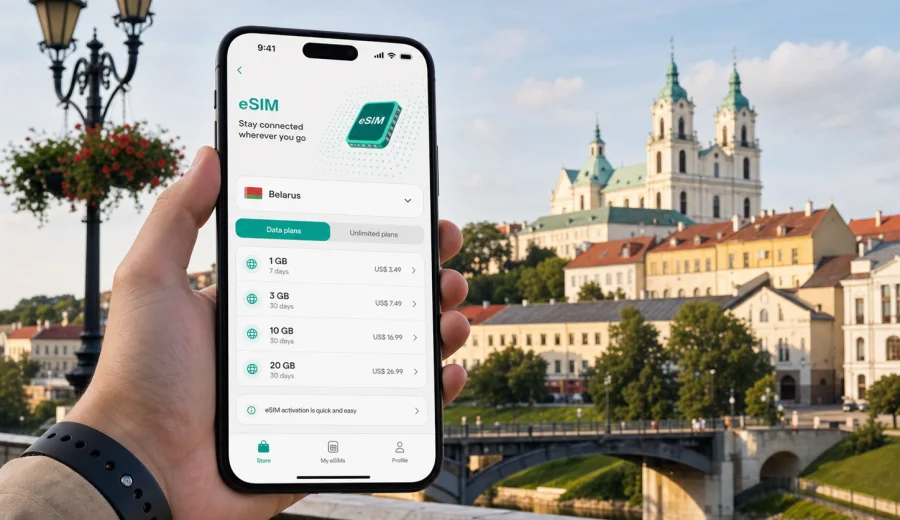
Grodno eSIM: mobile connection and internet for your trip
Grodno is one of the easiest Belarusian cities to explore on foot, but a smooth trip still depends on mobile internet. You may need maps for the old town, taxi apps after arrival, translation at a cafe, hotel messages, train updates, and quick route checks before crossing the Neman River or leaving the city for a day trip. An eSIM helps you prepare a data connection before you start looking for a local SIM card shop.
This guide focuses on practical connectivity in Grodno: arrival, local transport, hotels, business travel, short stopovers, and routes from the city to other places in Belarus. It also explains how to choose an eSIM tariff, what to check before purchase, and how to keep your main phone number available while using mobile data through a digital SIM.
Why mobile internet matters in Grodno
Grodno rewards slow travel. The historic center, Soviet Street, the Old and New Castles, Kalozha Church, the riverside, cafes, and parks are close enough for relaxed walking, but visitors still rely on online tools throughout the day. The city is compact, yet the useful details are often digital: opening hours, ride-hailing pickup points, translated menus, apartment check-in messages, banking confirmations, and train or bus information.
Mobile internet is especially useful in these Grodno situations:
- finding your hotel or apartment after arrival;
- checking walking routes through the old town and riverside paths;
- using online taxi and delivery apps;
- translating signs, menus, and messages;
- confirming museum, restaurant, and business appointment times;
- sharing location with travel companions;
- managing bank, airline, rail, or booking notifications;
- using messengers for calls when your eSIM tariff is data-only.
Public Wi-Fi can be helpful in hotels or cafes, but it is not a complete travel plan. You may need internet before check-in, between districts, on a tram or bus, or while coordinating a transfer. With an eSIM, you can install a digital SIM on a compatible phone and use a prepaid data tariff for the trip without replacing your physical SIM card.
Where eSIM is useful after arrival
Many trips to Grodno begin by road or rail rather than by a major international airport. Travelers may arrive from Minsk, Brest, Lida, Vilnius, Bialystok, or another regional route. The first hour is often when mobile data is most valuable: you need to tell your host that you have arrived, find the correct entrance, confirm transport, and check whether your planned route is walkable with luggage.
For a short stopover, eSIM is even more practical. When you have only a few hours, you do not want to spend the best part of the visit looking for a SIM card, confirming shop hours, or changing phone settings in a hurry. Preparing mobile data in advance makes it easier to focus on the route: station, center, riverside, lunch, and return transport.
Choosing an eSIM tariff for Grodno
A city article still uses the country as the tariff destination. For Grodno, choose an eSIM tariff that covers Belarus, then match the data amount and validity period to your route.
Use this quick comparison before you choose:
| Trip style | Typical data use | What to consider |
|---|---|---|
| One-day visit | Low to medium | Maps, taxis, messengers, tickets, restaurant searches |
| Weekend in Grodno | Medium | Navigation, photos, cloud backups on Wi-Fi, video kept limited |
| Business trip | Medium to high | Email, documents, video meetings, hotspot use if allowed |
| Family travel | Higher | Multiple devices, shared routes, translation, entertainment |
| Regional route | Medium to high | Grodno plus Minsk, Brest, Lida, castles, or border-area travel |
The most important variables are data volume, validity period, destination, price, and tariff conditions. A small package may be enough for maps and messaging, while a longer stay with work calls, cloud documents, and frequent video can require more data. Check whether tethering is allowed if you plan to share data with a laptop or another device.
How much data do you need in Grodno?
There is no single perfect amount because travel habits differ, but you can estimate your needs by activity rather than by city size. Grodno is walkable, so you may use less map data than in a large capital. At the same time, translation, taxi apps, photo sharing, and work messages can add up quickly.
Practical estimates:
- Maps, messengers, email, and light browsing: modest daily use.
- Frequent photo sharing and social media: medium daily use.
- Video calls, cloud files, and hotspot sessions: high daily use.
- Streaming video on mobile data: very high use and best avoided unless your tariff is chosen for it.
A good approach is to keep heavy updates, long video, and large cloud sync tasks for trusted Wi-Fi, then use mobile data for movement and time-sensitive tasks. In Grodno this works well because many hotels and cafes offer Wi-Fi, while eSIM covers the gaps between them.
Grodno travel scenarios where eSIM helps
Old town walks
The historic core is compact but full of small route decisions. You may move from Soviet Street to the castles, the river viewpoints, Kalozha Church, and back through cafes or courtyards. Mobile data helps you check walking time, avoid unnecessary detours, and translate local information without interrupting the walk.
Hotels and apartments
Self check-in, building entrance details, and host messages often arrive through apps or messengers. If your room is in or near the historic center, the building may have several entrances, courtyards, or staircases. A data connection lets you handle the last 200 meters of the trip without relying on a stranger's hotspot or a lobby password.
Taxis and local transport
Grodno is not difficult to move around, but online maps and taxi apps are useful after dark, in rain, or when you are going from the center to a business address, hotel, hospital, university building, or residential district. If you use public transport, mobile data helps you check route options and keep your destination visible.
Business visits
For a meeting in Grodno, mobile internet is a practical fallback. It helps you confirm address details, receive last-minute messages, open cloud documents, and share your location with colleagues. If a tariff allows hotspot use, it can also help with short laptop tasks, though you should check the tariff conditions before relying on tethering.
Day trips from Grodno
Travelers often combine Grodno with Lida, Mir, Novogrudok, Minsk, Brest, or countryside routes. An eSIM tariff for Belarus can support navigation and messaging beyond the city, as long as the selected tariff conditions match your route and your device connects to a local partner network where service is available.
Preparing before you travel
Before your trip, take a few minutes to prepare your phone. This is easier at home, where your current internet connection is stable and you can calmly check settings.
Checklist:
- Confirm that your phone supports eSIM.
- Make sure the device is not locked to another mobile operator.
- Check that your phone software is up to date.
- Choose a tariff for Belarus with enough data and validity.
- Save your hotel address offline as a backup.
- Keep your regular SIM active if you need bank or travel SMS.
- Read the tariff conditions, including when validity starts.
- Install the eSIM while you still have reliable Wi-Fi, if the instructions allow it.
If you are unsure whether your phone can use eSIM, check your device before choosing a tariff. Compatibility matters more than destination: an eSIM can only be installed on devices that support the technology and are not restricted by an operator lock.
When to activate your eSIM
Installation and activation are not always the same thing. In many travel scenarios, you can install the eSIM before departure and activate mobile data when you arrive, but the exact process depends on the tariff and device. Read the instructions shown after purchase and avoid deleting the eSIM profile unless support or the instructions tell you to do so.
For Grodno, a practical setup is:
1. Choose Belarus as the destination.
2. Select the data amount and validity period for your stay.
3. Install the eSIM on a compatible phone using the instructions provided.
4. Keep your primary SIM for calls or SMS if you need it.
5. After arrival, select the eSIM for mobile data.
6. Enable data roaming for the eSIM profile if the instructions require it.
7. Test maps and messengers before leaving the station, hotel, or pickup point.
Kaspersky eSIM Store is an app and website where you can choose, arrange, and activate an eSIM with a suitable data tariff for travel. For this city trip, you can choose an eSIM tariff for Belarus before visiting Grodno and check the data volume, validity period, and destination before you complete the purchase.
Installing eSIM on iPhone or Android
The exact menu names depend on your phone model and operating system version. In general, you receive installation details after purchase, then add the eSIM profile through mobile network settings or by using a QR code. Keep a stable internet connection during installation and do not rush through the confirmation screens.
Use the official setup guides when you install the profile:
After installation, label the profile clearly, for example "Travel data" or "Belarus data". This helps you avoid using the wrong SIM for mobile data. If you keep your usual SIM active for calls and messages, check which line handles mobile data and which line handles your regular number.
Practical settings for Grodno
Phone settings are small details, but they affect the whole trip. Before you leave your hotel or arrival point, check that the correct data line is selected and that apps can access mobile data. Open a map, load your hotel location, send a message, and confirm that your browser can open a page.
Recommended setup:
| Setting | Why it matters |
|---|---|
| Mobile data line | Ensures data uses the eSIM profile, not your home SIM |
| Data roaming for eSIM | Some travel eSIM profiles require it to connect |
| Primary voice line | Keeps your usual number available if needed |
| Low data mode | Helps reduce background usage on small packages |
| App updates | Best kept for Wi-Fi during travel |
| Offline maps | Useful backup if coverage or battery becomes limited |
If mobile data does not start immediately, wait a few minutes, check the selected data line, restart mobile data, and confirm that the eSIM profile is active. Local network registration can take a short time and depends on device settings and network conditions.
Short answers for trip planning
Is eSIM useful for Grodno?
Yes, if your phone supports eSIM and you want mobile internet for maps, taxis, translation, bookings, and messaging without looking for a physical SIM card after arrival.
Do I need a Grodno-specific tariff?
No. For a city trip, choose a Belarus eSIM tariff and match it to your data needs, validity period, and route.
Can I use eSIM for normal phone calls?
Many travel eSIM tariffs are data-only. Use internet-based calls through messengers, or keep your regular SIM active for voice and SMS if you need them.
Can I install eSIM before I arrive?
In many cases you can install it before travel, then activate mobile data after arrival. Always follow the instructions for the selected tariff because validity rules can differ.
What if my phone does not support eSIM?
You will need another connectivity option, such as roaming, Wi-Fi, or a physical SIM card. Check device compatibility before purchase.
Grodno routes and onward travel
Grodno is often part of a wider Belarus route: Lida, Minsk, Brest, Novogrudok, Mir, or countryside stops in the west of the country. If you expect to move beyond the city, choose a tariff with enough validity for the whole route, not only the nights spent in Grodno. For car travel, test navigation before leaving the city and keep a charger available. For cross-border itineraries, read tariff destinations carefully; a Belarus tariff is for Belarus, while a regional or global option may be useful only if it matches your route and conditions.
Final checklist before you go online in Grodno
Before you rely on mobile data in the city, run through this checklist:
- Your phone supports eSIM and is not operator-locked.
- The eSIM profile is installed and labeled clearly.
- Belarus is the selected destination for the tariff.
- The eSIM is selected for mobile data.
- Data roaming is enabled for the eSIM if required.
- Your home SIM is not using mobile data by accident.
- Maps, messenger, email, and browser have been tested.
This is enough for most travel scenarios: arrival, hotel check-in, walking routes, taxi rides, restaurant searches, business messages, and day trips from Grodno.
Choose mobile internet for your Grodno trip
Grodno is a city where mobile internet quietly improves the trip: you spend less time solving small logistics and more time moving confidently between the old town, riverside, hotels, cafes, meetings, and onward routes. An eSIM can be prepared before travel, used with a compatible phone, and managed without swapping a physical SIM card.
Before you leave, check your device compatibility, choose a data amount that fits your plans, and review the tariff conditions. Then use Kaspersky eSIM Store to prepare an eSIM tariff for Belarus and your Grodno trip so maps, messages, bookings, and travel updates are ready when you need them.