Travel connectivity guide
Groningen eSIM: Mobile Internet for Your Trip
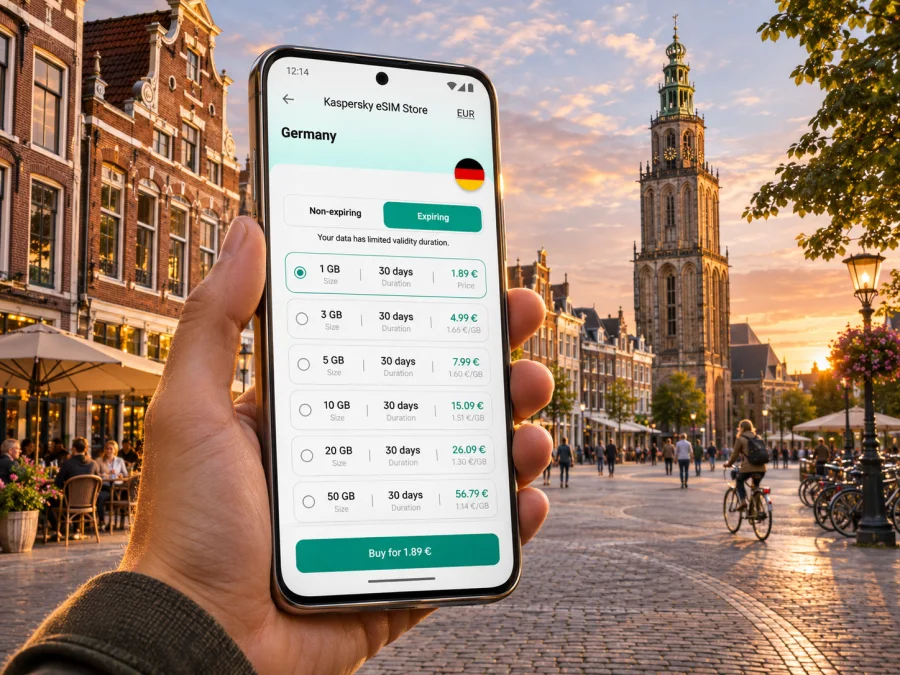
Groningen eSIM: mobile connection and internet for a city trip
Groningen is a compact northern Dutch city where a day can move from the station to the old centre, a museum, a canal-side café and a green park without a complicated itinerary. Mobile internet is useful for checking a changing train platform, finding a hotel entrance on a side street, reading a bus connection or keeping a map available while you walk. An eSIM can add a travel data option without removing your usual physical SIM, provided your phone supports eSIM and is not locked to a carrier.
This guide focuses on using mobile data around Groningen: what to prepare before travelling, how to arrive, and how to stay oriented between neighbourhoods and nearby destinations. The city is in the province of Groningen in the Netherlands, close to the German border; it is not an airport city with a single arrival route. Your best connection plan depends on where you land, your onward transport and how long you will stay.
Before you travel: make your data plan fit the trip
Start with your itinerary rather than a headline data allowance. A visitor who mainly uses offline maps and sends a few messages has different needs from someone navigating all day, joining video calls or uploading large files. Think about the moments when a working connection will make the trip easier: checking a platform, opening a ticket, contacting accommodation, translating a menu or booking a last-minute table.
A useful planning checklist:
- Length of stay: include the full period between arrival and departure, especially if your travel days cross midnight or you are visiting elsewhere in the Netherlands first.
- Expected use: navigation, messaging, browsing and occasional email use less data than frequent video, cloud backups or streaming. Download large maps and entertainment over Wi-Fi before leaving.
- Route: a Netherlands plan may suit a trip contained in the country; a multi-country plan may be relevant if your itinerary crosses borders. Read the destination list and terms on the selected plan page before checkout.
- Validity: check when the package validity begins and how long it lasts. Do not assume that installing an eSIM and starting data use are the same event; follow the activation terms shown for the package.
- Top-ups and limits: confirm whether more data can be added and what happens when the allowance is used. Keep a note of the account or support route you may need while travelling.
- Calls and texts: travel eSIM data packages do not necessarily include a regular phone number, voice calls or SMS. Keep your usual SIM available if you need those services, and use internet calling or messaging only where your account and connection allow it.
The Kaspersky eSIM Store app and website help travellers choose, order and activate an eSIM with a suitable data plan for an international trip. Check the plan details for the Netherlands, including its data amount, validity, price, supported destination and activation conditions. A city guide cannot establish whether a particular plan is available or what it costs at the time you travel; the live offer page is the place to review current options.
Check your phone and prepare installation
Before choosing a plan, confirm that the exact phone you will carry supports eSIM and is not carrier-locked. Support can vary by model, region and device variant, so a family name alone is not enough. Check the manufacturer’s information for the precise model number and region, then use the device compatibility checker if you need another check. Do this before purchase, not at the station after arrival.
Also make sure you can access the phone’s settings and your email or account while travelling. If an installation uses a QR code, you may need the code visible on another screen or a manual installation option supported by your device. Do not delete an installed eSIM profile to troubleshoot unless the instructions or support team tell you to: some profiles cannot simply be reinstalled after removal.
Before departure, consider these practical steps:
- Update your phone when you have a reliable connection and enough battery.
- Save your accommodation address, important tickets and a route to the hotel for offline access where available.
- Keep your home SIM enabled for calls or texts if you need it, but review its roaming settings and charges with your home operator.
- Label the travel eSIM clearly in the phone settings, such as “Netherlands data,” so you can recognise it later.
- Wait until the appropriate time to activate or select the travel eSIM for mobile data. Follow the package instructions rather than assuming every plan starts in the same way.
Arriving in Groningen
Many visitors reach Groningen by train after landing elsewhere in the Netherlands. Groningen’s railway network connects the city with destinations including Amsterdam, Leeuwarden, Utrecht, Rotterdam and Zwolle. NS lists three stations within the city: Groningen Central, Groningen Europapark and Groningen-Noord. For most first-time visitors staying near the historic centre, Groningen Central is the usual point to orient yourself, but check your accommodation address and itinerary before choosing a station.
If you arrive at Groningen Central, take a moment before leaving the station to confirm your onward route. The city centre is accessible on foot, and the station area connects with buses, cycling routes and roads. A map is particularly useful when a hotel is not directly on a main street: Groningen’s centre has canals, pedestrian areas and small lanes, so the shortest-looking route may not be the easiest with luggage.
Groningen Airport Eelde is a separate, smaller airport south of the city. Its current public transport information describes bus line 9 between Groningen and Eelde Airport, with a journey of about 30 minutes from Groningen Central to the airport stop and a walk of roughly 350 metres to the terminal. A peak-time line 209 is also described as running directly to the terminal. These details can change by day or season, so check the live timetable before setting out, especially for an early departure or late arrival. Do not confuse the airport with the city’s railway station: the final leg is by bus or another road transfer.
Keep the address of your accommodation saved in writing as well as in a map app. If your mobile data is unavailable at first, the address is still useful for asking for directions or showing a driver. At the airport or station, connect to Wi-Fi only if it is convenient and appropriate; it can be a short-term backup while you confirm the next leg, rather than the foundation of your whole trip.
For the destination, you can review current eSIM options for the Netherlands and compare the plan terms with your dates and likely use. The page is a country-level destination page; it does not represent a Groningen-specific tariff.
Getting around: walking, cycling, buses and trains
Groningen is widely associated with cycling, and bicycles are a normal part of everyday movement. Visitors can walk through the centre, use local buses for longer hops, or arrange a bicycle if they are comfortable riding in busy urban traffic. Mobile data helps with route planning, but it does not replace attention to cycle lanes, crossings, signs and local rules. Pause somewhere safe before checking a phone, and avoid standing in a cycle lane while looking for directions.
If you hire or borrow a bicycle, check where it may be left. The municipality asks people to park bicycles in designated bays, racks or parking facilities in the centre and around stations, and not to block footpaths or attach bikes to trees, bridges, railings, benches or lampposts. A quick map check before locking up can save time later, particularly near the station and the busy inner city.
Local buses can be useful when it rains, when you are carrying luggage, or when your stay is outside walking distance of the centre. Confirm the stop name and direction before boarding, and check the latest departure information for the date and time you are travelling. Routes and timetables are operational details that may change; do not rely on a screenshot from an earlier trip.
For regional journeys, Groningen Central is a useful rail starting point. Groningen Europapark or Groningen-Noord may be nearer depending on where you are staying or going. Search from the actual station listed on your ticket, and allow time to get there. A data connection is helpful when a service is disrupted or a platform changes, but keep a ticket and essential journey details accessible offline as a backup.
| Your situation | A practical way to plan |
|---|---|
| Staying in the historic centre | Walk for short trips; save your hotel pin and nearby station or bus stop. |
| Visiting a place beyond the centre | Check whether a local bus or one of the city’s other railway stations makes sense. |
| Cycling between areas | Follow marked routes, keep your phone secured, and park only in permitted places. |
| Taking a train out of town | Check the live journey and platform before departure; save your ticket offline if possible. |
| Travelling with luggage | Compare walking distance with a bus or taxi route before leaving the station. |
A data-friendly route through the centre
Begin around Groningen Central and walk towards the Groninger Museum, which sits between the station and the central area. From there, cross towards the old centre and use the Martinitoren as a visible landmark. The Grote Markt lies at the tower’s foot and is a natural place to pause, check directions, or decide whether to continue towards shops, cafés or the Forum. Opening arrangements for attractions can vary, so check current details before building a timed visit around them.
From the Grote Markt, choose a route that matches your pace rather than trying to cover everything in one loop. The canals and historic streets make it easy to take a scenic detour, while a map helps you return to a booked restaurant or accommodation. If you plan to climb the Martinitoren, account for the visit itself and the stairs; it is not a quick lift-up viewpoint. The official visitor information notes that opening hours can vary, so check the current schedule on the day.
For a calmer break, head north-west towards Noorderplantsoen. This green park follows the line of historic city defences and includes ponds and paths. It is a useful change of pace after a dense centre itinerary. Save a route back to your accommodation before you lose track of time, and download a map area in advance if you expect to spend the afternoon moving between quieter streets and the park.
This is a flexible outline, not a timed itinerary. If you have a museum booking, restaurant reservation or train to catch, plan around that fixed point first. Mobile navigation is most valuable when it helps you adjust the route without rushing: check it at a safe stopping place, then put your phone away while walking through crowded streets.
Choosing data use for Groningen
The best data plan depends on what you will actually do, not on the city’s size. For a weekend of walking and occasional messaging, maps, route checks and low-volume browsing may be enough if you download content over Wi-Fi and keep photos from backing up over mobile data. A longer stay with navigation, work tools, uploads and calls through apps may require more headroom. Avoid selecting an allowance solely because it is the smallest or largest available; compare the validity period and what happens when data runs out.
A few habits keep usage predictable: download maps and large files over Wi-Fi, pause automatic photo backups, and check the phone’s data-use screen during the trip. If the connection stops, first confirm that the travel eSIM is selected for mobile data and that the plan remains valid.
An eSIM package is generally a data option, not a replacement for every service on your regular number. If your home number must receive verification texts or calls, check your home operator’s roaming terms and your device’s dual-SIM settings before departure. The travel eSIM may be used for data while your primary line remains available for the services you choose, but the exact setup depends on your device and operator.
Install and activate your eSIM
Install the eSIM when you have a reliable internet connection and time to follow the on-screen steps. Read the plan instructions first: installation, activation and the start of package validity can be separate events, and conditions vary by plan. Keep the confirmation and any QR code accessible until you have confirmed the profile is installed. Use the official step-by-step instructions for Android or iPhone and iPad, following the path that matches your device.
After installation, label the line so it is easy to identify. When you are ready to use mobile data, select the travel eSIM as the data line and check whether the package instructions require data roaming to be enabled for that eSIM. That setting does not change your home operator’s charges by itself, but selecting the wrong line can result in unexpected roaming use on your regular SIM. Review both lines before browsing or navigating.
If the eSIM does not connect after arrival, work through these checks calmly:
- Confirm that the profile is installed, switched on and selected for mobile data.
- Recheck the plan’s destination, validity and activation conditions.
- Follow its network-selection instructions, then restart the phone if recommended.
- Contact support if it still does not connect, keeping your order details available.
Avoid deleting the eSIM profile as an early troubleshooting step. If you have a second device, do not assume the profile can be moved or reused on it; check the plan’s terms and ask support first. A saved Wi-Fi network, offline map and the hotel address give you practical fallback options while you resolve a setup issue.
When your Groningen itinerary extends beyond the city
A stay in Groningen can include day trips to other places in the province or onward travel through the Netherlands. Before you leave, check whether your eSIM plan’s destination coverage includes every country on your route; a Netherlands plan should not be assumed to cover a neighbouring country unless its terms say so. If your trip includes an international border, compare a regional option with a country-specific one and verify the supported destinations before purchase.
Rail and bus departure information can change, and the route that looks simplest on a map may not be the quickest on the day. Check your departure station, connection time and final stop before leaving Groningen. For an early train or a late return, consider how you will get between the station and your accommodation if local services are less frequent. Keep critical ticket details available without a live connection.
If your onward journey is to Germany, note that Groningen is in the northern Netherlands, but crossing the border changes the destination market for mobile data. Your phone may continue to show a signal while the package terms do not include that network. The safe check is the plan’s written country list, not the presence of a signal indicator.
Frequently asked questions
Is eSIM useful for a weekend in Groningen?
It can help with maps, transit checks, reservations and messages without relying only on public Wi-Fi. Compare it with your home roaming plan and expected data use.
Can I use my usual number and a travel eSIM together?
Many dual-SIM phones support more than one line, but features vary by model, region and carrier. Check your phone settings and home operator’s roaming terms, then choose which line handles mobile data.
Does a travel eSIM include calls and SMS?
Do not assume it does. Check the selected plan. Data-only service supports internet-based calling and messaging apps, while regular calls and SMS may depend on your usual SIM and operator.
Will the eSIM work everywhere in Groningen?
No plan guarantees service at every location or indoors. Availability depends on the plan, local network and conditions. Keep essential information available offline.
What if my phone does not support eSIM?
Check your exact device variant and carrier-lock status before purchase. You can consider your home operator’s roaming service or a physical SIM option suitable for your situation.
Groningen is straightforward to explore when the first arrival leg is clear and you have a way to check changing directions as you go. Prepare the important details before you set off, keep an offline fallback, and use mobile data for the moments when it genuinely helps: navigating to your stay, checking a connection or adjusting a walk across the city.
Choose an eSIM for your Netherlands trip
When you are ready, compare the current Netherlands options in the Kaspersky eSIM Store app or website. Review the package’s destination, data allowance, validity, price and activation terms, then choose an option that matches your itinerary. The app and website help you select, order and activate an eSIM for mobile data on a compatible device.
Explore current eSIM options for the Netherlands and prepare your connection before travelling to Groningen.


