Travel connectivity guide
Grouville eSIM for Mobile Internet in Jersey
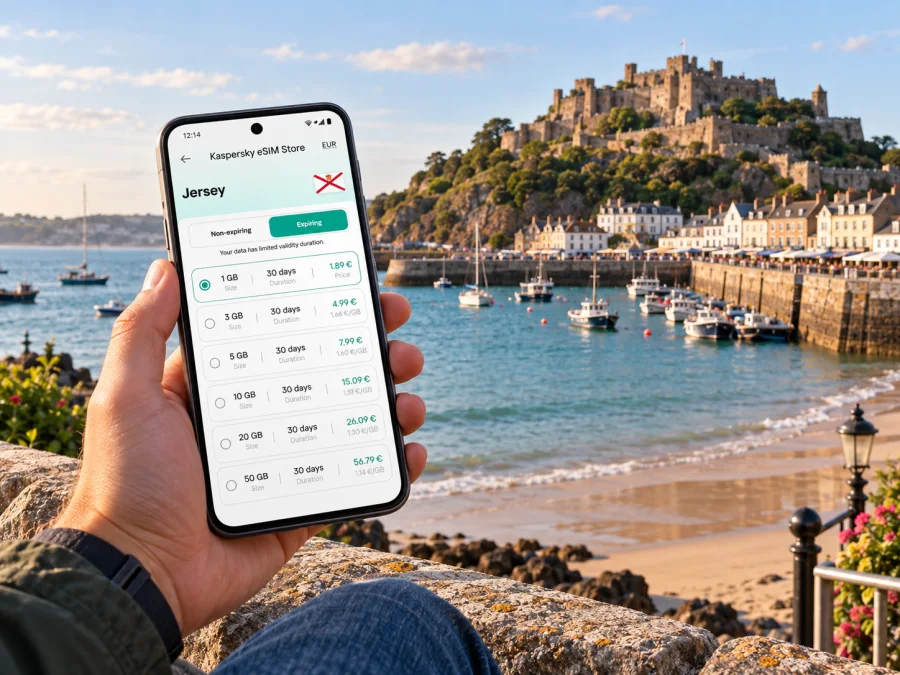
Grouville eSIM: mobile connection and internet for a Jersey visit
Grouville is a useful base when your Jersey plans centre on the island’s east coast: a long bay, the harbour village of Gorey, and routes back towards St Helier. Mobile internet can help you check a bus journey, find your hotel, follow a coastal walk and keep travel details close at hand. An eSIM lets you prepare a data connection for the trip before you set out, while your usual number can remain available for calls or messages if your phone supports dual SIM use.
This guide focuses on the practical moments that shape a stay in Grouville: arriving on the island, finding your way from the airport or harbour, getting around without assuming every trip is a walk, and deciding what information to save before leaving accommodation. Grouville is a parish rather than a single compact town centre, so it helps to think in terms of landmarks and stretches of coast. Gorey Pier, the Royal Bay of Grouville and the inland roads each create a different kind of day.
What to expect around Grouville
The east coast has a different rhythm from the busier centre of St Helier. The Royal Bay of Grouville runs along an open shoreline, while Gorey harbour and village gather around the northern end of the bay beneath Mont Orgueil Castle. Depending on where you stay, a “nearby” beach, restaurant or bus stop may still mean a walk along a road or coastal path. Check the exact address and route rather than relying on a broad map pin.
Grouville works well for visitors who want coast, village services and access to other parts of Jersey in one itinerary. It can also suit a short break where the plan is deliberately simple: check in, walk by the water, eat near Gorey and make one or two excursions. If your schedule is packed with meetings across the island, compare journey times from your accommodation to each appointment before booking. The parish is not interchangeable with St Helier; travelling between them takes planning, particularly when you have a fixed arrival or departure time.
| Part of the area | Useful for | Navigation note |
|---|---|---|
| Royal Bay of Grouville | Beach walks, time by the water and coastal views | Identify the access point and the return route; the bay is a long stretch, not one doorway |
| Gorey harbour and pier | Food, a waterside pause and access to the castle area | Use “Gorey Pier” or your venue’s full address as a map destination |
| Inland Grouville | Accommodation, local roads and quieter walks | Check the nearest stop and walking route in daylight if you arrive late |
| St Helier connection | Larger transport interchange, shops and onward journeys | Allow time to reach town and confirm the return service before an evening out |
Arriving in Jersey and continuing to Grouville
Most air travellers begin at Jersey Airport, west of Grouville. After landing, the first useful tasks are practical: connect to the internet, confirm your accommodation address, check your onward transport and let your host know if your arrival is delayed. A saved booking confirmation and an offline map are helpful if mobile service takes a moment to register or you are inside a terminal with limited signal.
Public buses serve destinations around Jersey, and routes connect St Helier with Gorey and the east coast. Visit Jersey lists routes 1 and 1A between Liberation Station and Gorey Pier, with route 2 continuing between Liberation Station and St Catherine. Services and timetables can vary, so check the current timetable for your travel date rather than relying on a remembered departure time. If travelling from the airport, look up the complete journey: it may involve a connection in St Helier rather than a single direct ride to your final address.
For a smooth airport-to-accommodation transfer:
- Save the full accommodation address, including parish or postcode, before leaving home.
- Check whether your host recommends a specific stop, entrance or taxi drop-off point.
- Compare the bus journey with a taxi or pre-arranged transfer if you have bulky luggage, arrive late, or need to reach an address away from the main route.
- Keep enough battery for maps, tickets and messages. A small power bank is useful on a day that combines arrival and sightseeing.
- Once on the island, verify the return route too; the last practical connection may matter more than the outward one.
Map distance does not show every steep approach or roadside stretch. Follow marked paths and local signs, and choose a bus or taxi if the walk is unsuitable for your group.
Getting around: buses, walking and local transfers
Grouville is best navigated as a set of connected places rather than a grid of streets. Buses are useful for linking Gorey with St Helier and for reaching other stops along the island routes. Walking is rewarding around the bay and harbour, but the distance between your lodging, the beach and a meal can be longer than it appears. A taxi can bridge the awkward part of a route, especially with luggage or after a late meal.
Before setting out, check the live journey information, direction of travel and walking leg between the stop and your destination. If changing in St Helier, check the connection time and keep an alternative in mind.
On coastal days, follow local safety notices and marked routes; a phone map is not a substitute. Download the area for offline use and save battery for return directions.
At the northern end of the bay, Gorey is a natural focal point. The harbour, village and Mont Orgueil Castle sit close together, but the castle rises above the waterfront and involves an uphill approach. Jersey Heritage notes that the castle has many steps; visitors should consider their mobility and check current access details before setting off. If your group needs a gentler day, combine a harbour visit with a shorter section of shoreline and take a break at a café rather than trying to cover the entire coast.
Choosing where to stay and planning your days
Accommodation location shapes each day. A hotel near Gorey Pier puts you by the harbour and local services; an inland property may be quieter but call for more planning around stops, walks and evening transport. Check the exact address: “near the bay” can describe quite different journeys.
For a beach-focused stay, map the access point from your door and check whether the route is comfortable after dark. For a business trip, assess the journey to the meeting venue and the reliability of a backup option. If you will work from your room, ask the accommodation about its Wi-Fi rather than assuming it will meet your needs; mobile data can be a useful option when you are away from Wi-Fi, but plan your usage around your chosen tariff.
Mobile internet for maps, messages and travel details
A data connection is useful in Grouville for checking bus updates, navigating between dispersed addresses, contacting accommodation and looking up opening information while out. It also helps when plans change: you can compare a route from the harbour, share a meeting point or find a taxi contact without returning to your room. Keep offline copies of key information as a backup.
An eSIM is a digital SIM profile installed on a compatible device. For travel, it can provide a data option without swapping out the physical SIM card. Kaspersky eSIM Store is an app and website where you can choose, arrange and activate an eSIM with a suitable data plan for an international trip. Review the destination, data allowance, validity period, activation instructions and any plan conditions before choosing. Plan names and inclusions can differ, so use the details shown for the option you select.
If Jersey is one stop on a wider route, check that the plan matches every place where you expect to use data. A destination label, regional coverage and validity dates matter more than the city name in your itinerary. If your travels also include the United Kingdom, France or another nearby destination, confirm whether the selected plan includes those places before relying on it. Do not assume that a Jersey visit is automatically covered by a plan named for a neighbouring destination.
Kaspersky eSIM Store can help you review eSIM options for a Jersey trip and prepare before you travel. Check the destination coverage and plan terms carefully to confirm they suit your journey.
Before you install an eSIM
Check that your phone supports eSIM and is not locked in a way that prevents using another profile. You can check whether your device supports eSIM before arranging a plan. Also confirm that you will have a suitable internet connection for installation and follow the on-screen steps for your device. Keep your primary SIM settings clear: decide which line should handle calls and messages, and which should use mobile data.
Install at a calm moment, ideally before departure if the plan’s instructions permit it. Some plans start their validity at installation, while others begin at first connection or activation; follow the specific terms shown for the selected plan. Do not remove a profile simply because it is not immediately in use. If you need to troubleshoot, check the plan instructions and device settings first.
Use the appropriate guide for your phone: eSIM installation instructions for Android or eSIM installation instructions for iOS. Keep the QR code or installation details accessible on another screen or in a saved message if you need to scan it with the phone being configured.
After installation, review the mobile data settings and select the intended line for data use. Turn data roaming on for the travel eSIM only if the plan instructions tell you to do so. Keep your usual SIM available for calls or verification messages if useful, while checking with your home provider about any roaming charges. On arrival, allow the device to connect and confirm that the selected line is active before relying on it for navigation.
A compact preparation checklist
Before you leave for Jersey, take a few minutes to prepare:
- Save the full address and contact details for your accommodation.
- Add the airport, Gorey Pier and any planned meeting places to your map.
- Check bus routes and timetables close to your travel date.
- Download an offline map of the areas you expect to visit.
- Review your eSIM’s destination, validity, data allowance and installation steps.
- Confirm device compatibility and keep your usual SIM settings understandable.
- Bring a charging cable and consider a power bank for long walks or day trips.
- Save transport tickets, reservations and return arrangements where you can access them offline.
Tailor the checklist to your itinerary: a stay by Gorey Pier calls for different route planning from an inland address or island-wide business schedule.
Frequently asked questions
Is Grouville a good base for exploring Jersey?
It can be a good choice if you want an east-coast stay near the Royal Bay of Grouville and Gorey. Bus links connect Gorey with St Helier, but compare the route from your specific accommodation with the places you plan to visit. The right base depends on your schedule, mobility and preference for a quieter coastal setting.
Can I get from Jersey Airport to Grouville by bus?
Public buses operate across Jersey, and airport journeys may involve travelling via St Helier. Check the current route and timetable for your arrival time and final address. If a connection is inconvenient or you have heavy luggage, compare a taxi or pre-arranged transfer.
Do I need mobile data for a stay in Grouville?
You can prepare much of the trip offline, but data is convenient for live route checks, messages, updated opening details and changes to plans. Download maps and booking information in advance, then choose a data option that fits your travel pattern and the locations included in its terms.
Does a travel eSIM replace my normal phone number?
A data eSIM is generally intended for mobile data; calling and SMS depend on the terms of the selected plan. You can often keep your regular SIM active for calls or messages while using another line for data, if your device supports that setup. Check your home provider’s roaming conditions and your phone settings.
What should I check when choosing an eSIM for Jersey?
Check the listed destination coverage, data allowance, validity, activation timing and device requirements. If your itinerary crosses borders or includes other islands, confirm that each destination is included. Coverage and service depend on the plan terms and local network availability, so avoid assuming that a nearby place is covered automatically.
Is the beach right beside Gorey Pier?
The northern end of the Royal Bay of Grouville borders Gorey Harbour and village, and the bay continues along the coast. The distance to the beach depends on where you start. Use a specific access point and account for walking conditions rather than treating the whole bay as a single entrance.
Prepare your connection before the trip
A well-planned Grouville visit can be relaxed without leaving logistics to chance. Save your address, check the route from the airport, plan how you will move between the bay, Gorey and the rest of Jersey, and keep important details available offline. Then choose an eSIM option whose listed destinations and data terms fit your itinerary.
Use Kaspersky eSIM Store to choose an eSIM plan for your Jersey visit and arrange the installation before you need directions on the move. Review the plan details and device instructions, then keep your map, bookings and return journey easy to find.


