
Travel connectivity guide
eSIM Guam: mobile internet for travel
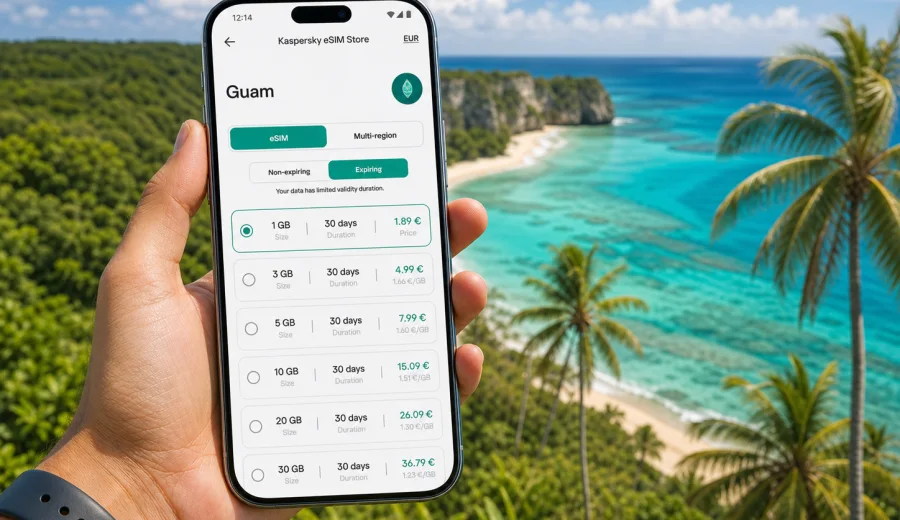
eSIM in Guam: mobile connection and internet for your trip
Guam is a compact island, but a trip there can involve many different online moments: airport arrival, hotel check-in, navigation around Tumon, beach days, hikes, rental car routes, restaurant bookings, and messages to family across time zones. An eSIM can make mobile connection and internet easier to prepare before you travel, because you do not need to search for a physical SIM card after landing.
This guide explains how to use an eSIM for Guam, how to estimate the right data volume, what to check before buying a plan, and how Kaspersky eSIM Store fits into the trip preparation process. ## Why eSIM is useful for a trip to Guam
Guam is often visited for beach holidays, family visits, military-related travel, business, diving, and Pacific island routes. In all these scenarios, mobile internet is not just a nice extra. It helps you move around confidently and avoid relying only on hotel Wi-Fi or public networks.
An eSIM is a digital SIM profile installed on a compatible smartphone or tablet. For travel, it is useful because you can keep your main SIM card in the phone and add a separate data plan for the destination. In most cases, your usual number can remain available for calls or messages through your primary SIM, while mobile data is handled by the travel eSIM.
For Guam, that can be helpful from the first hour of the trip. Antonio B. Won Pat International Airport is close to Tumon and Hagåtña, but you may still need mobile data for maps, ride coordination, hotel messages, or checking arrival details. If you land late, travel with children, or continue to another part of the island, having internet ready reduces the number of small decisions you need to make on arrival.
What mobile internet is needed for in Guam
The island is easy to underestimate because distances are short. The online scenarios are still varied. A one-week vacation can include beaches, malls, lookout points, parks, restaurants, and day trips, and each situation creates different data needs.
Common uses include:
- navigation from the airport to Tumon, Tamuning, Hagåtña, or southern villages;
- messaging through WhatsApp, Telegram, iMessage, Signal, or other apps;
- hotel check-in details, booking confirmations, and digital vouchers;
- weather checks before beach trips, boat tours, or hikes;
- translation, search, restaurant menus, and opening hours;
- ride-hailing, taxi coordination, or rental car route planning;
- video calls with family or work contacts;
- uploading photos and short videos from the beach or viewpoint.
The key question is not only whether you need internet, but how much data you are likely to use. Light travelers may only need maps and messaging. Remote workers or frequent video callers should choose a larger package and pay closer attention to validity period and hotspot rules.
Guam travel scenarios and data needs
Different trips need different eSIM plans. A short stopover, a family beach holiday, and a business visit do not use data in the same way.
| Trip scenario | Typical online tasks | Practical data approach |
|---|---|---|
| 2-3 day short stay | maps, messages, taxi coordination, basic browsing | small data package if you use hotel Wi-Fi for heavy tasks |
| 5-7 day beach vacation | maps, restaurant search, photo sharing, messaging, booking apps | medium package with enough buffer for daily use |
| Family trip | navigation, entertainment for children, shared photos, group chats | medium or larger package, especially if hotspot is needed |
| Diving or outdoor itinerary | maps, weather, operator messages, photo uploads after tours | medium package; download offline maps before remote routes |
| Business travel | email, video meetings, cloud documents, hotspot | larger package and careful check of validity and tethering rules |
| Pacific route with more destinations | Guam plus nearby or onward travel | consider whether a country, regional, or global plan fits the route |
If you are unsure, choose based on your heaviest expected habit. Video, cloud backup, streaming, and hotspot use consume data much faster than maps or messengers. You can also reduce usage by downloading maps, playlists, documents, and entertainment before departure.
How to choose an eSIM plan for Guam
A good eSIM choice starts with the trip, not with the largest number on the screen. Before selecting a plan, define how long you will stay, what you will do online, and whether the phone will be used by one person or shared through hotspot.
Check these points:
1. Destination: make sure the plan is valid for Guam.
2. Data volume: choose enough GB for the trip length and your online habits.
3. Validity: match the plan duration with your travel dates.
4. Activation rules: understand when the validity period starts.
5. Device support: confirm that your phone or tablet supports eSIM.
6. Hotspot rules: check whether tethering is allowed if you plan to share data.
7. Calls and SMS: do not assume they are included unless the plan terms say so.
For most travelers, a data-only eSIM is enough because calls and messages can be handled through internet-based apps. If you need regular voice calls or SMS through a phone number, read the plan conditions carefully before purchase. Travel eSIM plans often focus on mobile data.
How Kaspersky eSIM Store fits into preparation
Kaspersky eSIM Store is an app and website where you can quickly choose, arrange, install, and activate an eSIM with a suitable plan for mobile internet during an international trip. The service is useful when you want to prepare before departure and avoid looking for a physical SIM card after arrival.
The process is built around practical travel decisions. You choose the destination, review the available data volumes and validity periods, check the price and conditions, and install the eSIM on a compatible device. After purchase, the eSIM details are available in your profile or app, so you can follow the setup steps when you are ready.
For Guam, this helps you plan mobile internet alongside flights, accommodation, and transport. When you already know the trip length and expected data use, you can choose an eSIM plan for Guam before you travel and keep the setup ready for arrival.
Device compatibility before buying
Before purchasing any eSIM plan, confirm that your smartphone or tablet supports eSIM and is not locked in a way that prevents adding a travel eSIM profile. This step matters more than the destination, because a plan cannot be used normally if the device cannot install the eSIM.
Check your device before choosing a plan. Also review your phone settings or manufacturer information if you are unsure. Many recent iPhone, Samsung Galaxy, Google Pixel, and selected other models support eSIM, but support can vary by region, model version, and carrier lock status.
Use this checklist:
- the device supports eSIM;
- the device is not restricted to one mobile operator;
- the operating system is up to date enough for eSIM installation;
- you can access the internet during setup, either through Wi-Fi or another mobile connection;
- you understand which SIM profile will be used for mobile data;
- you know whether data roaming should be enabled for the eSIM profile.
If you travel with a group, check every device separately. One traveler may have a compatible phone while another has a model without eSIM support or a carrier-locked device.
How to install and activate eSIM for Guam
Installation usually takes a few steps, but it is best not to rush it at the airport gate. Prepare the eSIM while you still have stable internet, read the instructions, and decide whether you want to install before departure or after arrival. The exact flow depends on your device and operating system.
For detailed setup steps, use the official installation guides: Android instructions and iOS instructions. Follow the on-screen instructions for your device and the eSIM details shown after purchase.
A practical setup flow looks like this:
1. Check that your device supports eSIM.
2. Choose Guam as the destination and select a suitable data plan.
3. Complete the order and open the eSIM details in your profile or app.
4. Install the eSIM using the provided method, such as a QR code or manual details.
5. Set the eSIM as the mobile data line when you want to use it.
6. If required by the plan or device, enable data roaming for the eSIM profile.
7. Test the connection when you arrive, then monitor data use during the trip.
Do not delete the eSIM profile unless you are sure you no longer need it. Some eSIM profiles cannot be moved or reinstalled freely after activation. If something does not work, check the instructions first and contact support if needed.
Data planning: how many GB might be enough
There is no single correct data volume for Guam. A traveler who mostly uses hotel Wi-Fi may use very little mobile data. Another traveler who uploads videos, uses hotspot, and joins video calls may need much more.
Use this rough planning model:
| Usage style | Examples | What to consider |
|---|---|---|
| Light | messaging, maps, email headers, simple browsing | small package can be enough for a short trip |
| Moderate | daily maps, social media, photo uploads, booking apps | medium package gives more comfort |
| Heavy | video calls, hotspot, cloud files, frequent uploads | larger package is safer |
| Shared use | one phone used as hotspot for laptop or family | check hotspot rules and choose more data |
To control data use, disable automatic cloud photo backup on mobile data, download offline maps, update apps before departure, and use Wi-Fi for large downloads when you trust the network. If your phone shows per-SIM data statistics, reset the counter before the trip to track usage more clearly.
What to prepare before departure
The easiest eSIM experience starts before the trip. Do not leave compatibility checks and basic setup until the moment you need internet.
Before flying to Guam:
- check your device compatibility and carrier lock status;
- choose the data volume based on trip length and online habits;
- save the eSIM installation instructions where you can find them;
- keep hotel address, booking numbers, and transport details offline;
- download offline maps for Guam and key routes;
- confirm whether your main SIM should stay active for calls or SMS;
- decide which SIM profile will handle mobile data after arrival.
If you travel for work, test authentication apps before departure. Some accounts need SMS, authenticator apps, or secure email access.
Quick checklist for choosing eSIM for Guam
Use this short checklist when you are close to making a decision:
- Destination is Guam.
- Validity covers the full trip.
- Data volume matches your expected use.
- Device supports eSIM and is not locked.
- Installation instructions are clear for Android or iOS.
- You know whether the plan is data-only.
- You understand hotspot and roaming settings.
- You have saved travel essentials offline.
- You know where to find support if setup questions appear.
FAQ about eSIM and mobile internet in Guam
Can I use eSIM in Guam instead of a physical SIM card?
Yes, if your device supports eSIM and the selected plan is valid for Guam. An eSIM lets you use mobile data without inserting a physical SIM card. Your main SIM can usually remain in the phone, depending on the device and settings.
Does an eSIM include a phone number?
Many travel eSIM plans are data-only. That means they are intended for mobile internet and may not include a regular phone number, voice calls, or SMS. Check the plan conditions before purchase if you need those functions.
Should I install eSIM before flying or after arrival?
You can often install the eSIM before departure while you have stable internet, then activate or start using it according to the plan instructions. Read the activation details carefully, because validity rules can differ by plan.
Can I use hotspot with my eSIM?
Hotspot availability depends on the selected plan and device settings. If you plan to share internet with a laptop or another traveler, check the plan conditions before buying and choose enough data for shared use.
What if my mobile internet does not work right away?
Check that the eSIM profile is installed, turned on, and selected for mobile data. If the plan instructions require data roaming for the eSIM profile, enable it. Also confirm that your device is not trying to use your primary SIM for data. If the issue continues, contact support.
Is public Wi-Fi enough for Guam?
Public or hotel Wi-Fi can be useful, but it may not cover airport transfers, beach days, rental car routes, or moments when you need maps and messages immediately. An eSIM helps you rely less on Wi-Fi availability during the trip.
Choose mobile internet for Guam before you travel
Preparing mobile connection and internet in advance makes a Guam trip simpler. You can land with a clear setup plan, keep your main SIM in the phone, and use mobile data for maps, messages, bookings, and everyday travel tasks.
Kaspersky eSIM Store helps you choose, arrange, install, and activate an eSIM with a suitable data plan for an international trip. Before buying, check device compatibility, read the plan conditions, and choose the data volume and validity period that match your itinerary.
If Guam is your destination, you can review eSIM options for your trip to Guam and prepare mobile internet before departure.